
FiiO QX13
FiiO QX13 Portable DAC Amp User Manual
Model: QX13
1. Introduction
This manual provides detailed instructions for the FiiO QX13 Portable DAC Amp. The QX13 is a high-performance digital-to-analog converter and headphone amplifier designed for superior audio quality on the go. It features a premium carbon fiber body, a flagship ESS ES9027PRO DAC, powerful output, and a vibrant color display.
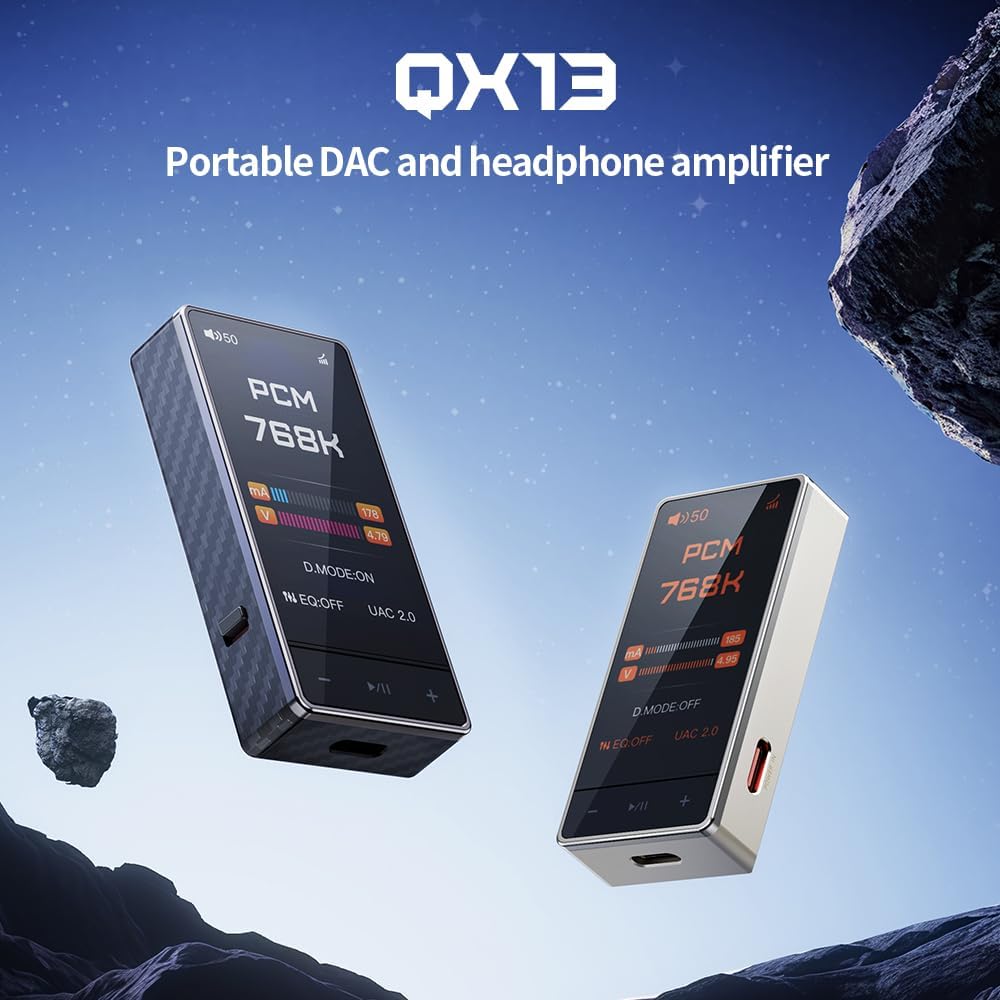
Image: The FiiO QX13 Portable DAC and Headphone Amplifier, showcasing its compact design and two color variants (black and titanium gold).
2. Package Contents
Please check the package contents upon unboxing to ensure all items are present:
- FiiO QX13 Portable DAC Amp Unit
- Cable (USB-C to USB-C for data and power)
- Premium Magnetic Leather Case
- 8-strand Decoding Cable
- User Manual (this document)

Image: The FiiO QX13 shown with its magnetic leather case, compatibility with E-STICK mini power banks, and the included 8-strand decoding cable, illustrating the full ecosystem of accessories.
3. Product Overview
3.1. Physical Design
The FiiO QX13 features a robust and lightweight design, crafted with a 21-layer stacked carbon fiber body. This material provides exceptional strength, heat resistance, and a distinctive textured finish. An optional titanium-gold aluminum version is also available.

Image: Close-up view of the FiiO QX13's carbon fiber body, highlighting its texture and the material's properties such as strength, anti-interference, and thermal insulation.
3.2. Display and Controls
The QX13 is equipped with a 1.99-inch full-color touchscreen, protected by Corning Gorilla Glass 3 for scratch resistance. The display is powered by a 32-bit processor, supporting multiple dynamic UI themes for an advanced user interface.

Image: Front view of the FiiO QX13, showing its vibrant color display with audio information such as PCM 768K, current, and voltage levels, along with touch controls.

Image: A detailed view of the FiiO QX13's extra-large color display, highlighting its 1.99" IPS screen, 67.6% screen-to-body ratio, 32-bit powerful processor, and Corning glass protection.
4. Setup
4.1. Initial Charging
Before first use, it is recommended to fully charge the FiiO QX13. Connect the included USB-C cable to the QX13's front Type-C port and to a compatible USB power adapter (not included) or a computer's USB port. The display will indicate charging status.
4.2. Connecting to Audio Source
The QX13 can connect to various audio sources:
- USB-C Connection: Use the included USB-C to USB-C cable to connect the QX13 to a smartphone, tablet, computer, or other compatible device. The QX13 supports UAC1.0 mode for devices like Nintendo Switch or PS5, and UAC2.0 for higher fidelity with computers and modern mobile devices.
- Coaxial Output: The 3.5mm output port also supports S/PDIF coaxial digital output, allowing connection to external DACs or audio systems.
4.3. Connecting Headphones
Connect your headphones to the appropriate headphone jack on the FiiO QX13. The device supports both 3.5mm and balanced outputs (if available on your model, refer to product specifications for details).
5. Operating Instructions
5.1. Power On/Off
Press and hold the power button (location specified in product diagram, typically on the side) for a few seconds to power the device on or off.
5.2. Volume Control
Adjust the volume using the dedicated volume buttons or the touchscreen interface. The QX13 supports 60-step and 120-step volume adjustment scales for precise control.
5.3. Navigating the Interface
Utilize the touchscreen to navigate through menus, select settings, and view playback information. The customizable UI allows for personalized themes and layouts.
5.4. FiiO Control App
For advanced control and customization, download the FiiO Control App on your Android device. This app allows for detailed settings adjustments, including the 10-band lossless PEQ (Parametric Equalizer).

Image: A collage demonstrating various functionalities of the FiiO QX13, including 3.5mm S/PDIF output, UAC1.0 mode compatibility with Switch/PS5, 60-step and 120-step volume adjustment, and support for the Android FiiO Control App/Web.
6. Key Features
6.1. Flagship ESS ES9027PRO DAC
The QX13 incorporates the ESS Sabre PRO series DAC, specifically the ES9027PRO, featuring a fully differential 8-channel parallel design. This architecture ensures ultra-low distortion and is paired with dual ultra-low-noise regulators (ES9312) for precise channel matching, optimized power efficiency, and reduced jitter, delivering studio-level signal accuracy.

Image: Diagram illustrating the desktop-grade ESS SABRE PRO flagship ES9027PRO DAC, showing its 8-channel parallel DAC design and the integration of ES9312 Dual LDOs for precise audio processing.
6.2. High-Performance Op-Amps
The device utilizes six high-performance TI op-amps: four INA1620 chips for ultra-low crosstalk and stability, and two OPA1692 chips for ultra-low noise and distortion. This configuration ensures crystal-clear dynamics and a powerful output of 900mW per channel, capable of driving high-impedance headphones effortlessly.

Image: Diagram showing the arrangement of six high-end TI op-amps (INA1620 and OPA1692) within the FiiO QX13, emphasizing their role in delivering powerful and stable audio output with high efficiency.
6.3. Patented Desktop Mode
The QX13 features a patented Desktop Mode that adaptively regulates performance and power consumption. In Desktop Mode, it can deliver up to 900mW output power, comparable to full-size headphone amplifiers, while optimizing power efficiency. It also includes a high-precision power meter to assess USB power supply capabilities.

Image: A comparison table illustrating the performance improvements and power consumption reduction in the FiiO QX13's Patented Desktop Mode, showing 900mW output and reduced power usage compared to other models.
6.4. XMOS 16-Core XU316 Processor
The QX13 utilizes a pro-grade XMOS 16-core XU316 USB Audio quality chip, offering high performance, low latency, and support for up to 768kHz/32bit PCM and DSD512 native decoding. Dual ultra-low phase noise, low temperature drift femtosecond crystal oscillators ensure accurate audio processing. This processor also enables the 10-band lossless PEQ, adjustable via the FiiO Control App or web interface.

Image: Diagram highlighting the XMOS 16-core XU316 processor, detailing its support for high-resolution PCM and DSD decoding, dual crystal oscillators, and 10-band lossless PEQ capabilities.
6.5. Advanced Audio Architecture
The QX13 condenses a high-end audio architecture into a compact dongle. It achieves high-precision audio signal conversion through dual crystal oscillators and multiple stages of analog processing, including LPF voltage amplification, BUF current boosting, and parallel-enhanced current expansion, delivering sound quality comparable to professional DACs and headphone amplifiers.

Image: Schematic diagram of the FiiO QX13's specially designed audio architecture, illustrating the signal path through the dual crystal oscillators, 8-channel fully differential DAC, LPF, and AMP-Driver stages to the output interface.
6.6. Multi-Layer Shielding
To ensure optimal audio performance and thermal management, the QX13 features digital and analog board separation with multi-layer shielding. This design effectively isolates components, absorbs and dissipates heat, and ensures sustained high-power output without interference.

Image: Exploded view diagram of the FiiO QX13's internal structure, showing the digital and analog board separation and the various multi-layer shielding components like cushion pads, insulation sheets, shielding covers, thermal conductive silicone, and electromagnetic anti-interference sheets.
6.7. Magnetic Ecosystem
The QX13 is part of a magnetic ecosystem, enhancing its portability and versatility. It includes a premium magnetic leather case for protection and easy attachment to devices. It is also compatible with FiiO's E-Stick Power Bank (sold separately) for on-the-go charging and the E-Stick Combo Case for a portable desktop amplifier setup.
7. Maintenance
- Cleaning: Use a soft, dry cloth to clean the exterior of the device. For the screen, a microfiber cloth is recommended. Avoid using harsh chemicals or abrasive materials.
- Storage: Store the QX13 in a cool, dry place away from direct sunlight and extreme temperatures. When not in use, it is advisable to keep it in its protective case.
- Battery Care: To prolong battery life, avoid fully discharging the device frequently. If storing for an extended period, charge it to approximately 50% and recharge every few months.
- Port Care: Keep all ports free of dust and debris. Avoid inserting foreign objects into the ports.
8. Troubleshooting
| Problem | Possible Cause | Solution |
|---|---|---|
| No sound output |
|
|
| Device not recognized by computer/phone |
|
|
| Short battery life |
|
|
9. Specifications
| Feature | Detail |
|---|---|
| Model Name | QX13 |
| Connectivity Technology | Wired |
| Included Components | Cable |
| Number of Items | 1 |
| Manufacturer | FiiO |
| Package Dimensions | 6.61 x 4.33 x 1.97 inches |
| Item Weight | 8.8 ounces |
| ASIN | B0FGJ497MW |
| Item model number | QX13 |
| Date First Available | July 3, 2025 |
| Brand | FiiO |
| Color | Black |
| Ear Placement | In Ear |
| Form Factor | No |
| Headphones Jack | 3.5 mm Jack |
10. Warranty and Support
For warranty information and technical support, please refer to the official FiiO website or contact FiiO customer service directly. Keep your purchase receipt as proof of purchase for warranty claims.
Official FiiO Website: www.fiio.com
Related documentsQX13


Ask a question about this manual
Ask about setup, troubleshooting, compatibility, parts, safety, or missing instructions. Manuals+ will review the question and use this page’s manual context to help answer it.