1. Product Overview
The Yealink HA64 Pro is a versatile wireless headset designed for flexible work environments, offering seamless connectivity across multiple devices. It combines DECT technology for extended range with Bluetooth for mobile freedom, ensuring clear communication whether you are in the office, at home, or on the go.
2. What's in the Box
- Yealink HA64 headset
- Touchscreen charging base
- AC Power adapter
- USB Cable for desk phone + computer
3. Setup and Connectivity
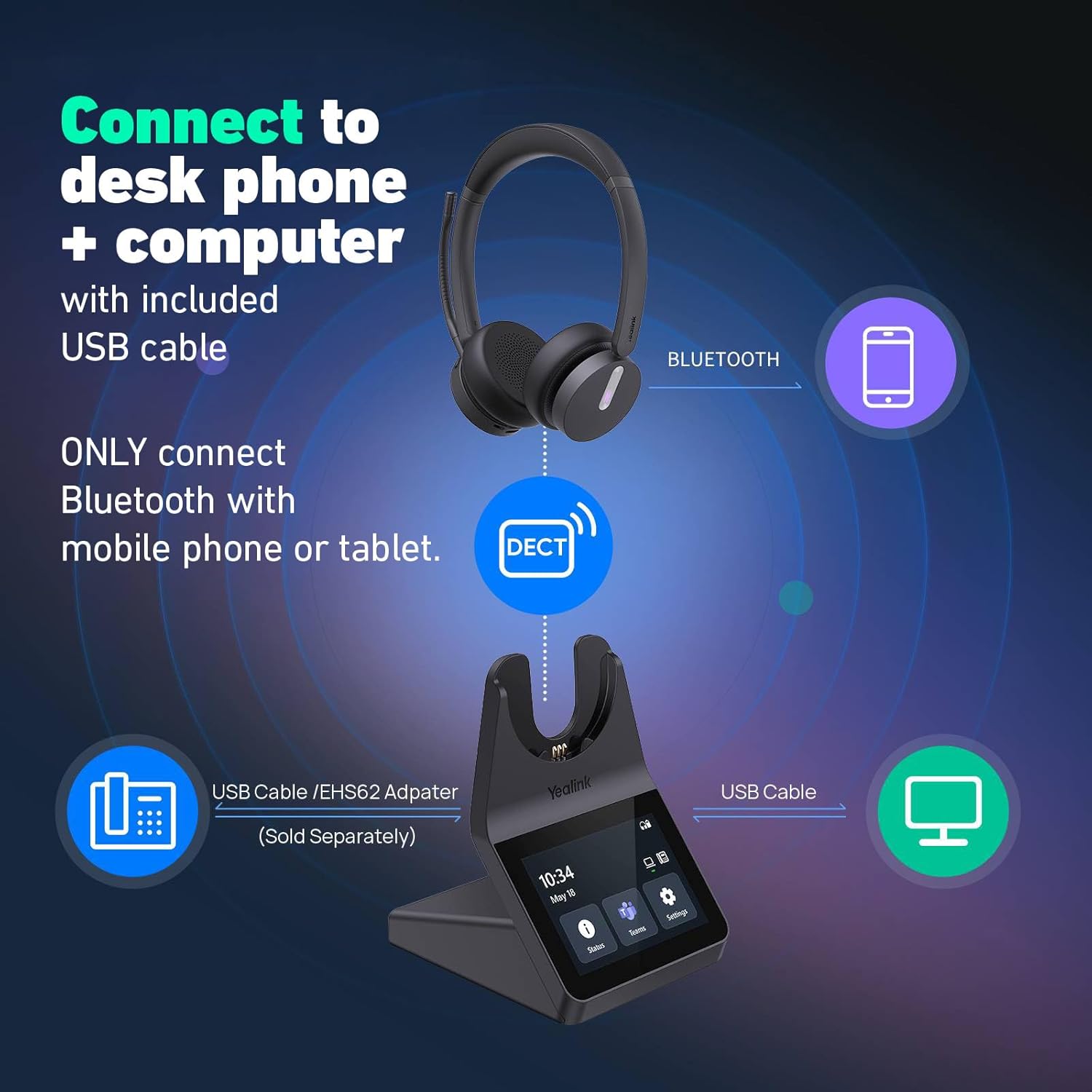
The HA64 Pro offers universal compatibility and easy setup for various devices:
- Power Connection: Plug the AC power adapter into the touchscreen charging base and a power outlet.
- Computer Connection: Connect the USB cable from the charging base to your computer (Windows/Mac).
- Desk Phone Connection: Connect the USB cable from the charging base to your desk phone. Note: An accessory may be required for some desk phones. Contact support for compatibility verification.
- Smartphone/Tablet Connection (Bluetooth): To pair the headset directly with your mobile phone or tablet, push the power button on the headset up towards the Bluetooth icon for 3 to 5 seconds until it enters pairing mode. Select the headset from your device's Bluetooth settings.

3.1. Connectivity Overview Video
Video 1: An overview of the Yealink HA64 Pro headset's connectivity options, demonstrating its use with various devices and its seamless integration into different work environments.
4. Wearing Styles and Comfort
The HA64 Pro headset is designed for all-day comfort and flexibility:
- Lightweight Design: The single speaker headband is extremely lightweight, ensuring comfort during extended use.
- Soft Ear Cushions: Features soft ear cushions for a comfortable fit.
- Adjustable Headband: The headband is adjustable to fit various head sizes.
- Rotating Speakers: Speakers rotate 180 degrees for optimal positioning.
- Flexible Microphone Boom: The microphone boom rotates 260 degrees, allowing precise placement on either side of your mouth.

4.1. Headset Design and Adjustments Video
Video 2: Demonstrates the lightweight design, soft ear cushions, adjustable headband, and rotating microphone boom of the Yealink HA64 Pro headset for personalized comfort.
5. Wireless Range
Experience unparalleled freedom with the HA64 Pro's superior wireless range:
- DECT Technology: Provides up to 600 feet of wireless range, allowing you to move freely during calls or meetings without signal interruption. This is approximately 5-10 times more range than typical Bluetooth headsets.
- Bluetooth Connectivity: Offers up to 100 feet of range for mobile devices.
5.1. Wireless Range Test Video
Video 3: A demonstration of the Yealink HA64 Pro's impressive wireless range using DECT technology, showcasing its ability to maintain clear audio over long distances.
6. Touchscreen Base Features
The 3.5-inch color touchscreen on the charging base provides intuitive control and information:
- Call Management: Easily manage calls directly from the screen.
- Device Settings: Customize various settings without needing to download additional software.
- Battery Life Display: View the current battery life of your headset.
- Mode Switching: Switch between UC (Unified Communications) and Teams mode directly from the screen.

6.1. Touchscreen Functionality Video
Video 4: A detailed look at the touchscreen interface of the Yealink HA64 Pro, demonstrating how to manage calls, view battery life, and adjust settings.
7. Call Controls and Busy Light
Efficiently manage your calls and indicate your availability:
- Easy Call Controls: Answer/end calls, adjust volume, and mute/unmute directly from the headset or the touchscreen base.
- Lift-to-Mute Function: Simply lift the microphone boom to mute your audio.
- Visual Busy Light: A red busy light built into the headset illuminates when you are on a call, signaling to others not to interrupt.
- Optional BLT60 Busy Light: For enhanced visibility, an optional BLT60 Busy Light accessory can be added.


7.1. Busy Light Demonstration Video
Video 5: A demonstration of the integrated busy light on the Yealink HA64 Pro headset, which glows red to indicate when you are on a call, preventing interruptions.
8. Audio Quality and Noise Cancellation
The HA64 Pro ensures crystal-clear audio for both you and your callers:
- Noise-Canceling Microphone: Equipped with 3 built-in microphones that actively reduce unwanted background noise, isolating your voice for clear calls in noisy environments.
- Clean Sound Delivery: Speakers deliver clean sound for calls, meetings, and music.
- Passive Noise Cancellation: Provides some hearing protection by passively reducing ambient noise.
- Sidetone: Features sidetone for a more natural speaking experience.

8.1. Noise Cancellation Test Video
Video 6: A demonstration of the Yealink HA64 Pro's noise-canceling capabilities in various noisy office environments, showcasing its effectiveness in isolating speech.
9. Battery Life
The HA64 Pro provides reliable battery performance for your workday:
- DECT Mode Talk Time: Up to 14 hours (mono).
- Bluetooth Mode Talk Time: Up to 26 hours (mono).
- Fast Charging: Approximately 1.5 hours for a full charge.
- Standby Time: Up to 157 hours (mono).
10. Software and Firmware Updates
Manage and update your headset with ease:
- Yealink USB Connect: Download the free Yealink USB Connect software to personalize and manage your headset. This allows for firmware updates and adjustment of settings.
- Device Management: For IT administrators, the software facilitates managing an entire fleet of headsets.
10.1. Yealink USB Connect Software Video
Video 7: An overview of the Yealink USB Connect software, demonstrating its use for updating firmware and adjusting headset settings.
11. Specifications
| Feature | Detail |
|---|---|
| Model Name | HA64 Pro |
| Brand | Yealink |
| Style | Single Speaker |
| Connectivity Technology | DECT, Bluetooth 5.2 |
| Wireless Communication Technology | DECT |
| Noise Control | Environmental Noise Cancellation |
| Microphone | 3 built-in noise-canceling microphones |
| Control Type | Touch Screen |
| Touchscreen Size | 3.5 inches |
| DECT Range | Up to 600 feet |
| Bluetooth Range | Up to 100 feet |
| Talk Time (DECT Mono) | 14 hours |
| Talk Time (Bluetooth Mono) | 26 hours |
| Charging Time | 1.5 hours |
| Standby Time (Mono) | 157 hours |
| Item Weight | 1 pound |
| Product Dimensions | 4 x 3 x 7 inches |
| Compatible Devices | Desk Phone, Mac, PC, Mobile Phone, Tablet |
| Included Components | Yealink HA64 headset, Touchscreen charging base, AC Power, USB Cable for desk phone + computer |
12. Troubleshooting
If you encounter any issues with your Yealink HA64 Pro headset, please refer to the official Yealink support resources or contact customer service for assistance. Common issues and solutions can often be found in the Yealink USB Connect software or on the manufacturer's website.
13. Warranty and Support
The Yealink HA64 Pro comes with a 2-year warranty guaranteed by Headset Advisor and Yealink. For pre-sales support or any technical inquiries, please contact Headset Advisor directly.


