
Introduction
Thank you for choosing the Aheaplus 59-Inch Reversible Gaming Desk. This manual provides essential information for the safe assembly, operation, and maintenance of your new desk. Please read these instructions carefully before beginning assembly and retain them for future reference.
Setup and Assembly
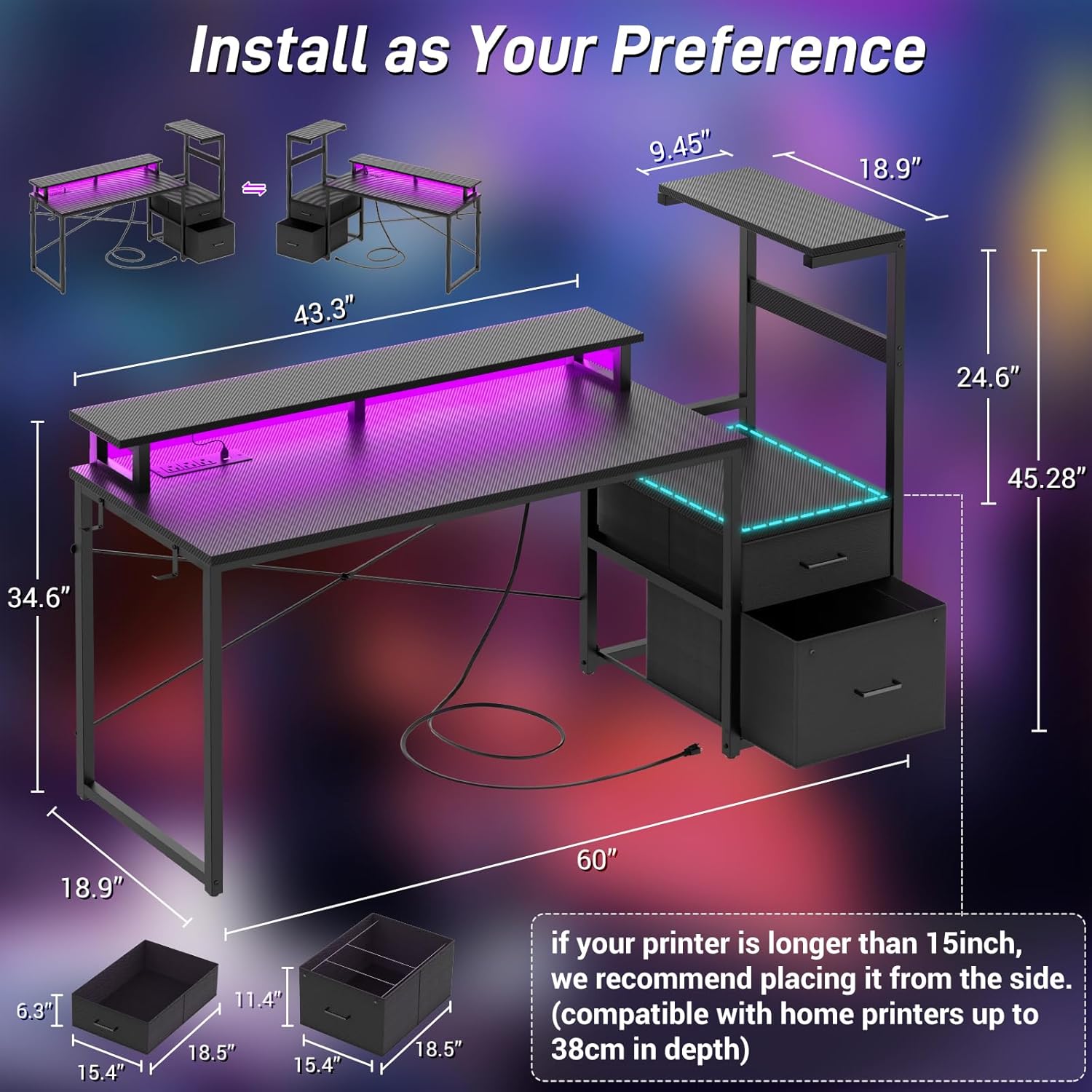
The Aheaplus gaming desk is designed for straightforward assembly. All necessary hardware, tools, and clearly labeled parts are included to facilitate the process. The desk features a reversible design, allowing you to configure the storage shelf on either the left or right side to best suit your space and preferences.
Assembly Steps:
- Unpack all components and verify against the parts list provided in the packaging.
- Follow the step-by-step instructions in the included assembly guide. Pay close attention to diagrams for correct orientation of parts.
- Determine your preferred orientation for the storage shelf (left or right) before attaching the main desktop.
- Ensure all screws and fasteners are securely tightened after assembly to ensure stability. Do not overtighten.

Operating Instructions
LED Light Strip Operation:
Your desk is equipped with a built-in RGB LED light strip. This feature can be controlled via a dedicated smart application, offering access to over 60,000 colors and multiple dynamic modes. You can synchronize the lights with music or set a timer for automated operation.
- Power On/Off: Connect the LED strip's power cable to a suitable power source.
- App Control: Download the specified smart application (refer to the separate LED controller instructions for app name and download details). Pair your device with the LED strip via Bluetooth or Wi-Fi as instructed.
- Color and Mode Selection: Use the app interface to select desired colors, adjust brightness, choose from various dynamic lighting modes, or activate music sync.
- Timer Function: Set schedules for the LED lights to turn on or off automatically.

Integrated Power Outlet:
The desk includes a recessed power strip with 3 AC outlets and 2 USB ports, designed to provide convenient power for up to 5 devices simultaneously. This allows for easy charging and powering of laptops, phones, gaming consoles, and other peripherals.
- Connection: Plug the desk's main power cord into a standard wall outlet.
- AC Outlets: Use the 3 AC outlets for devices requiring standard wall power (e.g., monitors, desktop computers).
- USB Ports: Use the 2 USB ports for charging smaller devices like smartphones, tablets, or USB-powered accessories.
- Safety: Do not exceed the maximum power rating of the integrated power strip. Avoid spilling liquids near the outlets.

Storage Features:
The desk offers multiple storage solutions to keep your workspace organized:
- Fabric Drawers: Utilize the fabric drawers for storing office supplies, cables, or personal items.
- File Drawer: The dedicated file drawer is suitable for letter-sized documents, helping to keep important papers neatly organized.
- High Storage Shelves: The 1-tier high storage shelves provide space for books, decorative items, or additional equipment.
- Printer Cabinet: A designated area allows for easy placement and access to a printer or scanner.
- Side Hooks: Two side hooks are included for hanging headphones, backpacks, or other accessories.
- Monitor Stand: The integrated monitor stand elevates your display to an ergonomic height, promoting better posture and providing additional storage underneath.


Maintenance
Regular maintenance will help preserve the appearance and functionality of your Aheaplus gaming desk.
- Cleaning: Wipe surfaces with a soft, damp cloth. Avoid abrasive cleaners or harsh chemicals that could damage the finish.
- Dusting: Regularly dust all surfaces, including the LED strip and power outlet area, to prevent buildup.
- Fasteners: Periodically check all screws and connections to ensure they remain tight. Retighten if necessary.
- Liquid Spills: Immediately wipe up any liquid spills to prevent damage to the engineered wood and electrical components.
Troubleshooting
If you encounter any issues with your desk, refer to the following common troubleshooting tips:
- Desk Wobbles: Ensure all assembly screws are fully tightened. Check that the desk is placed on a level surface. Adjust any leveling feet if present.
- LED Lights Not Working: Verify that the LED strip is properly connected to its power source and that the power source is active. Check the app connection and settings.
- Power Outlets Not Functioning: Confirm the desk's main power cord is securely plugged into a working wall outlet. Check for tripped circuit breakers in your home. Ensure devices plugged into the outlets are functioning correctly.
- Drawers Stick: Ensure the drawer slides are correctly installed and free of obstructions. Apply a small amount of silicone lubricant if needed.
If problems persist, please contact customer support for assistance.
Specifications
| Brand | Aheaplus |
| Model Number | B0FGDCJ3SL |
| Product Dimensions | 59"L x 18.9"W x 45.28"H |
| Color | Carbon Fiber Black |
| Material | Engineered Wood (Top), Metal (Base) |
| Special Features | Built-In USB Outlet, LED Lights, Reversible Design, File Drawers, Monitor Stand |
| Power Outlet | 3 AC Outlets, 2 USB Ports |
| Number of Drawers | 2 (1 fabric, 1 file) |
| Assembly Required | Yes |
Warranty Information
Aheaplus products are manufactured with quality and durability in mind. For specific warranty details regarding your Aheaplus 59-Inch Reversible Gaming Desk, please refer to the warranty card included in your product packaging or contact Aheaplus customer support directly. Keep your proof of purchase for any warranty claims.
Customer Support
Should you have any questions, require assistance with assembly, or if your item arrives damaged, scratched, or with missing parts, please do not hesitate to contact Aheaplus customer service. Our team is committed to resolving any issues promptly.
Contact Information: Please refer to the contact details provided in your product packaging or visit the official Aheaplus website for support options.