
Introduction
The KONNWEI KW206 is an advanced automotive tool designed to provide real-time vehicle data and diagnostic capabilities. It functions as both a Head-Up Display (HUD) for critical driving information and a comprehensive OBD2 diagnostic scanner. This manual provides instructions for the proper setup, operation, and maintenance of your KW206 device.
Product Overview
The KW206 integrates a 3.5-inch full-color LCD screen to display over 100 key vehicle parameters. It is compatible with OBDII/EOBD-compliant gasoline, diesel, and hybrid vehicles manufactured from 2003 onwards. Key features include:
- Real-time Data Display: Speed, RPM, coolant temperature, fuel consumption, voltage, throttle position, intake pressure, and more.
- Diagnostic Functions: Read and clear Diagnostic Trouble Codes (DTCs), reset Check Engine Light, I/M readiness status, freeze frame data, O2 sensor test, EVAP system test.
- Safety Alerts: Customizable warnings for overspeed, high engine temperature, low voltage, and RPM limits.
- Performance Testing: 0-100 km/h acceleration test.
- User-Friendly Interface: Auto-adjusting brightness, multiple display themes, metric/imperial unit switching.

Image: The KONNWEI KW206 device showing its main display and various data points.
Package Contents
Verify that all items are present in your package:
- KONNWEI KW206 Auto Diagnostic Scanner Unit
- OBDII Connection Cable
- User Manual (this document)
- USB Cable (for software updates)
- Mounting Accessories (e.g., anti-slip mat, stand)

Image: The KONNWEI KW206 package contents, showing the main unit, OBDII cable, and other accessories.
Setup and Installation
The KW206 is designed for plug-and-play installation. No complex setup or external power source is required.
- Locate the OBDII Port: The OBDII port is typically located under the dashboard on the driver's side of the vehicle. Refer to your vehicle's owner's manual if you cannot locate it.
- Connect the Device: Plug the provided OBDII connection cable into your vehicle's OBDII port. Ensure a secure connection.
- Position the Device: Place the KW206 unit on your dashboard using the provided anti-slip mat or stand. Ensure it does not obstruct your view of the road.
- Power On: Once connected, the device will automatically power on when the vehicle's ignition is turned to the ON position (or engine started).
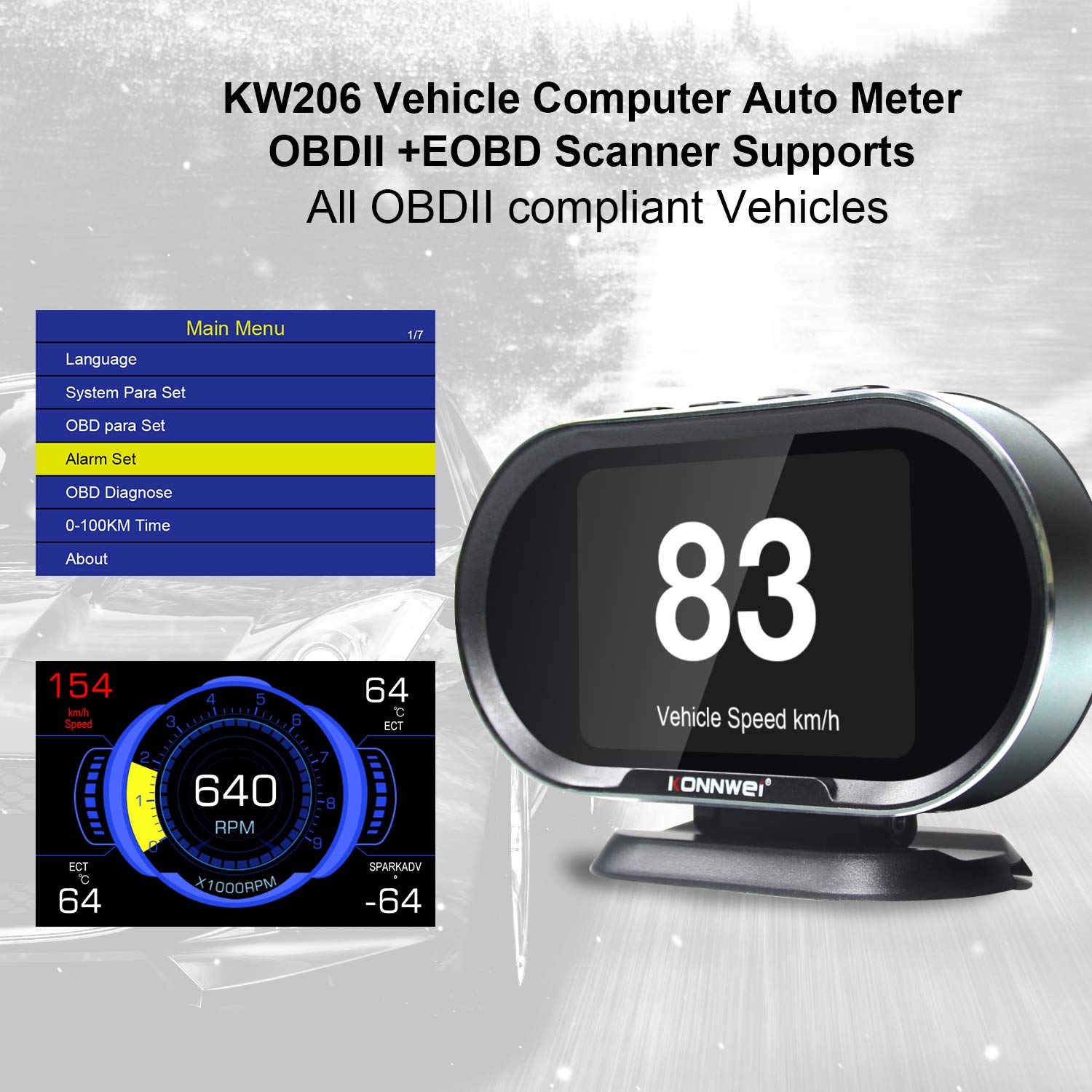
Image: The main menu of the KW206, accessible after initial setup, allowing configuration of various parameters.
Operating Instructions
The KW206 features an intuitive four-button interface for navigation and selection.
Basic Navigation
- Use the UP and DOWN buttons to scroll through menu options or data parameters.
- Press the OK button to confirm a selection or enter a submenu.
- Press the ESC button to return to the previous screen or exit a function.
Display Modes and Parameters
The KW206 offers multiple display modes and can show up to 95 different parameters. You can cycle through these modes and select specific data streams to monitor.
- Real-time Data Stream: View live sensor data such as engine RPM, vehicle speed, coolant temperature, fuel system status, calculated load value, and more.
- Customizable Displays: The device allows you to configure which parameters are displayed on the main screen.
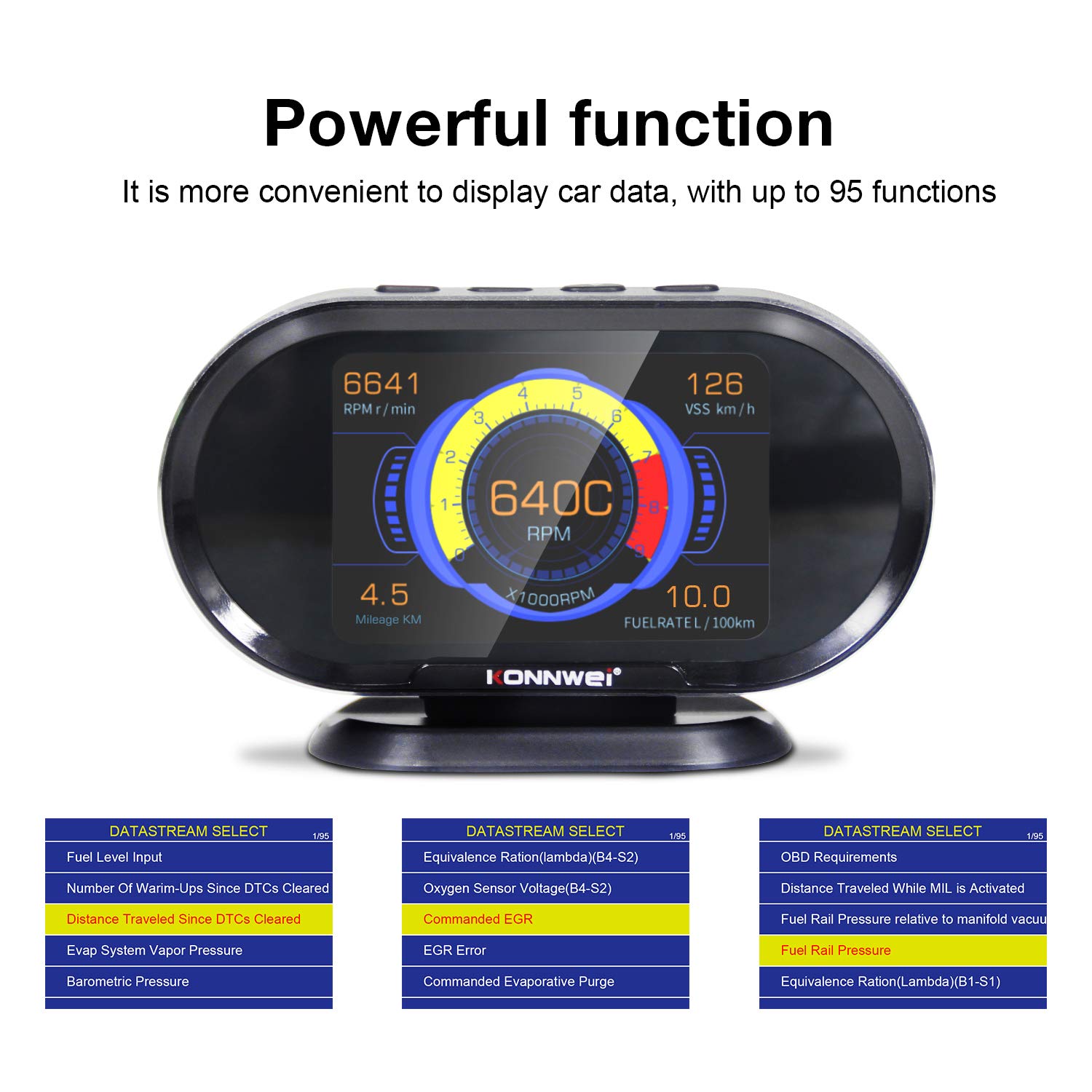
Image: The KW206 displaying various vehicle data points simultaneously, demonstrating its multi-functionality.

Image: A visual representation of the numerous functions and parameters available on the KW206, including diagnostic tools and alert settings.
Diagnostic Functions
- Read Codes: Retrieve generic (P0, P2), manufacturer-specific (P1), and pending Diagnostic Trouble Codes (DTCs).
- Clear Codes: Erase DTCs and reset the Check Engine Light (MIL). This also clears I/M readiness monitor status.
- I/M Readiness: Check the status of emission-related monitors to determine if the vehicle is ready for an emissions test.
- Freeze Frame Data: View a snapshot of vehicle operating conditions at the time a fault code was set.
- O2 Sensor Test: Retrieve O2 sensor monitor test results.
- EVAP System Test: Initiate a test of the Evaporative Emission Control System.

Image: The KW206 displaying OBD stream data, including diagnostic trouble codes and real-time sensor readings.
Alert Settings
Configure various alerts to enhance driving safety and monitor vehicle health.
- Overspeed Warning: Set a maximum speed limit, and the device will alert you if exceeded.
- High Engine Temperature Alert: Receive a warning if the engine coolant temperature reaches a predefined threshold.
- Low Voltage Warning: Alerts you to potential battery or charging system issues.
- RPM Limit Reminder: Set an RPM limit to prevent over-revving the engine.

Image: The KW206 indicating an alarm condition with a red display, contrasting with a normal white display.
Maintenance
To ensure the longevity and optimal performance of your KW206 device, follow these maintenance guidelines:
- Cleaning: Use a soft, dry cloth to clean the device. Avoid abrasive cleaners or solvents.
- Storage: Store the device in a cool, dry place when not in use. Avoid extreme temperatures.
- Software Updates: The KW206 supports lifetime free software updates. Regularly check the KONNWEI official website for the latest firmware to ensure compatibility with new vehicle models and improved functionality. Connect the device to a computer via the provided USB cable for updates.
- Cable Care: Inspect the OBDII cable periodically for any signs of damage. Do not use a damaged cable.
Troubleshooting
If you encounter issues with your KW206, refer to the following common problems and solutions:
| Problem | Possible Cause | Solution |
|---|---|---|
| Device does not power on. |
|
|
| No data displayed or incorrect readings. |
|
|
| Check Engine Light remains on after clearing codes. |
|
|
Specifications
| Feature | Detail |
|---|---|
| Model | KW206 |
| Display | 3.5-inch Color LCD |
| Dimensions (L x W x H) | 5.4 x 3.3 x 2.1 inches (13.7 x 8.4 x 5.3 cm) |
| Weight | 10.2 ounces (0.29 kg) |
| Operating Voltage | 9-16V (via OBDII port) |
| Operating Temperature | 0°C to 60°C (32°F to 140°F) |
| Storage Temperature | -20°C to 70°C (-4°F to 158°F) |
| Supported Protocols | J1850, CAN, ISO9141, EOBD |
| Material | ABS Plastic |
Warranty and Support
KONNWEI provides lifetime customer support and free software updates for the KW206 device. For technical assistance, warranty claims, or further inquiries, please refer to the contact information provided on the official KONNWEI website or the product packaging.
Regularly check the official KONNWEI website for the latest software updates to ensure optimal performance and compatibility.


