
1. Introduction
This manual provides detailed instructions for the installation, operation, and maintenance of your SIXWIN Android Car Stereo, Model A7053A3196. This unit is designed specifically for Dodge Charger vehicles manufactured between 2011 and 2014. Please read this manual thoroughly before installation and use to ensure proper function and to maximize your experience.

Figure 1: SIXWIN Android Car Stereo installed in a Dodge Charger.
2. Product Overview
2.1 Key Features
- Android 13 Operating System
- 2GB RAM + 64GB ROM Memory
- 9-inch Touch Screen Display
- Wireless & Wired Apple CarPlay and Android Auto
- Mirror Link Functionality (iOS & Android)
- Built-in GPS Navigation (online & offline maps)
- WiFi Connectivity
- Bluetooth Hands-free Calling and Music Streaming
- FM/RDS Radio with 18 preset stations
- Support for Steering Wheel Controls (SWC)
- Backup Camera Input (AHD camera included)
2.2 Packing List
Verify that all components are present in the package:

Figure 2: Included components and dimensions.
- Power Cable
- RCA Cable
- 8PIN Canbus Plug
- Original USB Cable
- Rear Camera Input Cable
- Radio Antenna
- GPS Antenna
- Canbus Decoder
- AHD Rear Camera
- Installation Tool
- Microphone
- 6Pin USB Cable
- 4Pin USB Cable
- User Manual
3. Compatibility & Important Notes
This car stereo is designed for Dodge Charger models from 2011 to 2014. It is compatible with both basic and navigation versions of these vehicles.
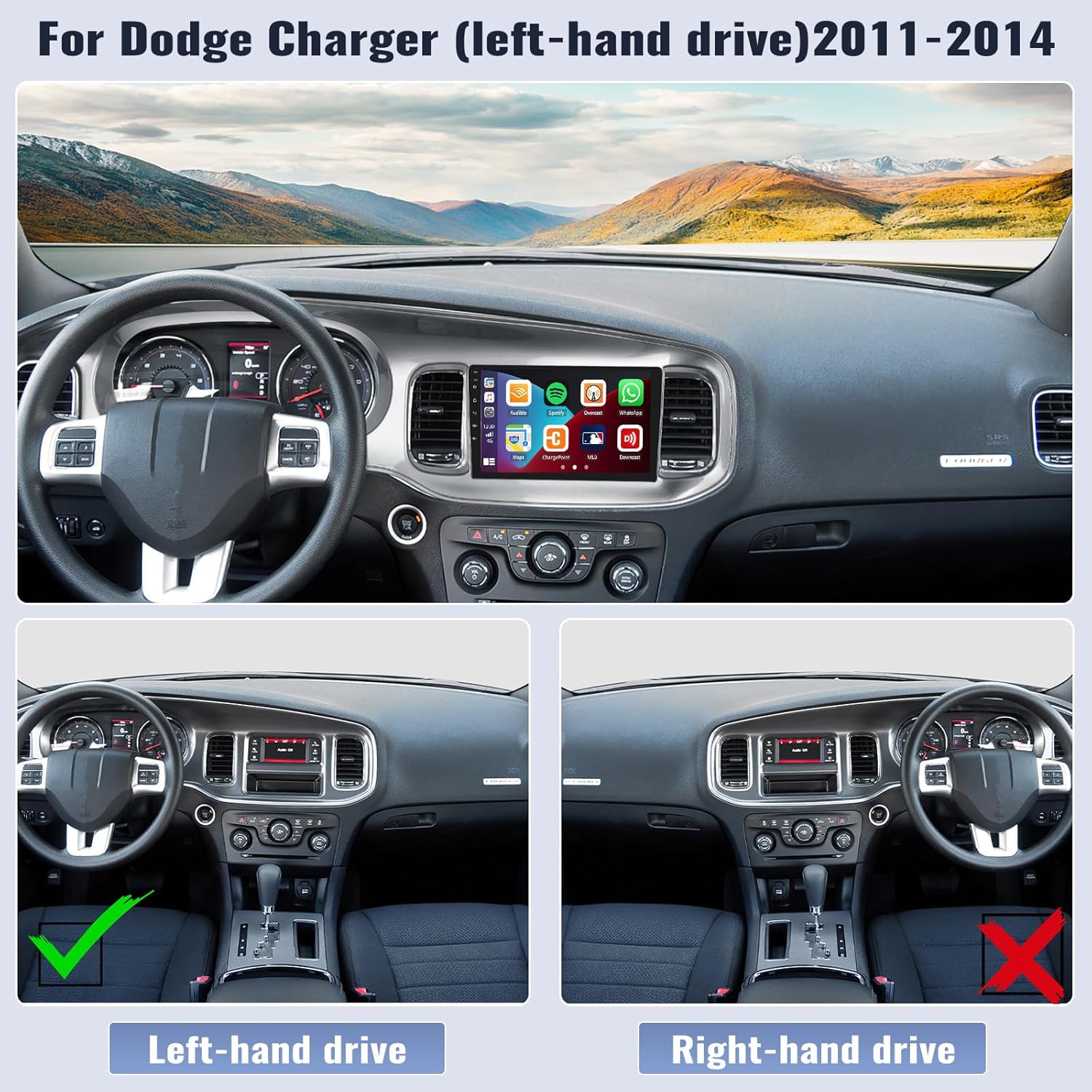
Figure 3: Compatibility with left-hand drive Dodge Charger 2011-2014.
Important Note: This product is designed for left-hand drive vehicles only. It is not compatible with right-hand drive models.
CD Player Compatibility: If your original car's CD player has a different back connector than shown in Figure 4, this product may not be compatible. Please contact customer service for assistance if you are unsure.

Figure 4: Original car CD player back connector for compatibility check.
For Jeep Renegade models, ensure the small black Canbus cable is connected during installation.
Mirror Link functionality does not support Samsung phones.
4. Installation
The SIXWIN Android Car Stereo is designed for plug-and-play installation. However, professional installation is recommended. Refer to the included wiring diagrams and your vehicle's service manual for specific details.
4.1 General Steps
- Preparation: Disconnect the vehicle's battery to prevent electrical shorts.
- Remove Original Unit: Carefully remove the existing car stereo and dashboard trim.
- Connect Wiring: Connect the provided power cable, RCA cables, USB cables, radio antenna, GPS antenna, and Canbus plug to the new stereo and the vehicle's harness. Ensure all connections are secure.
- Canbus Connection: If your vehicle is a Jeep Renegade, connect the small black Canbus cable.
- Install Rear Camera: Route the rear camera cable and install the camera according to the instructions in Section 6.
- Mount New Stereo: Secure the SIXWIN Android Car Stereo into the dashboard opening.
- Reconnect Battery: Reconnect the vehicle's battery.
- Test Functionality: Power on the unit and test all functions (radio, Bluetooth, GPS, CarPlay/Android Auto, steering wheel controls, backup camera).
- Reassemble: Reinstall any removed dashboard trim.
For detailed wiring diagrams, please refer to the user manual included in the package or contact customer support.
5. Operating Instructions
5.1 Wireless CarPlay & Android Auto
Connect your compatible smartphone wirelessly or via USB to access CarPlay or Android Auto. This allows you to use navigation, make calls, send messages, and listen to music directly from your phone's interface on the car stereo screen.

Figure 5: Wireless/Wired Apple CarPlay functionality.

Figure 6: Wired Android Auto functionality.
- Voice Control: Use Siri or Google Assistant for hands-free operation.
- Navigation: Access map applications for real-time directions.
- Communication: Manage phone calls, contacts, and messages.
- Media: Play music and podcasts from your phone.
5.2 Mirror Link
Mirror Link allows you to display your smartphone's screen directly onto the car stereo. This feature supports both iOS and Android devices, though it is not compatible with Samsung phones.

Figure 7: Mirror Link for Android and iOS devices.
5.3 GPS Navigation & WiFi
The unit features built-in GPS navigation. It comes pre-installed with the "Here We Go" app, allowing for both online and offline navigation. Connect to WiFi to download additional apps from the Play Store, such as YouTube, TikTok, and Spotify.

Figure 8: GPS Navigation and WiFi connectivity.
5.4 Bluetooth Hands-free & Music
Pair your phone via Bluetooth for hands-free calling and audio streaming. You can answer calls, dial numbers, and play music directly through the car stereo.

Figure 9: Bluetooth hands-free functionality.
5.5 FM/RDS Radio
Tune into FM radio stations within the 87.50-108.0 MHz range. The unit supports RDS (Radio Data System) for displaying station information. You can save up to 18 preset stations.

Figure 10: FM/RDS Radio interface.
5.6 Steering Wheel Control (SWC)
The unit supports your vehicle's existing steering wheel controls. This allows you to adjust volume, change tracks, and answer calls without taking your hands off the wheel.

Figure 11: Steering Wheel Control setup.
5.7 Split Screen Functionality
Utilize the split-screen feature to run two applications simultaneously, such as navigation and music playback.

Figure 12: Split Screen in operation.
5.8 EQ Sound Settings
Adjust the audio equalizer settings to customize your sound experience. Presets for various music genres are available, along with manual adjustments.

Figure 13: EQ Sound adjustment interface.
5.9 User Interface Themes
The stereo offers various user interface themes to personalize the display's appearance.

Figure 14: Multiple UI themes for personalization.
6. Backup Camera Operation
The included AHD backup camera provides a clear view behind your vehicle, enhancing safety during parking and reversing maneuvers. The display automatically switches to the camera feed when the vehicle is in reverse gear.

Figure 15: Backup Camera features and display.
- Clear Night Vision: The camera provides clear images even in low-light conditions.
- 170° Wide Angle: Offers a broad field of view for comprehensive coverage.
- Waterproof: Designed to withstand various weather conditions.
- High Definition: Delivers sharp and detailed video feed.
7. Specifications
| Feature | Specification |
|---|---|
| Model Number | A7053A3196 |
| Operating System | Android 13 |
| RAM | 2GB |
| ROM | 64GB |
| Display Size | 9 Inches |
| Product Dimensions | 35 x 9 x 3 inches |
| Item Weight | 4.27 pounds |
| Connectivity | Wireless (CarPlay, Android Auto, WiFi, Bluetooth) |
| Map Type | North America, Worldwide (via Here We Go app) |
| Audio Output Mode | Stereo |
| Voice Command | Microphone, Touchscreen |
8. Troubleshooting
This section addresses common issues you might encounter. For problems not listed here, please contact customer support.
- No Power:
- Check all power cable connections.
- Ensure the vehicle's battery is properly connected and charged.
- Verify vehicle fuses related to the stereo.
- No Sound:
- Check speaker wire connections.
- Ensure volume is not muted or set too low.
- Verify audio source selection.
- GPS Not Working / Inaccurate:
- Ensure the GPS antenna is properly installed and has a clear view of the sky.
- Check GPS settings in the unit.
- Download offline maps if operating in areas with poor network coverage.
- CarPlay / Android Auto Not Connecting:
- Ensure your phone is compatible and running the latest OS.
- Try both wired and wireless connections.
- Restart both the car stereo and your smartphone.
- For wired connection, use a high-quality USB cable.
- Steering Wheel Controls Not Responding:
- Verify the Canbus connection is secure.
- Access the SWC learning function in the stereo settings to re-map buttons if necessary.
- Backup Camera Not Displaying:
- Check the camera's power and video signal connections.
- Ensure the vehicle is in reverse gear.
9. Maintenance
To ensure the longevity and optimal performance of your SIXWIN Android Car Stereo, follow these maintenance guidelines:
- Cleaning the Screen: Use a soft, lint-free cloth to gently wipe the touchscreen. Avoid abrasive cleaners or solvents.
- Software Updates: Periodically check for and install software updates to ensure optimal performance and access to new features. Connect the unit to WiFi to check for updates.
- Cable Connections: Ensure all cables remain securely connected. Loose connections can lead to intermittent issues.
- Environmental Conditions: Avoid exposing the unit to extreme temperatures or direct sunlight for prolonged periods.
10. Warranty & Support
The SIXWIN Android Car Stereo comes with a 1-year warranty. The estimated battery life is 2 years.
For online help, technical support, or any questions regarding your product, please contact us via email:
Email: sixwin_vip@163.com

Figure 16: Customer support contact information.
