
1. Introduction
The Elitech ANE-200W is a digital anemometer designed for accurate measurement of wind speed, air volume (CFM/CMM), and temperature. Featuring Bluetooth connectivity for real-time monitoring via a mobile application and USB data export to PC, this device is suitable for HVAC technicians, environmental testing, and various field applications. Its compact design and multi-unit flexibility ensure reliable performance in diverse environments.
2. Safety Information
- Read all instructions carefully before operating the device.
- Do not expose the device to extreme temperatures, humidity, or direct sunlight for extended periods.
- Avoid dropping the device or subjecting it to strong impacts.
- Keep the device away from strong magnetic fields.
- Do not attempt to disassemble or modify the device, as this will void the warranty and may cause damage.
- Dispose of batteries according to local regulations.
3. Package Contents
Verify that all items listed below are present in your package:
- Elitech ANE-200W Digital Anemometer
- 9V Battery (pre-installed or included separately)
- USB Cable
- Protective Carrying Case
- Lanyard
- User Manual

4. Product Overview
The Elitech ANE-200W features a robust design with an integrated impeller for wind speed measurement, a clear LCD display, and intuitive control buttons. It is capable of measuring wind speed, air flow, temperature, and humidity.

4.1 Device Components
- Impeller: Measures wind speed and air flow.
- LCD Display: Shows measurement readings, units, and status indicators.
- Control Buttons: For power, unit selection, mode switching, backlight, and data hold.
- Battery Compartment: Houses the 9V battery.
- USB Port: For PC connection and data export.
5. Setup
5.1 Battery Installation
- Locate the battery compartment cover on the back of the device.
- Slide or unscrew the cover to open it.
- Insert the included 9V battery, ensuring correct polarity (+/-).
- Replace the battery compartment cover securely.
5.2 Power On/Off
- To power on, press the VEL/AVG button.
- To power off, press and hold the VEL/AVG button for approximately 2 seconds. The device also features an auto-off function to conserve battery power.
5.3 Bluetooth Connection (Mobile App)
The Elitech ANE-200W can connect to the Elitech App (available for iOS and Android) for real-time monitoring and data management.
- Download the Elitech App from your device's app store.
- Ensure Bluetooth is enabled on your mobile device.
- Power on the ANE-200W anemometer.
- Open the Elitech App and follow the on-screen instructions to search for and connect to your device.
- Once connected, you can view real-time data, historical graphs, and export data in CSV format.

5.4 PC Software Installation and USB Connection
For advanced data analysis and long-term recording, connect the anemometer to a PC using the provided USB cable.
- Download the Elitech PC software from the official Elitech website.
- Install the software on your computer.
- Connect the anemometer to your PC using the USB cable.
- Launch the Elitech PC software. The software should automatically detect the device.
- You can now read, analyze, and export data from the device.

6. Operating Instructions
6.1 Basic Measurement
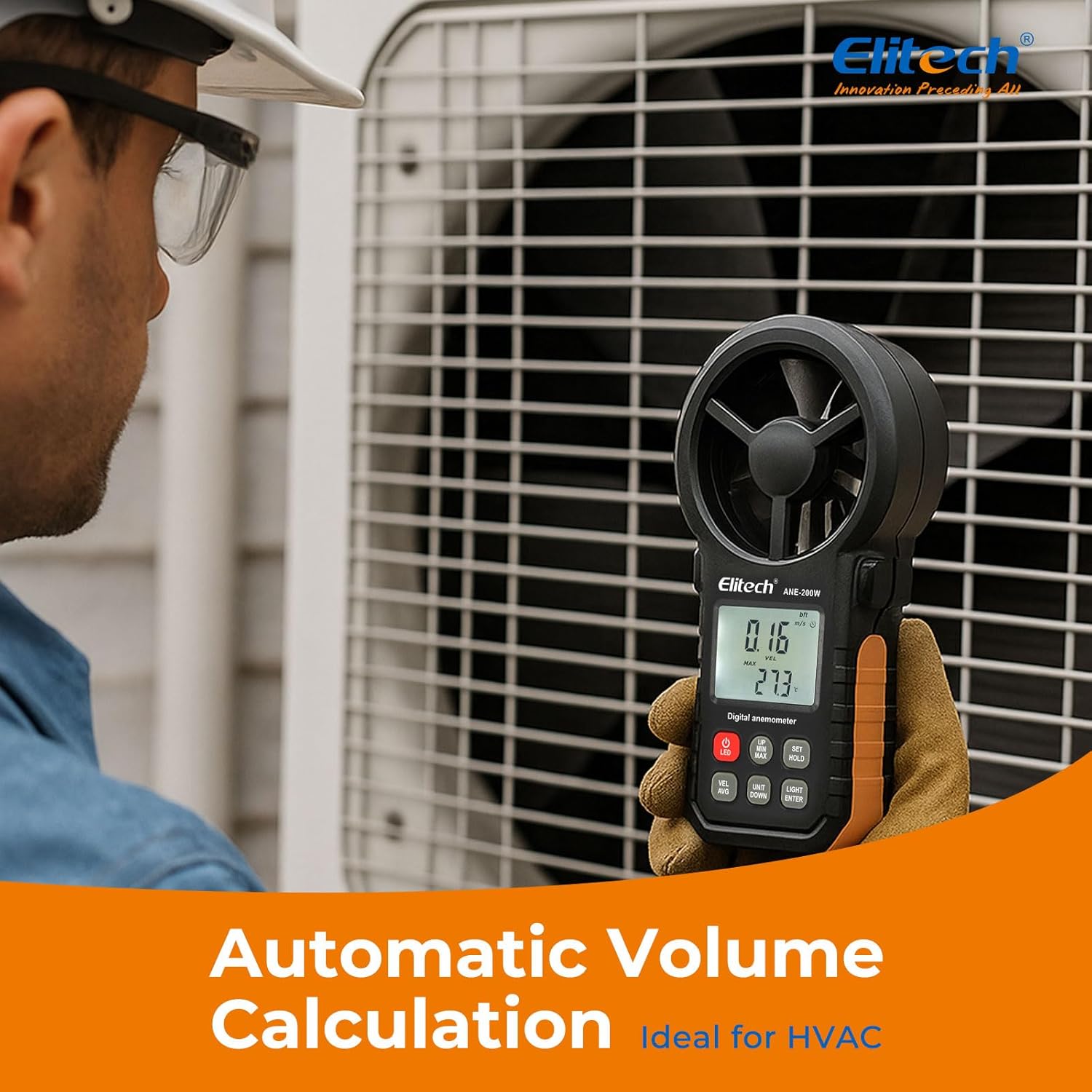
After powering on, the device will display real-time wind speed and temperature. Ensure the impeller is facing the airflow for accurate readings.
6.2 Unit Selection
The ANE-200W supports multiple units for wind speed and air volume.
- Press the UNIT/DOWN button to cycle through wind speed units: m/s, km/h, mph, knots, ft/min, and Beaufort scale.
- To switch between CFM (Cubic Feet per Minute) and CMM (Cubic Meters per Minute) for air volume, navigate to the air volume measurement mode and use the UNIT/DOWN button.
- Temperature units (Celsius/Fahrenheit) can typically be adjusted in the settings menu (refer to the detailed manual for specific steps).

6.3 MAX/MIN/AVG/HOLD Functions
- Press the SET/HOLD button briefly to activate the data hold function, freezing the current reading on the display. Press again to release.
- Press the MAX/MIN button to cycle through maximum, minimum, and average readings for the current measurement session.
6.4 Backlight Operation
Press the LIGHT/ENTER button to turn the LCD backlight on or off, improving visibility in low-light conditions.
6.5 Data Logging and Export
The ANE-200W supports data logging internally (up to 960 sets) and export via Bluetooth to the mobile app or via USB to PC software. Refer to sections 5.3 and 5.4 for connection details.
7. Maintenance
- Cleaning: Wipe the device with a soft, dry cloth. Do not use abrasive cleaners or solvents.
- Storage: Store the device in its protective carrying case in a cool, dry place when not in use. Remove the battery if storing for extended periods to prevent leakage.
- Battery Replacement: Replace the 9V battery when the low battery indicator appears on the display. Follow the battery installation steps in section 5.1.
8. Troubleshooting
- Device does not power on: Check battery installation and ensure the battery has sufficient charge. Replace if necessary.
- Inaccurate readings: Ensure the impeller is clean and unobstructed. Verify the device is positioned correctly in the airflow. Check unit settings.
- Bluetooth connection issues: Ensure Bluetooth is enabled on both the anemometer and your mobile device. Restart both devices and try pairing again. Make sure the Elitech App is up to date.
- USB data export failure: Ensure the USB cable is securely connected to both the device and the PC. Verify that the Elitech PC software is correctly installed and running.
- Unit conversion discrepancies (CFM/CMM): While the device provides conversion, always double-check the displayed units and ensure they align with your expectations, especially when dealing with cubic measurements.
9. Specifications
| Feature | Specification |
|---|---|
| Model Number | US-ANE-200W |
| Wind Velocity Range | 0-30m/s (0-90km/h, also supports multiple units) |
| Wind Flow Range | 0-999900 m³/min (also supports CFM) |
| Wind Temperature Range | -10~45°C (14-113°F) |
| Humidity Range | 10-90 %RH |
| Temperature Accuracy | ±1 °C |
| Connectivity Technology | Bluetooth, USB |
| Special Features | Bluetooth App Control, USB Data Export, Backlit Display, Max/Min/AVG Function |
| Power Source | Battery Powered (1 x 9V battery included) |
| Package Dimensions | 7.2 x 4.92 x 2.24 inches |
| Item Weight | 11.68 ounces |
| Manufacturer | Elitech |

10. Warranty and Support
Elitech provides a standard warranty for this product. For detailed warranty information, technical support, or service inquiries, please visit the official Elitech website or contact their customer service directly. Keep your purchase receipt as proof of purchase for warranty claims.


