
1. Introduction
Thank you for purchasing the COWSAR Z5820DN-SILVER Nugget Ice Maker. This appliance is designed to produce soft, chewable nugget ice efficiently for your home, kitchen, or office. Please read this manual thoroughly before operating the ice maker to ensure safe and optimal performance. Keep this manual for future reference.
2. Important Safety Instructions
- Read all instructions before using the appliance.
- Ensure the voltage matches the rating label on the appliance.
- Do not immerse the power cord, plug, or any part of the appliance in water or other liquids.
- Unplug from the outlet when not in use, before assembling or disassembling parts, and before cleaning.
- Do not operate any appliance with a damaged cord or plug, or after the appliance malfunctions or has been damaged in any manner. Contact customer service for assistance.
- Do not use outdoors. This appliance is for indoor household use only.
- Do not let the cord hang over the edge of a table or counter, or touch hot surfaces.
- Do not place on or near a hot gas or electric burner, or in a heated oven.
- Always place the appliance on a firm, flat surface.
- Do not use the appliance for other than intended use.
- Supervise children when the appliance is in use.
- Use only potable water in the water reservoir.
- Ensure proper ventilation around the appliance. Maintain at least 5 inches of space from walls and other objects.
3. Package Contents
- COWSAR Z5820DN-SILVER Nugget Ice Maker
- User Manual
- Ice Scoop (may be included)
4. Product Overview
4.1 External Components

Figure 4.1: Front view of the COWSAR Nugget Ice Maker, showing ice being dispensed into a glass.
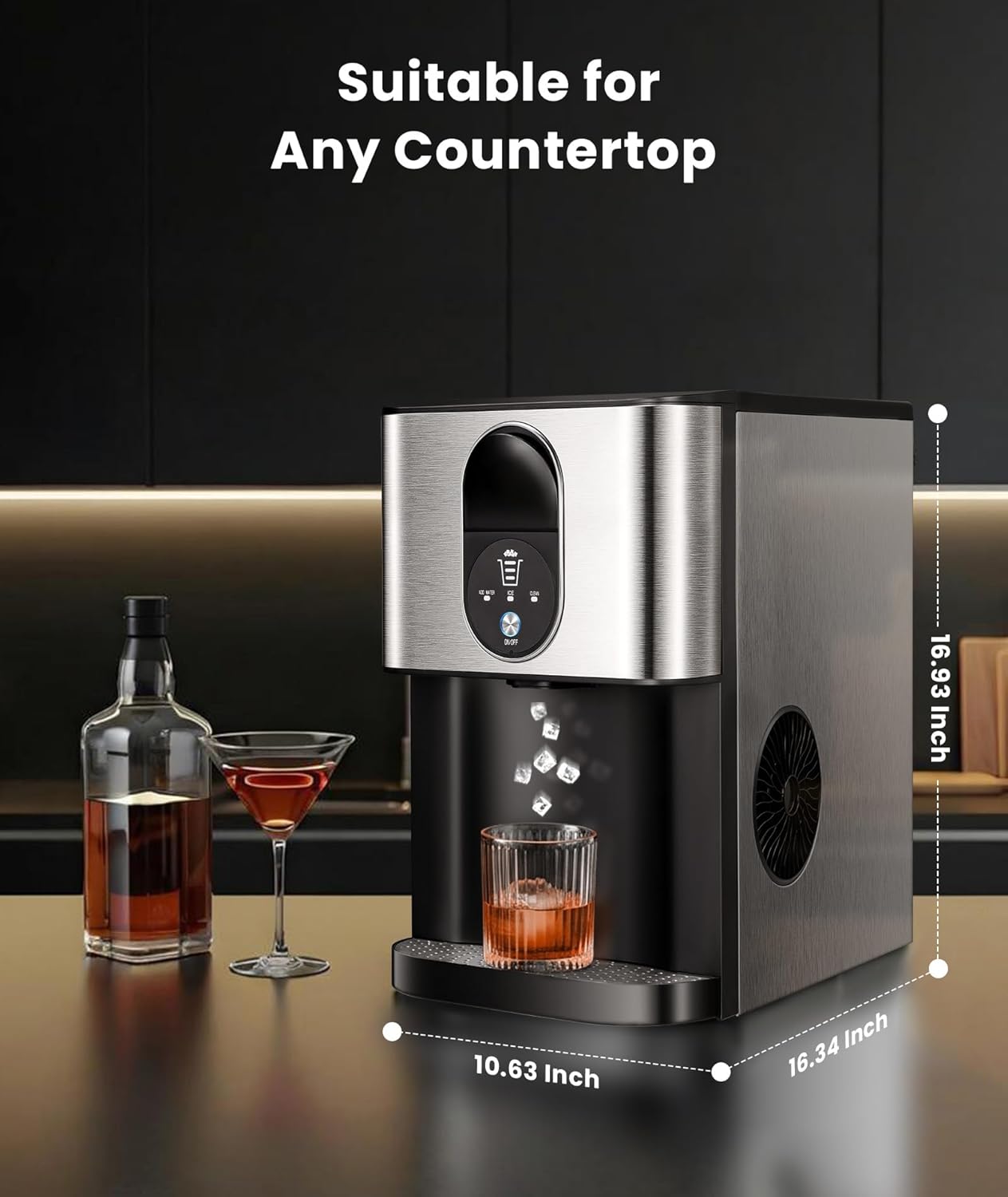
Figure 4.2: Side view of the COWSAR Nugget Ice Maker with approximate dimensions: 10.63 inches (W), 16.34 inches (D), 16.93 inches (H).
4.2 Control Panel and Indicators

Figure 4.3: Close-up of the control panel, highlighting indicators and buttons.
- ADD WATER Indicator: Illuminates when the water reservoir needs refilling.
- ICE Indicator: Illuminates when ice is being produced.
- CLEAN Indicator: Illuminates during the self-cleaning cycle.
- ON/OFF Button: Press to turn the unit on or off. Long press for 5 seconds to activate self-cleaning.
- Ice Quantity Indicator: Displays the remaining ice quantity in the storage basket.
5. Setup
5.1 Unpacking and Placement
- Remove all packaging materials and tape. Inspect the ice maker for any damage.
- Place the ice maker on a stable, level surface away from direct sunlight and heat sources. Ensure there is at least 5 inches of clearance around the unit for proper ventilation.
- Allow the unit to stand upright for at least 2 hours before plugging it in, especially if it was transported horizontally. This allows the refrigerant to settle.
5.2 Initial Cleaning
Before first use, it is recommended to clean the ice maker. You can use the self-cleaning function for this purpose (refer to Section 7.1).
5.3 Filling the Water Reservoir

Figure 5.1: Methods for filling the 2.4L water reservoir.
- Open the flip-top lid on the top of the unit.
- Pour potable water directly into the reservoir. Alternatively, the 2.4L water tank can be removed for filling at a faucet.
- Fill the reservoir up to the 'MAX' fill line. Do not overfill.
- Close the lid securely.
6. Operating Instructions
6.1 Powering On and Ice Production

Figure 6.1: Basic operation steps for the COWSAR Nugget Ice Maker.
- Ensure the water reservoir is filled (refer to Section 5.3).
- Plug the power cord into a grounded electrical outlet.
- Press the ON/OFF button on the control panel to start the ice-making process. The ICE indicator will illuminate.
- The first batch of ice may take slightly longer to produce. Subsequent batches will be faster. The unit can produce up to 44 lbs of ice in 24 hours.
6.2 Dispensing Ice
The COWSAR Nugget Ice Maker features a contactless ice dispenser.
- Place your beverage cup directly under the ice dispenser chute.
- Pull the control lever located above the dispenser chute. Nugget ice will be dispensed into your cup.
- Release the lever to stop dispensing.
6.3 Indicator Lights
- ADD WATER: When this light is on, the water level in the reservoir is low. Refill the reservoir to resume ice production.
- ICE: This light indicates that the ice maker is actively producing ice.
- CLEAN: This light indicates the unit is in self-cleaning mode.
7. Maintenance
7.1 Self-Cleaning Function

Figure 7.1: Internal view of the self-cleaning process.
The self-cleaning cycle helps maintain the hygiene of your ice maker.
- Ensure the water reservoir is filled with clean water.
- With the unit plugged in, press and hold the ON/OFF button for 5 seconds. The CLEAN indicator will illuminate.
- The self-cleaning cycle will run for approximately 10 minutes. During this time, water will circulate through the internal system.
- Once the cycle is complete, the CLEAN indicator will turn off.
- Drain the water from the unit as described in Section 7.2.
7.2 Draining Water
Regularly drain the water from the unit, especially after cleaning or before extended periods of non-use.
- Unplug the ice maker from the power outlet.
- Locate the drain plug, typically at the bottom or rear of the unit.
- Place a suitable container under the drain plug.
- Unplug the drain cap to allow water to flow out.
- Once all water has drained, securely replace the drain cap.
7.3 External Cleaning
- Wipe the exterior of the ice maker with a soft, damp cloth.
- Do not use abrasive cleaners or solvents.
- Clean the drip tray regularly to prevent water buildup.
8. Troubleshooting
| Problem | Possible Cause | Solution |
|---|---|---|
| Ice production is slow. | First ice making cycle. | The first cycle is typically slower. Subsequent cycles will operate at normal speed. |
| Unit makes a sound of small ice cubes colliding. | Normal operation during ice formation. | This is a normal operational sound as ice cubes are formed and collected. |
| Water overflows when unit is shut down. | Ice melting inside the unit. | Remove all ice cubes from the unit before shutting it down to prevent overflow from melting ice. |
| Excessive water in the drip tray. | Internal water tank overflow. | Unplug the water drain cap to drain the water from the unit. Ensure the internal water tank is not overfilled. |
| ADD WATER indicator is on, but reservoir is full. | Sensor malfunction or debris. | Unplug the unit, check for any obstructions around the water level sensor, and plug it back in. If the issue persists, contact customer support. |
| No ice production. | No water, unit not plugged in, or malfunction. | Check water level, ensure power connection, and press ON/OFF. If still no ice, contact customer support. |
9. Specifications
| Feature | Specification |
|---|---|
| Model Number | Z5820DN-SILVER |
| Product Dimensions (D x W x H) | 16.34" x 10.63" x 16.93" |
| Weight | 35.27 Pounds |
| Water Reservoir Capacity | 2.4 Liters |
| Ice Production Capacity | Up to 44 lbs / 24 hours |
| Wattage | 200 watts |
| Manufacturer | COWSAR |
10. Warranty and Support
For warranty information or technical support, please refer to the warranty card included with your product or contact COWSAR customer service through the retailer where the product was purchased. Please have your model number (Z5820DN-SILVER) and purchase date available when contacting support.