
Introduction
This manual provides detailed instructions for the installation, operation, and maintenance of your Stinger HORIZON12 12.8-inch Car Stereo. This system is designed for seamless integration into 2014-2018 Chevrolet Silverado and GMC Sierra vehicles, including 2015-2019 Silverado HD and Sierra HD models. Please read this manual thoroughly before using the product to ensure proper functionality and safety.
Setup and Installation
The Stinger HORIZON12 is designed for a plug-and-play installation, providing an OEM-style factory look. While the system is engineered for straightforward integration, professional installation is recommended to ensure all features function correctly and to avoid any potential damage to the vehicle or unit.
Compatibility:
- 2014-2018 Chevrolet Silverado and GMC Sierra.
- 2015-2019 Silverado HD and Sierra HD models.
- Compatible with both Bose and non-Bose equipped vehicles.
- Note: The system may not retain select factory features. Refer to the detailed installation guide for specific information.
Included Components:
- 12.8" Touchscreen Display
- Radio Replacement Interface
- Dash Kit
- Installation Hardware
- User Guide (PDF available for download)
For detailed step-by-step instructions, please consult the official Installation Manual (PDF) provided by Stinger.

Image: Comparison of the original dashboard radio and the Stinger HORIZON12 installed, showing the integrated 12.8-inch display.
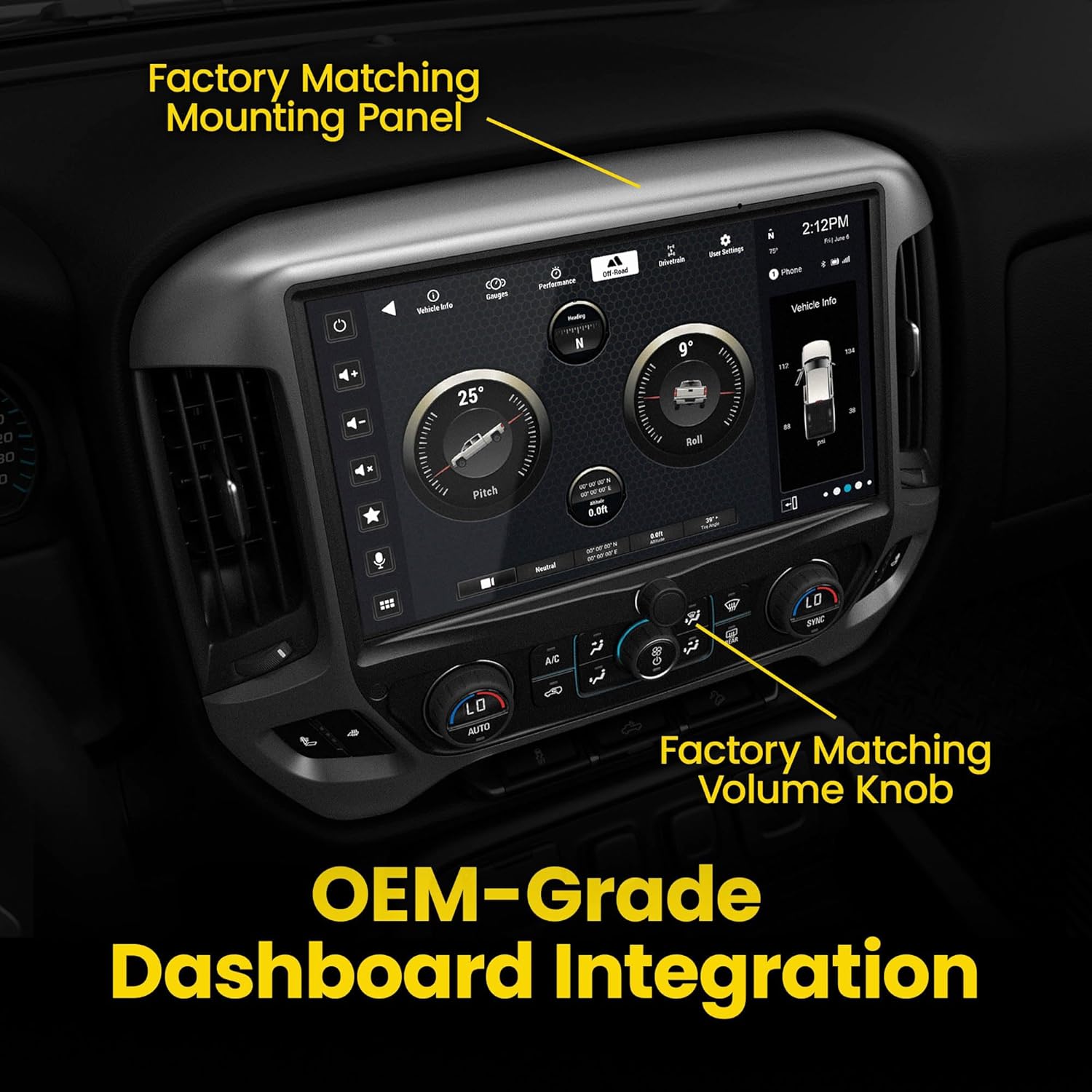
Image: Close-up of the Stinger HORIZON12 showing the factory-matching mounting panel and volume knob for OEM-grade dashboard integration.
Operating Instructions
1. Display and Interface
The HORIZON12 features a 12.8-inch Full HD (1920x1080) touchscreen display. It is IP65 weather-resistant and includes anti-glare, anti-reflection, and anti-fingerprint film protection for clear visibility and smooth control.
- Touchscreen Control: Navigate the interface by touching icons and swiping.
- Customizable Home Screen: Personalize your home screen with custom backgrounds and adjustable app icon layouts.
- Fast Boot: The system offers a quick wake-up time for instant access to infotainment features.

Image: The 12.8-inch display highlighting its optically bonded, IP65 weather-resistant, anti-glare, and anti-fingerprint features.
2. Smartphone Integration
The unit supports MFi-certified wired and wireless Apple CarPlay and Android Auto for seamless smartphone integration.
- Wireless Apple CarPlay & Android Auto: Access navigation, calls, messages, music, and voice-controlled apps directly from the display.
- Bluetooth 5.1: Connect your device for hands-free calling and audio streaming.

Image: The Stinger HORIZON12 screen displaying the Apple CarPlay interface, showing icons for phone, music, maps, messages, and other applications.
Video: Demonstrates the features of the Horizon12 GM Radio, including wireless Apple CarPlay and Android Auto functionality.
3. Navigation
- Optional iGO GPS: An iGO GPS navigation card (SE-P24, sold separately) provides offline navigation capabilities.
- OnX Offroad Maps: Includes a 3-month subscription to OnX Offroad Maps for trail navigation, difficulty ratings, private land boundaries, and camping information in 3D.

Image: The Stinger HORIZON12 screen displaying the iGO Navigation interface with a map, current location, and route information.
4. Vehicle Information and Gauges
Monitor various vehicle parameters directly on the display.
- Off-Road Gauges: Track pitch, roll, GPS coordinates, compass, altitude, transfer case position, and steering angle.
- Real-time Performance Gauges: Access customizable gauges for drivetrain and other vehicle information.
- Customizable Widgets: Arrange widgets for quick access to frequently used controls and information.

Image: The Stinger HORIZON12 screen displaying customizable widgets for vehicle information, including coolant temp, engine oil life, and tire angle.

Image: The Stinger HORIZON12 screen displaying real-time vehicle information, including pitch and roll angles, and various performance gauges like oil temp and oil pressure.
Video: An overview of the Stinger HORIZON12 features, including the customizable widgets and vehicle information display.
5. Audio Controls
The system offers advanced audio tuning capabilities for a customized sound experience.
- Hi-Fi Audio Playback: Enjoy premium sound quality.
- RCA Outputs: 4.5V 8-channel RCA outputs for external amplifiers.
- Subwoofer Control: Dedicated control for subwoofer output.
- Equalizer: 15-band EQ with 6 presets for fine-tuning audio.
- Crossovers: Built-in High-Pass Filter (HPF) and Low-Pass Filter (LPF) crossovers.
Image: The Stinger HORIZON12 screen displaying the advanced audio settings, including a graphical 15-band equalizer for sound customization.
6. Radio and Media
- HD AM/FM Tuner: Receive crystal-clear HD radio broadcasts.
- SiriusXM: Compatible with SiriusXM satellite radio (SXV300 vehicle tuner sold separately).
7. Connectivity and Camera Support
- USB Ports: Two USB-A ports and one USB-C port with fast 3A charging.
- HDMI Input: For expanded connectivity options.
- Camera Inputs: Supports up to 4 AHD/CVBS cameras, including backup, dash, blind spot, and front cameras.
Maintenance
To ensure the longevity and optimal performance of your Stinger HORIZON12 unit, follow these maintenance guidelines:
- Screen Cleaning: Use a soft, lint-free cloth specifically designed for electronics screens. Gently wipe the display to remove dust and fingerprints. Avoid abrasive materials or harsh chemical cleaners, as these can damage the anti-glare and anti-fingerprint coatings.
- General Cleaning: Keep the surrounding dash area clean and free of debris.
- Software Updates: Periodically check the manufacturer's website for firmware updates to ensure your system has the latest features and performance enhancements.
Troubleshooting
This section addresses common issues you might encounter with your HORIZON12 unit. For more complex problems, contact Stinger customer support.
| Problem | Possible Cause | Solution |
|---|---|---|
| Slow Boot-Up Time | System initialization, background processes. | The system typically takes approximately 30-35 seconds to fully boot and connect to a phone. This is normal operation. Ensure no unnecessary applications are running in the background if customization options allow. |
| No Audio Output | Volume muted, incorrect source selected, wiring issue. | Check the volume level and ensure it is not muted. Verify the correct audio source (e.g., Radio, Apple CarPlay, Android Auto, Bluetooth) is selected. Inspect wiring connections if the issue persists after checking settings. |
| Smartphone Connectivity Issues (CarPlay/Android Auto) | Bluetooth/Wi-Fi interference, incorrect settings, phone software issue. | Ensure Bluetooth and Wi-Fi are enabled on your smartphone. Restart your phone and the HORIZON12 unit. Check for any pending software updates for both your phone and the car stereo. Ensure your phone is MFi-certified for wired connections. |
| GPS Signal Loss | Obstruction, antenna issue, driving in areas with poor signal. | Ensure the GPS antenna has a clear line of sight to the sky. Avoid areas with heavy tree cover or tall buildings. If using the optional iGO GPS card, ensure it is properly inserted. |
Specifications
| Feature | Detail |
|---|---|
| Brand | STINGER |
| Model Name | GM14RB12 |
| Screen Size | 12.8 inches |
| Resolution | 1920 x 1080 |
| Display Type | LCD |
| Touch Screen Type | Capacitive |
| Operating System | Android, iOS (via CarPlay/Android Auto) |
| Connectivity Technology | Bluetooth, HDMI, USB, Wireless |
| Bluetooth Version | 5.1 (from image) |
| Special Features | Built-In Bluetooth, Certified Wireless Apple CarPlay & Android Auto, GPS Navigation, Off-Road Gauges, Touchscreen |
| Map Type | North America, Street, Topographical |
| Supported Satellite Navigation System | GPS |
| Audio Output Mode | Stereo |
| Compatible Devices | Amplifier, Camera, Smartphone, Speaker, Subwoofer |
| USB Ports | 2x USB-A, 1x USB-C (3A charging) |
| Camera Support | Up to 4 AHD/CVBS cameras |
| Item Dimensions (L x W x H) | 12.31"L x 0.34"W x 7.67"H |
| Item Weight | 15 pounds |
Warranty Information
The Stinger HORIZON12 Car Stereo comes with a 1 Year Manufacturer Warranty. Please retain your proof of purchase for warranty claims. For specific terms and conditions, refer to the warranty documentation included with your product or contact Stinger customer support.
Customer Support
For technical assistance, troubleshooting, or general inquiries regarding your Stinger HORIZON12, please contact Stinger customer service. Their team is available to provide support and guidance.
- User Guide: A detailed User Guide (PDF) is available for download.
- Installation Manual: An Installation Manual (PDF) is also available for comprehensive setup instructions.
- Online Resources: Visit the official STINGER website for FAQs, product updates, and additional support resources.


