
1. Introduction
This manual provides essential information for the operation and maintenance of your LIGE CC-DM4-A GPS Smartwatch. Please read it thoroughly to ensure proper use and to maximize the device's capabilities.

Image 1.1: LIGE CC-DM4-A GPS Smartwatch, showcasing its design with both leather and silicone straps.
2. What's in the Box
- 1 x LIGE CC-DM4-A Black Smartwatch
- 1 x Black Leather Strap (22mm)
- 1 x Black Silicone Strap (22mm)
- 1 x Charging Cable
- 1 x User Manual
3. Setup
3.1 Initial Charging
Before first use, fully charge your smartwatch. Connect the charging cable to the magnetic charging points on the back of the watch and to a USB power source (5V/1A adapter recommended, not included). A full charge typically takes approximately 3 hours.
3.2 App Installation and Pairing
To unlock the full functionality of your smartwatch, download the GloryFitPro application on your smartphone. The app is compatible with Android 5.0+ and iOS 11+.
- Scan the QR code provided in the physical user manual or search for "GloryFitPro" in your smartphone's app store.
- Install and open the GloryFitPro application.
- Ensure Bluetooth is enabled on your smartphone.
- In the app, navigate to the device section and select "Add a new device."
- Select the LIGE DM4 device from the list to initiate pairing.
- Follow any on-screen prompts to complete the pairing process.

Image 3.1: Visual guide for connecting the smartwatch to the GloryFitPro app.
4. Operating Instructions
4.1 Basic Navigation
- Touchscreen: Swipe left/right, up/down, and tap to navigate menus and select options.
- Side Buttons: Use the physical buttons on the side for quick access to functions or to return to the home screen.
4.2 GPS Functionality
The smartwatch features an integrated L1 GPS chip and receives signals from six satellite systems (GPS, Beidou, GLONASS, Galileo, QZSS, and NAVIC) for fast and precise outdoor positioning. It supports AGPS technology for enhanced accuracy.
- Trajectory Recording: During outdoor activities, the watch can record your route, which can be viewed in the GloryFitPro app.

Image 4.1: GPS tracking feature showing a recorded route on the watch and a detailed map on a connected smartphone.
4.3 Sports Modes
The watch offers over 170 diverse sports modes, including running, cycling, swimming, skiing, and surfing. It also supports automatic recognition for 5 daily activities: walking, running, cycling, elliptical, and rowing.
- Select your desired sport mode from the watch menu to start tracking.
- The watch provides professional sports data to help improve training quality.

Image 4.2: Overview of the 170+ sports modes available on the smartwatch.
4.4 Health Monitoring
The smartwatch supports 24/7 health monitoring features. Note: Health data is for reference only and should not be used for medical diagnosis.
- Heart Rate Tracking: Monitors your heart rate continuously.
- Blood Oxygen (SpO2) Monitoring: Measures blood oxygen levels.
- Stress Monitoring: Tracks your stress levels throughout the day.
- Sleep Quality Analysis: Records sleep stages (deep, light, REM) and provides insights into your sleep patterns.

Image 4.3: Health monitoring features including heart rate, blood oxygen, stress, and sleep tracking.
4.5 Calls and Notifications
The smartwatch supports Bluetooth calls and app notifications when connected to your smartphone.
- Bluetooth Calls: Make, receive, or reject calls directly from your wrist. You can sync up to 100 contacts.
- App Notifications: Receive alerts from applications like Facebook, Instagram, and WhatsApp.
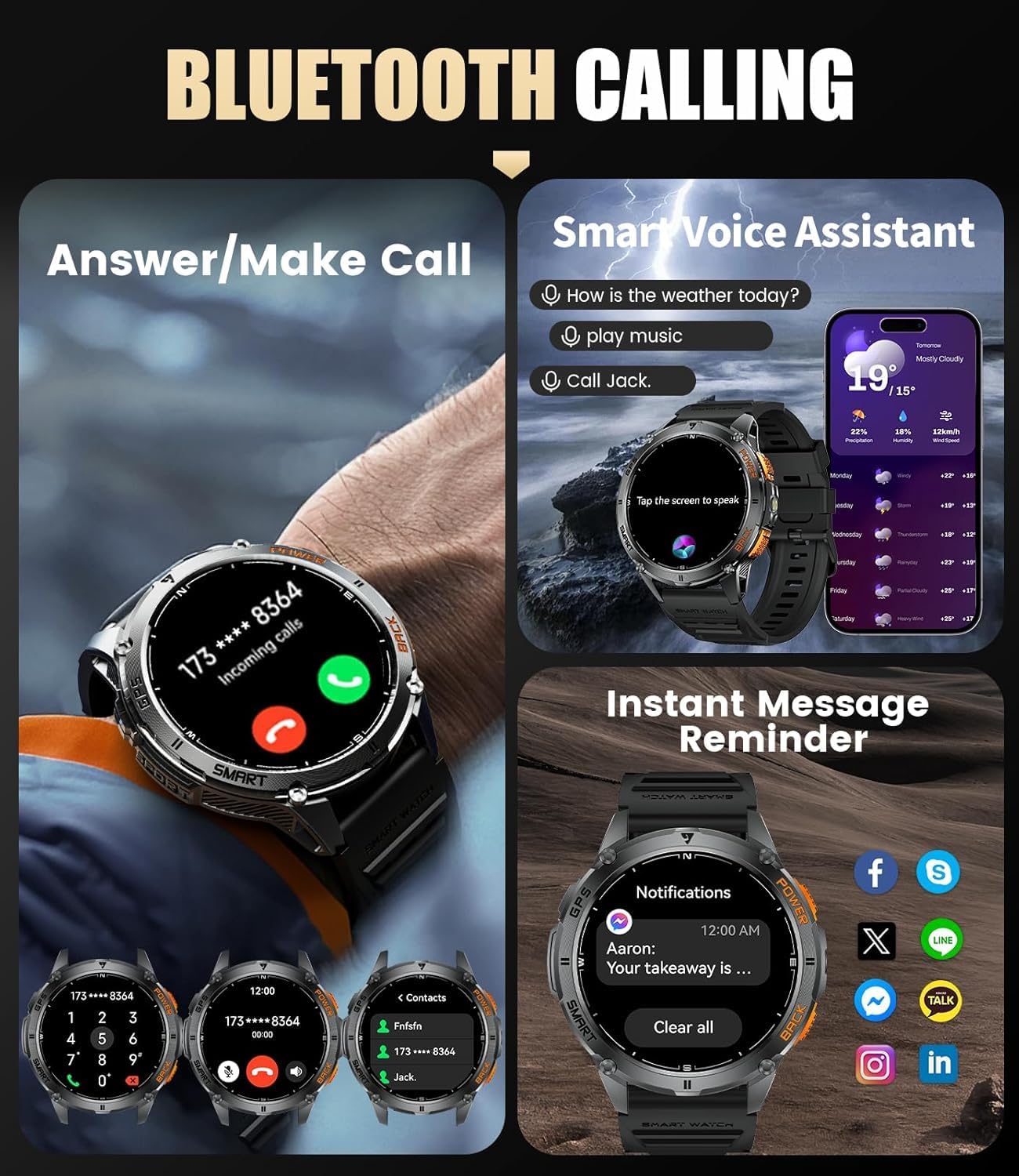
Image 4.4: Bluetooth calling and notification features on the smartwatch.
4.6 Watch Faces and Customization
The 1.43-inch AMOLED HD display offers a resolution of 466x466 pixels and 326 PPI for rich colors and clear visibility. It supports Always-On Display (AOD).
- The watch includes 10 local watch faces and 6 AOD faces.
- Through the GloryFitPro app, you can download over 300 additional watch faces.
- Personalize your watch face using your own photos.

Image 4.5: Customization options for watch faces and the vibrant AMOLED display.
4.7 Integrated Sensors (Compass, Altimeter, Barometer)
The smartwatch is equipped with professional sensors for outdoor exploration.
- 3D Electronic Compass: Provides precise orientation in complex terrains.
- Altimeter: Monitors real-time altitude.
- Barometer: Tracks atmospheric pressure changes.

Image 4.6: Display of integrated compass, altimeter, and barometer functions.
4.8 LED Flashlight
A practical LED flashlight is integrated into the watch for convenience in low-light conditions.
- Access the flashlight function from the quick settings menu.
- Caution: Do not direct the light towards eyes.

Image 4.7: The integrated LED flashlight in use for various scenarios.
5. Maintenance
5.1 Cleaning
- Wipe the watch and straps regularly with a soft, damp cloth.
- Avoid using harsh chemicals or abrasive materials.
- Ensure the charging contacts are clean and dry before charging.
5.2 Water Resistance
The watch is 5ATM water-resistant (up to 50 meters), suitable for swimming and showering. It is not recommended for diving or high-pressure water activities.
- Do not operate buttons underwater.
- After exposure to saltwater, rinse the watch with fresh water and dry thoroughly.

Image 5.1: The smartwatch demonstrating its 5ATM water resistance.
5.3 Battery Life
The 530 mAh high-performance battery offers extended usage times:
- Typical use: 7-10 days
- Always-On Display (AOD): Approximately 4 days
- GPS mode: Approximately 24 hours
- Standby mode: Up to 60 days
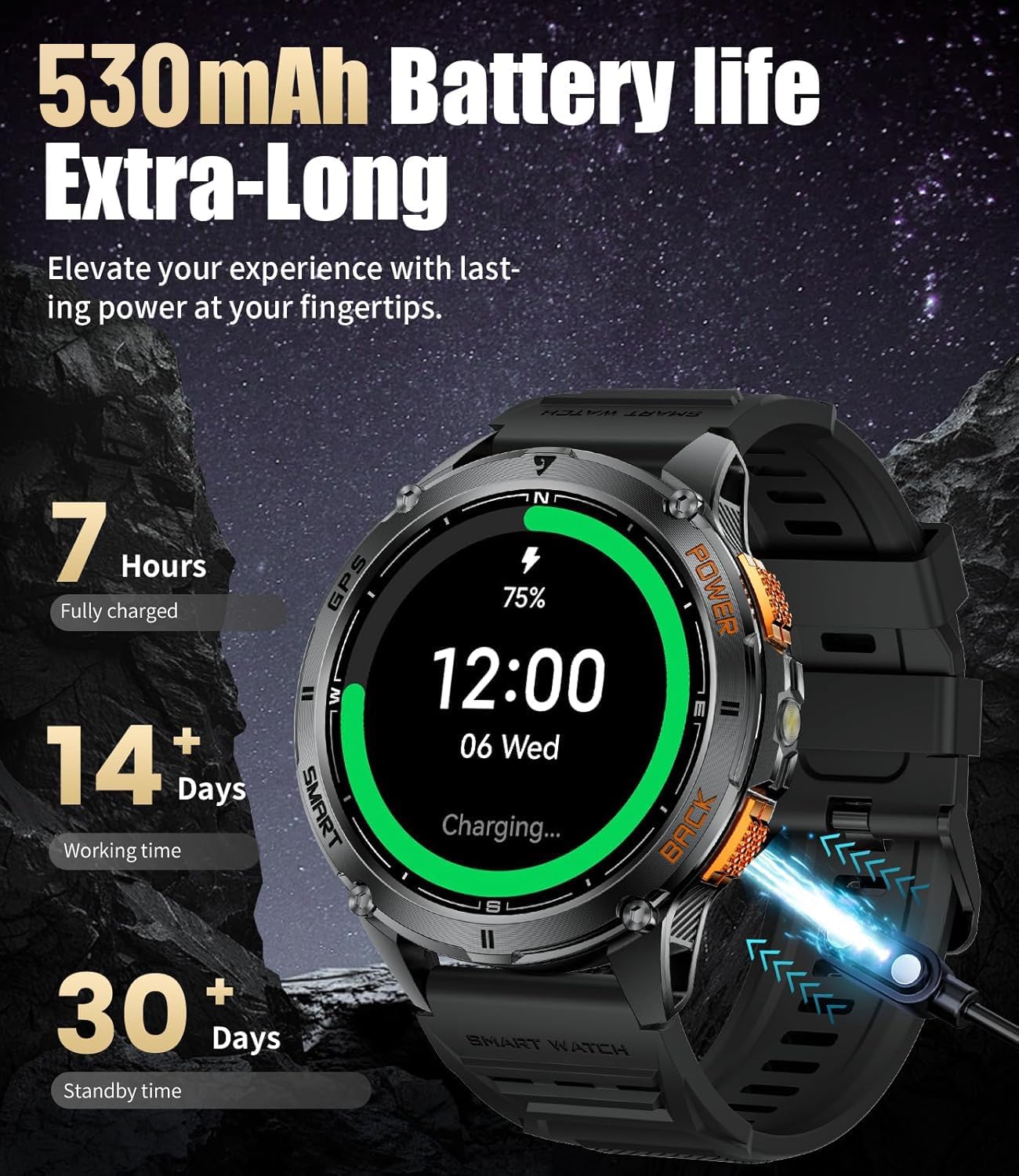
Image 5.2: Battery life and charging information for the smartwatch.
6. Troubleshooting
- Watch not turning on: Ensure the watch is fully charged.
- Cannot pair with phone: Make sure Bluetooth is enabled on your phone and the watch is within range. Restart both devices and try again.
- Inaccurate health data: Ensure the watch is worn snugly on your wrist. Remember, data is for reference only.
- GPS signal issues: Ensure you are in an open outdoor area with a clear view of the sky. GPS acquisition can sometimes take longer.
- Notifications not appearing: Check app permissions on your phone and ensure notifications are enabled for the GloryFitPro app and the specific apps you wish to receive alerts from.
7. Specifications
| Feature | Specification |
|---|---|
| Brand | LIGE |
| Model Number | CC-DM4-A |
| Display | 1.43-inch AMOLED, 466x466 pixels, 326 PPI |
| Operating System Compatibility | Android 5.0+ & iOS 11+ |
| Connectivity | Bluetooth |
| GPS | Integrated GPS (L1 chip, 6 satellite systems: GPS, Beidou, GLONASS, Galileo, QZSS, NAVIC) |
| Water Resistance | 5ATM (up to 50 meters) |
| Battery Capacity | 530 mAh Lithium-polymer |
| Special Features | Bluetooth calls, GPS, Alarm, Always-On Display, Multi-sport tracker, Compass, Altimeter, Barometer, LED Flashlight |
| Case Material | High-strength Zinc Alloy |
| Strap Size | 22 mm |
8. Warranty and Support
8.1 Manufacturer's Warranty
This LIGE smartwatch comes with a 2-year manufacturer's warranty. Please retain your proof of purchase for warranty claims.
8.2 Customer Support
For any questions, technical assistance, or warranty inquiries, please contact LIGE customer support through the official website or your retailer.


