
SEDETA standing desk
SEDETA L Shaped Standing Desk User Manual
Model: standing desk | Brand: SEDETA
1. Introduction
The SEDETA L Shaped Standing Desk is a versatile and multifunctional workstation designed for home office and gaming environments. It combines an adjustable height standing desk with ample storage solutions, including file drawers, a hutch, and additional shelving. Integrated LED lights and a convenient power outlet station enhance its functionality and user experience.
This manual provides essential information for the setup, operation, maintenance, and troubleshooting of your new desk. Please read it thoroughly before assembly and use to ensure proper functionality and safety.

2. Setup and Assembly
Your SEDETA L Shaped Standing Desk is designed for straightforward assembly. All necessary parts are numbered, and clear, detailed instructions are included in the packaging. It is recommended to assemble the desk in the room where it will be used due to its size and weight.
2.1 Pre-Assembly Checklist
- Verify all components are present according to the parts list in your instruction booklet.
- Ensure you have the recommended tools (if any are not included).
- Clear a spacious area for assembly.
2.2 Assembly Steps
Follow the step-by-step instructions provided in the included assembly manual. Pay close attention to diagrams and ensure all screws are properly tightened to maintain the desk's stability and durability.

Important Safety Note: There is a gap between the desktop and the bookshelf. Be careful not to pinch hands when lifting or lowering the desktop.
2.3 Initial Power-Up
Once assembled, connect the power cord to a suitable electrical outlet. The integrated power outlets and LED lights will be ready for use.
Video 1: A 3D display video demonstrating the assembly and key features of the SEDETA L Shaped Standing Desk, including height adjustment, storage, and lighting.
3. Operating Instructions
3.1 Adjustable Height Standing Desk
The desk features an electric lifting motor allowing infinite height adjustment from 29 to 47 inches. Use the intelligent keypad located on the desk to control the height.
- Up/Down Buttons: Use the arrow buttons to raise or lower the desk to your desired height.
- Memory Settings: The keypad includes a memory function to save up to 3 favorite height settings. To save a setting, adjust the desk to the desired height, then press and hold one of the numbered memory buttons (1, 2, or 3) until the display confirms it's saved. To recall a saved height, simply press the corresponding numbered button.

3.2 RGB LED Lights
The desk is equipped with RGB LED lights located in the hutch, offering multiple colors and 29 flashing modes. Control the lights via a remote control or a dedicated mobile application.
- Music Sync Function: The built-in sensitivity adjustable microphone allows the LED light color to change with the rhythm of sound and music.
- APP Control: Download the specified application to access over 60,000 colors and DIY modes, along with timing functions.

3.3 Charging Station
A convenient charging station is integrated into the desktop, providing power for multiple devices simultaneously.
- Outlets: Includes 4 AC outlets and 2 USB ports.
- On-Off Switch: Use the dedicated on-off switch to power off the charging station with one button, ensuring safe electricity use.
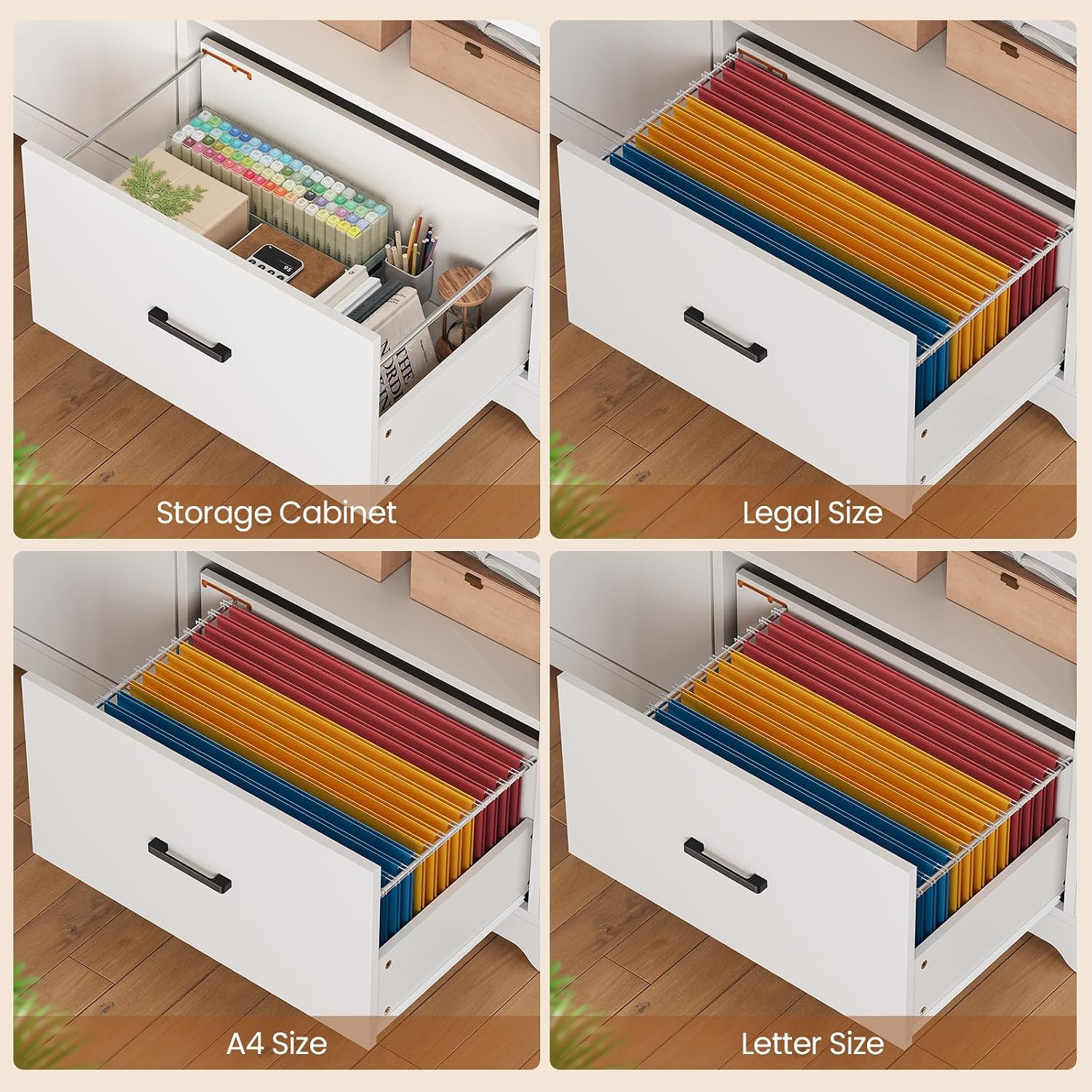
3.4 Storage Features
The desk offers extensive storage options to keep your workspace organized.
- File Drawers: A large file cabinet drawer is designed to fit legal, letter, and A4 documents.
- Storage Cabinet: A dedicated storage cabinet provides enclosed space for various office essentials.
- Open Shelves: The hutch and side shelving offer open storage for books, decor, and frequently accessed items. The bookshelf can be placed on either the left or right side to suit your needs.


4. Maintenance
Regular maintenance will help prolong the life and appearance of your SEDETA L Shaped Standing Desk.
- Cleaning: Wipe surfaces with a soft, damp cloth. Avoid harsh chemicals or abrasive cleaners that could damage the finish.
- Tighten Screws: Periodically check and ensure all screws and fasteners are properly tightened to maintain structural integrity.
- Motor Care: The high-quality motor is designed for durability and quiet operation. Avoid overloading the desk beyond its maximum load capacity (352 lbs) to prevent strain on the motor.
- Electrical Safety: Always use the on-off switch on the charging station to power down devices when not in use or before cleaning the desk.
5. Troubleshooting
If you encounter any issues with your SEDETA L Shaped Standing Desk, please refer to the following common solutions:
| Problem | Possible Cause | Solution |
|---|---|---|
| Desk not adjusting height | Power not connected; Motor overload; Cable disconnection. | Ensure power cord is securely plugged in. Reduce weight on the desk. Check all motor cables are properly connected. Refer to the specific motor manual for reset procedures if available. |
| LED lights not working | Power issue; Remote/APP not connected. | Check power connection to the lights. Ensure remote control has working batteries or APP is correctly paired. |
| Charging station not working | On-off switch is off; Power surge. | Ensure the on-off switch on the charging station is in the 'on' position. Check if the circuit breaker has tripped. |
| Desk wobbles | Loose screws; Uneven floor. | Tighten all assembly screws. Adjust leveling feet on the desk legs to compensate for uneven flooring. |
If your sit stand desk arrives damaged, scratched, or missing parts, or if you encounter issues not covered in this section, please contact SEDETA customer support for assistance. We will provide a free replacement or offer a partial refund as applicable.
6. Specifications
| Feature | Detail |
|---|---|
| Brand | SEDETA |
| Model Number | standing desk |
| Product Dimensions | 23.1"D x 48.6"W x 29.5"H |
| Color | White |
| Style | Industrial |
| Base Material | Metal |
| Top Material Type | Engineered Wood |
| Special Feature | Adjustable Height, Built-In USB Outlet |
| Item Weight | 134 Pounds |
| Minimum Height | 29.5 Inches |
| Maximum Height | 46.8 Inches |
| Number of Drawers | 1 |
| Number Of Shelves | 2 |
| Power Outlets | 4-Outlet & 2 USB Ports |
7. Warranty and Support
SEDETA is committed to providing high-quality products and customer satisfaction.
7.1 Warranty Information
This product comes with a limited warranty. For specific details regarding the warranty period and coverage, please refer to the documentation included with your purchase or contact SEDETA customer service.
7.2 Returns and Replacements
The product is eligible for 30-day easy returns. If your desk arrives damaged, scratched, or with missing parts, please contact us immediately. We are committed to resolving any issues by sending a free replacement or offering a partial refund.
7.3 Customer Support
For any questions, concerns, or support needs, please contact SEDETA customer service. Our team is ready to assist you with product inquiries, assembly help, or troubleshooting.
Contact Information: Please refer to the contact details provided on the product packaging or the official SEDETA website.
Ask a question about this manual
Ask about setup, troubleshooting, compatibility, parts, safety, or missing instructions. Manuals+ will review the question and use this page’s manual context to help answer it.