
1. Welcome
Thank you for choosing the AWEI T1 Pro Wireless Bluetooth Headphones. This manual provides detailed instructions for setting up, operating, and maintaining your new earbuds. Please read this manual carefully before use to ensure optimal performance and longevity of your device.
2. Product Overview
2.1. Package Contents
- Wireless Earbuds (Left and Right)
- Charging Case
- USB Charging Cable
- Eartips (various sizes)
- User Manual
2.2. Earbud and Charging Case Components
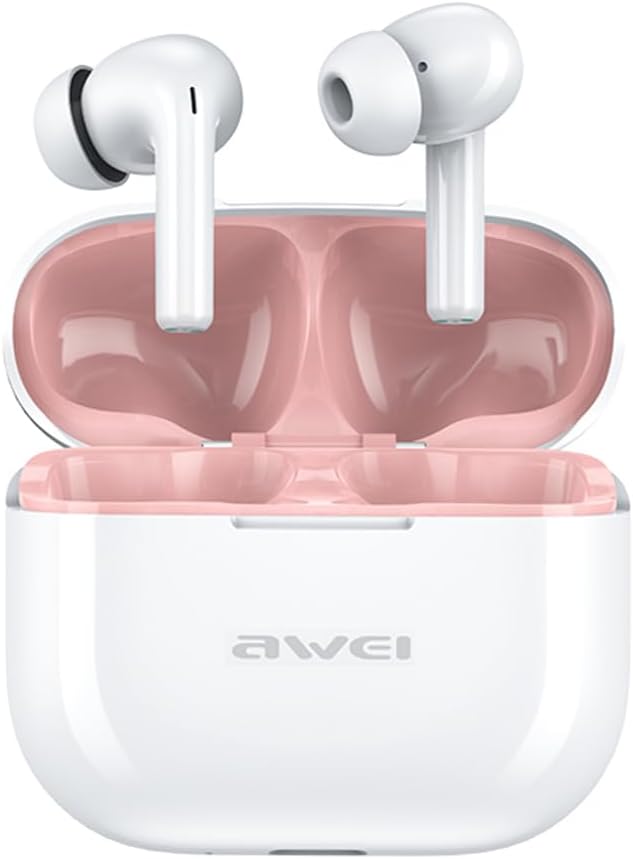
Image: The AWEI T1 Pro wireless earbuds are shown in their open charging case. The earbuds are white with a stem design, and the interior of the charging case is a light pink color. The AWEI logo is visible on the front of the white charging case.
The AWEI T1 Pro earbuds feature an ergonomic in-ear design for a comfortable and secure fit. The compact charging case not only protects the earbuds but also provides multiple charges on the go.
2.3. Key Features
- Hi-Fi Sound Quality: Equipped with 13mm speakers for an immersive audio experience and clear call performance.
- Bluetooth 5.4 Technology: Ensures a faster, more stable signal transmission with low latency and a wireless range of up to 10 meters. (Note: Some packaging may indicate Bluetooth 5.3, but the device supports 5.4 for enhanced performance).
- Smart Touch Control: Intuitive touch sensors on each earbud allow for easy control of music playback, calls, and voice assistant activation.
- Long Battery Life: Enjoy up to 7 hours of continuous playback per charge. The 300mAh charging case extends total playtime to 36 hours in dual-ear mode or up to 60 hours in single-ear mode. The case fully charges in approximately 1 hour via Type-C.
- IPX6 Waterproof Design: Resistant to sweat and rain, making them suitable for sports and outdoor activities.

Image: A detailed diagram illustrating the internal components of an earbud speaker, labeled as 'Drive Units HiFi Stereo', highlighting the layered structure of the audio driver for high-fidelity sound.

Image: A stylized depiction of a microchip labeled '5.3 Bluetooth', surrounded by circuit board elements, emphasizing lower latency and increased stability in wireless communication.

Image: A black earbud is shown next to a smartphone displaying a music player interface. Text indicates 'Touch Control Wake up Voice Assistant', illustrating how touch gestures on the earbud can control phone functions like answering calls or activating a voice assistant.

Image: A smartphone displaying a music player is shown alongside a transparent block, symbolizing extended power. Text highlights 'Full of Energy Long Battery Life', indicating the 300mAh charging case provides 7 hours of continuous use per charge.

Image: Two black earbuds are depicted, one dry and the other surrounded by water droplets, illustrating the 'No Fear of Sweat & Rain IPX6 Waterproof Rate' feature, which prevents water penetration during sports.
3. Setup
3.1. Initial Charging
- Before first use, place both earbuds into the charging case.
- Connect the provided USB Type-C charging cable to the charging port on the case and a power source (e.g., USB wall adapter, computer USB port).
- The indicator lights on the charging case will show charging status. A full charge for the case takes approximately 1 hour.
- Ensure the earbuds are fully charged before initial pairing.
3.2. Pairing with a Device
- Open the charging case. The earbuds will automatically power on and enter pairing mode.
- On your device (smartphone, tablet, laptop), enable Bluetooth.
- Search for available Bluetooth devices.
- Select "AWEI T1 Pro" from the list of devices.
- Once connected, you will hear a confirmation tone, and the earbuds will be ready for use.
- The earbuds will automatically reconnect to the last paired device when taken out of the case, if Bluetooth is enabled on the device.
4. Operating Instructions
4.1. Power On/Off
- Power On: Open the charging case, or long-press the touch area on both earbuds for 3 seconds.
- Power Off: Place the earbuds back into the charging case and close the lid, or long-press the touch area on both earbuds for 5 seconds.
4.2. Touch Controls
| Function | Action |
|---|---|
| Play/Pause Music | Single tap on either earbud |
| Next Song | Double tap on the right earbud |
| Previous Song | Double tap on the left earbud |
| Volume Up | Triple tap on the right earbud |
| Volume Down | Triple tap on the left earbud |
| Answer/End Call | Single tap on either earbud |
| Reject Call | Long press on either earbud for 2 seconds |
| Activate Voice Assistant | Long press on either earbud for 2 seconds (when not on a call) |
4.3. Making and Receiving Calls
When a call comes in, you can answer or reject it using the touch controls as described above. During a call, a single tap will end the conversation.
4.4. Music Playback
Control your music directly from the earbuds. Use single, double, or triple taps to play, pause, skip tracks, or adjust volume.
5. Maintenance
5.1. Cleaning
- Regularly clean the earbuds and charging case with a soft, dry, lint-free cloth.
- Do not use abrasive cleaners, alcohol, or chemical solvents.
- Gently remove any earwax or debris from the earbud mesh and charging contacts using a dry cotton swab or a small, soft brush.
5.2. Storage
- When not in use, always store the earbuds in their charging case to protect them from dust and damage.
- Store the device in a cool, dry place, away from extreme temperatures and direct sunlight.
5.3. Water Resistance
The AWEI T1 Pro earbuds are rated IPX6 waterproof, meaning they are protected against high-pressure water jets from any direction. This makes them suitable for workouts and light rain. However, they are not designed for swimming or submersion in water. Ensure the earbuds are dry before placing them back into the charging case to prevent damage.
6. Troubleshooting
6.1. Common Issues and Solutions
- Earbuds not pairing with device:
Ensure both earbuds are charged. Turn off and on your device's Bluetooth. Forget "AWEI T1 Pro" from your device's Bluetooth list and try pairing again. - Only one earbud working:
Place both earbuds back into the charging case, close the lid, wait a few seconds, then open the lid and take them out. This should reset their connection. If the issue persists, try resetting the earbuds (refer to manufacturer's website for specific reset instructions if needed). - No sound or low volume:
Check the volume level on both your device and the earbuds. Ensure the earbuds are properly seated in your ears. Try cleaning the earbud mesh for any obstructions. - Charging case not charging:
Ensure the USB cable is securely connected to both the case and the power source. Try a different charging cable or power adapter. - Earbuds not charging in case:
Ensure the charging contacts on both the earbuds and the case are clean and free of debris. Make sure the earbuds are correctly seated in the case.
7. Specifications

Image: A graphic displaying the technical specifications of the AWEI T1 Pro, including basic information, horn details, Bluetooth version, and battery capacities.
| General Information | |
|---|---|
| Model Name | T1 Pro |
| Product Type | Stereo TWS Earbuds |
| Net Weight | 36g |
| Dimensions (Case) | 58*50*24mm |
| Ear Placement | In Ear |
| Control Type | Touch Control |
| Water Resistance Level | IPX6 Waterproof |
| Noise Control | Adaptive Noise Cancellation |
| Audio Specifications | |
| Speaker Diameter | 13mm |
| Sensitivity | 100±3dB |
| Frequency Response Range | 20Hz~20,000Hz |
| Impedance | 32 Ohm |
| Connectivity | |
| Bluetooth Version | 5.4 (Image shows 5.3) |
| Wireless Range | Up to 10 meters |
| Supported Protocols | HSP, HFP, A2DP, AVRCP |
| Compatible Devices | Laptops, Tablets, Mobile Phones |
| Battery & Charging | |
| Charging Case Battery | 300mAh / 3.7V |
| Earbud Battery Capacity | 45mAh * 2 |
| Music Play Time | Up to 7 hours (per charge) |
| Talk Time | Up to 8 hours |
| Standby Time | Up to 300 hours |
| Charging Time (Case) | Approximately 1 hour |
| Charging Port | USB Type-C |
8. Warranty and Support
AWEI products are designed and manufactured to the highest quality standards. For information regarding warranty coverage, please refer to the warranty card included in your product packaging or visit the official AWEI website. If you encounter any issues or require technical assistance, please contact AWEI customer support through the contact information provided on the official website or your purchase platform.


