
Important Safety Instructions
Please read all instructions carefully before using this appliance. Failure to follow these instructions may result in electric shock, fire, or serious injury.
- Do not touch hot surfaces. Use handles or knobs.
- To protect against electrical hazards, do not immerse cord, plugs, or toaster in water or other liquid.
- Close supervision is necessary when any appliance is used by or near children.
- Unplug from outlet when not in use and before cleaning. Allow to cool before putting on or taking off parts.
- Do not operate any appliance with a damaged cord or plug, or after the appliance malfunctions or has been damaged in any manner.
- Do not use outdoors.
- Do not let cord hang over edge of table or counter, or touch hot surfaces.
- Do not place on or near a hot gas or electric burner, or in a heated oven.
- Always attach plug to appliance first, then plug cord into the wall outlet. To disconnect, turn any control to "off", then remove plug from wall outlet.
- Do not use appliance for other than intended use.
- Oversize foods, metal foil packages, or utensils must not be inserted in a toaster as they may involve a risk of fire or electric shock.
- A fire may occur if toasters are covered or touching flammable material, including curtains, draperies, walls, and the like, when in operation.
- Do not attempt to dislodge food when toaster is plugged in.
- Do not operate unattended.
- The bread may burn, therefore do not use the toaster near or below combustible material, such as curtains.
Product Overview
The Foyoconven TAC1001-UL is a 4-slice touch screen toaster designed for efficient and precise toasting. It features dual independent controls, multiple bread type presets, and 6 browning levels.
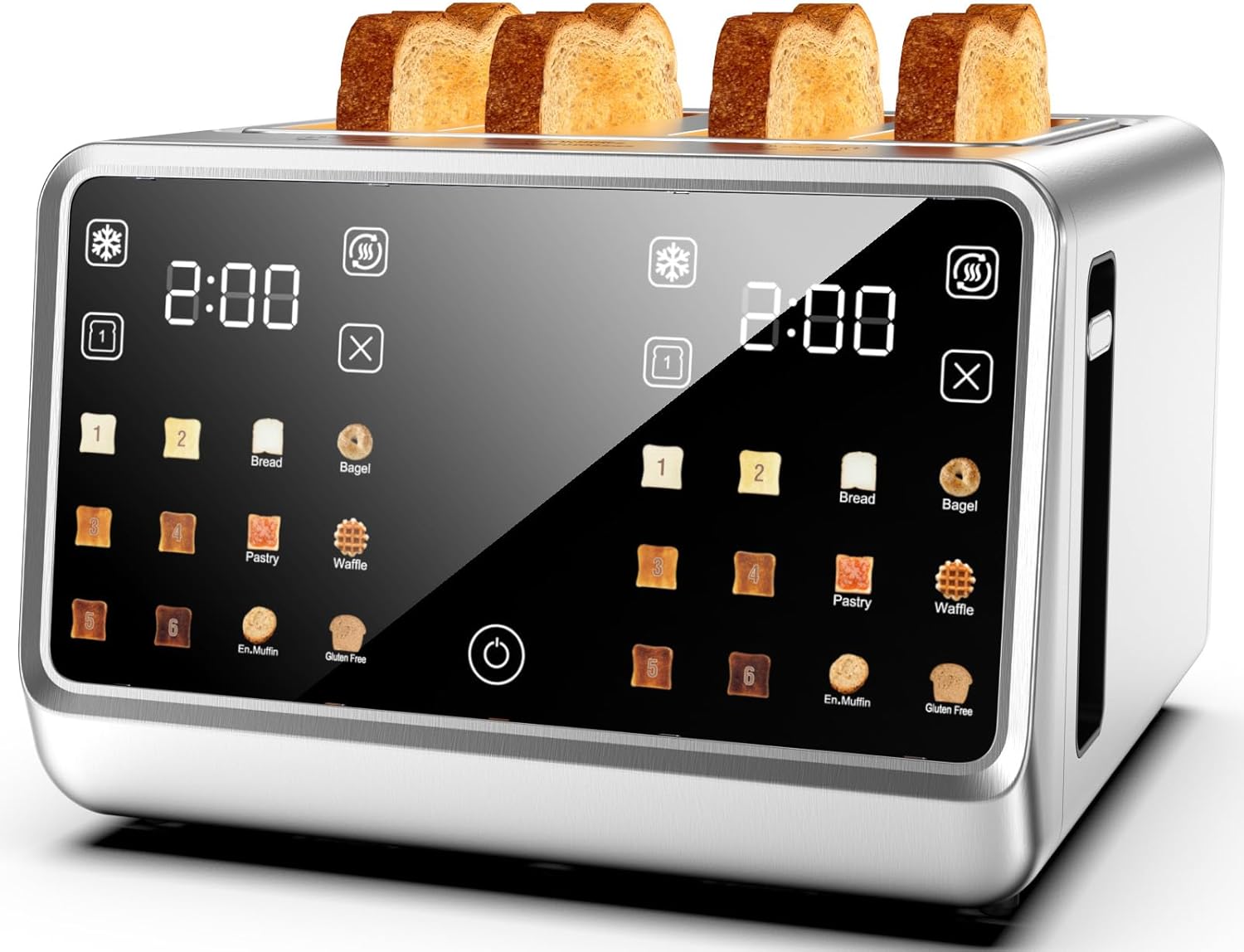
Image: Front view of the Foyoconven 4-slice touch screen toaster with bread slices inserted, showcasing the digital display and control panel.

Image: Close-up of the toaster's touchscreen interface, illustrating the interactive controls for various settings.
Setup
- Unpacking: Carefully remove the toaster and all packaging materials. Retain packaging for future storage or transport.
- Placement: Place the toaster on a stable, flat, heat-resistant surface, away from flammable materials such as curtains or walls. Ensure adequate ventilation around the appliance.
- First Use: Before first use, operate the toaster without bread on the highest browning setting (Level 6) to burn off any manufacturing residues. A slight odor or smoke may be present; this is normal and will dissipate. Allow the toaster to cool completely.
- Power Connection: Ensure the power cord is fully extended and plug the toaster into a standard 120V AC electrical outlet.
Operating Instructions
Control Panel Overview

Image: Diagram illustrating the various buttons and indicators on the toaster's touch screen, including Countdown Display, Defrost Button, Single Slice Button, Toast Shade Selection Area, Power On Button, Reheat Button, Cancel Button, and Bread Selection Area.
- Power On Button: Activates the toaster.
- Countdown Display: Shows remaining toasting time.
- Bread Selection Area: Icons for different bread types (Bread, Bagel, Waffle, Pastry, Muffin, Gluten Free).
- Toast Shade Selection Area: Numbers 1-6 for browning levels.
- Defrost Button: For toasting frozen items.
- Reheat Button: For warming previously toasted items.
- Single Slice Button: Optimizes heating for one slice.
- Cancel Button: Stops the toasting cycle immediately.
General Toasting Procedure

Image: The Foyoconven toaster on a kitchen counter with various breakfast items, demonstrating its use for different types of bread.
- Insert Bread: Place up to four slices of bread or other items into the toaster slots. Ensure items fit without forcing. The toaster features 1.5-inch wide slots designed to accommodate various bread types, including thick-cut sourdough, bagels, and waffles.
- Power On: Press the Power On button on the touchscreen.
- Select Bread Type: Tap the icon corresponding to your bread type (e.g., Bread, Bagel, Waffle). The touchscreen interface includes 6 preset bread types: Bagel, Gluten-Free, Waffle, Pastry, and Bread.
- Select Browning Level: Choose your desired browning level from 1 (lightest) to 6 (darkest). The toaster is equipped with dual independent control panels, allowing two separate toasting operations simultaneously, each with 6 browning levels.
- Lower Lever: Push down the toast lever until it locks into place. The toasting cycle will begin.
- Completion: The toaster will automatically raise the toast when the cycle is complete.
Special Functions
- Defrost: For frozen bread. Insert frozen item, select bread type, select browning level, then press the Defrost button. Lower the lever. The toaster will automatically adjust the time for defrosting and toasting.
- Reheat: For warming already toasted items without further browning. Insert item, press the Reheat button, then lower the lever.
- Single Slice Toasting: To toast a single slice efficiently. Insert one slice, select bread type, select browning level, then press the Single Slice button. Lower the lever. This mode optimizes heat distribution for one slot, reducing energy consumption.
- Bagel Mode: When "Bagel" is selected as the bread type, the toaster utilizes focused heating elements to crisp the cut side of the bagel while gently warming the outer, rounded side.
- Cancel: To stop the toasting cycle at any time, press the Cancel button.

Image: The toaster's display showing icons for Defrost, Reheat, Single Toasting, and Cancel functions, indicating their availability.

Image: Top-down view of the toaster slots, highlighting the 1.5-inch extra-wide slots suitable for various bread types like bagels.
Maintenance
Regular cleaning ensures optimal performance and extends the life of your toaster.
- Unplug and Cool: Always unplug the toaster from the power outlet and allow it to cool completely before cleaning.
- Crumb Tray:
- Locate the removable crumb tray at the bottom of the toaster.
- Pull out the crumb tray and discard accumulated crumbs.
- Wipe the tray clean with a damp cloth and dry thoroughly before reinserting.
- Ensure the crumb tray is fully inserted before operating the toaster.
- Exterior Cleaning:
- Wipe the exterior of the toaster with a soft, damp cloth. The toaster features a food-grade stainless steel exterior.
- Do not use abrasive cleaners, scouring pads, or harsh chemicals, as these can damage the finish.
- Ensure no moisture enters the toaster slots or electrical components.
- Interior Cleaning: Do not insert any objects into the toaster slots for cleaning. If food becomes lodged, unplug the toaster and carefully invert it to dislodge the item.
- Cord Storage: The toaster features a wire storage slot on the bottom for neat organization when not in use.

Image: Illustration showing the removable crumb tray being pulled out for cleaning and the wire storage slot on the bottom of the toaster for cord management.
Troubleshooting
| Problem | Possible Cause | Solution |
|---|---|---|
| Toaster does not turn on. | Not plugged in; power outlet malfunction; toaster not powered on via touchscreen. | Ensure the toaster is securely plugged into a working outlet. Press the Power On button on the touchscreen. |
| Bread does not toast evenly. | Uneven bread thickness; crumb accumulation; incorrect setting for bread type. | Ensure bread slices are of uniform thickness. Clean the crumb tray. Select the appropriate bread type and browning level. For single slices, use the Single Slice function. |
| Toaster smokes or smells during operation. | First use residue burn-off; food lodged in slots; excessive crumbs. | A slight odor on first use is normal. Unplug and allow to cool. Clean crumb tray. If food is lodged, unplug and carefully remove. |
| Toast lever does not stay down. | Toaster not powered on; no settings selected. | Ensure the toaster is powered on and a bread type and browning level have been selected on the touchscreen. |
Specifications
- Brand: Foyoconven
- Model: TAC1001-UL
- Color: Stainless Steel
- Material: Stainless Steel
- Product Dimensions: 10.98"D x 10.75"W x 7.6"H
- Wattage: 1800 watts
- Voltage: 120V
- Number of Slices: 4
- Special Features: Built-In Timer, Cancel Function, Defrost Mode, LED Indicator, Touchscreen, Single Slot Toasting, Reheat Function, Bagel Mode
- Item Weight: 4.85 pounds
Warranty and Support
For warranty information or technical support, please contact Foyoconven customer service. Refer to your purchase documentation for specific warranty terms and contact details.
Online Support: Visit the official Foyoconven store on Amazon for product information and support resources: Foyoconven Store