
Introduction
Thank you for choosing TAGRY X88 Wireless Earbuds. This manual provides detailed instructions on how to set up, operate, and maintain your earbuds to ensure optimal performance and longevity. Please read this manual thoroughly before using the product.
What's Included
- Bluetooth Headphones (TAGRY X88 Wireless Earbuds)
- Charging Case
- Type-C Charging Cable
- Eartips (S/M/L sizes)
- User Manual
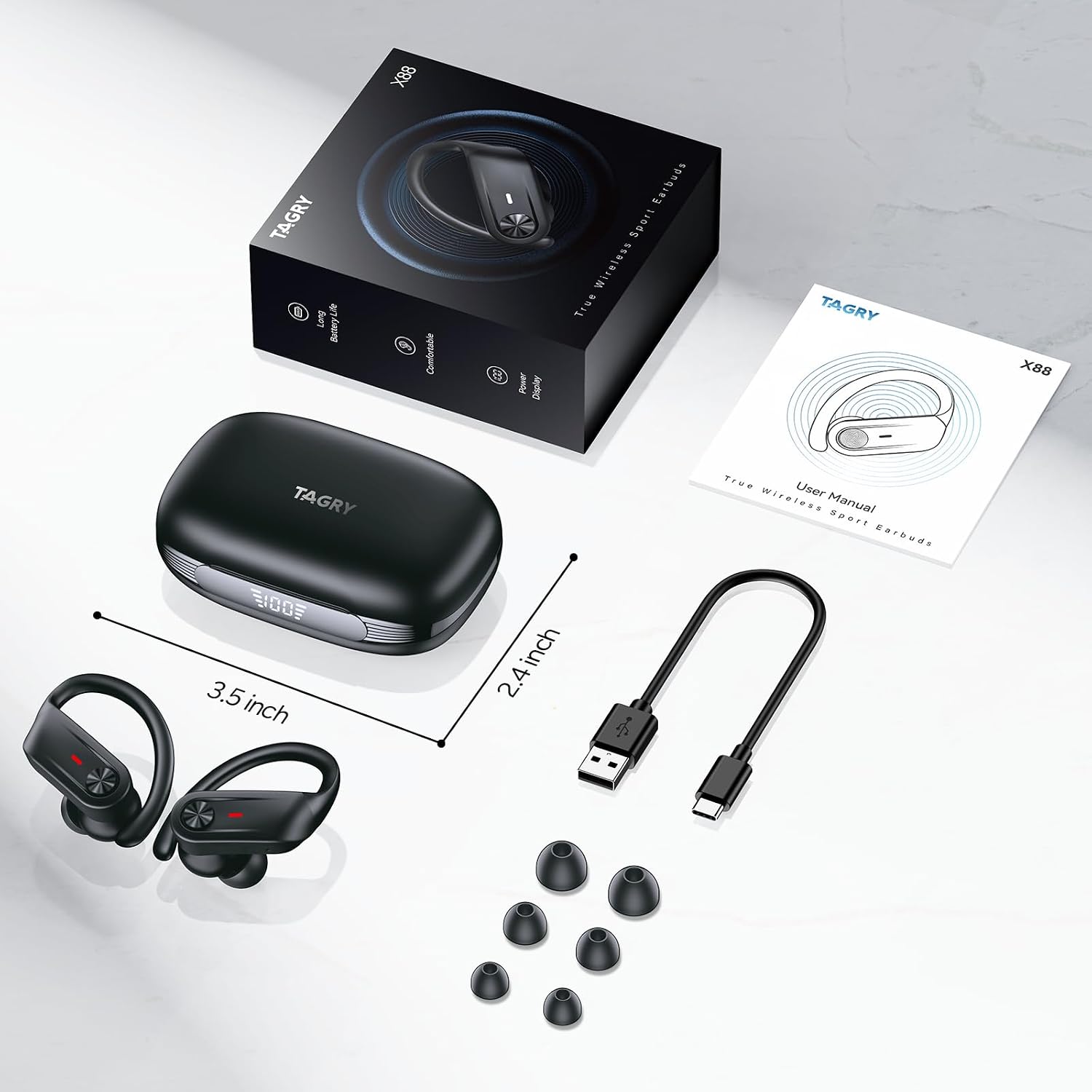
Image: All components included in the TAGRY X88 Wireless Earbuds package.
Features
- Extended Playtime: Up to 10 hours of playtime per charge, extended to 80 hours with the charging case.
- Digital Power Display: Dual LED display on the charging case shows real-time battery levels for the case and each earbud.
- Fast Pairing: Automatic power-on and pairing with your device upon opening the charging case after initial setup.
- One-Button Control: Physical button on each earbud for easy control of music playback, volume, track skipping, voice assistant activation, and call management.
- Comfort Fit: Soft and flexible earhooks ensure a snug and secure fit for all-day comfort, ideal for sports and active use. Includes S/M/L eartips for personalized fit.
- IPX7 Waterproof: Designed to resist sweat, rain, and splashes, making them suitable for workouts and outdoor activities.
- Superior Stereo Sound: Engineered with 13mm drivers for crystal-clear highs, balanced mids, and powerful bass.
- Crystal Clear Calls: Built-in microphone ensures clear voice transmission during calls.
- Advanced Bluetooth 5.4: Provides stable and fast connection with a range of up to 33 feet, ensuring seamless audio streaming and reduced latency.

Image: The TAGRY X88 earbuds and charging case highlighting the 80-hour total playtime.

Image: Illustrates the comfortable design of the earbuds with flexible earhooks and interchangeable eartips.

Image: The earbuds shown with water, emphasizing their IPX7 waterproof capability.
Setup
1. Initial Charging
Before first use, fully charge the earbuds and the charging case. Connect the provided Type-C charging cable to the charging port on the case and a USB power source. The dual LED display on the case will show the charging progress. Ensure both earbuds are properly seated in the case for charging.
2. Pairing with Your Device
- Open the charging case. The earbuds will automatically power on and enter pairing mode (indicated by a flashing light on the earbuds).
- On your device (smartphone, tablet, etc.), enable Bluetooth.
- Search for "X88" in the list of available Bluetooth devices and select it to connect.
- Once connected, the earbuds will indicate successful pairing (e.g., a voice prompt or solid light).
- For subsequent uses, the earbuds will automatically connect to the last paired device when removed from the case.

Image: Demonstrates the simple one-step pairing process with a mobile device.
3. Fitting the Earbuds
Choose the eartip size (S, M, L) that provides the most comfortable and secure fit for your ears. The earhooks are flexible and designed to fit snugly over your ears, ensuring stability during movement. Adjust the earbud and earhook until you achieve a comfortable seal and optimal sound quality.
Operating Instructions
One-Button Control Functions
| Action | Function |
|---|---|
| Single Tap (L/R) | Play/Pause Music, Answer/End Call |
| Double Tap (L) | Previous Track |
| Double Tap (R) | Next Track |
| Triple Tap (L/R) | Activate Voice Assistant |
| Long Press (L) | Volume Down |
| Long Press (R) | Volume Up |
| Long Press (L/R) during call | Reject Call |
Power On/Off
- Power On: Open the charging case, and the earbuds will automatically power on.
- Power Off: Place the earbuds back into the charging case and close the lid. They will automatically power off and begin charging.
Maintenance
- Cleaning: Regularly clean the earbuds and charging case with a soft, dry cloth. Do not use harsh chemicals or abrasive materials.
- Eartips: Remove eartips periodically and clean them with water and mild soap. Ensure they are completely dry before reattaching.
- Water Resistance: While IPX7 waterproof, avoid prolonged submersion in water. Dry the earbuds thoroughly if they get wet before placing them back in the charging case to prevent damage.
- Storage: Store the earbuds in their charging case when not in use to protect them and keep them charged. Store in a cool, dry place away from extreme temperatures.
Troubleshooting
| Problem | Solution |
|---|---|
| Earbuds not pairing/connecting. | Ensure Bluetooth is enabled on your device. Place earbuds back in the case, close the lid, then open again to re-enter pairing mode. Forget "X88" from your device's Bluetooth list and re-pair. |
| Only one earbud working. | Ensure both earbuds are charged. Place both earbuds back in the charging case, close the lid, and then open it again. This should re-sync them. |
| No sound. | Check device volume and earbud volume. Ensure earbuds are connected to the correct device. Try restarting your device and re-pairing. |
| Charging case not charging. | Check the Type-C cable and power adapter. Ensure the charging port is clean and free of debris. |
Specifications
| Feature | Detail |
|---|---|
| Model Name | X88 |
| Brand | TAGRY |
| Connectivity Technology | Wireless (Bluetooth 5.4) |
| Wireless Communication Technology | Bluetooth |
| Headphones Jack | Bluetooth |
| Battery Life | 80 Hours (with charging case) |
| Water Resistance Level | IPX7 Waterproof |
| Frequency Response | 20000 Hz |
| Frequency Range | 20~20000 Hz |
| Impedance | 32 Ohm |
| Noise Control | Sound Isolation |
| Control Type | Volume Control (One Button) |
| Item Weight | 2.85 Ounces |
| Product Dimensions | 1.18 x 2.36 x 3.54 inches |
| Material | Acrylonitrile Butadiene Styrene (ABS), Plastic |
| Included Components | Bluetooth Headphones, Charging Case, Eartip, Type-C Charging Cable, User Manual |
Warranty and Support
For detailed warranty information and customer support, please refer to the official TAGRY website or contact their customer service directly. Keep your purchase receipt as proof of purchase for any warranty claims.
For further assistance, you may visit the TAGRY Store on Amazon.


