
1. Introduction
Thank you for choosing the intpw P9 PRO 9-in-1 USB C Hub. This versatile docking station expands the connectivity of your USB-C enabled devices, providing a comprehensive solution for data transfer, video output, and power delivery. Designed for efficiency and convenience, it is compatible with a wide range of laptops, tablets, and smartphones.
2. Product Overview
The intpw P9 PRO hub features a durable aluminum unibody design for efficient heat dissipation and a premium feel. Its ergonomic 32-degree angle enhances usability on your desk. The hub integrates multiple ports to meet diverse connectivity needs.

Figure 1: intpw P9 PRO 9-in-1 USB C Hub, showcasing its compact design and multiple ports.
Port Layout and Functions:
- HDMI Port (4K@60Hz): Connect to an external monitor, HDTV, or projector for high-resolution video output. Supports both Mirror and Extend display modes.
- USB-C 3.2 Data Port (10Gbps): For high-speed data transfer. Note: This port is for data transfer only and does not support video output or charging.
- USB-A 3.2 Ports (10Gbps) x 2: For high-speed data transfer with USB-A devices like external hard drives or flash drives.
- USB-A 2.0 Ports (480Mbps) x 2: Ideal for connecting peripherals such as a mouse, keyboard, or wireless USB receivers.
- PD 100W Charging Port: Power your USB-C laptop or tablet while using the hub. Requires an external power adapter (not included, at least 65W recommended). Note: This port does not support data transfer or video output.
- SD/TF Card Reader (104MB/s): Simultaneously read and write data from SD and MicroSD cards, perfect for photographers and video editors.
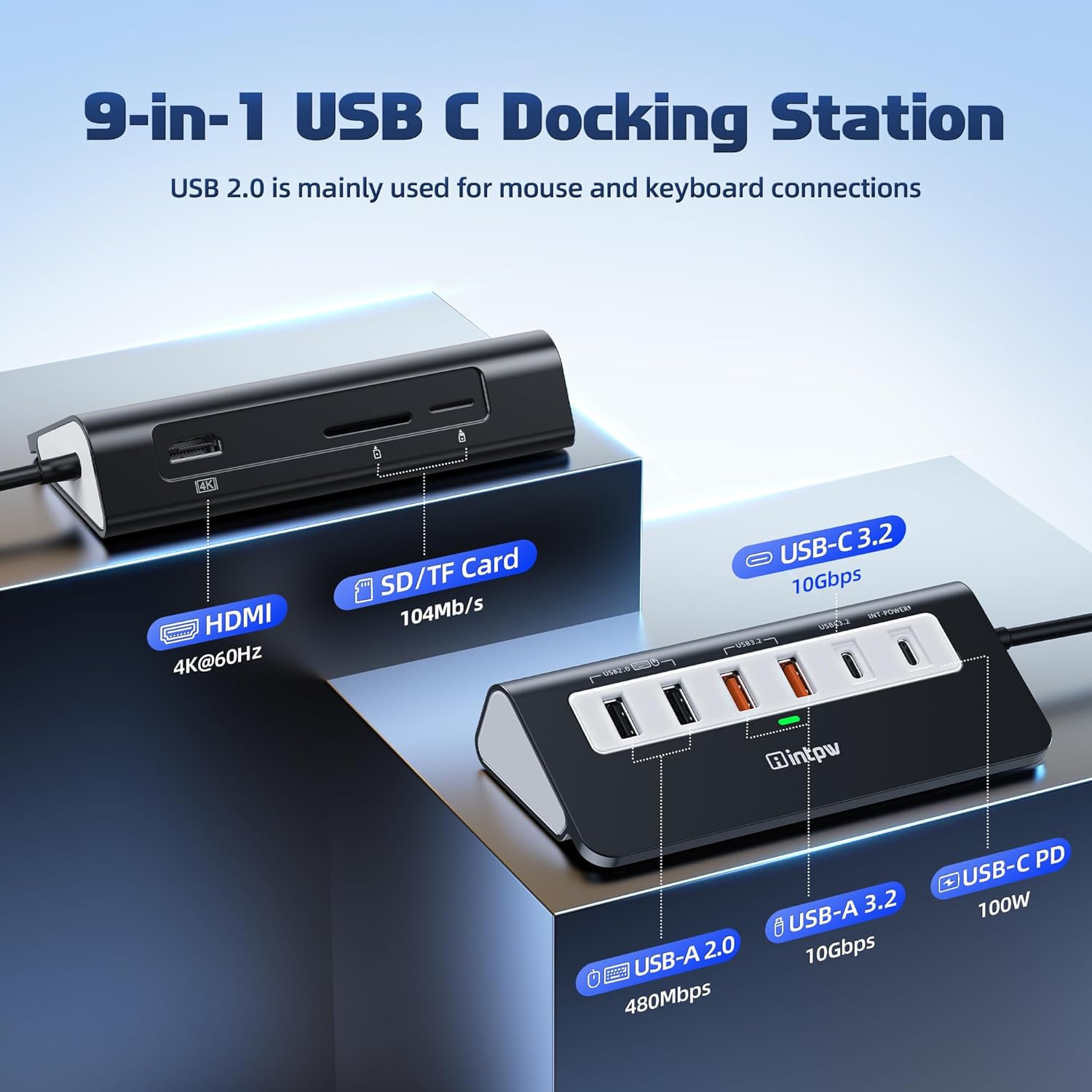
Figure 2: Detailed view of the intpw P9 PRO USB C Hub ports, including HDMI, SD/TF card slots, USB-A, USB-C data, and PD charging ports.

Figure 3: Illustration of the wide compatibility of the intpw P9 PRO USB C Hub with various devices and operating systems.
Key Features:
- 9-in-1 Functionality: Combines essential ports into one compact device.
- Aluminum Ergonomic Design: Enhanced durability, heat dissipation, and user comfort with a 32-degree angle.
- High-speed Data Transfer: Up to 10Gbps via USB 3.2 ports.
- Brilliant 4K@60Hz Display: Supports high-definition video output.
- PD 100W Fast Charging: Efficient power delivery to your host device.
Video 1: Official product video demonstrating the plug-and-play functionality and 4K@60Hz HDMI output of the intpw P9 PRO USB C Hub.
Video 2: Official product video providing an unboxing and overview of the features of the intpw P9 PRO USB C Hub.
3. Setup Instructions
- Connect to Host Device: Plug the integrated USB-C cable of the P9 PRO hub into a compatible USB-C port on your laptop, tablet, or smartphone. Ensure your device's USB-C port supports USB Type-C DP Alt Mode or Thunderbolt for video output functionality.
- Power Connection (Optional but Recommended): For stable performance, especially when connecting multiple devices or using the HDMI output, connect your original power adapter (or a 65W+ USB-C PD adapter) to the PD 100W charging port on the hub.
- Connect Peripherals: Attach your desired devices (monitor, mouse, keyboard, external drives, SD/TF cards) to the corresponding ports on the hub.
The hub is plug-and-play, requiring no additional drivers for most operating systems.
4. Operating Instructions
Using the HDMI Port:
- Connect an HDMI cable from the hub to your external display.
- Ensure your host device's USB-C port supports video output.
- Adjust display settings (mirror/extend) through your operating system's display preferences.

Figure 4: Visual representation of the 4K@60Hz HDMI output capability of the intpw P9 PRO USB C Hub.
Data Transfer:
- Use the USB-A 3.2 and USB-C 3.2 data ports for high-speed file transfers.
- Insert SD or TF cards into the dedicated slots for quick access to media files.

Figure 5: Demonstration of 10Gbps high-speed data transfer using the intpw P9 PRO USB C Hub.
Charging with PD Port:
- Connect your laptop's power adapter to the PD 100W port on the hub.
- This allows your laptop to charge while other peripherals are connected and in use.

Figure 6: Illustration of 100W Power Delivery charging a laptop through the intpw P9 PRO USB C Hub.
5. Maintenance
- Keep the hub clean and free from dust. Use a soft, dry cloth for cleaning.
- Avoid exposing the hub to extreme temperatures or humidity.
- Do not drop or subject the hub to strong impacts.
- Ensure proper ventilation around the hub during extended use to maintain optimal operating temperature (below 45°C).
6. Troubleshooting
No Display Output via HDMI:
- Ensure your host device's USB-C port supports video output (DP Alt Mode or Thunderbolt).
- Try connecting your laptop's power adapter to the hub's PD port before connecting the monitor.
- Check the HDMI cable connection and try a different cable if necessary.
Devices Not Recognized:
- Ensure the hub is securely connected to your host device.
- For power-intensive devices, connect an external power adapter to the hub's PD port.
- Try connecting the device to a different port on the hub.
- For mouse and keyboard, it is recommended to use the USB 2.0 ports.
Slow Charging/Data Transfer:
- For PD charging, use your original power supply or at least a 65W power supply.
- Ensure you are using the correct USB 3.2 ports for high-speed data transfer.
- Avoid unplugging or plugging the PD charger while the hub is in use, as this can cause temporary disconnections.
7. Specifications
| Feature | Detail |
|---|---|
| Brand | intpw |
| Model Number | P9 PRO |
| Number of Ports | 9 |
| Hardware Interface | HDMI, USB, USB Type C |
| HDMI Output | 4K@60Hz |
| USB-C Data Port | 10Gbps (Data Transfer Only) |
| USB-A 3.2 Ports | 2 x 10Gbps |
| USB-A 2.0 Ports | 2 x 480Mbps |
| Power Delivery | 100W (Input, Power Adapter Not Included) |
| Card Reader | SD/TF (104MB/s) |
| Enclosure Material | Aluminum |
| Compatible Devices | Macbook M1/M2/M3/M4/M5, Type C Laptops, iPad Air/Pro, iMac, Steam Deck, iPhone 15/16/17 Series, etc. |
| Operating System | iOS, macOS |
8. Warranty & Support
Warranty:
The intpw P9 PRO USB C Hub comes with an 18-month warranty from the date of purchase. This warranty covers manufacturing defects and malfunctions under normal use. Please retain your proof of purchase for warranty claims.
Customer Support:
For technical assistance, troubleshooting, or warranty inquiries, please contact intpw customer support through the following channels:
- Online Support: Visit the official intpw website for FAQs and support resources.
- Email: Refer to your product packaging or the intpw website for the customer service email address.
Please provide your product model number (P9 PRO) and a detailed description of the issue when contacting support.
