
1. Introduction
Thank you for choosing the ATHLERIA Wall Climbing Robot Gecko. This innovative remote-controlled toy is designed to provide engaging entertainment by simulating a gecko's ability to crawl across various smooth surfaces. Please read this manual thoroughly before use to ensure proper setup, operation, and maintenance.
2. Package Contents
Ensure all items listed below are present in your package:
- 1 x ATHLERIA Wall Climbing Robot Gecko
- 1 x Remote Control (requires 2 AAA batteries, not included)
- 1 x USB Charging Cable
- 1 x Instruction Manual (this document)

Image: Overview of the ATHLERIA Wall Climbing Robot Gecko and its included accessories.
3. Product Features
- Gravity-Defying Movement: Capable of crawling across floors, walls, and ceilings.
- Dual Play Modes: Easily switch between Wall Climbing Mode and Ground Crawling Mode.
- Extended Remote Range: Control the gecko from up to 33 feet away.
- Realistic Design: Features glowing LED eyes, simulated feet, and a flexible silicone tail for authentic reptilian movements.
- Rechargeable Battery: The gecko includes a rechargeable battery for convenience.
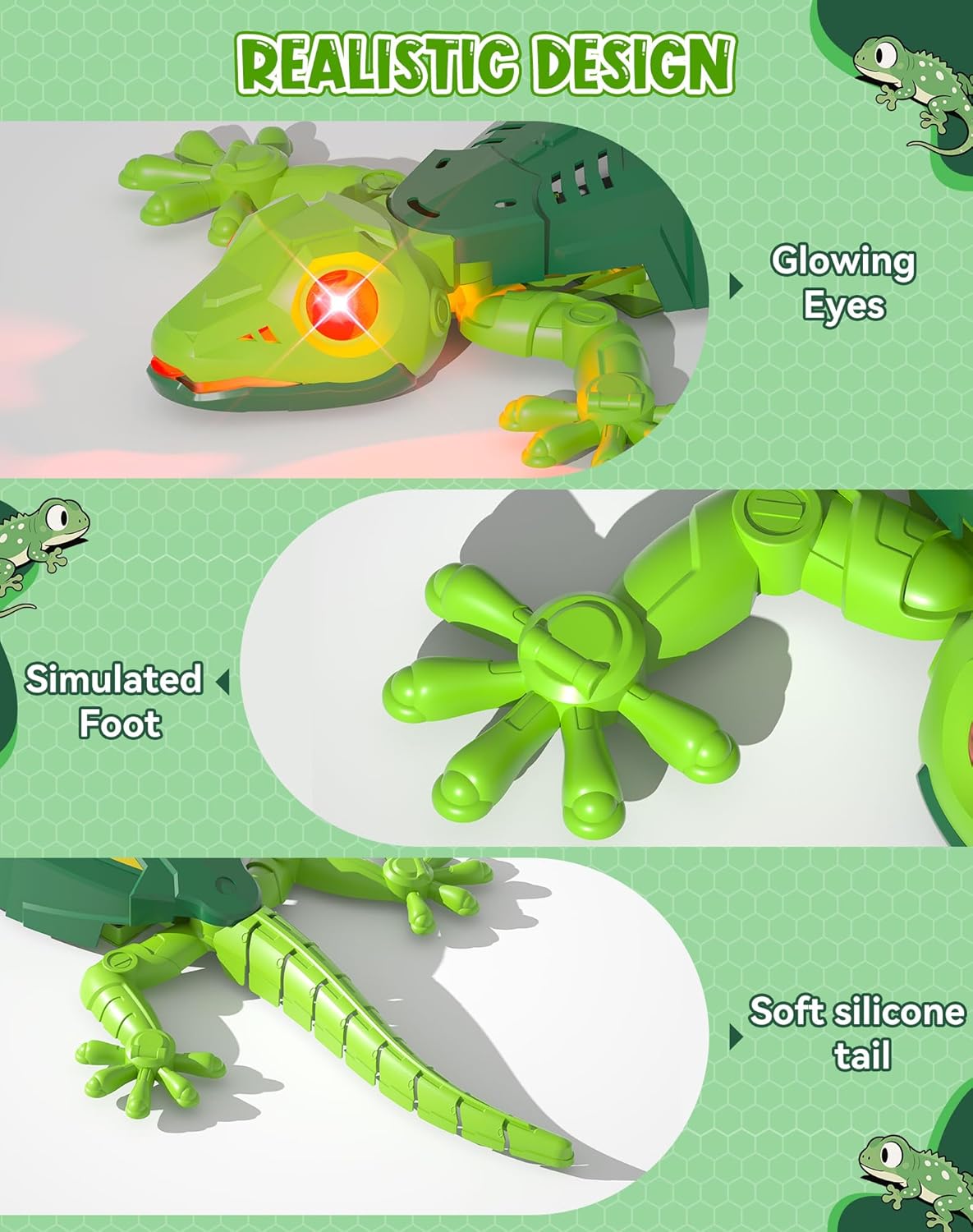
Image: Detailed view of the gecko's realistic design elements.
4. Setup
- Install Remote Control Batteries: Open the battery compartment on the back of the remote control. Insert 2 AAA batteries (not included), ensuring correct polarity. Close the compartment securely.
- Charge the Gecko: Connect the included USB charging cable to the gecko's charging port (located on the underside). Connect the other end to a USB power source. The gecko's internal battery is rechargeable.
- Power On the Gecko: Locate the ON/OFF switch on the underside of the gecko. Slide the switch to the 'ON' position. You may hear a slight vacuuming sound, which is normal and indicates the suction mechanism is active.

Image: Remote control layout and battery installation guide.
5. Operating Instructions
The remote control allows for precise movement and mode selection.
- Movement Controls: Use the directional buttons on the remote to move the gecko forward, backward, left, and right.
- 360° Spins: Utilize specific button combinations (refer to remote diagram) for 360-degree rotations.
- Mode Selection: The gecko features two modes:
- Wall Climbing Mode: Activates the suction mechanism, allowing the gecko to adhere to and move across smooth vertical and inverted surfaces.
- Ground Crawling Mode: Disables the suction, enabling traditional ground movement.
- Recommended Surfaces: For optimal wall climbing performance, use on smooth and clean surfaces such as walls, glass, and ceilings.
- Avoid: Carpets and textured wallpapers are not suitable for wall climbing.

Image: The gecko demonstrating Wall Climbing Mode and Ground Crawling Mode.

Image: Examples of suitable surfaces for the wall climbing feature.
6. Charging Instructions
The ATHLERIA Wall Climbing Robot Gecko is equipped with a rechargeable Lithium Ion battery. Use the provided USB charging cable to recharge the device. A full charge allows for extended playtime. If the gecko's performance on walls diminishes, it may indicate a low battery and require recharging.
7. Maintenance
- Keep the gecko and remote control clean and dry.
- Avoid exposing the toy to extreme temperatures or direct sunlight.
- Regularly check the suction area on the gecko's underside for any debris that might hinder performance. Clean gently with a soft, dry cloth if necessary.
8. Troubleshooting
| Problem | Possible Cause | Solution |
|---|---|---|
| Gecko does not move or respond to remote. | Low battery in gecko or remote. | Charge the gecko. Replace AAA batteries in the remote control. |
| Gecko falls from wall or does not stick. | Low battery in gecko; surface is not smooth or clean; suction mechanism is blocked. | Recharge the gecko. Ensure surface is smooth and free of dust/debris. Clean the suction area. |
| Remote control not working. | Batteries are dead or incorrectly installed. | Replace AAA batteries, ensuring correct polarity. |
9. Specifications
- Product Dimensions: 14 x 6.1 x 1.57 inches
- Item Weight: 7.1 ounces
- Item Model Number: SM51S
- Manufacturer Recommended Age: 3 years and up
- Batteries: 1 Lithium Ion battery required (included in gecko), 2 AAA batteries required (not included for remote).
- Manufacturer: SHANTOU SUNMIR INNOVATION TECHNOLOGY CO., LTD
10. Safety Information
Warning: Not applicable to children under 3 years old.
This product is designed for entertainment purposes. Adult supervision is recommended during play. Keep away from water and moisture. Do not attempt to modify or disassemble the product, as this may cause damage or injury.
11. Warranty and Support
For any questions, concerns, or support needs regarding your ATHLERIA Wall Climbing Robot Gecko, please contact ATHLERIA customer service. Please retain your proof of purchase for warranty claims.