
Introduction
Thank you for purchasing the Pinmoco 47'' High Gloss TV Stand with LED Lights. This manual provides essential information for the safe assembly, operation, and maintenance of your new entertainment center. Please read these instructions carefully before assembly and retain them for future reference.
Key Features:
- Sleek Modern Design: High-gloss finish suitable for various room aesthetics.
- RGB Remote Control LED Lights: Features 7 main colors and 22 dynamic modes for customizable ambiance.
- Smart Storage: Includes 2 open shelves and 2 large side compartments for organizing media devices and accessories.
- Adjustable & Spacious: Transparent glass shelves with 3-height adjustment options.
- Sturdy Construction: Made from P2 board and tempered glass, supporting up to 100 lbs.
Package Contents
Before beginning assembly, ensure all parts and hardware are present. Refer to the included parts list in your packaging. If any components are missing or damaged, please contact customer support.

Image 1: Pinmoco 47-inch High Gloss TV Stand with LED Lights, displaying a television, gaming consoles, and various accessories neatly arranged on its shelves. The LED lights are illuminated, creating an ambient glow.
Setup and Assembly
Assembly of the TV stand requires basic tools, which are typically included in the package. Follow the step-by-step instructions and diagrams provided in the separate assembly guide for detailed instructions.
- Unpack Components: Carefully remove all parts from the packaging and lay them out on a clean, soft surface to prevent scratches.
- Identify Parts: Match each component with the parts list in the assembly guide.
- Assemble Frame: Begin by assembling the main frame of the TV stand according to the diagrams. Ensure all connections are secure.
- Install Shelves: Insert the glass shelves into the designated slots. The height of the glass shelves can be adjusted to three different positions.
- Attach LED Lights: Follow the instructions for attaching the LED light strips to the stand.
- Final Check: Once assembled, ensure the stand is stable and all screws are tightened.
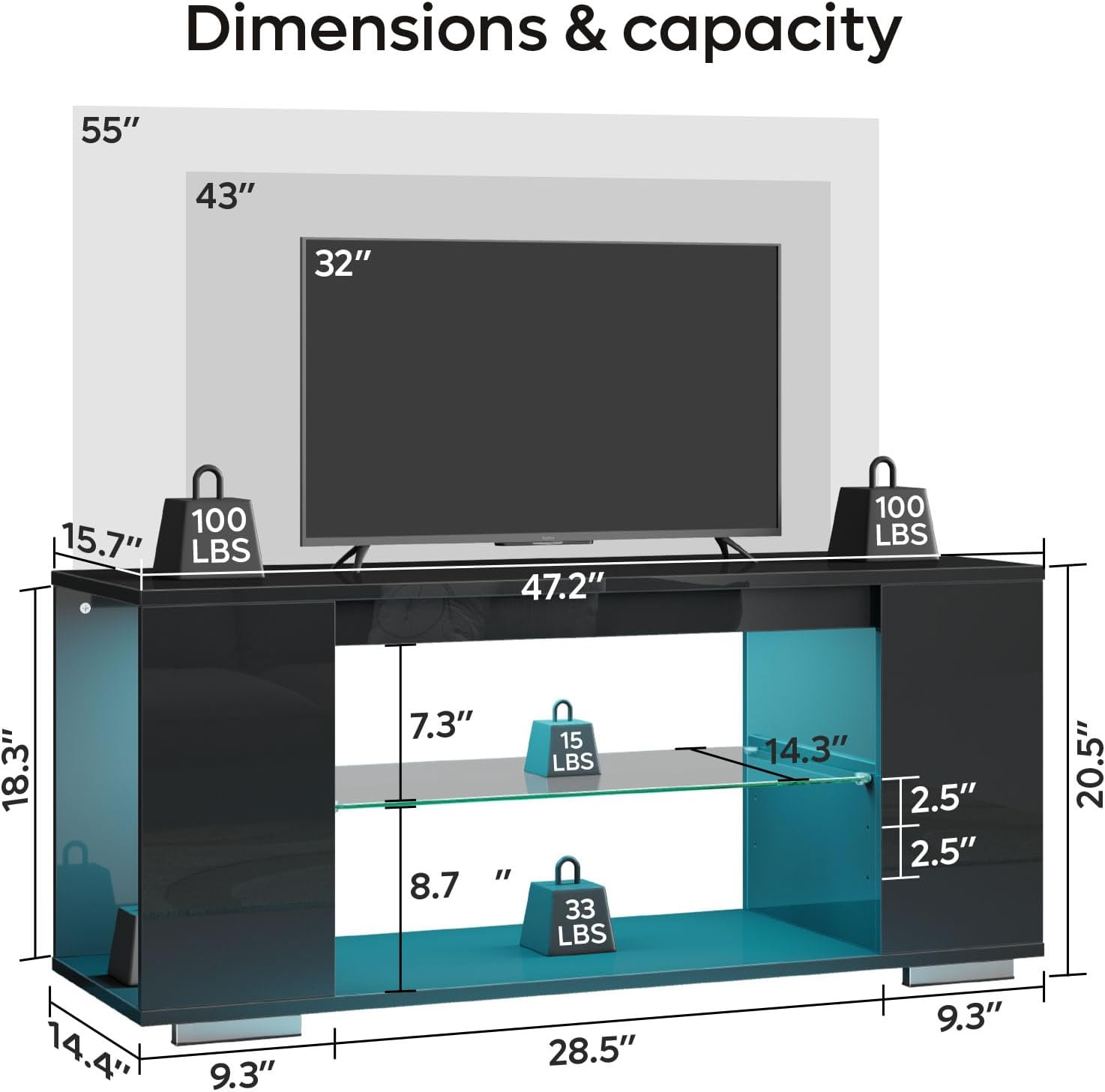
Image 2: A diagram illustrating the dimensions of the TV stand (47.2" L x 15.7" W x 20.5" H) and its weight capacities. The top surface supports 100 lbs, and the internal shelves support 15 lbs and 33 lbs respectively.
Operating LED Lights
The integrated LED lighting system is controlled via a remote control, allowing you to customize the ambiance of your entertainment area.
- Power On/Off: Press the power button on the remote control to turn the LED lights on or off.
- Color Selection: Use the dedicated color buttons or the RGB color wheel on the remote to select from 7 main colors.
- Mode Selection: Cycle through 22 dynamic lighting modes using the 'MODE' button to achieve various effects.
- Brightness Adjustment: Adjust the brightness levels using the '+' and '-' buttons.
- Speed Adjustment: For dynamic modes, adjust the speed of the effects using the 'SPEED' buttons.

Image 3: A hand holding the remote control for the LED lights, demonstrating its functionality. The remote features buttons for power, color selection, mode changes, and brightness/speed adjustments. The TV stand's LED lights are shown illuminated in a vibrant color.
Maintenance
- Cleaning: Wipe the high-gloss surfaces with a soft, damp cloth. Avoid abrasive cleaners or harsh chemicals that may damage the finish. For glass shelves, use a glass cleaner.
- Dusting: Regularly dust all surfaces with a dry, soft cloth.
- LED Lights: Ensure the LED light strips and connections are free from dust and debris. Do not attempt to disassemble the LED components.
- Stability Check: Periodically check all screws and connections to ensure the stand remains stable. Tighten if necessary.
Troubleshooting
| Problem | Possible Cause | Solution |
|---|---|---|
| LED lights do not turn on. |
|
|
| Remote control not responding. |
|
|
| Stand feels unstable. |
|
|
Specifications
| Model Number | L103720X-YBLK |
| Brand | Pinmoco |
| Material | P2 Board, Tempered Glass |
| Color | Black |
| Product Dimensions (L x W x H) | 47 x 15 x 20 inches (119.4 x 38.1 x 50.8 cm) |
| Item Weight | 36 pounds (16.3 kg) |
| Weight Capacity (Top Surface) | 100 lbs (45.3 kg) |
| Weight Capacity (Glass Shelves) | 15 lbs (6.8 kg) and 33 lbs (15 kg) |
| LED Features | 7 Main Colors, 22 Dynamic Modes, Remote Control |
Warranty and Support
This product is subject to a 30-day return policy from the date of purchase. For specific warranty details, product support, or to report missing/damaged parts, please contact Pinmoco customer service directly. You can often find contact information on the packaging or by visiting the official Pinmoco Brand Store.
