
1. Introduction
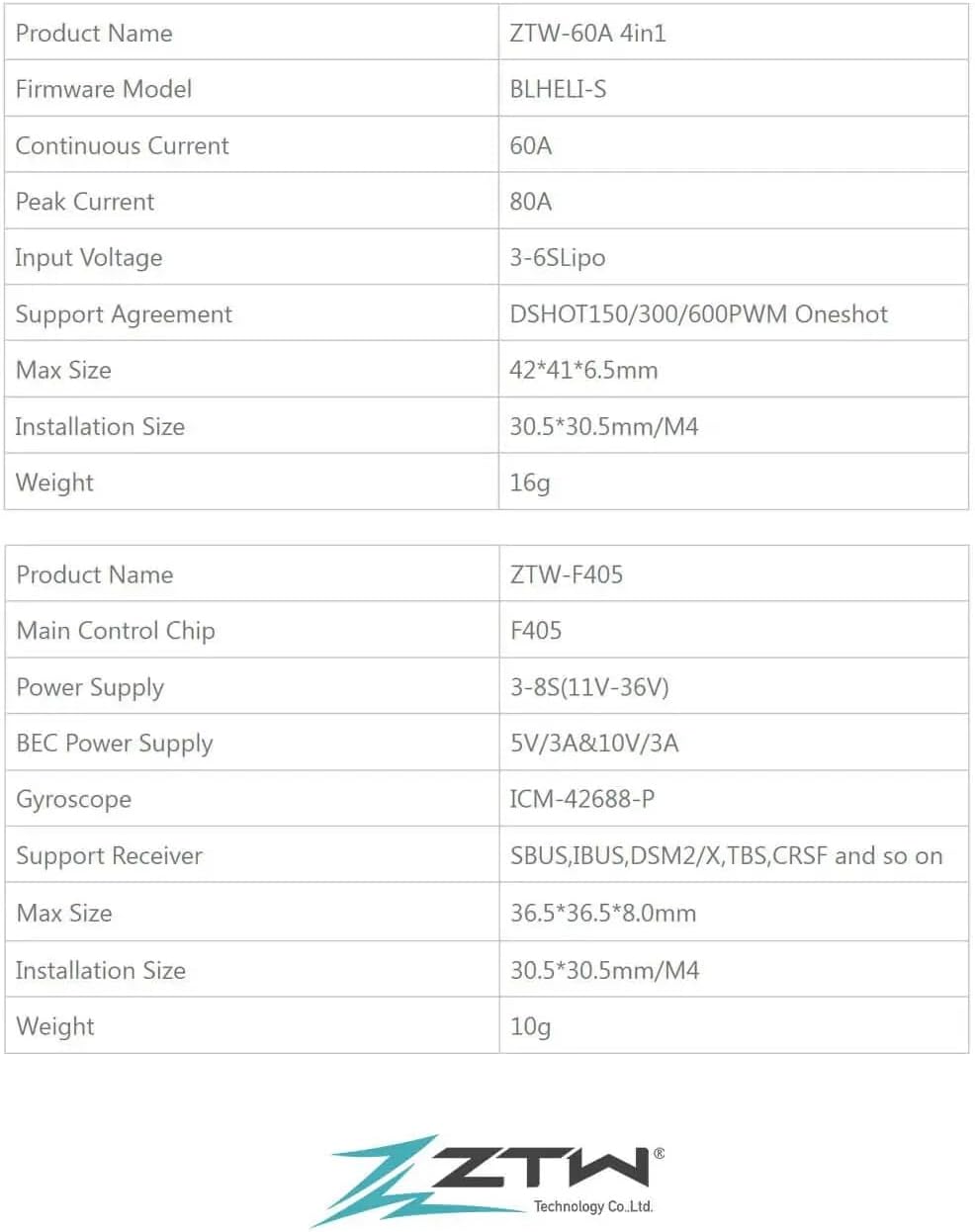
This manual provides detailed instructions for the installation, operation, and maintenance of the Xiangtat ZTW F405 V3 Flight Controller Stack. This high-performance stack is designed for RC FPV racing and freestyle drones, featuring a 30x30 Bluetooth-enabled Flight Controller and a 4-in-1 60A BLHeliS ESC Board, supporting 3-6S LiPo batteries and DShot150A/300/600 protocols.
2. Product Overview and Features
The ZTW F405 V3 Flight Controller Stack combines a powerful flight controller with a robust 4-in-1 Electronic Speed Controller (ESC) to provide a compact and efficient solution for your drone. Key features include:
- Wireless Configuration: Configure your Flight Controller (FC) and ESC via Bluetooth using the ZTW app, allowing for convenient tuning anytime, anywhere.
- Powerful 60A 4-in-1 ESC: Equipped with a robust BB21 MCU, large motor pads for easy soldering, Japan-made filtering SMT capacitors, and an onboard TVS protective diode for smooth flight performance. Supports real 60A output for demanding 6S motors.
- Onboard Battery Life Indicator: A sophisticated 4-level LED battery indicator provides real-time insight into your battery's health, eliminating the need for a separate LiPo checker.
- Effortless Motor Configuration: Adjust motor direction easily using the SpeedyBee app, compatible with BLHeli32, BLHeli_S, and BlueJay ESCs, reducing the need for cables and complex procedures.
- 8 Motor Output: Supports up to 8 motors, providing versatility for various drone configurations.
- Cutouts for FPV Camera: Designed with cutouts for easy integration of an FPV camera.
- Built-in Barometer: Enhances flight stability and altitude hold capabilities.
- Individual BECs: Features 5V 2A and 9V 2A individual BECs for reliable power supply to peripherals.
- SD Card Slot: Includes an SD card slot for up to 4GB Blackbox logging.
- DJI Plug & Play: Simplifies connection with DJI systems.
- 4.5V Output for GPS Module: Dedicated output for GPS module integration.
- Sufficient 4x UARTs: Provides ample UARTs for various peripheral connections.
Product Components
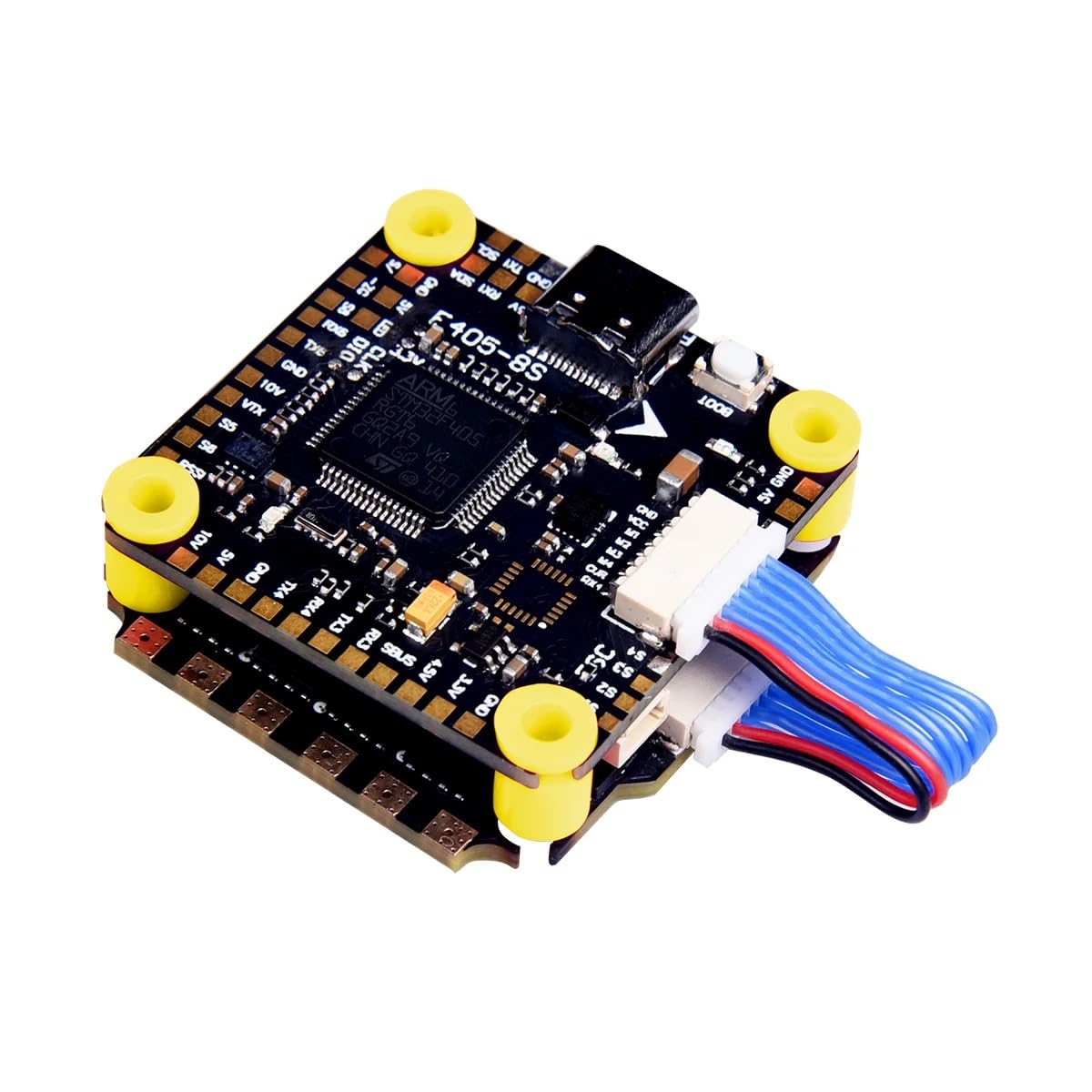



Product Video
Official product video showcasing the Xiangtat F405 V4 V5 Flight Controller Stack, highlighting its features and design.
3. Setup
Proper setup is crucial for optimal performance and safety. Follow these steps carefully:
- Physical Installation: Mount the ZTW F405 V3 Flight Controller Stack onto your drone frame. The installation size is 30.5x30.5mm with M4 mounting holes. Ensure secure fastening to minimize vibrations.
- Wiring Connections: Connect the ESC to the motors and the flight controller. Utilize the large motor pads on the ESC for secure soldering. Connect your FPV camera, receiver (SBUS, IBUS, DSM2/X, TBS, CRSF), GPS module (using the 4.5V output), and other peripherals to the appropriate UARTs and pads on the flight controller. For DJI systems, use the dedicated Plug & Play port.
- Power Connection: Connect your 3-6S LiPo battery to the ESC. Ensure correct polarity. The onboard TVS protective diode helps prevent voltage spikes.
- Initial Configuration (Betaflight/Cleanflight): Connect the flight controller to your computer via USB. Use the appropriate configurator software (e.g., Betaflight Configurator) to flash the latest firmware and perform initial setup.
- Wireless Configuration (ZTW App): Download the ZTW app on your smartphone. Connect to the flight controller via Bluetooth to fine-tune PID settings, rates, and other flight parameters wirelessly.
- ESC Configuration (SpeedyBee App): For BLHeli_S/BlueJay ESCs, use the SpeedyBee app to configure ESC settings, including motor direction. This can be done wirelessly, simplifying the process.
4. Operating Instructions
Once the ZTW F405 V3 Flight Controller Stack is installed and configured, follow these guidelines for operation:
- Pre-Flight Check: Before each flight, ensure all connections are secure, propellers are correctly installed, and the battery is fully charged.
- Battery Monitoring: Observe the 4-level LED battery indicator on the ESC to monitor your battery's charge level during flight. Plan your flights to avoid deep discharge.
- Arming and Disarming: Follow your flight controller's configured arming procedure (e.g., stick commands, switch). Always arm in a safe, open area. Disarm immediately after landing or in an emergency.
- Flight Modes: Utilize the configured flight modes (e.g., Acro, Angle, Horizon) as per your preference and skill level.
- Wireless Tuning: If needed, land your drone safely and use the ZTW app via Bluetooth to make minor adjustments to your flight controller or ESC settings without needing a computer.
5. Maintenance
Regular maintenance helps ensure the longevity and reliability of your ZTW F405 V3 Flight Controller Stack:
- Visual Inspection: After each flight, inspect the FC and ESC for any signs of damage, loose connections, or debris.
- Cleaning: Gently clean the boards with a soft brush or compressed air to remove dust, dirt, or grass. Avoid using liquids directly on the electronics.
- Firmware Updates: Periodically check for and install the latest firmware updates for both the flight controller (e.g., Betaflight) and the ESC (BLHeli_S/BlueJay) to benefit from performance improvements and bug fixes.
- Soldering Joints: Occasionally inspect soldering joints for cracks or cold joints, especially after hard crashes. Re-solder if necessary.
6. Troubleshooting
If you encounter issues with your ZTW F405 V3 Flight Controller Stack, consider the following troubleshooting steps:
- No Power: Check battery connection, ensure correct polarity, and inspect power cables for damage. Verify the main power lead to the ESC.
- Motors Not Spinning:
- Ensure the drone is armed.
- Check motor connections to the ESC.
- Verify ESC calibration and firmware.
- Use the SpeedyBee app to check motor direction and test individual motors.
- Unstable Flight:
- Check for loose propellers or damaged motors.
- Review PID settings in the ZTW app or Betaflight Configurator.
- Ensure the flight controller is securely mounted and isolated from vibrations.
- Bluetooth Connection Issues:
- Ensure Bluetooth is enabled on your smartphone and the ZTW app has necessary permissions.
- Restart the app and the flight controller.
- Ensure no other devices are interfering with the Bluetooth signal.
- Peripherals Not Working: Check wiring for the specific peripheral (e.g., FPV camera, GPS). Verify UART assignments and settings in the flight controller software.
- Blackbox Logging Not Working: Ensure an SD card is inserted correctly and formatted. Check Blackbox settings in the flight controller software.
7. Specifications

| Feature | Detail |
|---|---|
| Brand | Xiangtat |
| Model Name | Flight Controller |
| Special Features | Bluetooth Configuration, 4-level LED Battery Indicator, Easy Motor Direction Adjustment |
| Connectivity Technology | Bluetooth |
| Control Type | App Control |
| Included Components | Flight Controller |
| Material | Plastic |
| UPC | 762210657398 |
| GTIN | 762210657398 |
8. Warranty and Support
For warranty information and technical support, please refer to the official Xiangtat website or contact your retailer. Keep your proof of purchase for any warranty claims.
For further assistance, you may visit the Xiangtat Store on Amazon.