
BURCHDA AZ20
BURCHDA AZ20 E-MTB User Manual
Comprehensive Guide for Setup, Operation, and Maintenance
1. Introduction
Welcome to the user manual for your new BURCHDA AZ20 E-MTB. This electric mountain bike is designed for versatile use, featuring a full suspension system, powerful motor, and a robust aluminum frame. It is equipped with 20-inch 4.0 fat tires, hydraulic disc brakes, and a 48V20Ah lithium-ion battery, offering a reliable and comfortable riding experience across various terrains. This manual provides essential information for the safe assembly, operation, and maintenance of your E-MTB. Please read it thoroughly before your first ride.

Figure 1.1: The BURCHDA AZ20 E-MTB, showcasing its robust design and included front basket.
2. Safety Information
Your safety is paramount. Always wear a helmet and appropriate safety gear when riding. Adhere to local traffic laws and regulations.
2.1 General Safety Guidelines
- Perform a pre-ride inspection before each use, checking brakes, tire pressure, and battery level.
- Ensure all quick-release levers and bolts are securely tightened.
- Do not ride under the influence of alcohol or drugs.
- Be aware of your surroundings and anticipate potential hazards.
- Avoid riding in adverse weather conditions, such as heavy rain or snow, if visibility is poor.
2.2 Braking System
The BURCHDA AZ20 is equipped with hydraulic disc brakes for reliable stopping power.
- Familiarize yourself with the braking feel and stopping distance in a safe area before riding in traffic.
- Apply both front and rear brakes simultaneously for optimal control and stability.
- The automatic taillight enhances visibility, especially during braking.
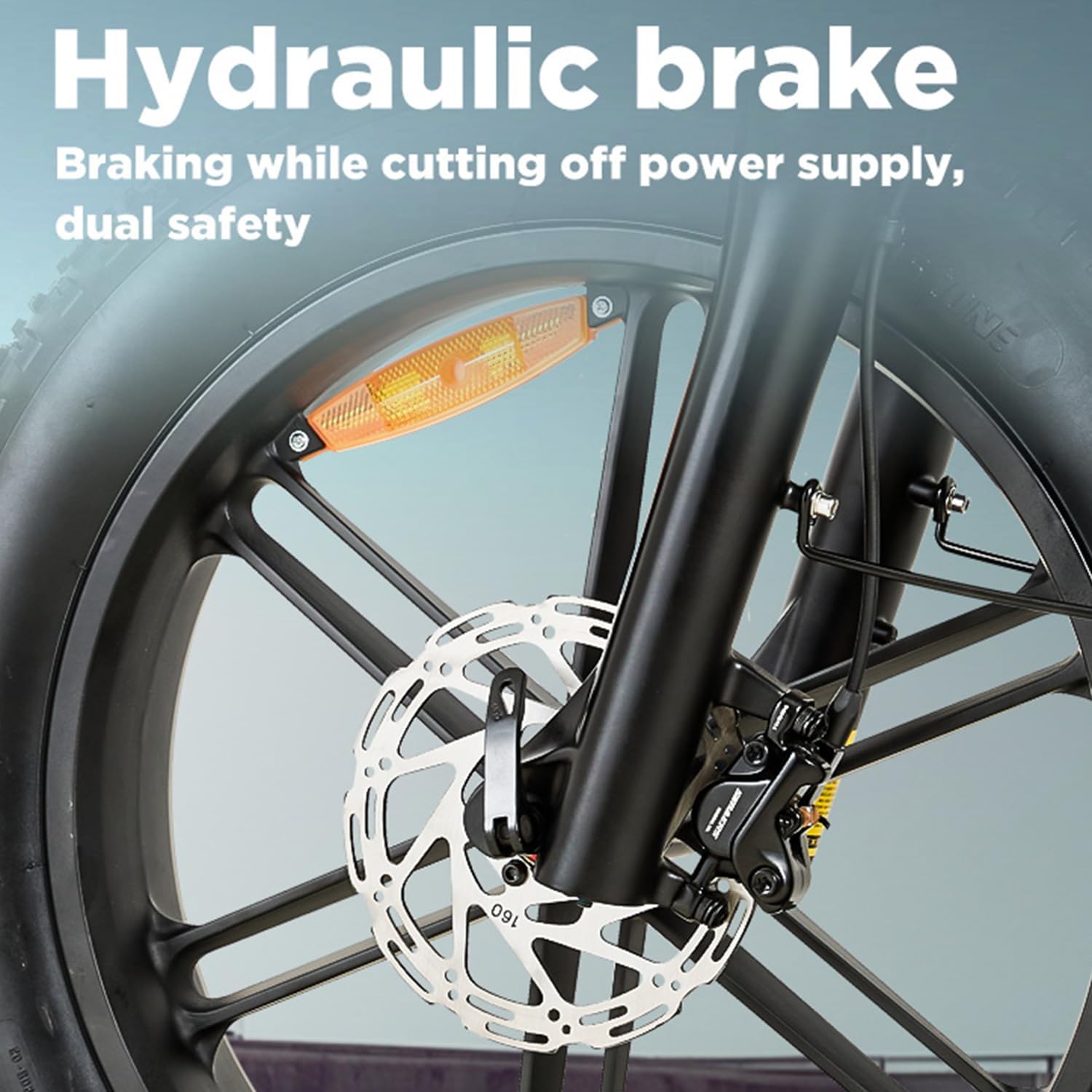
Figure 2.1: Detail of the hydraulic disc brake system, providing strong and consistent stopping power.

Figure 2.2: The integrated warning taillight, designed to improve visibility for vehicles behind the rider.
2.3 Battery Safety
- Only use the charger provided by BURCHDA.
- Do not expose the battery to extreme temperatures or direct sunlight for prolonged periods.
- Avoid puncturing, dropping, or disassembling the battery pack.
- Charge the battery in a well-ventilated area, away from flammable materials.
3. Assembly and Initial Setup
Your BURCHDA AZ20 E-MTB comes partially assembled. Follow these steps for final assembly and initial setup. It is recommended to have basic tools available, such as Allen wrenches and a pedal wrench.
3.1 Unpacking and Inspection
- Carefully remove the bicycle and all components from the packaging.
- Inspect for any visible damage during shipping. Contact customer support immediately if damage is found.
- Verify all included components are present: bicycle frame, front wheel, handlebars, seat post, pedals, charger, and any accessories like the basket, horn, reflectors, and fenders.
3.2 Handlebar Installation
- Attach the handlebars to the stem, ensuring proper alignment with the front wheel.
- Tighten the stem bolts evenly and securely.
- Adjust the angle of the brake levers and shifters for comfortable reach.

Figure 3.1: Handlebar assembly with the integrated LCD display and control buttons.
3.3 Pedal Installation
- Identify the left (L) and right (R) pedals.
- The right pedal (R) threads clockwise into the crank arm.
- The left pedal (L) threads counter-clockwise into the crank arm.
- Tighten pedals firmly with a pedal wrench.
3.4 Seat Post and Saddle Adjustment
- Insert the seat post into the frame's seat tube.
- Adjust the saddle height so your leg has a slight bend at the knee when the pedal is at its lowest point.
- Secure the quick-release lever or bolt firmly.
- The extra-wide 27cm comfort saddle is designed for ergonomic support.

Figure 3.2: The ergonomically optimized 27cm wide saddle, designed for enhanced comfort during rides.
3.5 Tire Inflation
- Inflate tires to the recommended pressure indicated on the tire sidewall.
- Proper tire pressure is crucial for safety, performance, and battery range.
4. Operating Instructions
Understanding the controls and features of your BURCHDA AZ20 E-MTB will ensure a smooth and enjoyable ride.
4.1 Battery and Charging
- The 48V20Ah Li-Ion battery is integrated into the frame and is removable for charging.
- Charging time is approximately 4-6 hours for a full charge.
- Ensure the battery is securely locked into the frame before riding.
- A fully charged battery provides a range of 60-70km, depending on terrain, rider weight, and assist level.

Figure 4.1: The 48V20Ah large capacity battery, featuring a Battery Management System (BMS) for multi-functional protection.
4.2 Control System and Display
The E-MTB features a three-part control system: an intelligent display, a smart controller, and a 7-speed gear shift.
- Intelligent Display: Provides real-time data including battery level, speed (KM/H or MPH), mileage, error codes, and current assist level. It also features a USB charging port for external devices.
- Riding Modes:
- E-Bike Mode: Full electric power, no pedaling required.
- Assistance Mode: Motor provides assistance as you pedal, with multiple assist levels (e.g., 5-speed).
- Manual Mode: Ride like a traditional bicycle without motor assistance.
- 7-Speed Gear Shift: Allows you to adjust pedaling resistance for different terrains and speeds.
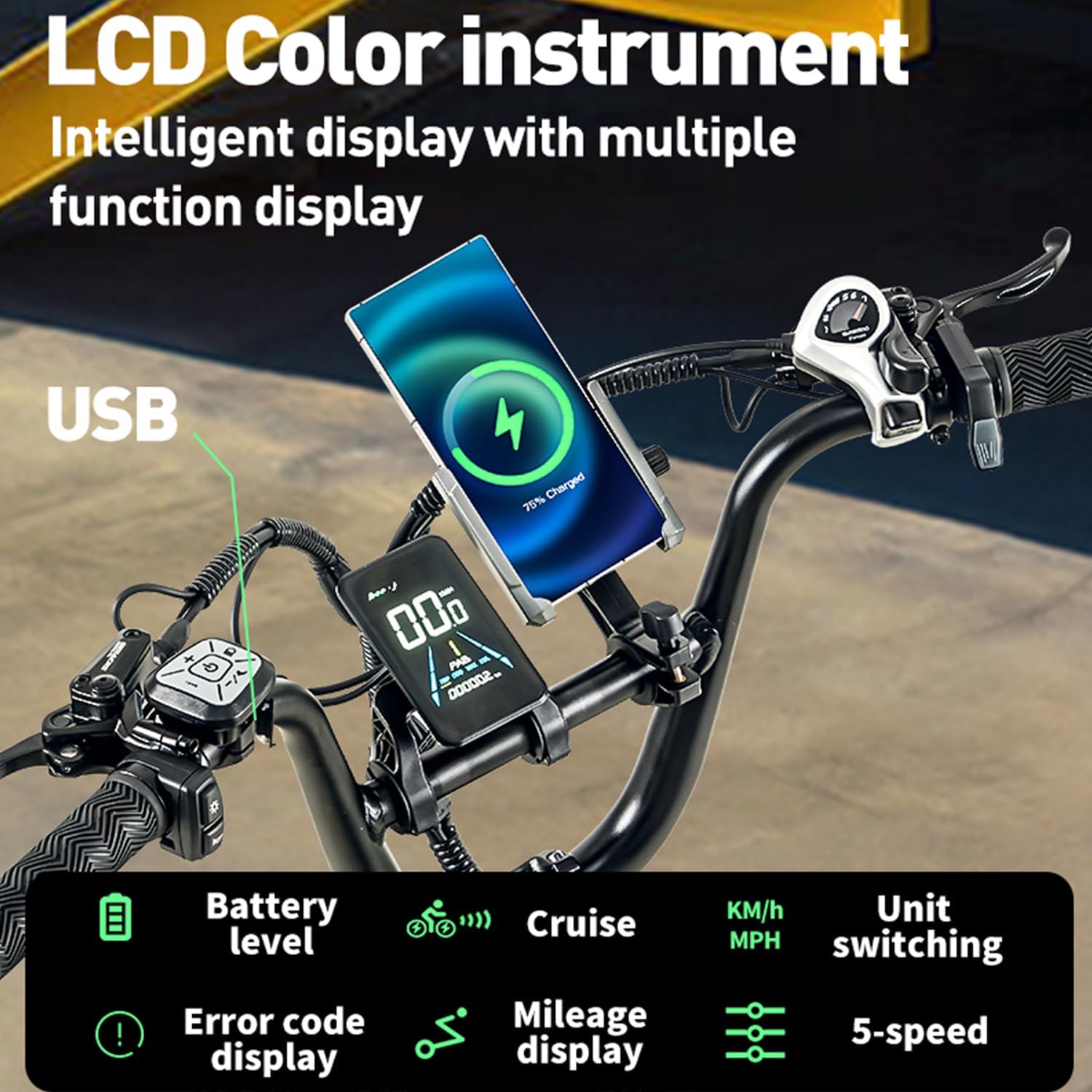
Figure 4.2: The intelligent LCD color instrument display, showing various functions like battery level, cruise control, speed unit switching, error codes, mileage, and 5-speed assist levels.
4.3 Motor and Performance
The BURCHDA AZ20 is equipped with a high-power motor designed for strong output and excellent torque.
- The motor provides assistance for climbing hills with ease, supporting up to a 30° incline.
- Adjustable speed settings are available, with a maximum speed of 25km/h (governed by regulations).
- The motor delivers 95 N.m of torque for powerful acceleration.

Figure 4.3: The high-power motor, providing strong output and torque for efficient climbing and acceleration.
4.4 Suspension System
The dual-suspension system, including a lockable front fork, provides a comfortable ride over varied terrain.
- The front suspension fork can be locked for more efficient pedaling on smooth surfaces.
- The rear suspension absorbs shocks from bumps and uneven ground, enhancing rider comfort and control.

Figure 4.4: Visual representation of the dual shock suspension system, designed to absorb impacts for a smoother ride.
5. Maintenance
Regular maintenance is crucial for the longevity and safe operation of your E-MTB.
5.1 Cleaning
- Clean the bike regularly with a damp cloth and mild soap. Avoid high-pressure washers near electrical components.
- Keep the chain and gears clean and lubricated.
5.2 Battery Care
- Store the battery in a cool, dry place when not in use.
- If storing for extended periods, charge the battery to 50-70% every 2-3 months.
- Do not fully discharge the battery before recharging.
5.3 Brake and Tire Checks
- Regularly check brake pads for wear and replace them when necessary.
- Ensure brake levers have proper tension and responsiveness.
- Inspect tires for cuts, punctures, and proper inflation before each ride.
5.4 Fastener Checks
- Periodically check all bolts, nuts, and quick-release levers for tightness.
- Pay special attention to critical areas like the handlebars, seat post, wheels, and crank arms.
6. Troubleshooting
This section addresses common issues you might encounter with your BURCHDA AZ20 E-MTB.
| Problem | Possible Cause | Solution |
|---|---|---|
| Motor not assisting | Battery low or off; assist level set to zero; brake lever engaged. | Check battery charge and power; increase assist level on display; ensure brake levers are fully released. |
| Display not turning on | Battery not connected or dead; loose cable connection. | Ensure battery is fully inserted and charged; check all electrical connections. |
| Brakes feel weak | Worn brake pads; air in hydraulic line; misaligned calipers. | Inspect and replace brake pads; consult a bike mechanic for hydraulic bleeding or caliper adjustment. |
| Unusual noises from drivetrain | Dry chain; misaligned derailleur; loose components. | Lubricate chain; adjust derailleur; check for loose bolts. |
| Error code on display | Specific system malfunction. | Refer to the display's error code manual (if provided separately) or contact customer support with the specific code. |
7. Specifications
Detailed technical specifications for the BURCHDA AZ20 E-MTB.
| Feature | Specification |
|---|---|
| Brand | BURCHDA |
| Model Number | AZ20 |
| Bike Type | Fatbike, Multifunctional Bicycle |
| Age Range | Adult |
| Frame Material | Aluminum Alloy |
| Suspension Type | Full Suspension |
| Wheel Size | 20 Inches |
| Tire Size | 20 x 4.0 Inches (Fat Tire) |
| Number of Speeds | 7-Speed |
| Brake Type | Hydraulic Disc Brake |
| Battery | 48V20Ah Li-Ion (Removable) |
| Charging Time | 4-6 Hours |
| Range (Electric Assist) | 60-70 km |
| Max Load Capacity | 200 kg |
| Item Weight | 35 Kilograms |
| Included Components | Reflectors, Horn, Basket, Luggage Rack, Fenders |
| Special Features | Dual Disc Brake, Multi-Speed, Taillight, Dual Suspension, Digital Display |

Figure 7.1: Product dimensions and recommended rider height (5'2"-6'0") for the BURCHDA AZ20 E-MTB.
8. Warranty and Support
For warranty information and customer support, please refer to the documentation included with your purchase or visit the official BURCHDA website.
- Keep your proof of purchase for warranty claims.
- For technical assistance or spare parts, contact BURCHDA customer service.
Related documentsAZ20


Ask a question about this manual
Ask about setup, troubleshooting, compatibility, parts, safety, or missing instructions. Manuals+ will review the question and use this page’s manual context to help answer it.