
LIGE EF10-B
LIGE EF10-B Smart Watch User Manual
Model: EF10-B
Introduction
This manual provides detailed instructions for the setup, operation, maintenance, and troubleshooting of your LIGE EF10-B Smart Watch. Please read this manual thoroughly to ensure proper use and to maximize the features of your device.

Image: The LIGE EF10-B Smart Watch, showcasing its round display and metallic strap, with smaller inset images highlighting various watch faces and features like call notifications and battery level.
What's Included
The package contains the following items:
- 1 x LIGE EF10-B Smart Watch (silver)
- 1 x Silver Steel Strap
- 1 x Blue Silicone Strap
- 1 x Bracelet Extension Accessory and Tool
- 1 x User Manual
- 1 x Charging Cable
Setup Guide
1. Charging the Smart Watch
Before initial use, fully charge your LIGE EF10-B Smart Watch. Connect the provided charging cable to the watch and a 5V-1A USB power adapter (not included) or a computer USB port. Avoid using adapters with higher voltage to prevent damage.

Image: A close-up of the LIGE EF10-B Smart Watch displaying an 800mAh battery icon, indicating its large capacity and long battery life. Text overlays suggest typical usage and standby times.
2. App Installation
To unlock the full functionality of your smart watch, you need to install the companion application on your smartphone.
- Search for the "Da Fit" app in your smartphone's app store (Apple App Store for iOS or Google Play Store for Android).
- Download and install the "Da Fit" application.

Image: A step-by-step guide on how to connect the LIGE EF10-B Smart Watch, showing the "Da Fit" app icon, Bluetooth settings, device selection, and enabling Bluetooth calling.
3. Device Pairing
Follow these steps to pair your smart watch with your smartphone:
- Ensure your smartphone's Bluetooth is turned on.
- Open the "Da Fit" app on your smartphone.
- Within the app, navigate to the device section and select "Add device" or "Search Now" to discover your LIGE EF10-B Smart Watch (it may appear as "V69 MAX" or similar).
- Select your watch from the list to initiate the pairing process. Confirm any pairing requests on both your phone and watch.
- Once connected, the app will synchronize data and set the correct time on your watch.
4. Enabling Bluetooth Calling
After successful pairing, you can enable the Bluetooth calling feature:
- On your watch, swipe down from the top of the screen to access quick settings.
- Locate and tap the Bluetooth calling icon to enable or disable this feature.
- Ensure your phone's Bluetooth settings show two connections to the watch: one for data sync and one for calls.
Operating Instructions
Display and Navigation
The LIGE EF10-B features a 1.85-inch HD display with a highly responsive touch interface. Navigate through menus by swiping left, right, up, or down. Tap to select options. The watch also includes physical buttons for quick access to functions or to return to the home screen.

Image: A side view of the LIGE EF10-B Smart Watch highlighting its 1.85-inch large HD display. An inset comparison shows the benefits of its larger screen and higher resolution compared to smaller smartwatches.
Bluetooth Calling and Notifications
Once connected via Bluetooth, you can manage calls and receive notifications directly on your watch.
- Answering/Making Calls: Use the watch's dial pad or contact list (synced from the app) to make calls. Incoming calls can be answered or rejected directly from the watch screen. The built-in speaker and noise-cancelling microphone ensure clear communication.
- Message Reminders: Receive notifications for SMS, Facebook, WhatsApp, Twitter, TikTok, and other applications. You can view message content on the watch display.

Image: Demonstrates the Bluetooth calling feature of the LIGE EF10-B Smart Watch, showing a user answering a call on their wrist. Also highlights the voice assistant and various app notification icons.
Health Monitoring
The LIGE EF10-B Smart Watch provides comprehensive health tracking features:
- Heart Rate Monitor: Monitors your heart rate throughout the day. Access the heart rate interface on the watch or in the app to view real-time data and historical trends.
- Blood Oxygen (SpO2) Monitor: Measures your blood oxygen saturation levels.
- Sleep Monitor: Tracks your sleep patterns, including deep sleep, light sleep, and awake times. Detailed analysis is available in the "Da Fit" app.
- Breathing Exercise: Guided breathing exercises to help reduce stress.

Image: Illustrates the health monitoring capabilities of the LIGE EF10-B Smart Watch, including heart rate, blood oxygen, breathing exercises, and sleep tracking, with a visual of the watch displaying heart rate data.

Image: Shows the scientific sleep monitoring feature of the LIGE EF10-B Smart Watch, displaying a graph of sleep stages (deep, light, awake) and total sleep duration, with a person sleeping in the background.
Sports Modes
The watch supports over 120 sports modes, with intelligent recognition for 21 common activities. Select your desired sport mode before starting an activity to track metrics such as calories burned, steps, distance, and heart rate.

Image: Displays the LIGE EF10-B Smart Watch's 126 sports modes feature, with icons representing various activities like running, cycling, and swimming. A cyclist is shown wearing the watch, which displays activity metrics.
Additional Features
Your LIGE EF10-B Smart Watch offers a variety of other useful functions:
- Voice Assistant: Access your phone's voice assistant directly from the watch.
- Weather Forecast: View current weather conditions and forecasts.
- Music Control: Control music playback on your smartphone (play, pause, skip tracks).
- Camera Control: Use your watch as a remote shutter for your smartphone camera.
- Alarms, Stopwatch, Timer: Standard timekeeping functions.
- Sedentary and Water Reminders: Receive alerts to move or drink water.
- Find Phone: Locate your paired smartphone by making it ring.
- Customizable Watch Faces: Choose from over 300 watch dials or create your own using photos.

Image: A collage showcasing various features of the LIGE EF10-B Smart Watch, including weather display, full metal body, Bluetooth calling, drinking water reminders, calculator, AI voice assistant, stopwatch, timer, music control, and remote camera control.
Maintenance and Care
Water Resistance (5ATM / IP68)
The LIGE EF10-B Smart Watch is 5ATM waterproof and IP68 rated, making it suitable for daily use, hand washing, rain, and swimming. It is not recommended for hot showers, saunas, or diving. When submerged, the touchscreen function automatically turns off to prevent accidental touches.

Image: A person swimming underwater while wearing the LIGE EF10-B Smart Watch, illustrating its 5ATM waterproof rating. Inset images show icons for rain, hand washing, sweat, and swimming.
Durability
Constructed with high-strength stainless steel and a scratch-resistant MOSH 9H glass display, the watch is designed for durability. It has undergone military-grade testing for resistance to extreme temperatures, solar radiation, liquid pollution, rain, salt spray, and impact.
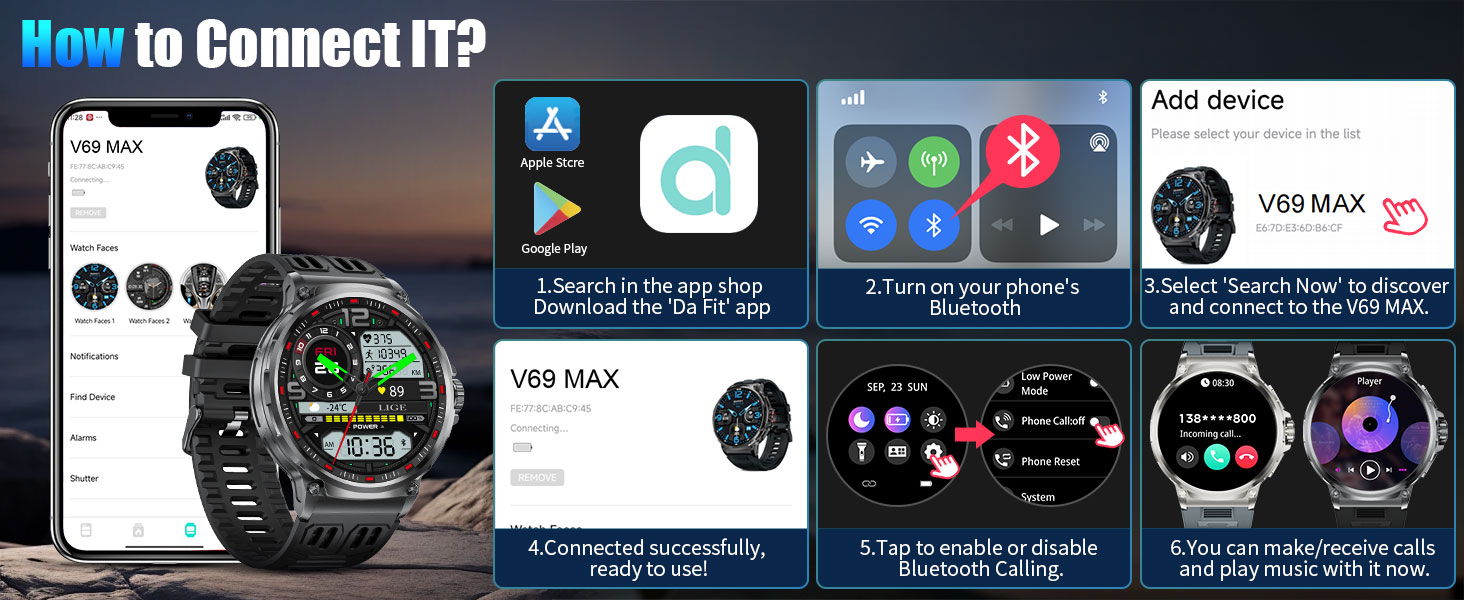
Image: A graphic detailing the military-grade durability tests passed by the LIGE EF10-B Smart Watch, including high/low temperature, solar radiation, liquid pollution, rain, salt spray, and impact tests.
Cleaning
Regularly clean your watch and strap with a soft, dry cloth. If necessary, use a slightly damp cloth and mild soap, then rinse and dry thoroughly. Avoid harsh chemicals or abrasive materials.
Battery Life
The 800mAh battery provides 8-14 days of continuous use under normal conditions and up to 60 days of standby time. Battery life may vary based on usage patterns, settings, and environmental factors.
Troubleshooting
| Problem | Possible Cause | Solution |
|---|---|---|
| Watch does not turn on or respond. | Low battery. | Charge the watch for at least 30 minutes using the provided charging cable and a 5V-1A adapter. |
| Unable to pair with smartphone. | Bluetooth is off on phone, app not open, watch not discoverable, or interference. |
|
| Bluetooth calling not working. | Bluetooth calling feature disabled on watch or phone, or incorrect pairing. |
|
| Notifications not appearing. | App permissions not granted, notifications disabled in app, or watch not connected. |
|
| Inaccurate health data (e.g., heart rate, sleep). | Improper fit, sensor obstruction, or movement during measurement. |
|
Specifications
| Feature | Detail |
|---|---|
| Model Number | EF10-B |
| Brand | LIGE |
| Screen Size | 1.85 Inches (Round) |
| Display Type | HD IPS |
| Battery Capacity | 800 mAh Lithium Ion |
| Connectivity | Bluetooth 5.0 |
| Water Resistance | 5ATM / IP68 |
| Operating System | Wear OS 1.5 (Customized) |
| Memory Storage Capacity | 256 MB |
| RAM Memory Installed Size | 128 MB |
| GPS | Via Smartphone |
| Product Dimensions | 3.94 x 1.97 x 0.98 inches |
| Item Weight | 0.035 ounces (1 Grams) |
| Compatibility | Android 4.4+ / iOS 9.0+ |
Warranty and Support
LIGE offers a 2-year warranty for the EF10-B Smart Watch, covering manufacturing defects and malfunctions under normal use.
For any questions, technical assistance, or warranty claims, please contact LIGE customer support. We aim to provide a satisfactory response within 24 hours.
Please refer to your purchase documentation for specific contact details or visit the official LIGE website for support information.
Related documentsEF10-B


Ask a question about this manual
Ask about setup, troubleshooting, compatibility, parts, safety, or missing instructions. Manuals+ will review the question and use this page’s manual context to help answer it.