
1. Introduction
Thank you for choosing the AOGUERBE Mag-Safe Portable Charger. This 10000mAh magnetic power bank is designed to provide convenient and fast charging for your compatible devices, especially the iPhone 12/13/14/15/16/17 series. Featuring 22.5W fast charging, wireless capabilities, an LED display, and a foldable stand, this device ensures you stay powered throughout your day. Please read this manual carefully to ensure proper usage and optimal performance.
2. Product Overview
Key Features:
- Magnetic Wireless Charging: Strong magnetic attachment and nano adsorption for secure wireless charging up to 15W.
- High Capacity: 10,000mAh battery for extended power.
- Fast Wired Charging: 22.5W output via USB-A and 20W via USB-C for rapid charging.
- LED Digital Display: Clearly shows remaining battery percentage.
- Foldable Stand: Integrated one-touch stand for hands-free viewing while charging.
- Compact Design: Card-sized dimensions (4.09 × 2.68 × 0.79 inches) that do not block phone cameras.
- Multi-Protection Safety System: Built-in cryogenic IC ice cores and multiple protections against over voltage, over charge, over current, and short circuit.
Product Components:
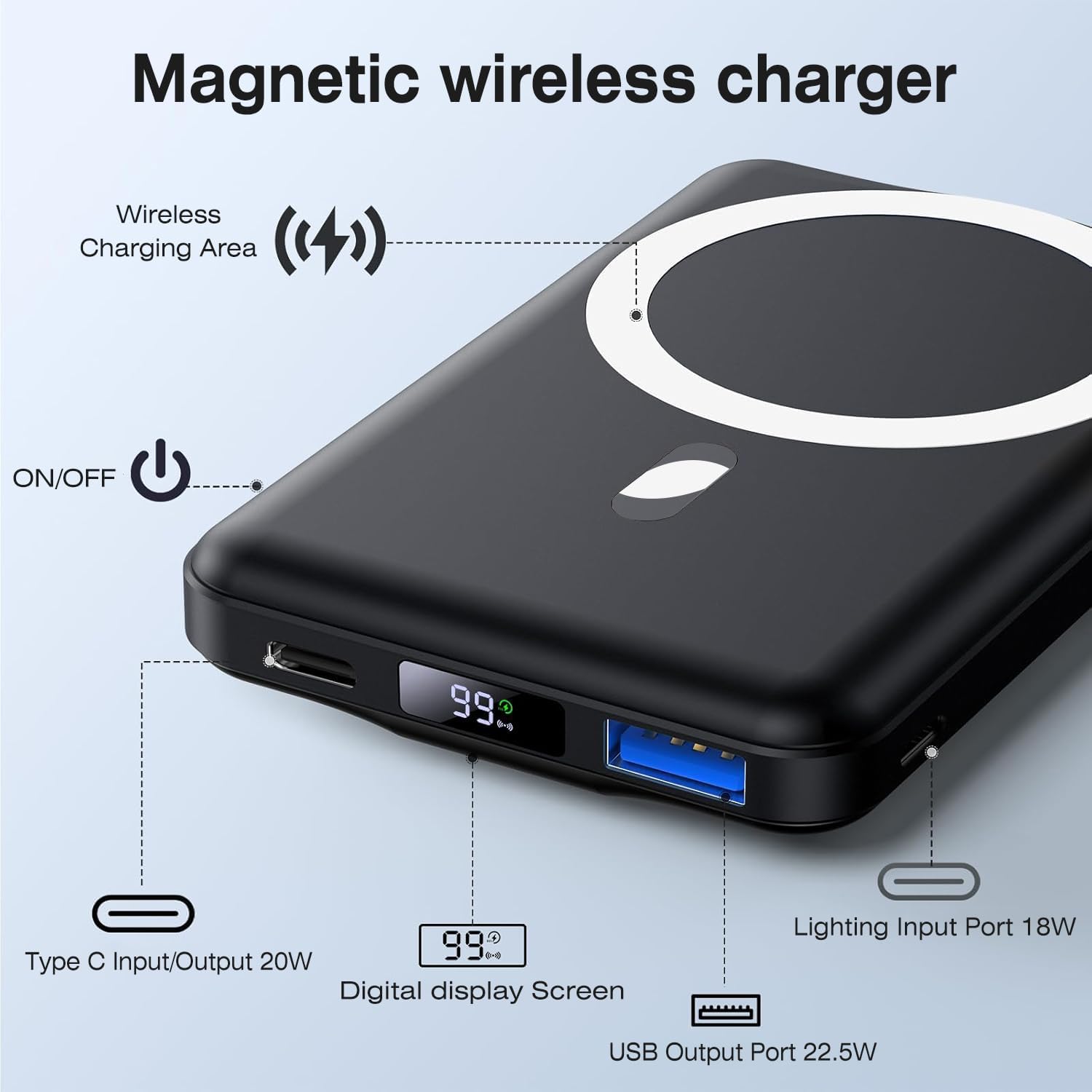
Figure 1: Overview of the AOGUERBE Magnetic Wireless Charger, highlighting the Wireless Charging Area, ON/OFF button, Type C Input/Output (20W), Digital Display Screen, USB Output Port (22.5W), and Lighting Input Port (18W).

Figure 2: The power bank's capability to charge three devices concurrently: 15W wireless, 22.5W via USB-A, and 20W via Type-C.

Figure 3: Visual representation of the comprehensive safety features, ensuring device protection during charging.
3. Setup
Initial Charging of the Power Bank:
- Use the provided USB-C cable to connect the power bank to a compatible power adapter (not included).
- The LED digital display will show the charging progress. Ensure the power bank is fully charged before first use for optimal performance.
Compatibility:
- Designed for iPhone 17 Air, iPhone 17, iPhone 17 Pro, iPhone 17 Pro Max, iPhone 16, iPhone 16 Plus, iPhone 16 Pro, iPhone 16 Pro Max, iPhone 15, iPhone 15 Plus, iPhone 15 Pro, iPhone 15 Pro Max, iPhone 14, iPhone 14 Plus, iPhone 14 Pro, iPhone 14 Pro Max, iPhone 13, iPhone 13 mini, iPhone 13 Pro, iPhone 13 Pro Max, iPhone 12, iPhone 12 mini, iPhone 12 Pro, and iPhone 12 Pro Max.
- Suitable for use without cases or with Mag-Safe compatible cases.

Figure 4: Device compatibility with the magnetic power bank, emphasizing use with Mag-Safe cases or no case.
4. Operating Instructions
Wireless Charging (Mag-Safe):
- Ensure your device is Mag-Safe compatible or has a Mag-Safe case.
- Align the back of your device with the magnetic charging area of the power bank. The magnets will securely attach.
- The LED display on the power bank will show its remaining charge, and your device will indicate that it is charging.
- To turn off wireless charging, press the power bank button twice in a row.

Figure 5: Magnetic attachment and wireless charging in progress.
Wired Charging:
- Connect your device to the power bank using a compatible USB-C or USB-A cable.
- The power bank supports 20W output via USB-C and 22.5W via USB-A for fast charging.
Using the Foldable Stand:
- Press the power bank button twice in a row to activate the stand function.
- Unfold the integrated stand from the back of the power bank.
- Place your device on the stand for hands-free viewing while it charges.

Figure 6: Using the foldable stand for convenient hands-free viewing.
5. Maintenance
- Charging Frequency: If the power bank is not used for a long time, please charge it once every 3 months to maintain battery health.
- Cleaning: Keep the power bank clean and dry. Do not wash it with depurative chemistry.
- Storage: Store in a cool, dry place away from direct sunlight and extreme temperatures.
6. Troubleshooting
Common Issues and Solutions:
- Device not charging:
- Ensure the power bank is sufficiently charged.
- For wireless charging, verify your device/case is Mag-Safe compatible and properly aligned.
- For wired charging, check cable connections and ensure the cable is not damaged.
- Press the power button once to activate charging if it's in standby mode.
- Slow charging:
- Ensure you are using a high-quality, compatible charging cable.
- For optimal speed, use the original USB-C cable provided to charge the power bank itself.
- Avoid using your device heavily while charging.
- Power bank not turning on:
- Charge the power bank for at least 30 minutes.
- If the issue persists, contact customer support.
Safety Protections:
The AOGUERBE magnetic portable charger incorporates a multi-protect safety system to ensure the safety of your devices. This includes:
- Over Voltage Protection
- Over Charge Protection
- Over Current Protection
- Short Circuit Protection
- Over Temperature Protection (as indicated in A+ content images)
7. Specifications
| Feature | Detail |
|---|---|
| Model Number | KT-D001 |
| Battery Capacity | 10000 Milliamp Hours (38.5Wh) |
| Wireless Output | Up to 15W |
| USB-C Input/Output | 20W |
| USB-A Output | 22.5W |
| Product Dimensions | 4.1 x 2.6 x 0.8 inches |
| Item Weight | 8.1 ounces |
| Special Features | Digital Display, Fast Charging, Over Charging Protection, Pocket Size, Wireless Charging, Foldable Stand |
| Color | Obsidian Black |
| Manufacturer | Shenzhen Zhilianxintong Electronics Co., Ltd |
8. Warranty and Support
Your AOGUERBE Mag-Safe Portable Charger comes with AOGUERBE professional technical support and friendly customer service. For any questions, concerns, or support needs, please refer to the contact information provided with your product packaging or visit the official AOGUERBE website.
Specific warranty details are typically provided with the product at the time of purchase. Please retain your proof of purchase for any warranty claims.
