
1. Introduction
Thank you for choosing the Coleshome Reversible L-Shaped Gaming Desk. This manual provides essential information for the safe assembly, operation, and maintenance of your new desk. Please read these instructions carefully before beginning assembly and retain them for future reference.
This versatile desk is designed to provide a spacious and organized workspace, suitable for gaming, studying, working, or general home office use. Its reversible design allows for flexible configuration to fit various room layouts.

Image 1: The Coleshome L-shaped gaming desk configured for a gaming setup, showcasing its spacious surface and integrated storage shelves. The desk is positioned in a room with blue ambient lighting, highlighting its aesthetic appeal and functionality.
2. Safety Instructions
- Always assemble the desk on a soft, clean surface to prevent scratches.
- Ensure all screws and fasteners are securely tightened before use. Periodically check and re-tighten as necessary.
- Do not overload the desk or shelves beyond their weight capacity. Refer to specifications for details.
- Keep small parts and packaging materials away from children to prevent choking hazards.
- Avoid placing hot items directly on the desk surface without protection.
- Do not stand or sit on the desk.
- Use the adjustable feet to ensure the desk is stable and level on uneven floors.
3. Package Contents
Before assembly, verify that all components listed below are present and undamaged. If any parts are missing or damaged, please contact customer support.
- Desktop Panels (Main and Corner)
- Metal Frame Components (Legs, Support Bars)
- Storage Shelf Panels
- Adjustable Leveling Feet
- Assembly Hardware (Screws, Bolts, Allen Wrench)
- Instruction Manual
4. Setup and Assembly Instructions
Assembly typically requires two people. Follow the steps below carefully.
- Unpack and Identify Parts: Carefully unpack all components and lay them out on a soft, clean surface. Compare them with the parts list to ensure everything is present.
- Assemble the Main Frame: Attach the metal legs and support bars to form the primary desk frame. Ensure all connections are finger-tightened initially.
- Attach Desktop Panels: Secure the main desktop panel and the corner panel to the assembled frame using the provided screws.
- Assemble Storage Shelves: Construct the storage shelf unit. Note that the desk is reversible, allowing the L-shape to be configured to the left or right side based on your preference.
- Integrate Storage Unit: Attach the assembled storage shelf unit to the main desk frame.
- Install Adjustable Feet: Screw the adjustable leveling feet into the bottom of all desk legs.
- Final Tightening: Once all parts are in place and the desk is in its desired orientation, fully tighten all screws and bolts using the provided Allen wrench. Do not overtighten.
- Level the Desk: Place the desk in its final position. Adjust the leveling feet by rotating them until the desk is stable and does not wobble.

Image 2: This diagram provides precise measurements of the Coleshome L-shaped desk, including its length (120cm), width (70cm), height (75.7cm), and shelf dimensions (34cm and 33.2cm height for shelves). These measurements are crucial for planning placement and ensuring compatibility with your space.

Image 3: A close-up view of the desk's adjustable leveling feet. These feet can be rotated to compensate for uneven floors, ensuring the desk remains stable and level. The design also includes corner reinforcement for added stability.
5. Operating Instructions
5.1 Reversible Configuration
The L-shaped design of this desk is reversible. During assembly, you can choose to place the shorter return section with the storage shelves on either the left or right side to best suit your room layout and personal preference.

Image 4: This image presents the Coleshome L-shaped desk in a home office setting, demonstrating its versatility. The L-shape can be assembled with the shorter return on either the left or right side, adapting to different room layouts and user preferences. It features a monitor, laptop, and other office essentials.
5.2 Adjustable Storage Shelves
The integrated storage shelves offer flexibility. The middle shelf can be adjusted or removed to accommodate items of varying heights, such as a computer tower, books, or decorative items.
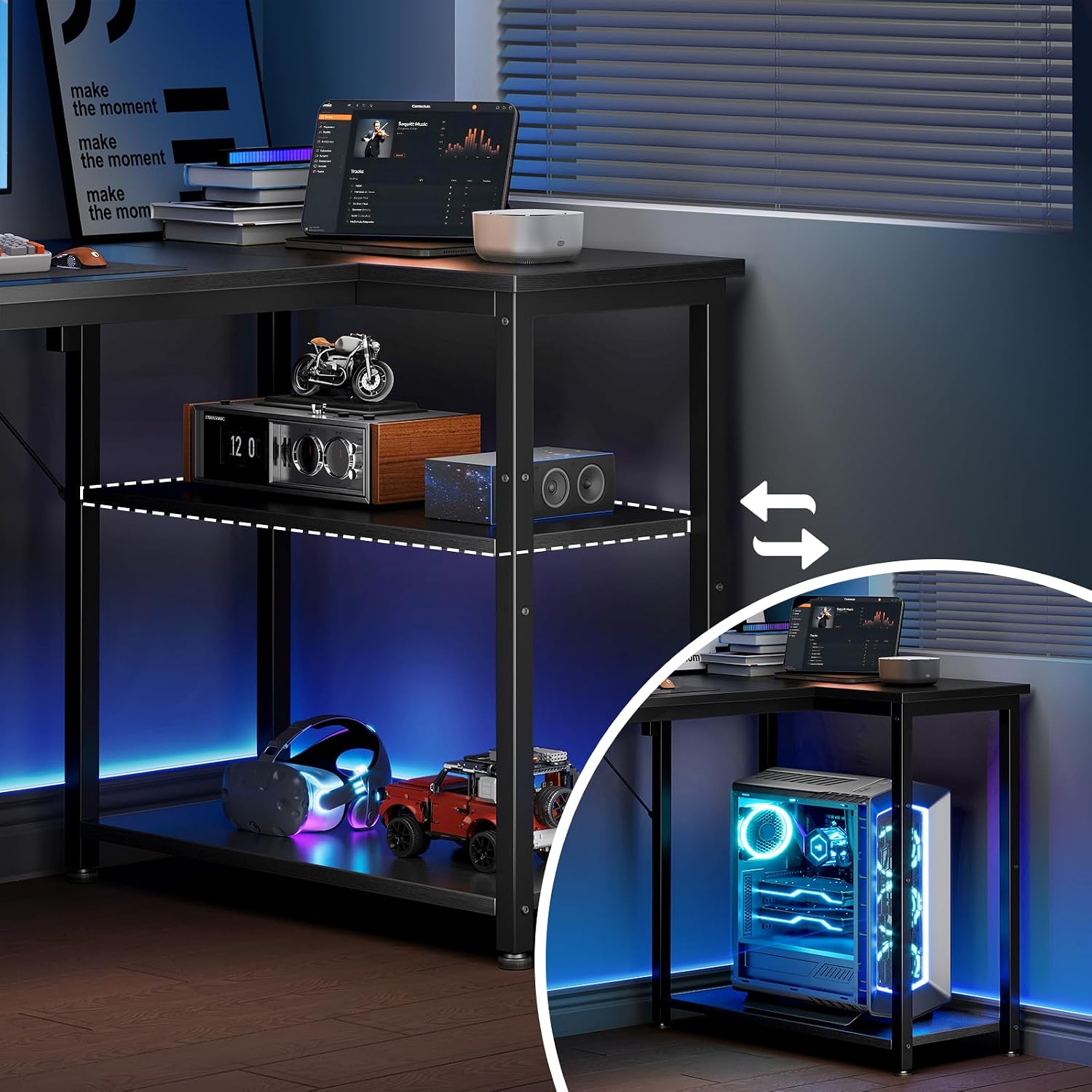
Image 5: This image illustrates the adjustable nature of the storage shelves on the Coleshome desk. The dashed lines indicate that the middle shelf can be removed or repositioned to accommodate items of various heights, such as a computer tower or larger storage boxes.
5.3 Leveling the Desk
After placing the desk, ensure it is stable. If it wobbles, gently lift the corner that is lower and rotate the corresponding adjustable foot clockwise to raise it, or counter-clockwise to lower it, until the desk is perfectly level and stable.
6. Maintenance
- Cleaning: Wipe the desk surface with a soft, damp cloth. Avoid using harsh chemicals or abrasive cleaners, as these can damage the finish.
- Spills: Clean up spills immediately to prevent staining or damage to the desk material.
- Fasteners: Periodically check all screws and bolts to ensure they remain tight. Re-tighten if necessary to maintain stability.
- Placement: Avoid exposing the desk to direct sunlight or extreme temperature changes, which can cause warping or discoloration.
7. Troubleshooting
- Desk Wobbles: Ensure all assembly screws are fully tightened. Adjust the leveling feet on the bottom of the desk legs to compensate for uneven floor surfaces.
- Parts Missing/Damaged: If you find any parts missing or damaged upon opening the package, do not proceed with assembly. Contact Coleshome customer support immediately for assistance.
- Difficulty Assembling: Review the assembly instructions carefully. Ensure all parts are oriented correctly. If issues persist, contact customer support.
8. Specifications
| Feature | Detail |
|---|---|
| Brand | Coleshome |
| Model Number | B02SY023201008UK |
| Product Dimensions (D x W x H) | 70D x 120W x 75.7H cm |
| Item Weight | 10.8 Kilograms |
| Color | Black |
| Assembly Required | Yes |
| Adjustable Features | Reversible L-shape, Adjustable Leveling Feet, Adjustable/Removable Storage Shelf |
9. Warranty and Support
For warranty information, product support, or to report missing/damaged parts, please contact Coleshome customer service through the retailer where the product was purchased. Please have your model number (B02SY023201008UK) and purchase details ready when contacting support.
