Introduction
This manual provides detailed instructions for the assembly, operation, and maintenance of your NEEWER NF01 Smart LED Floor Lamp. Please read this manual thoroughly before use to ensure proper functionality and safety. The NF01 lamp offers versatile lighting options with 16 million colors, smart control features, and various scene modes to enhance your living space.

Image: The NEEWER NF01 Smart LED Floor Lamp, showcasing its sleek design, remote control, and a smartphone displaying the control app interface with various color and brightness settings.
Package Contents
Verify that all components are present before beginning assembly:
- Light Base
- Light Strip
- 3 x Aluminum Lamp Pole
- Remote Control
- 2 x Connector
- Adapter
- Screwdriver
- Screw Accessory Kit
- Packaging Box
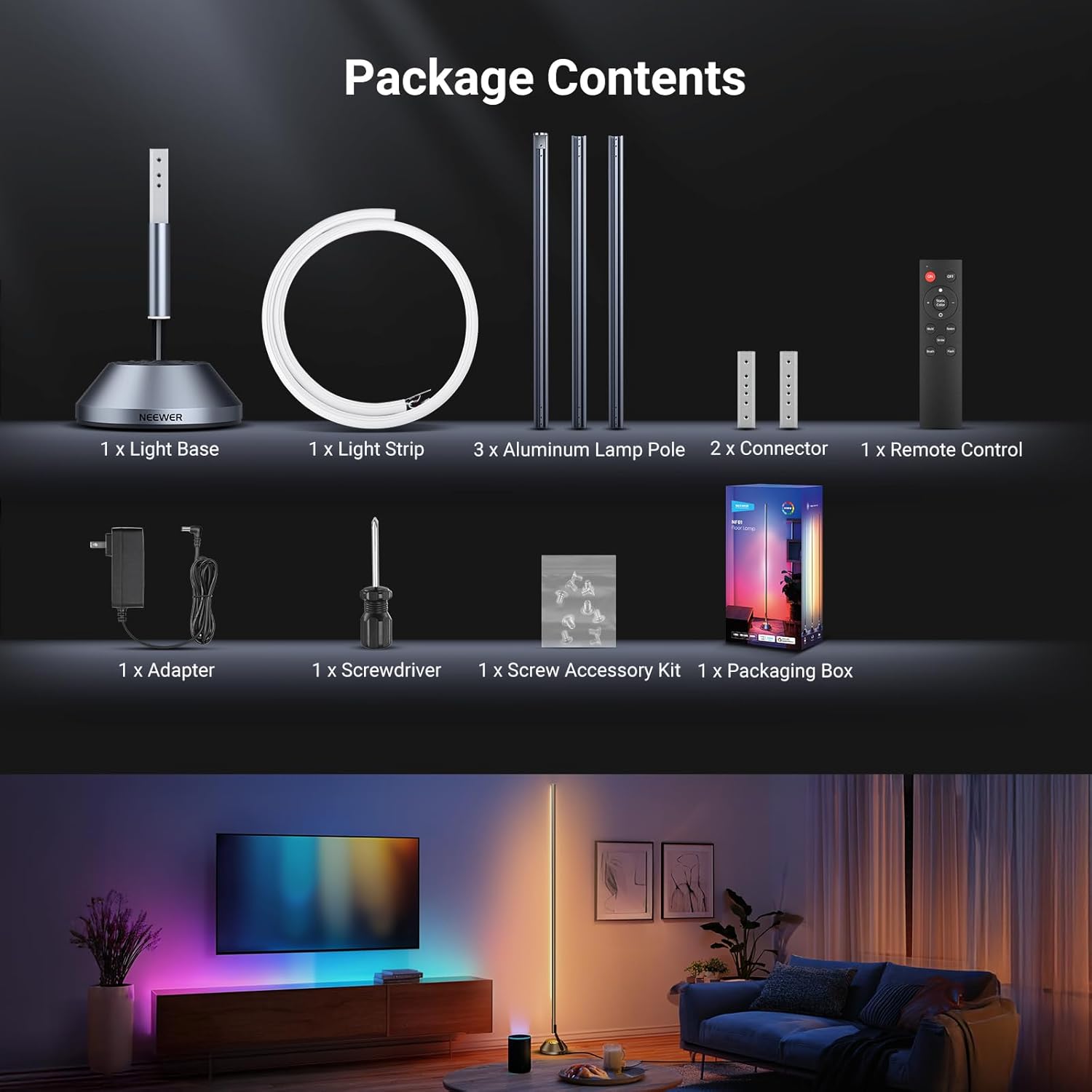
Image: A visual representation of all items included in the NEEWER NF01 Smart LED Floor Lamp package, ensuring users can confirm they have received everything.
Setup and Assembly
Follow these steps to assemble your NEEWER NF01 Smart LED Floor Lamp:
- Connect Lamp Poles: Align the connector holes on the aluminum lamp poles and secure them using the provided screws and screwdriver.
- Attach Light Strip: Carefully insert the light strip into the assembled lamp poles, ensuring it is seated correctly.
- Connect to Base: Connect the light strip power cable to the power port on the light base.
- Secure Base: Attach the assembled lamp pole to the weighted metal base.
- Power On: Connect the adapter to the lamp and plug it into a power outlet.

Image: A visual guide illustrating the simple four-step installation process for the NF01 lamp, ensuring easy and correct assembly.
Operating Instructions
1. APP Control (Neewer Home App)
Download the 'Neewer Home' app (ensure it's not the general 'Neewer' app) from your smartphone's app store. Pair the lamp via Bluetooth to access advanced functions:
- Color Selection: Choose from 16 million colors using the color wheel.
- Brightness Adjustment: Adjust brightness from 1% to 100%.
- Scene Modes: Select from over 50 preset scenes categorized into Daily Life, Holidays, Emotions, and Nature.
- DIY Customization: Create and save your own personalized lighting effects.
- Music Sync: Synchronize the light's pulse and shift with music beats or game sound effects.
- AI Lighting Engine: Generate personalized lighting scenes using voice commands, text, or images.

Image: The Neewer Home app interface, demonstrating various control options for the smart floor lamp, including color selection, scene presets, and music synchronization.

Image: The AI Crafted Lightscapes feature in the app, allowing users to create custom lighting effects by providing text or image prompts.
2. Remote Control
Use the included remote control for quick adjustments:
- Power On/Off
- Adjust Color Temperature (1800K-6500K)
- Adjust Brightness
- Cycle through Scene Modes
- Activate Music Mode
3. Voice Control (Google Assistant & Alexa)
The NF01 lamp is compatible with Google Assistant and Amazon Alexa. Link your lamp through the respective smart home app to enable voice commands for:
- Turning the lamp on/off
- Changing colors
- Adjusting brightness
- Activating specific scenes

Image: Demonstrates wireless voice control compatibility with smart home assistants like Alexa, allowing hands-free operation of the lamp.
Video: An overview of the NEEWER NF01 Smart LED Floor Lamp, highlighting its various features and dynamic lighting capabilities.
Video: A demonstration of the NEEWER Smart LED Floor Lamp's features, including color changes and smart control options.
4. Timer Function
Schedule the lamp's on/off times with custom color temperature, brightness, and duration settings. This feature supports:
- Sleep Aid Mode: Gradually dims the light until it turns off.
- Wake Up Mode: Gradually brightens the light to simulate a sunrise.

Image: The timer function interface in the app, detailing options for scheduling the lamp's operation, including specific times and lighting parameters.
Key Features
- High Brightness: Delivers up to 1500 lumens with a wide 180° beam angle.
- Adjustable Color Temperature: Ranging from 1800K (warm white) to 6500K (cool white).
- Stepless Dimming: Brightness adjustable from 1% to 100%.
- Eye-Friendly Lighting: Soft light without dazzling or visible flashing for optimal eye comfort.
- Modern Design: Tall, sleek, minimalist design with a sturdy aluminum alloy base.
- Bottom Lighting: Built-in LED at the base creates a floating visual effect.
- Silicone Light Strip: Smooth and delicate surface, easily fitting inside the lamp tube, providing wider light spread and richer colors compared to standard strips.

Image: Illustrates the lamp's high brightness and adjustable color temperature, showing its versatility for different lighting needs.

Image: Details the robust construction of the lamp, featuring a sturdy aluminum alloy base and a modern minimalist metal pole.

Image: A visual comparison demonstrating the superior light diffusion and color vibrancy of the NF01's silicone light strip.
Maintenance
- Cleaning: Wipe the lamp with a soft, dry cloth. Do not use abrasive cleaners or solvents.
- Power Disconnection: Always unplug the lamp from the power outlet before cleaning or performing any maintenance.
- Storage: If storing the lamp for an extended period, disassemble it and store it in its original packaging in a dry, cool place.
Troubleshooting
| Problem | Possible Cause | Solution |
|---|---|---|
| Lamp does not turn on. | Not plugged in; power outlet issue; lamp switch off. | Ensure the lamp is securely plugged into a working outlet. Check the power button on the base or remote. |
| Cannot connect to Neewer Home app. | Bluetooth not enabled; incorrect app; 5GHz Wi-Fi network. | Ensure Bluetooth is enabled on your device. Download the 'Neewer Home' app (not the general 'Neewer' app). The lamp only supports 2.4GHz Wi-Fi. |
| Remote control not working. | Battery depleted; remote out of range. | Replace the remote control battery. Ensure the remote is within effective range of the lamp. |
| Voice control not responding. | Not linked to smart assistant; Wi-Fi connectivity issue. | Verify the lamp is correctly linked in your Google Assistant or Alexa app. Check your Wi-Fi connection. |
Specifications
| Feature | Detail |
|---|---|
| Brand | NEEWER |
| Model | NF01 |
| Lamp Type | Floor Lamp |
| Light Source Type | LED |
| Light Output Maximum | 1500 Lumens |
| Color Temperature | 1800K-6500K (Warm White, Cool White) |
| Dimming Range | 1%-100% |
| Shade Color | Multicolor (16 Million Colors) |
| Beam Angle | 180° |
| Control Methods | APP (Neewer Home), Remote, Voice (Google Assistant, Alexa) |
| Material | Aluminum, Silicone |
| Product Dimensions | 17.09 x 7.01 x 8.86 inches |
| Item Weight | 6.18 pounds |
| Indoor/Outdoor Usage | Indoor |
| Wi-Fi Compatibility | 2.4GHz only (5GHz NOT supported) |
Safety Information
Please observe the following safety precautions:
- Do not expose the lamp to water or excessive moisture.
- Ensure the lamp is placed on a stable, level surface to prevent tipping.
- Do not attempt to disassemble or repair the lamp yourself. Contact customer support for assistance.
- Keep out of reach of children and pets.
- Use only the provided power adapter.
- Avoid direct eye exposure to the light source for prolonged periods.
Warranty and Support
NEEWER products come with a standard manufacturer's warranty. For detailed warranty information, technical support, or service inquiries, please refer to the warranty card included in your package or visit the official NEEWER website. Please retain your proof of purchase for warranty claims.


