
1. Introduction
Thank you for choosing the SIXTOP Android 15 Carplay Autoradio. This manual provides essential information for the proper installation, operation, and maintenance of your new car multimedia system. Please read this manual thoroughly before use to ensure optimal performance and safety.
2. Safety Information
- Professional Installation Recommended: Installation should be performed by a qualified technician to prevent damage to the vehicle or the unit.
- Power Supply: Ensure the unit is connected to a 12V DC power supply with negative grounding.
- Avoid Distractions: Do not operate the unit in a way that distracts you from driving. Always prioritize road safety.
- Temperature: Avoid exposing the unit to extreme temperatures or direct sunlight for prolonged periods.
- Moisture: Keep the unit dry. Exposure to moisture can cause malfunction or damage.
3. Compatible Vehicles
This autoradio is designed for specific Mercedes Benz models. Please verify your vehicle's compatibility before installation.
- Mercedes Benz A-Class W169 (2004-2012)
- Mercedes Benz B-Class B200/W245 (2004-2012)
Compare your vehicle's central console and adapter port with the images below to confirm compatibility.
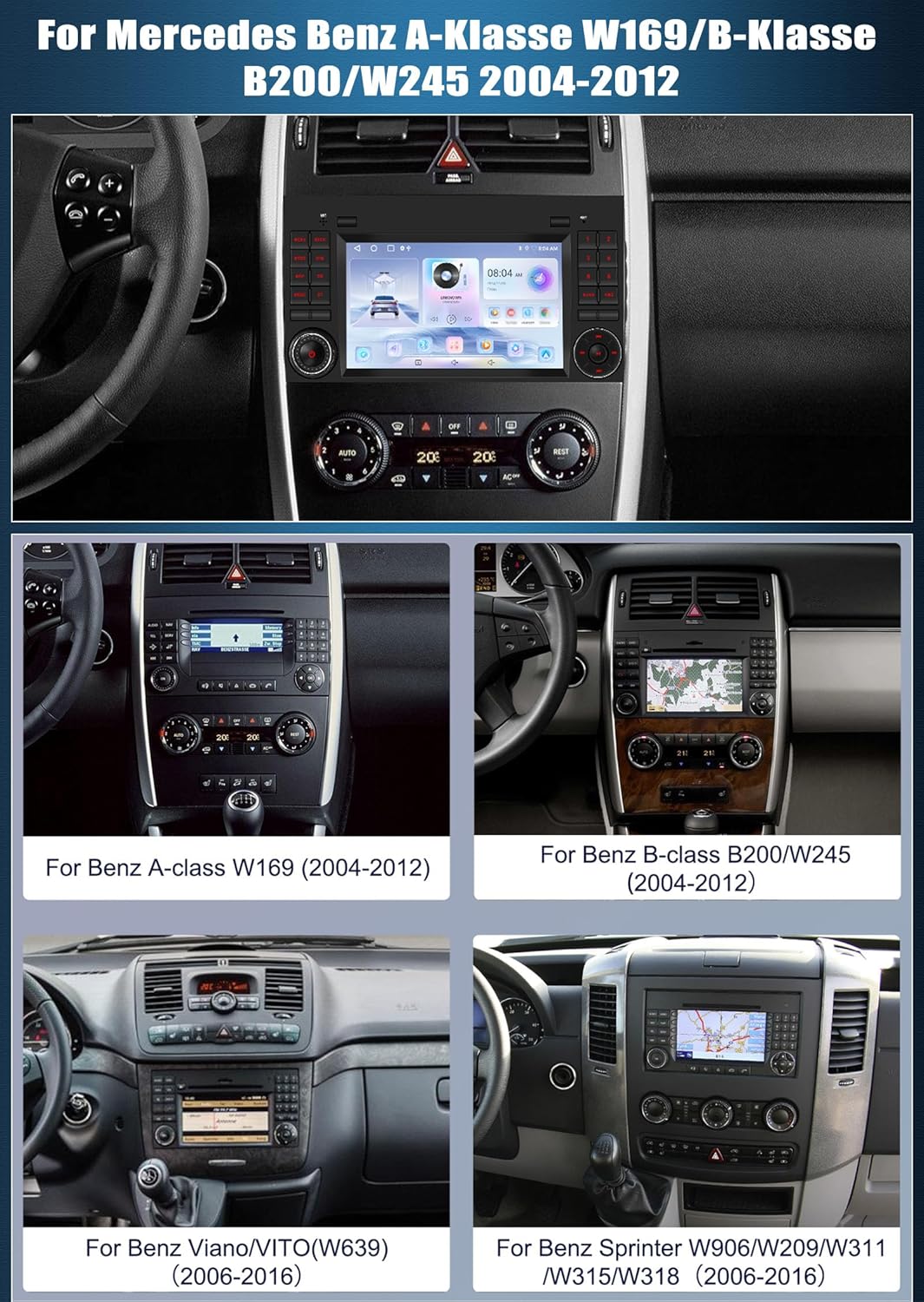
Image: Various Mercedes Benz dashboards, including A-Class W169 and B-Class W245, showing the fitment area for the autoradio. This image helps users identify if their vehicle's dashboard matches the compatible models.
4. Package Contents
Upon opening the package, ensure all items listed below are present and undamaged.
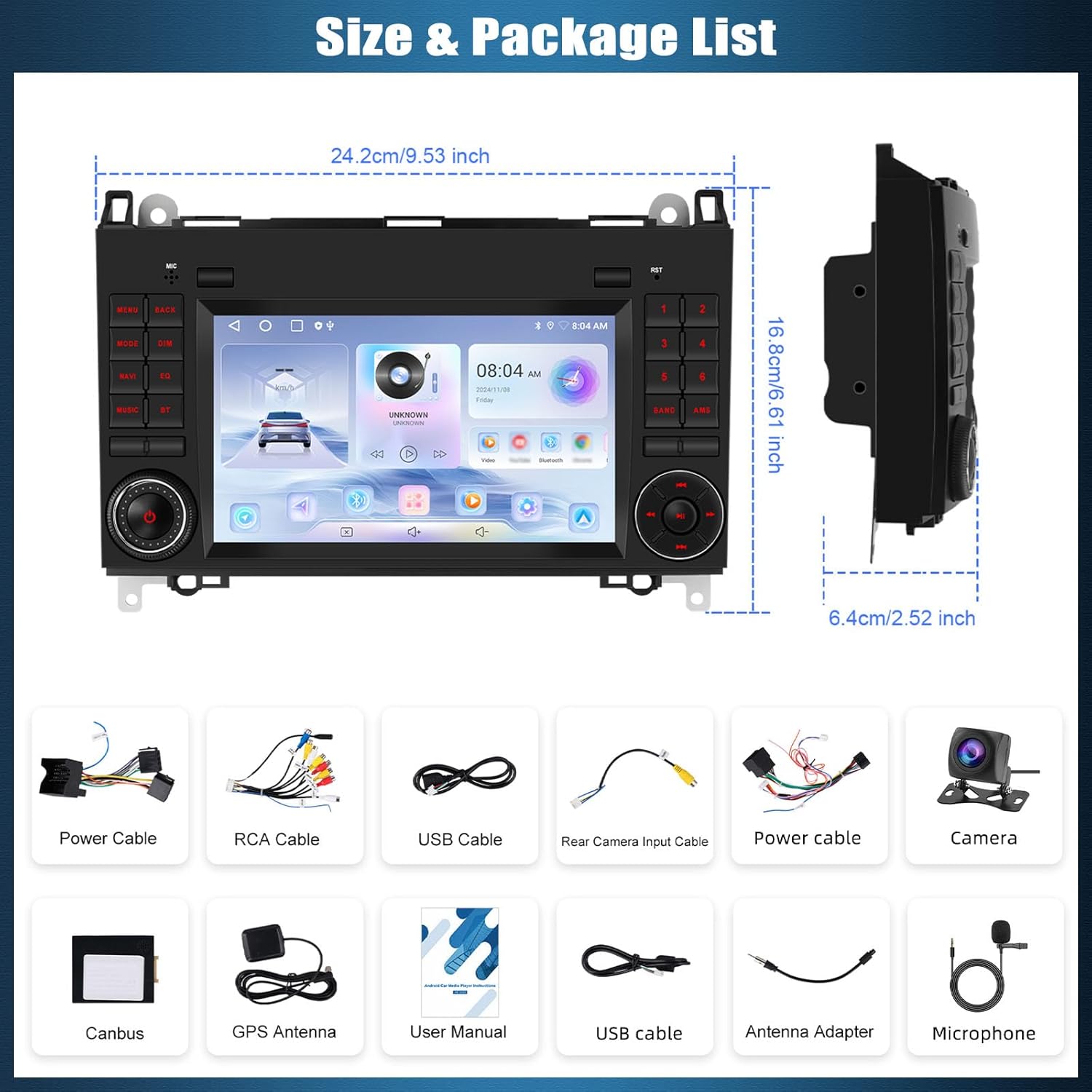
Image: The autoradio unit with its dimensions (24.2cm x 16.8cm x 6.4cm) and a visual representation of all included accessories. This includes various cables, a camera, GPS antenna, and the user manual.
- SIXTOP Android 15 Carplay Autoradio Unit
- Power Cable (x2)
- RCA Cable
- USB Cable (x2)
- Rear Camera Input Cable
- Camera (Rear View)
- Canbus Decoder
- GPS Antenna
- User Manual
- Antenna Adapter
- External Microphone
5. Setup and Installation
Installation of the autoradio involves electrical connections and dashboard disassembly. It is highly recommended to have this procedure performed by a certified professional to avoid damage to your vehicle or the unit.
5.1 Pre-Installation Checks
- Ensure the vehicle's ignition is off and the battery is disconnected.
- Verify all package contents are present.
- Confirm vehicle compatibility with the unit.
5.2 Wiring Connections
Refer to the wiring diagram provided in the included user manual for detailed connection instructions. Key connections include:
- Power Cable: Connect to the vehicle's power supply (12V DC, negative ground).
- Canbus Decoder: Connect to the vehicle's CAN-BUS system for steering wheel controls and other vehicle data integration.
- GPS Antenna: Mount in a location with a clear view of the sky for optimal signal reception.
- Rear Camera Input Cable: Connect the included rear camera for reversing display functionality.
- USB Cables: For connecting external devices or USB drives.
- External Microphone: Connect for improved call quality during Bluetooth hands-free operation.
6. Operating Instructions
6.1 Basic Controls and Touchscreen
The unit features a 7-inch IPS 2.5D touchscreen for primary interaction. Physical buttons on the unit and steering wheel controls provide additional functionality.

Image: The autoradio unit displaying its high-definition touchscreen with various colorful backlight options. The image also illustrates how the unit integrates with the vehicle's steering wheel controls for convenient operation.
6.2 Steering Wheel Controls (SWC)
The unit supports original steering wheel buttons, allowing control over audio functions without taking your hands off the wheel. After installation, the system should automatically recognize and map most common controls. If not, refer to the system settings for manual configuration.
6.3 Wireless CarPlay, Wired Android Auto, and Mirror Link
Connect your smartphone to access navigation, music, calls, and more directly on the autoradio display.
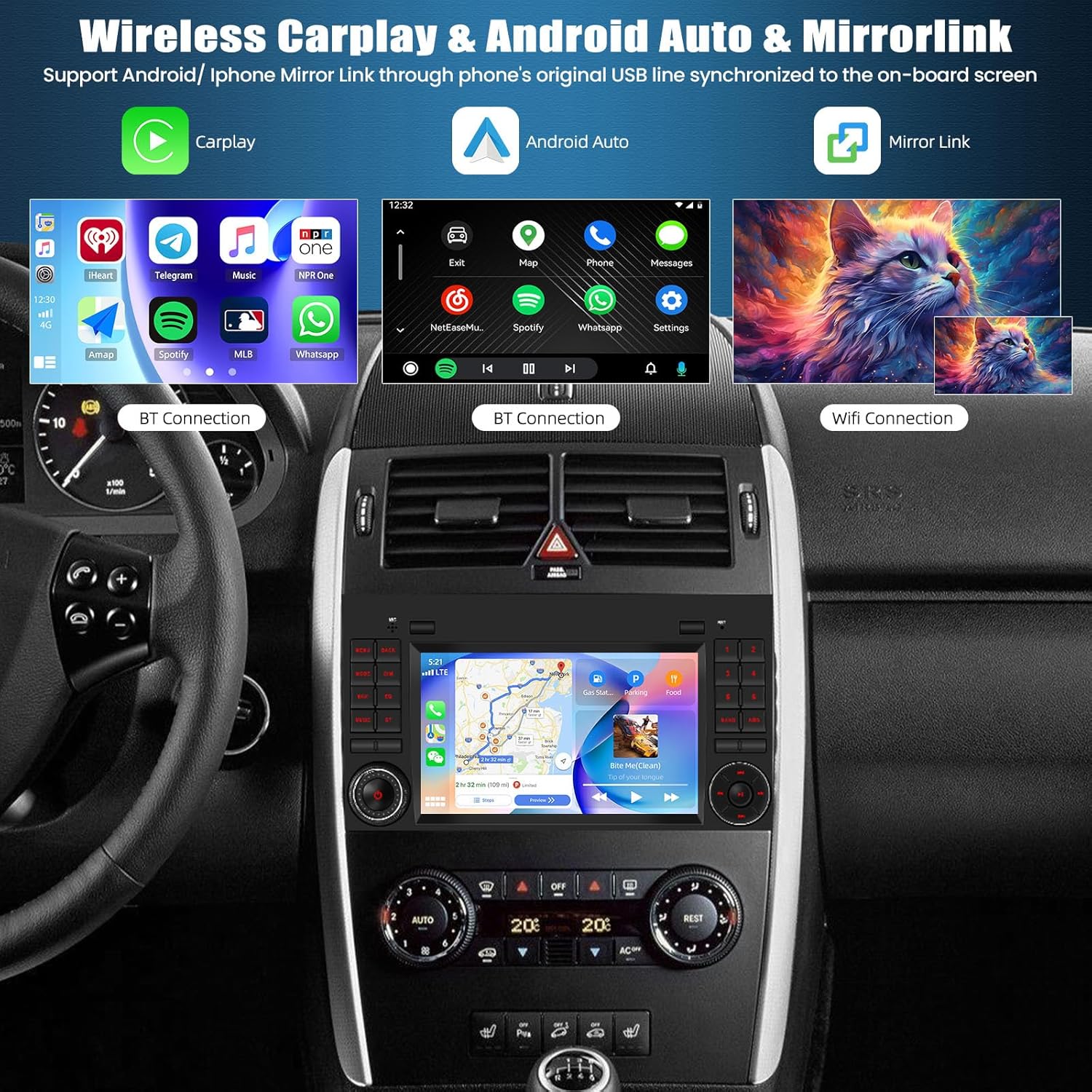
Image: The autoradio screen demonstrating the interfaces for Wireless CarPlay, Android Auto, and Mirrorlink. This visual shows how smartphone applications and content are displayed and controlled on the unit.
- CarPlay (Wireless/Wired): For iPhone users. Connect wirelessly via Bluetooth and Wi-Fi, or via USB cable.
- Android Auto (Wired): For Android users. Connect via USB cable.
- Mirror Link (iOS/Android): Allows mirroring your phone's screen onto the autoradio display. Connect via USB or Wi-Fi.
6.4 Bluetooth Connectivity
Pair your mobile phone via Bluetooth for hands-free calling and audio streaming.

Image: A multi-panel image illustrating the Bluetooth calling interface, Bluetooth music playback, FM/RDS radio tuner, and DSP (Digital Sound Processor) settings for audio customization.
- Hands-Free Calling: Access your phonebook, make and receive calls directly from the unit. The external microphone enhances call clarity.
- Bluetooth Music Playback: Stream audio from your paired device to the car's speakers.
6.5 FM/RDS Radio
Tune into your favorite radio stations with clear reception.
- FM/RDS: Enjoy FM radio with RDS (Radio Data System) for station information, traffic updates, and weather forecasts.
- Preset Stations: Store up to 18 of your preferred stations for quick access.
6.6 GPS Navigation
The unit features integrated GPS for reliable navigation.
- Online Maps: Connect to Wi-Fi to use online navigation applications.
- Offline Maps: Download maps from the Play Store for navigation without an internet connection.
6.7 Rear Camera Function (Reversing Display)
Enhance parking safety with the included rear camera.

Image: A visual comparison demonstrating the clarity of the unit's reversing display compared to other systems. It highlights features like HD resolution, clear image, waterproof design, 170° wide-angle view, and night vision capabilities.
- When the vehicle is shifted into reverse gear, the screen automatically displays the rear camera feed.
- Supports AHD camera input for high-definition video.
6.8 DSP Settings (Digital Sound Processor)
Customize your audio experience with the built-in DSP.
- Adjust equalizer settings (EQ) to match your audio preferences.
- Explore multiple surround sound field modes for an immersive listening experience.
7. Maintenance
- Cleaning the Screen: Use a soft, lint-free cloth to gently wipe the touchscreen. Avoid abrasive cleaners or solvents.
- Software Updates: Periodically check for available software updates to ensure optimal performance and access to new features. Updates can typically be found through the system settings or the manufacturer's website.
- Avoid Liquid Contact: Do not allow liquids to enter the unit, as this can cause severe damage.
8. Troubleshooting
| Problem | Possible Cause | Solution |
|---|---|---|
| Unit does not power on. | Loose power connection, blown fuse, vehicle battery issue. | Check power cables and connections. Inspect vehicle fuses. Ensure vehicle battery is charged. |
| No sound. | Volume too low, mute activated, incorrect audio output settings, loose speaker wires. | Increase volume. Check if mute is active. Verify audio settings. Inspect speaker connections. |
| GPS signal weak or lost. | GPS antenna obstructed or improperly installed. | Ensure GPS antenna has a clear view of the sky. Check antenna connection. |
| Bluetooth connection issues. | Device not in pairing mode, incorrect pairing code, interference. | Ensure phone's Bluetooth is on and in pairing mode. Re-pair the device. Move closer to the unit. |
| Rear camera not displaying. | Camera cable loose, camera faulty, incorrect input selection. | Check camera cable connections. Ensure vehicle is in reverse. Verify camera input settings. |
If problems persist after attempting these solutions, please contact customer support.
9. Specifications
| Feature | Description |
|---|---|
| Brand | SIXTOP |
| Operating System | Android 15 |
| Display | 7-inch IPS 2.5D Touchscreen |
| Connectivity Technology | Bluetooth, Wi-Fi |
| Special Features | Android Auto, Apple CarPlay (Wireless/Wired), GPS Navigation, FM/RDS Radio, Mirror Link, Steering Wheel Control (SWC) Support, DSP |
| Compatible Devices | Car |
| Audio Output Mode | Stereo |
| Surround Sound Configuration | 2.0 |
| Color | Black |
| Product Dimensions | 10P x 10l x 10H mm (Approx. 24.2cm x 16.8cm x 6.4cm) |
| Item Weight | 1400 Grams |
10. Warranty and Support
For warranty information and technical support, please refer to the documentation included with your purchase or contact the retailer/manufacturer directly. Keep your proof of purchase for warranty claims.
