
Oliry S1 Pro
Oliry Smart AI Bark Collar S1 Pro User Manual
Model: S1 Pro
Introduction
This manual provides comprehensive instructions for the safe and effective use of your Oliry Smart AI Bark Collar S1 Pro. Please read this manual thoroughly before operating the device to ensure proper function and the well-being of your dog. This collar is designed to assist in training dogs to reduce excessive barking through humane and adjustable correction methods.
Important Safety Information
- Do not use this collar on puppies under 6 months of age or dogs weighing less than 8 lbs.
- Avoid leaving the collar on your dog for more than 12 hours per day to prevent skin irritation.
- Regularly check your dog's neck for any signs of irritation or sores. If irritation occurs, discontinue use and consult a veterinarian.
- Ensure the collar is fitted correctly, allowing two fingers to fit comfortably between the collar and your dog's neck.
- This device is designed for training purposes and should not be used as a punishment tool.
- Keep out of reach of children.
Package Contents
Verify that all items are present in your package:
- Oliry Smart AI Bark Collar (S1 Pro)
- Adjustable Nylon Strap
- USB Type-C Charging Cable
- Short Contact Points (2x)
- Long Contact Points (2x)
- Silicone Conductive Covers (4x)
- Test Light Tool
- User Manual

Image: All components included in the Oliry Smart AI Bark Collar S1 Pro package.
Product Overview
The Oliry Smart AI Bark Collar S1 Pro features an intelligent design with multiple training modes and adjustable sensitivity. Key components include:
- Main Unit: Houses the AI chip, LCD screen, control buttons, and correction mechanisms.
- LCD Display: Shows battery level, sensitivity level, and current working mode.
- Control Buttons: Power button, Mode button ('M'), and Sensitivity adjustment buttons.
- Contact Points: Removable metal prongs (short and long) for static correction, with optional silicone covers for comfort.
- Adjustable Strap: Durable nylon strap suitable for various dog sizes.
- Charging Port: USB Type-C port for convenient recharging.

Image: The Oliry Smart AI Bark Collar S1 Pro main unit and examples of dogs wearing it.

Image: Detailed view of the collar's digital display screen and its various indicators.
Setup
1. Charging the Collar
- Connect the provided USB Type-C charging cable to the collar's charging port.
- Plug the other end of the cable into a USB power adapter (not included), computer, or power bank.
- The LCD screen will indicate charging status. A full charge typically takes approximately 2 hours.
- Once fully charged, the battery icon will show full. The collar can operate for up to 18 days on a single charge, depending on usage.
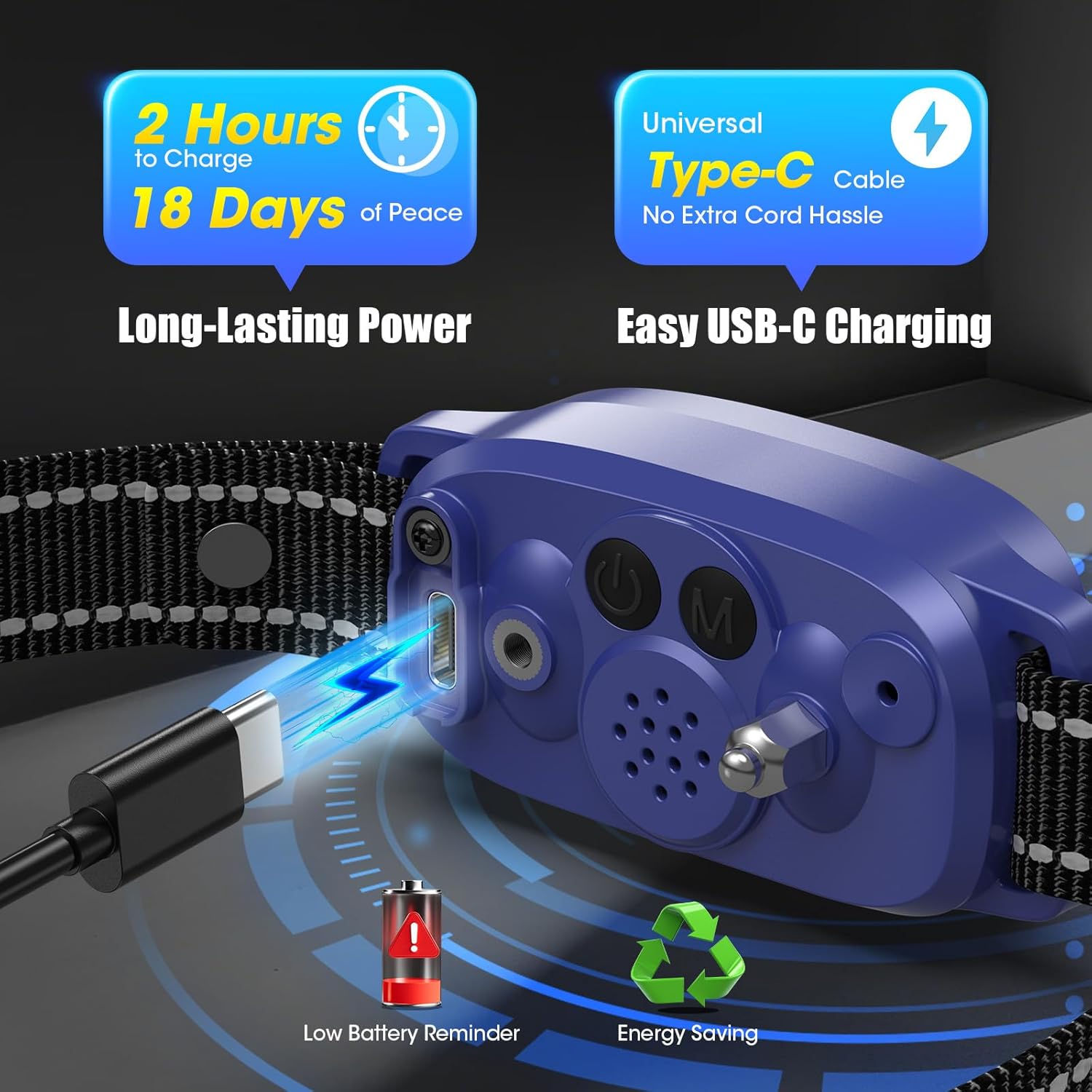
Image: The collar connected to a USB-C charging cable, highlighting its fast charging and long battery life.
2. Attaching Contact Points
Choose the appropriate contact points based on your dog's coat length:
- Short Contact Points: For dogs with short coats.
- Long Contact Points: For dogs with thick or long coats to ensure proper skin contact.
Screw the chosen contact points into the designated holes on the underside of the collar unit. For added comfort and to prevent irritation, place the silicone conductive covers over the metal contact points.
3. Fitting the Collar
- Place the collar around your dog's neck, ensuring the main unit is positioned centrally on the underside of the neck, close to the vocal cords.
- Adjust the nylon strap to achieve a snug fit. The contact points must make direct contact with your dog's skin.
- To check for proper fit, you should be able to insert two fingers comfortably between the collar and your dog's neck. The collar should not be too loose (to avoid movement and false triggers) or too tight (to prevent discomfort or skin irritation).
- Trim any excess strap length if necessary, and use the buckle to secure.
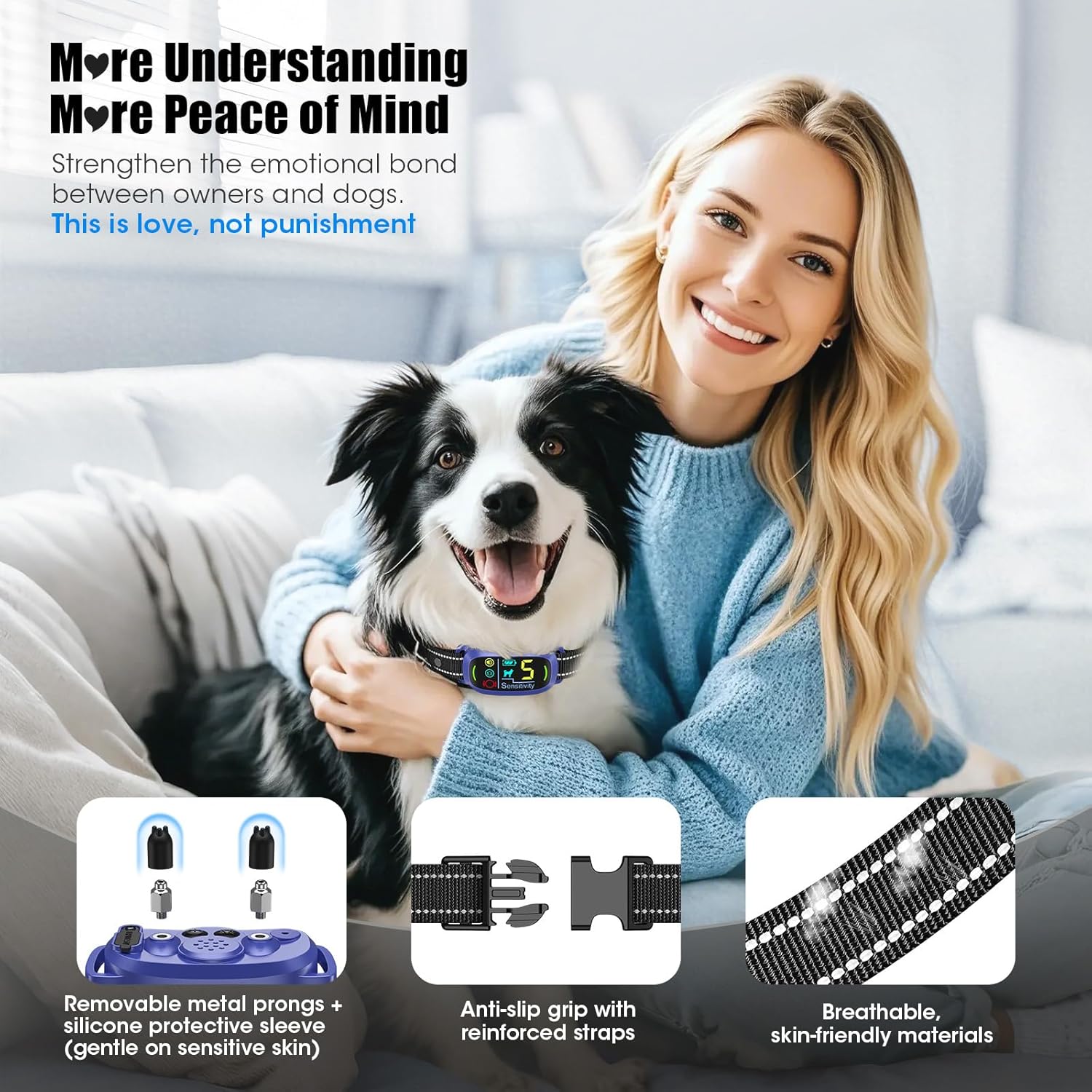
Image: Proper fit and features of the collar, including removable contact points with silicone covers.

Image: The collar's suitability for dogs of various sizes and breeds.
Operating Instructions
1. Power On/Off
- To Power On: Press and hold the power button until the LCD screen illuminates.
- To Power Off: Press and hold the power button until the LCD screen turns off.
2. Understanding the LCD Display
The clear LCD display provides real-time information:
- Battery Level: Indicates the remaining battery charge.
- Sensitivity Level: Displays the current sensitivity setting (1-5).
- Working Mode: Shows the active training mode (Beep, Vibration, Static, Boost Static).
3. Selecting Training Modes
The collar offers 5 training modes. Press the 'M' button to cycle through them:
- Beep Mode: Emits an audible tone as a warning.
- Vibration Mode: Provides a gentle vibration.
- Beep + Vibration Mode: Combines an audible tone with vibration.
- Beep + Vibration + Static Mode: Combines tone, vibration, and a mild static correction.
- Boost Static + Beep + Vibration Mode: Combines tone, vibration, and a stronger static correction.
Start with the gentlest mode (Beep) and gradually increase if necessary, observing your dog's response.

Image: Visual representation of the collar's five training modes and their progression.
4. Adjusting Sensitivity Levels
The collar has 5 adjustable sensitivity levels (1-5) to detect barking. Use the sensitivity adjustment buttons to select the appropriate level. Higher numbers indicate higher sensitivity.
- Levels 1-3: Recommended for noisy environments or dogs with softer barks.
- Levels 2-4: Suitable for normal environments.
- Levels 3-5: Ideal for quiet environments or dogs with louder barks.
Adjust the sensitivity to prevent false triggers from other noises while ensuring it responds to your dog's barking.
5. AI Chip & Instant Bark Detection
The S1 Pro features an advanced AI chip with voiceprint recognition technology. This allows the collar to accurately detect your dog's unique bark and filter out other noises, minimizing false triggers. The response time is approximately 0.01 seconds.

Image: Illustration of the collar's AI detection and quick response to barking.
6. Safety Mode
For your dog's safety, the collar automatically enters a safety mode and pauses correction after 6 continuous triggers within a short period. This prevents over-correction and ensures humane training.
Maintenance
- Cleaning: Regularly wipe the collar unit and strap with a damp cloth. Ensure the contact points are clean and free of debris. Do not use harsh chemicals.
- Battery Care: Charge the collar when the battery indicator is low. Avoid fully depleting the battery frequently to prolong its lifespan.
- Waterproofing: The S1 Pro is IP67 waterproof, meaning it is protected against immersion in water up to 1 meter for up to 30 minutes. It is suitable for use in rain, snow, and during dog bathing, but prolonged submersion is not recommended.

Image: The collar's IP67 waterproof rating allows for use in various wet conditions.
Troubleshooting
- Collar not activating:
- Ensure the collar is powered on and charged.
- Check if the contact points are making proper skin contact.
- Adjust the sensitivity level.
- False triggers:
- Lower the sensitivity level.
- Ensure the collar is fitted snugly to prevent movement.
- The AI chip is designed to filter out other noises, but extreme environmental sounds might occasionally interfere.
- Collar not holding charge:
- Ensure the charging cable is securely connected.
- Try a different USB power source.
- If the issue persists, contact customer support.
- Skin irritation:
- Remove the collar immediately.
- Clean your dog's neck and the collar.
- Ensure the silicone covers are used on the contact points.
- Consult a veterinarian if irritation is severe or persists.
- Ensure the collar is not worn for more than 12 hours daily.
Specifications
| Model Name | S1 Pro |
| Brand | Oliry |
| Item Weight | 5.9 ounces |
| Dimensions | 3.9 x 3.23 x 2.24 inches (Package) |
| Battery Type | 1 Nonstandard Battery (included) |
| Charging Time | Approx. 2 hours |
| Battery Life | Up to 18 days |
| Waterproof Rating | IP67 |
| Dog Size Compatibility | 8-150 lbs, Neck size 8-25 inches |
| Age Recommendation | Dogs over 6 months old |
| Training Modes | 5 (Beep, Vibration, Beep+Vibration, Beep+Vibration+Static, Boost Static+Beep+Vibration) |
| Sensitivity Levels | 5 |
Warranty and Support
The Oliry Smart AI Bark Collar S1 Pro comes with a 2-Year Replacement Promise. For warranty claims, technical support, or any questions regarding your product, please contact Oliry customer service through the retailer where the product was purchased or refer to the contact information provided in your product packaging.

Image: The product packaging highlighting the 2-Year Replacement Promise.
Ask a question about this manual
Ask about setup, troubleshooting, compatibility, parts, safety, or missing instructions. Manuals+ will review the question and use this page’s manual context to help answer it.