
1. Introduction
This manual provides detailed instructions for the assembly, operation, and maintenance of your Coleshome Corner Desk. Designed for efficiency and adaptability, this desk features a reversible storage shelf unit and a robust construction, making it ideal for various home office and study environments. Please read these instructions carefully before beginning assembly to ensure correct setup and safe use.
2. Safety Information
- Keep all packaging materials away from children to prevent choking hazards.
- Ensure all screws and fasteners are securely tightened before use. Periodically check and re-tighten as necessary.
- Do not stand or sit on the desk.
- Distribute weight evenly across the desktop and shelves to prevent tipping.
- Avoid placing hot items directly on the desk surface without protection.
- Use on a level surface to prevent instability.
3. Package Contents
Before assembly, verify that all components listed below are present and undamaged. If any parts are missing or damaged, please contact customer support.
- Desktop Panels (Main and Corner sections)
- Metal Frame Components (Legs, Support Bars)
- Storage Shelf Panels (2 units)
- Hardware Pack (Screws, Bolts, Allen Wrench)
- Adjustable Leveling Feet
- Instruction Manual
4. Assembly Instructions
Assembly typically requires two people. All necessary tools are included.
Step 1: Unpack and Identify Parts
Carefully unpack all components and lay them out on a clean, soft surface to prevent scratches. Refer to the parts list to identify each piece.
Step 2: Assemble the Main Frame
Connect the metal frame components using the provided screws and the Allen wrench. Ensure all connections are finger-tight at this stage.
Step 3: Attach Desktop Panels
Place the desktop panels onto the assembled frame. Secure them using the designated screws. Ensure the panels are aligned correctly before fully tightening.

Image: Overview of the desk with key dimensions, illustrating the overall structure.
Step 4: Install Reversible Storage Shelves
The storage shelf unit can be installed on either the left or right side of the desk. Attach the shelf frame to the main desk frame, then insert the two shelf panels. Secure all connections. The middle shelf can be removed if you need space for a PC tower.
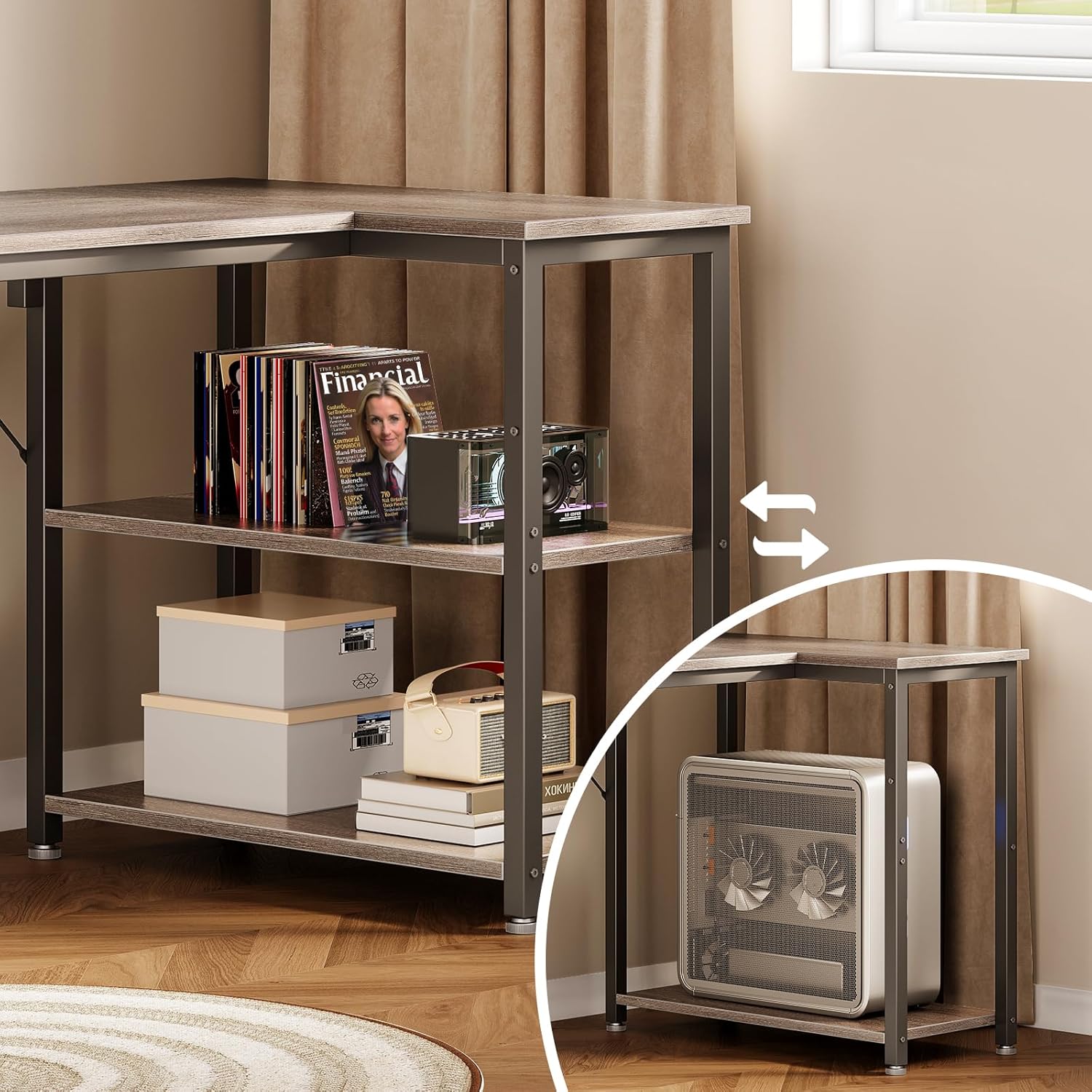
Image: Detail showing the reversible storage shelves, highlighting their flexible placement.

Image: Illustration of the removable middle shelf, allowing space for a computer tower.
Step 5: Final Tightening and Leveling
Once all parts are assembled, go back and fully tighten all screws. Adjust the leveling feet at the bottom of the desk legs to ensure the desk is stable and does not wobble on uneven floors.

Image: Detail showing the robust construction with reinforced steel frame and adjustable feet for stability.
5. Operating Instructions
Utilizing Reversible Shelves
The integrated storage shelves can be positioned on either the left or right side during assembly to best suit your room layout and personal preference. This flexibility allows for optimal space utilization in various settings.
Maximizing Desktop Space
The spacious L-shaped desktop provides ample room for multiple monitors, laptops, and other office essentials. The shelves below offer additional storage for books, files, or decorative items, helping to keep your workspace organized and clutter-free.
Adjusting Leveling Feet
The adjustable feet allow you to fine-tune the desk's height and stability on uneven floors. Rotate the feet clockwise to raise a corner and counter-clockwise to lower it until the desk is perfectly level and stable.
6. Maintenance
- Cleaning: Wipe the desk surface with a soft, damp cloth. Avoid using abrasive cleaners or harsh chemicals, as these can damage the finish.
- Spills: Clean up spills immediately to prevent staining or damage to the wood finish.
- Hardware Check: Periodically check all screws and bolts to ensure they remain tight. Re-tighten if necessary to maintain stability.
- Avoid Direct Sunlight: Prolonged exposure to direct sunlight can cause fading or discoloration of the desk surface.
7. Troubleshooting
- Desk Wobbles: Ensure all screws are fully tightened. Adjust the leveling feet on each leg until the desk is stable on the floor.
- Difficulty Assembling: Review the assembly instructions carefully. Ensure all parts are oriented correctly and that you are using the correct hardware for each step. Do not force parts together.
- Missing Parts: If any parts are missing from your package, please contact Coleshome customer support with your purchase details.
8. Specifications
| Brand | Coleshome |
| Model Number | cji-11 |
| Color | Grigio (Grey) |
| Product Dimensions | 100P x 70l x 75.7H cm (Depth x Width x Height) |
| Item Weight | 9.8 Kilograms |
| Special Feature | Desk with reversible storage shelves |
| Components Included | Libreria (Bookshelf/Storage Unit) |
| Assembly Required | Yes |
| Number of Internal Shelves | 2 |
9. Warranty and Support
For warranty information or customer support, please refer to the documentation included with your purchase or visit the official Coleshome website. If you have any questions or require assistance with your product, please contact our customer service team.