
1. Introduction
This manual provides detailed instructions for the KAIWEETS KC604 Digital Clamp Meter, KAIWEETS HT100s NCV Voltage Tester, and KAIWEETS HT118A Digital Multimeter. These instruments are designed for various electrical testing applications, offering accuracy and reliability for both professional and home use. Please read this manual thoroughly before operation to ensure safe and correct usage.
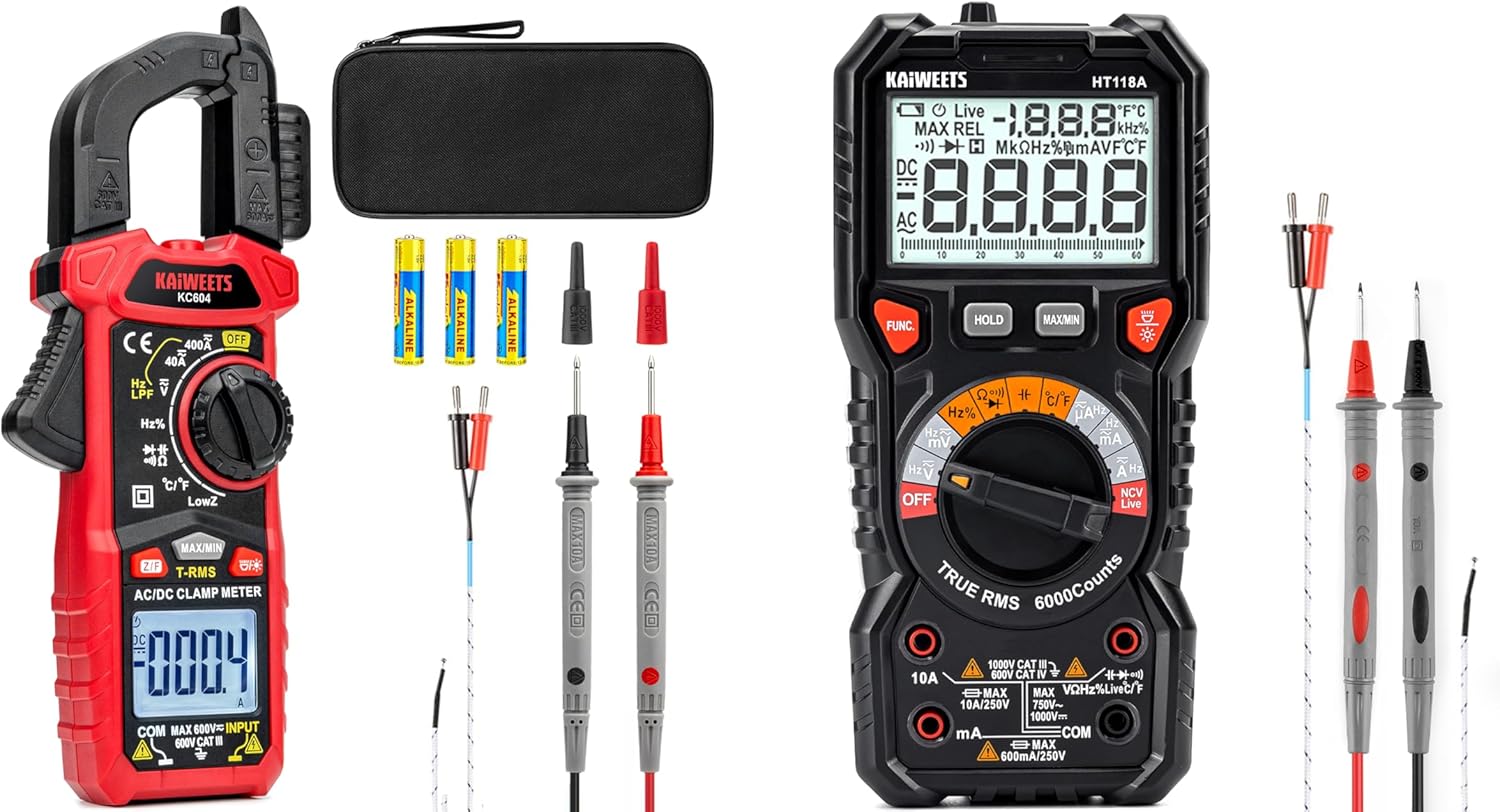
Figure 1.1: The KAIWEETS KC604 Digital Clamp Meter, HT100s NCV Voltage Tester, and HT118A Digital Multimeter shown with included accessories such as test leads, batteries, and a carrying case.
2. Safety Information
Always adhere to local and national safety codes. Use appropriate personal protective equipment (PPE) such as safety glasses and insulated gloves. Do not use the devices if they appear damaged or if the battery cover is not properly closed. Ensure test leads are in good condition before use.
- Do not exceed the maximum input values specified for each function.
- Exercise extreme caution when working with live circuits.
- Always disconnect power to the circuit before making resistance, capacitance, or diode measurements.
- Replace batteries when the low battery indicator appears to ensure accurate readings.
3. Setup
3.1 Battery Installation
All devices require batteries for operation. Refer to the specific device section for battery type and installation instructions.
- KC604 Clamp Meter: Open the battery compartment on the back and insert the specified batteries, observing polarity.
- HT100s Voltage Tester: Unscrew the cap at the end of the tester and insert the batteries, observing polarity.
- HT118A Digital Multimeter: Open the battery compartment on the back and insert the specified batteries, observing polarity.
3.2 Connecting Test Leads (KC604 & HT118A)
For measurements requiring test leads, insert the red test lead into the 'VÅmA' or 'VÅHz' jack and the black test lead into the 'COM' jack. Ensure a secure connection.

Figure 3.1: The KAIWEETS HT118A Digital Multimeter showing the correct connection of red and black test leads into their respective input jacks.
4. Operating Instructions
4.1 KAIWEETS KC604 Digital Clamp Meter
The KC604 is a True-RMS clamp meter capable of measuring AC/DC Current, AC/DC Voltage, Frequency, Resistance, Capacitance, Diode, Continuity, and Temperature. It features a D-shaped jaw for clamping around conductors and test lead storage.

Figure 4.1: The KAIWEETS KC604 Digital Clamp Meter, highlighting its robust design and included accessories like test leads and batteries.
- AC/DC Current Measurement: Rotate the dial to the 'A' (Ampere) function. Open the clamp jaw and enclose a single conductor. The display will show the current reading. Ensure only one conductor is within the clamp for accurate readings.
- Voltage, Resistance, Capacitance, etc.: Connect the test leads as described in Section 3.2. Rotate the dial to the desired function (e.g., 'V' for voltage, 'Å' for resistance). Apply the test probes to the circuit or component under test.
- True RMS: Provides accurate measurements for non-linear loads.

Figure 4.2: An electrician using the KAIWEETS KC604 Digital Clamp Meter to measure current on an electrical panel, demonstrating its practical application.

Figure 4.3: Close-up of the KAIWEETS KC604 Clamp Meter, illustrating its 1.1-inch D-shaped jaw for easy clamping and integrated test lead storage for convenience.
4.2 KAIWEETS HT100s NCV Voltage Tester
The HT100s detects both standard and low AC voltage without contact, providing a safer way to identify live wires.
- Voltage Detection: Power on the device. Bring the tip of the tester near the conductor. If AC voltage is present, the tester will emit an audible alarm and/or visual indication.
- Sensitivity Adjustment: Press the 'S' button to switch between standard (70-1000V AC) and low voltage (12-1000V AC) detection modes. Low voltage mode is suitable for identifying voltage in doorbells, thermostats, and irrigation wiring.
- NCV Sensor: The Non-Contact Voltage sensor automatically recognizes voltage and displays its intensity on a bar graph, providing a visual representation of the signal strength.
4.3 KAIWEETS HT118A Digital Multimeter
The HT118A is a 6000-count digital multimeter offering a wide range of measurement capabilities, including voltage, current, resistance, capacitance, frequency, duty-cycle, diode, and continuity tests.

Figure 4.4: The KAIWEETS HT118A Digital Multimeter, showcasing its LED lightning jacks that illuminate to guide correct probe placement for various measurements.
- Measurement Functions: Rotate the central dial to select the desired measurement function (e.g., DCV, ACV, DCA, ACA, Å, CAP, Hz).
- Auto-Ranging: The multimeter automatically selects the appropriate range for the measurement, simplifying operation.
- Backlit Screen: The 2.9-inch HTN backlit screen provides clear readings, even in low-light conditions. It features dual readings and an orange backlight that activates when voltage exceeds 80V or current exceeds 10A.
- LED Lightning Jacks: Flashing jacks help guide the user to place the test probes into the correct input terminals for the selected function.

Figure 4.5: A detailed view of the KAIWEETS HT118A Multimeter's 2.9-inch HTN backlit screen, displaying dual readings and the orange backlight feature for high voltage/current conditions.
5. Maintenance
5.1 Cleaning
Wipe the device casing with a damp cloth and mild detergent. Do not use abrasives or solvents. Ensure the device is powered off and disconnected from any circuits before cleaning.
5.2 Battery Replacement
Replace batteries promptly when the low battery indicator appears on the display. Refer to Section 3.1 for battery installation details. Always use the specified battery type.
5.3 Storage
When not in use, store the devices in a cool, dry place, away from direct sunlight and extreme temperatures. If storing for extended periods, remove the batteries to prevent leakage. The included case provides excellent protection.

Figure 5.1: The KAIWEETS HT118A Digital Multimeter neatly stored within its durable carrying case, designed for protection and organization of the device and its accessories.

Figure 5.2: The exterior of the KAIWEETS protective carrying case, made from high-quality EVA materials to offer crush-resistant, anti-shock, and water-resistant protection.
6. Troubleshooting
- No Display/Power: Check battery installation and ensure batteries are not depleted. Replace if necessary.
- Inaccurate Readings: Ensure test leads are properly connected and not damaged. Verify the correct function is selected. Check battery level.
- No NCV Detection (HT100s): Ensure the device is powered on. Check sensitivity settings.
- Clamp Meter Not Reading Current: Ensure only a single conductor is enclosed within the clamp jaw.
7. Specifications
7.1 KAIWEETS KC604 Digital Clamp Meter
- Display: 4000 Counts
- Measurement Type: True-RMS
- Functions: AC/DC Current, AC/DC Voltage, Frequency, Resistance, Capacitance, Diode, Continuity, Temperature
- Safety Rating: CAT III 600V
7.2 KAIWEETS HT100s NCV Voltage Tester
- Voltage Range: Standard (70-1000V AC), Low (12-1000V AC)
- Features: Adjustable sensitivity, NCV sensor with bar graph display
7.3 KAIWEETS HT118A Digital Multimeter
- Display: 6000 Counts, 2.9-inch HTN Backlit Screen
- Voltage Measurement: Up to 1000V DC, 750V AC
- Current Measurement: Up to 10A AC/DC
- Resistance Measurement: Up to 60M Ohms
- Other Functions: Temperature, Capacitance, Frequency, Duty-cycle, Wire On-Off, Diode, Continuity
- Features: Auto-ranging, LED Lightning Jacks
- Safety Rating: CAT III 1000V, CAT IV 600V
8. Warranty and Support
KAIWEETS provides a 36-Month after-sale service and lifetime technical support for these products. If you encounter any issues or have questions regarding the operation, maintenance, or specifications of your KAIWEETS KC604 Digital Clamp Meter, HT100s NCV Voltage Tester, or HT118A Digital Multimeter, please contact KAIWEETS customer support. Your satisfaction is important, and assistance is readily available.


