
1. Product Overview
The Wireless Bluetooth Lavalier Microphone Kit is designed for high-quality audio recording, offering a convenient and portable solution for various applications such as video recording, live streaming, online classes, and interviews. This kit features intelligent noise cancellation, stable 2.4GHz wireless transmission, and broad compatibility with Android, iPhone, cameras, and PCs.

Image 1.1: The complete Wireless Bluetooth Lavalier Microphone Kit, including two microphones, a USB-C receiver, and a Lightning receiver.
Package Contents:
- 2 x Wireless Microphones
- 1 x USB-C Receiver
- 1 x Lightning Receiver
- 2 x Windproof Foam Covers
- 1 x USB-C Charging Cable
- 1 x User Manual
2. Setup Guide
2.1 Charging the Microphones
Before initial use, ensure the microphones are fully charged. Connect the provided USB-C charging cable to the charging port on each microphone and to a standard USB power source. A full charge typically takes approximately 1.5 hours.
2.2 Connecting to Your Device
The microphone kit features a 'Plug and Play' design, requiring no additional apps or drivers for most compatible devices.
- For USB-C Devices (Android, PC): Insert the USB-C receiver directly into your device's USB-C port.
- For Lightning Devices (iPhone): Insert the Lightning receiver directly into your iPhone's Lightning port.
- Power On Microphones: Press and hold the power button on each microphone until the indicator light illuminates, indicating they are powered on and ready to pair. The microphones will automatically pair with the receiver.

Image 2.1: The microphone receiver connected to a smartphone, ready for use.
2.3 Attaching the Microphone
Each microphone features a built-in clip for easy attachment. Securely clip the microphone to your clothing, ideally near your mouth, for optimal audio capture. The included windproof foam covers can be placed over the microphone head to reduce wind noise in outdoor environments.
3. Operating Instructions
3.1 Recording Audio
Once the receiver is connected and the microphones are powered on and paired, open your preferred audio or video recording application on your device. The system will automatically recognize the external microphone. Begin recording as you normally would within the application.

Image 3.1: The microphone kit can be used for online classes, video recording, meetings, and live streaming.
3.2 Dual Microphone Use
The kit includes two microphones, allowing for simultaneous recording from two sources. Simply connect the receiver to your device and power on both microphones. Both microphones will transmit audio to the single receiver.

Image 3.2: The kit supports both single and dual microphone operation.
3.3 Key Features
- 2.4GHz Wireless Transmission: Provides stable and interference-free audio transmission up to 20 meters.
- Intelligent Noise Cancellation: Reduces ambient noise, ensuring clear voice capture even in noisy environments.
- Omnidirectional Audio Pickup: Captures sound from all directions, suitable for interviews and group recordings.
- Long Battery Life: Up to 6 hours of continuous use on a single charge.
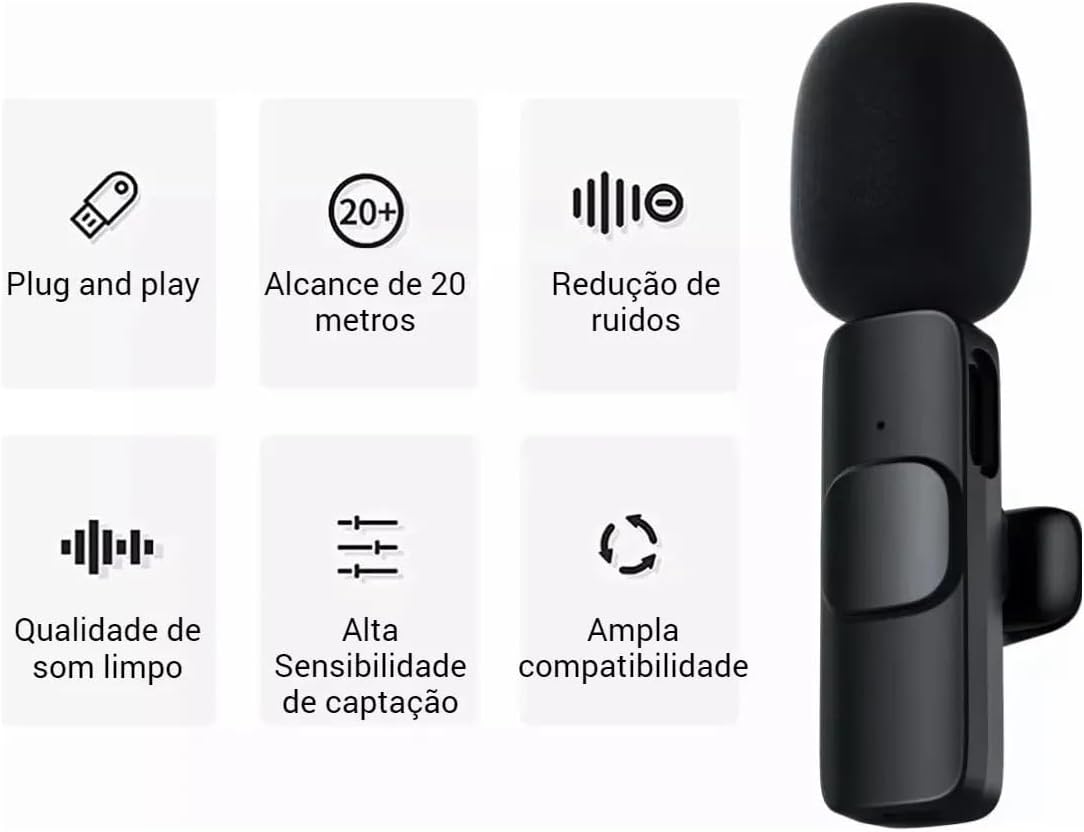
Image 3.3: Visual representation of the microphone's key features: Plug and Play, 20-meter range, noise reduction, clean sound quality, high sensitivity, and wide compatibility.
4. Maintenance and Care
To ensure the longevity and optimal performance of your microphone kit, follow these maintenance guidelines:
- Cleaning: Use a soft, dry cloth to clean the microphones and receivers. Avoid using harsh chemicals or abrasive materials.
- Storage: Store the kit in a cool, dry place away from direct sunlight and extreme temperatures.
- Battery Care: Recharge the microphones regularly, even if not in frequent use, to maintain battery health. Avoid fully depleting the battery for extended periods.
- Windproof Foam Covers: Periodically check and clean the foam covers. Replace them if they become damaged or worn to maintain effective wind noise reduction.
- Handle with Care: The microphones are lightweight and compact. Avoid dropping them or subjecting them to strong impacts.
5. Troubleshooting
If you encounter issues with your microphone kit, refer to the following common problems and solutions:
5.1 No Sound or Low Volume
- Check Connection: Ensure the receiver is fully inserted into your device's port.
- Microphone Power: Verify that the microphones are powered on and their indicator lights are active.
- Battery Level: Charge the microphones fully. Low battery can affect performance.
- Device Settings: Check your device's audio input settings to ensure the external microphone is selected. Adjust the volume levels on your recording application or device.
- Application Compatibility: While generally plug-and-play, some specific applications might require manual selection of the audio input device.
5.2 Connection Issues
- Re-pair: Turn off both the microphones and the receiver, then turn them back on to re-establish the connection.
- Device Restart: Restart your smartphone, camera, or PC.
- Interference: Move away from other 2.4GHz wireless devices (e.g., Wi-Fi routers, other wireless microphones) that might cause interference.
- Compatibility: Ensure your device's USB-C or Lightning port is fully functional and compatible with external audio input. Note that some specific phone models, like certain Samsung S series, might have unique compatibility requirements.
5.3 Unwanted Noise or Distortion
- Wind Noise: Ensure the windproof foam covers are properly installed, especially in outdoor or windy conditions.
- Proximity: Ensure the microphone is not too close to the sound source, which can cause distortion. Maintain an appropriate distance.
- Environmental Noise: While the microphone has noise cancellation, extreme background noise may still be audible. Try to record in quieter environments when possible.
- Cable Check: Ensure the charging cable is not connected during recording, as it is for charging only.
6. Specifications
| Model | 001 |
| Color | Black |
| Microphone Form Factor | Lavalier |
| Connectivity Technology | 2.4GHz Wireless, Auxiliary |
| Connector Type | USB Type-C, Lightning |
| Audio Pickup Pattern | Omnidirectional |
| Wireless Range | Up to 20 meters |
| Battery Life | Up to 6 hours |
| Charging Time | Approx. 1.5 hours via USB-C |
| Power Source | Electrical Power (Rechargeable Battery) |
| Material | Plastic |
| Product Weight | 11 Grams |
| Item Dimensions (L x W x H) | 7 x 6 x 6 centimeters |
| Hardware Platform Compatibility | Camera, PC, Smartphone (Android, iPhone) |
| Special Features | Volume Control, Intelligent Noise Cancellation |
7. Warranty and Support
7.1 Manufacturer's Warranty
This product comes with a manufacturer's warranty of 30 days from the date of purchase. This warranty covers manufacturing defects and malfunctions under normal use. Please retain your proof of purchase for warranty claims.
7.2 Extended Protection Plans
Extended protection plans may be available for purchase separately, offering coverage against failures and defects for 12 or 24 months beyond the manufacturer's warranty period. Please refer to the specific terms and conditions of these plans for details.
7.3 Customer Support
For further assistance, technical support, or warranty inquiries, please contact your retailer or the manufacturer's customer service department. Refer to the product packaging or purchase documentation for contact information.


