
1. Introduction
This manual provides essential information for the safe operation, maintenance, and troubleshooting of your DEWALT DXGNI2500 2,500-Watt Portable Inverter Generator. Please read this manual thoroughly before operating the generator to ensure proper use and to prevent injury or damage.
The DEWALT DXGNI2500 is a gas-powered portable inverter generator designed for various applications, including home backup, RV use, camping, and jobsite power. It features a 98cc OHV engine, clean inverter technology for sensitive electronics, and an integrated CO-Protect system for enhanced safety.
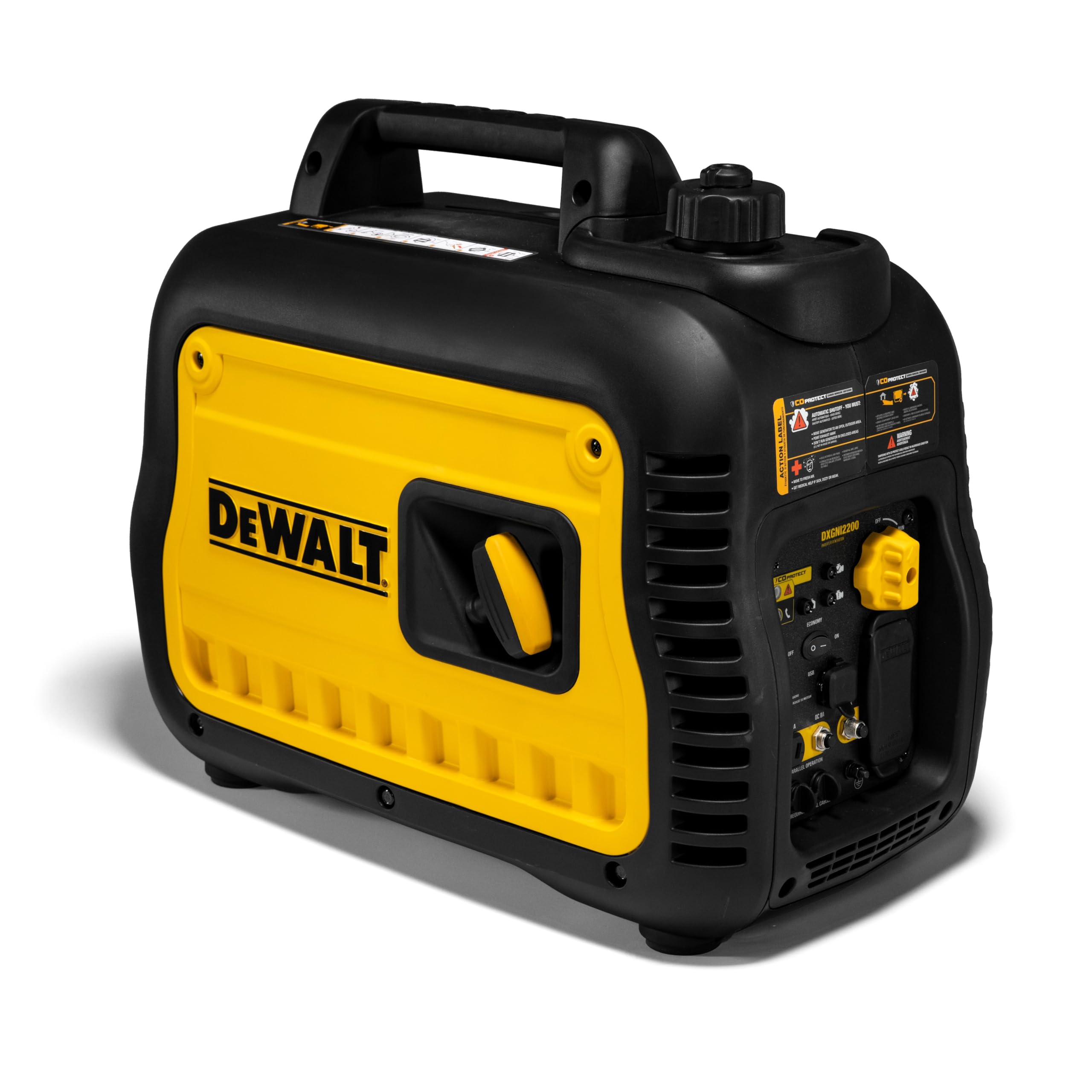
Front view of the DEWALT DXGNI2500 portable inverter generator, showcasing its compact design and yellow and black casing.
2. Safety Information
WARNING: Read and understand all safety warnings and instructions before operating this generator. Failure to follow these warnings may result in serious injury or death.
- Carbon Monoxide Hazard: Generators produce carbon monoxide (CO), an odorless, colorless, poisonous gas. Operating a generator indoors or in partially enclosed spaces can kill you in minutes. ALWAYS operate the generator outdoors in a well-ventilated area, far away from windows, doors, and vents.
- CO-Protect Technology: This generator is equipped with DEWALT's CO-Protect Technology, which automatically shuts down the generator if dangerous carbon monoxide levels are detected. Do not bypass or disable this safety feature.
- Electrical Shock Hazard: Never operate the generator in wet conditions. Ensure all electrical connections are dry and properly grounded. Do not touch the generator with wet hands.
- Fire Hazard: Gasoline is highly flammable. Refuel in a well-ventilated area with the engine off and cool. Do not smoke or allow open flames near the generator or fuel. Store fuel in approved containers.
- Hot Surfaces: The generator's engine and muffler become very hot during operation and remain hot for a period after shutdown. Avoid contact to prevent burns.
- Moving Parts: Keep hands, feet, and clothing away from moving parts to prevent injury.
- Children and Pets: Keep children and pets away from the generator at all times.
3. Package Contents
Verify that all items listed below are included in your package. If any items are missing or damaged, contact DEWALT customer service.
- DEWALT DXGNI2500 Portable Inverter Generator
- Owner's Manual
- Engine Oil (initial fill)
- Spark Plug Wrench
- Funnel
4. Product Features and Components
Familiarize yourself with the key features and components of your DEWALT DXGNI2500 generator.
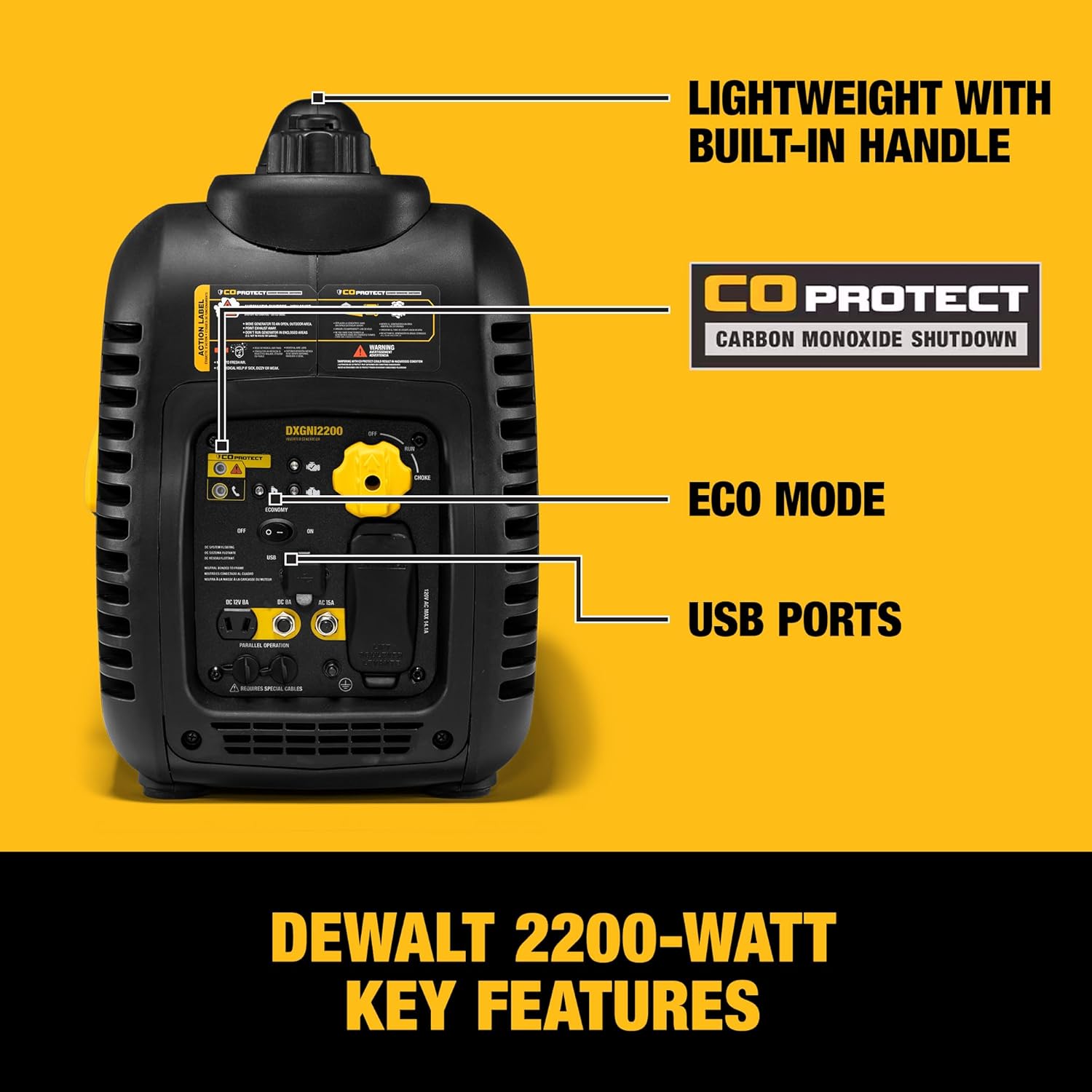
A detailed view of the DEWALT generator's control panel and features, pointing out the lightweight built-in handle, CO Protect system, Economy mode switch, and USB charging ports.
- 98cc OHV Engine: Provides reliable power for various applications.
- CO-Protect Technology: Automatically shuts down the generator if carbon monoxide levels become unsafe.
- Clean Inverter Power: Delivers stable power suitable for sensitive electronics.
- Economy Mode: Reduces fuel consumption and noise levels during lighter loads.
- Integrated Handle: For easy portability and transport.
- Covered Outlets: Protects electrical connections from dust, debris, and moisture.
- USB Ports: For charging small electronic devices.

An image highlighting the DEWALT inverter generator's features, including its quiet operation, 11-hour runtime at 25% load, and CO Protect carbon monoxide shutdown technology.

A set of four icons depicting key operational features: recoil start mechanism, engine status indicator, integrated carrying handle, and a standard power outlet.
5. Setup and Initial Preparation
5.1 Unpacking
Carefully remove the generator and all components from the packaging. Inspect for any shipping damage. Retain packaging for future storage or transport.
5.2 Adding Engine Oil
- Place the generator on a level surface.
- Locate the oil fill cap/dipstick.
- Remove the cap and, using the provided funnel, slowly add the recommended engine oil (SAE 10W-30 is typically recommended for general use) until it reaches the upper mark on the dipstick. Do not overfill.
- Securely replace the oil fill cap.
5.3 Adding Fuel
WARNING: Use fresh, unleaded gasoline with an octane rating of 87 or higher. Do not use E85 or any other fuel containing more than 10% ethanol. Never refuel while the engine is running or hot.
- Ensure the generator is turned OFF and has cooled down.
- Locate the fuel cap on top of the generator.
- Unscrew the fuel cap and slowly add gasoline to the fuel tank, being careful not to overfill. Leave a small air gap to allow for fuel expansion. The tank capacity is 1 gallon.
- Securely replace the fuel cap. Wipe up any spilled fuel immediately.
6. Operating Instructions
6.1 Starting the Generator
Ensure the generator is placed outdoors in a well-ventilated area, away from any openings to buildings.
- Ensure the fuel valve is in the "ON" position.
- Move the engine switch to the "ON" position.
- If the engine is cold, move the choke lever to the "CHOKE" position.
- Firmly grasp the recoil starter handle and pull it slowly until resistance is felt, then pull quickly and smoothly to start the engine. Repeat if necessary.
- Once the engine starts, slowly move the choke lever back to the "RUN" position.
- Allow the generator to run for a few minutes to warm up before connecting electrical devices.
6.2 Connecting Electrical Devices
Connect your electrical devices to the appropriate outlets on the generator. Ensure the total wattage of connected devices does not exceed the generator's running wattage (2200 Watts).

A graphic illustrating typical wattage requirements for common appliances like power tools, TVs, lights, coffee makers, slow cookers, and cell phones, to help determine generator sizing.
- Always use heavy-duty, outdoor-rated extension cords.
- Do not overload the generator.
- For sensitive electronics, ensure the generator is running smoothly before connecting.
6.3 Using Economy Mode
The Economy mode switch is located on the control panel. When activated, it automatically adjusts engine speed to match the load, reducing fuel consumption and noise levels. This mode is ideal for lighter loads or when extended runtime is desired.
- To activate: Flip the Economy mode switch to "ON".
- To deactivate: Flip the Economy mode switch to "OFF" for full power output.
6.4 Stopping the Generator
- Disconnect all electrical loads from the generator.
- Allow the generator to run for a few minutes without load to cool down.
- Move the engine switch to the "OFF" position.
- Turn the fuel valve to the "OFF" position.
7. Maintenance
Regular maintenance is crucial for the longevity and safe operation of your generator. Always perform maintenance with the engine OFF and cool, and disconnect the spark plug wire to prevent accidental starting.
7.1 Maintenance Schedule
| Service Item | Frequency |
|---|---|
| Check Engine Oil Level | Before each use |
| Change Engine Oil | First 20 hours, then every 50 hours or annually |
| Clean Air Filter | Every 50 hours or every 3 months |
| Inspect Spark Plug | Every 100 hours or every 6 months |
| Clean Fuel Filter | Annually or as needed |
7.2 Engine Oil Change
- Run the engine for a few minutes to warm the oil, then shut it off.
- Place a drain pan beneath the oil drain plug.
- Remove the oil drain plug and oil fill cap to allow oil to drain completely.
- Replace the drain plug and refill with the recommended amount and type of new engine oil.
- Replace the oil fill cap.
7.3 Air Filter Cleaning
- Remove the air filter cover.
- Remove the foam air filter element.
- Wash the element in warm, soapy water, rinse thoroughly, and allow to air dry completely.
- Lightly oil the foam element with engine oil, then squeeze out excess oil.
- Reinstall the air filter element and cover.
7.4 Storage
For long-term storage (over 30 days), prepare the generator as follows:
- Drain the fuel tank or add a fuel stabilizer according to the product instructions. Run the engine until it stops from lack of fuel if draining.
- Change the engine oil.
- Clean the exterior of the generator.
- Store in a clean, dry, well-ventilated area, away from ignition sources.
8. Troubleshooting
This section provides solutions to common operational issues. For problems not listed here, contact DEWALT customer service.
| Problem | Possible Cause | Solution |
|---|---|---|
| Engine will not start | No fuel Low oil level Choke not set correctly Spark plug issue | Add fresh fuel Add engine oil Adjust choke lever Inspect/clean/replace spark plug |
| No power output | Overload Circuit breaker tripped Economy mode active (for high loads) | Reduce load Reset circuit breaker Turn Economy mode OFF |
| Engine runs rough | Stale fuel Dirty air filter Spark plug issue | Drain and refill with fresh fuel Clean/replace air filter Inspect/clean/replace spark plug |
| Generator shuts down unexpectedly | Low oil shutdown CO-Protect activation Overload | Check oil level Move to well-ventilated area, check for CO sources Reduce load |
9. Specifications
| Specification | Value |
|---|---|
| Model | DXGNI2500 (PMC222500.03) |
| Starting Wattage | 2500 Watts |
| Running Wattage | 2200 Watts |
| Engine Type | 98cc OHV |
| Fuel Type | Gasoline |
| Fuel Tank Capacity | 1 Gallon |
| Runtime (25% Load) | Up to 8 hours |
| Voltage | 120 Volts |
| Item Weight | 58 Pounds |
| Product Dimensions (L x W x H) | 21.3" x 10.8" x 17.7" |
| Special Features | Automatic Shut Down, CO Sensor, Hour Meter |

An image showing the physical dimensions (21.5 in. L x 13 in. W x 19 in. H) and weight (52.5 lbs) of the DEWALT portable inverter generator.
10. Warranty and Support
10.1 Limited Warranty
The DEWALT DXGNI2500 Portable Inverter Generator comes with a 3-Year Limited Warranty. This warranty covers defects in material or workmanship. Please refer to the warranty card included with your product for full terms and conditions, or visit the official DEWALT website for detailed warranty information.
10.2 Customer Support
For technical assistance, replacement parts, or warranty claims, please contact DEWALT customer support:
- Website: www.dewalt.com/support
- Phone: Refer to your local DEWALT service center contact information (usually found in the included owner's manual or on the website).
When contacting support, please have your generator's model number (DXGNI2500) and serial number ready.


