
bemi KIX-M
bemi Smartwatch Fitness Tracker User Manual
Model: KIX-M (B0FCYD6VV2)
Introduction
This manual provides detailed instructions for the setup, operation, and maintenance of your bemi Smartwatch Fitness Tracker. Please read this manual thoroughly before using the device to ensure proper functionality and to maximize your user experience.
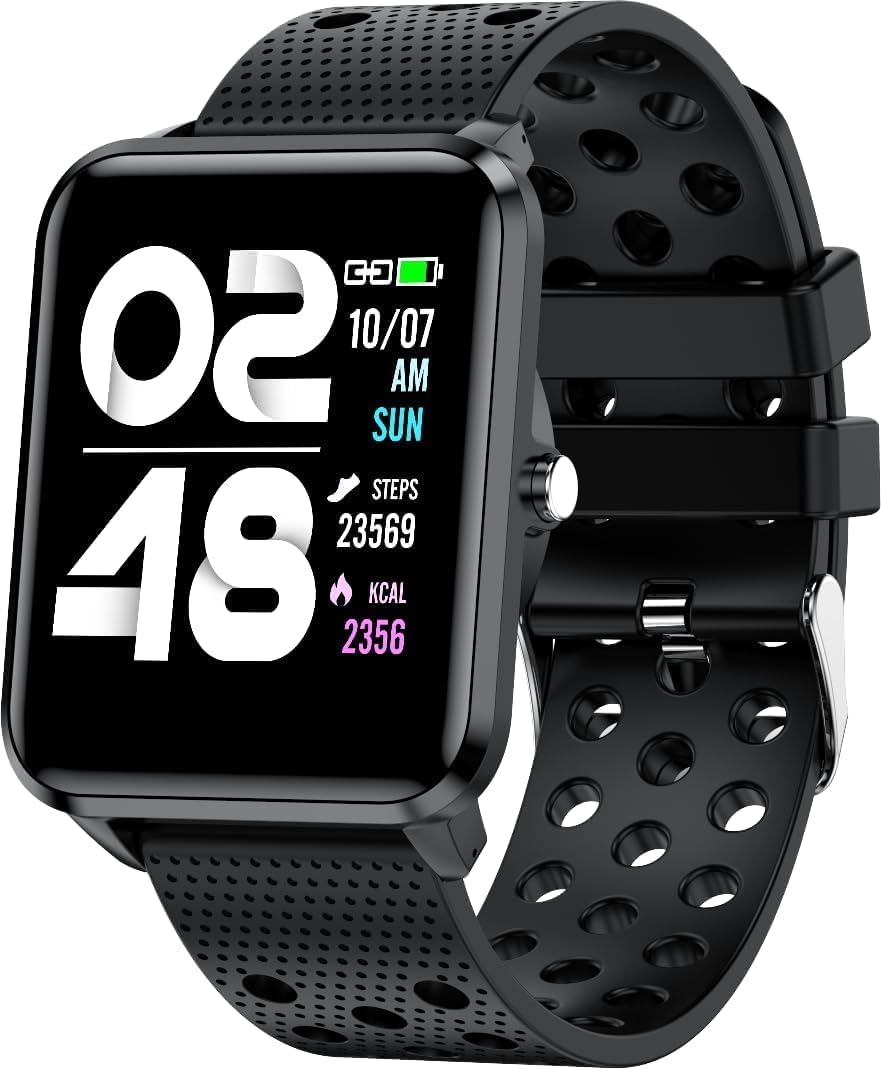
Image: Front view of the bemi Smartwatch, showing the digital display with time, date, steps, and calories burned. The watch has a black perforated silicone band.
What's in the Box
- Kix-m Smartwatch
- USB Cable (Charging Cable)
- User manual
- Gift Box
Setup
1. Charging the Smartwatch
Before first use, fully charge your smartwatch. Connect the provided USB charging cable to the magnetic charging points on the back of the watch and to a USB power source. The watch display will indicate charging status.

Image: Rear view of the bemi Smartwatch, highlighting the magnetic charging contacts and the optical heart rate sensor.
2. Installing the Companion App
The smartwatch operates with the "H Band" application. Download the app from the App Store (for iOS devices) or Google Play Store (for Android devices).
- Search for "H Band" in your device's app store.
- Download and install the application.
- Ensure your smartphone's Bluetooth is enabled.
3. Pairing the Smartwatch with Your Phone
- Open the "H Band" app on your smartphone.
- Follow the on-screen prompts to create an account or log in.
- Navigate to the device pairing section within the app.
- Select your bemi Smartwatch from the list of available devices. The app will guide you through the pairing process.
- Confirm the pairing request on both your phone and the smartwatch if prompted.
Note: The smartwatch is compatible with Android (4.4 or newer) and iOS (8.0 or newer) operating systems.
Operating Instructions
Basic Navigation
- Touchscreen: Swipe left/right, up/down to navigate through menus and features. Tap to select.
- Side Button: Press to wake the screen, return to the home screen, or confirm selections.
Key Features and Functions
Customizable Watch Faces
Choose from 24 clock faces available in the "H Band" application. You can also set a photo from your phone as the watch face.

Image: The smartwatch screen showing different digital and analog watch face designs, indicating customization options available through the app.
Activity Tracking
The smartwatch monitors your steps, distance, and calories burned. All activity data is recorded and can be viewed in the "H Band" app.

Image: A person running outdoors with the bemi Smartwatch visible on their wrist, showing the step tracking interface with current steps, distance, and calories.
Heart Rate and Blood Oxygen Monitoring
The watch provides 24-hour monitoring of pulse and blood oxygen levels. View real-time data on the watch or detailed historical data in the app.

Image: A close-up of the smartwatch screen showing heart rate (BPM) and blood pressure (mmHg) readings with a graph of historical data.
Sleep Monitoring
Track your sleep patterns, including deep sleep, light sleep, and awake times. The app provides detailed analysis of your sleep quality.

Image: The "H Band" app interface displaying sleep quality data, including total sleep duration, deep sleep, light sleep, and awake times, with a corresponding graph.
Music Playback
The KIX-M features a built-in audio player with 512MB of internal memory. You can store music directly on the watch and connect Bluetooth headphones or speakers for wireless listening.

Image: The bemi Smartwatch showing its music player interface with play/pause and skip controls, alongside a pair of wireless earbuds, demonstrating its audio capabilities.
Notifications
Receive notifications for calls, messages, and various applications directly on your smartwatch. Configure notification settings within the "H Band" app.

Image: The smartwatch screen showing an incoming message notification, with icons for various social media and communication apps like SMS, Twitter, WeChat, Skype, YouTube, Facebook, Google+, Instagram, and LinkedIn.
Other Smart Features
- 10 Sport Modes: Track specific workouts like running, cycling, and more.
- Movement Reminder: Get alerts to move if you've been sedentary for too long.
- Special Mode for Women: Track menstrual cycles and ovulation.
- Camera Control: Remotely control your phone's camera.
- Alarm: Set alarms directly from the watch or app.
- Stopwatch & Timer: Basic timekeeping functions.
- Find Phone: Locate your paired smartphone.
- GPS Position Tracking: Requires carrying your phone with you for GPS data.

Image: The "H Band" app interface displaying the female health tracking calendar, allowing users to log menstrual periods and predict ovulation.
Maintenance
Cleaning Your Smartwatch
Regularly clean your smartwatch and band to prevent skin irritation and maintain device performance.
- Wipe the watch screen and body with a soft, lint-free cloth.
- For stubborn spots, dampen the cloth slightly with water. Avoid using harsh chemicals or abrasive materials.
- Clean the charging contacts periodically to ensure good connection.
Water Resistance (IP68)
The smartwatch is IP68 waterproof, meaning it is resistant to dust and can withstand immersion in water up to 1.5 meters for up to 30 minutes. It is suitable for daily use, hand washing, and light rain. Avoid hot water, steam, or prolonged immersion in water, especially saltwater.

Image: The bemi Smartwatch with water splashing over its screen and band, illustrating its IP68 water resistance rating.
Battery Care
- Charge the battery fully before first use.
- Avoid completely draining the battery frequently.
- Store the device in a cool, dry place if not used for extended periods.
Troubleshooting
| Problem | Possible Cause | Solution |
|---|---|---|
| Watch not turning on | Low battery | Charge the watch for at least 30 minutes. |
| Cannot pair with phone | Bluetooth off, app not open, watch not discoverable, phone OS not compatible | Ensure Bluetooth is on. Open "H Band" app. Restart watch and phone. Check OS compatibility (Android 4.4+/iOS 8.0+). |
| Inaccurate health data (HR, SpO2) | Improper fit, sensor obstruction, movement during measurement | Ensure watch is snug but comfortable on wrist. Clean sensor. Remain still during measurement. |
| Notifications not received | App permissions, notification settings, Bluetooth disconnected | Check app permissions for notifications. Verify notification settings in "H Band" app. Ensure watch is connected via Bluetooth. |
| Screen unresponsive | Software glitch, low battery | Restart the watch (if possible). Charge the watch. |
Specifications
| Feature | Detail |
|---|---|
| Model | KIX-M |
| Screen Size | 1.5 Inches |
| Display Type | Touchscreen |
| Water Resistance | IP68 |
| Connectivity | Bluetooth (Dual Bluetooth module) |
| Internal Memory | 512 MB (for music storage) |
| Battery Capacity | 200 Milliamp Hours (mAh) |
| Operating System | ROTS |
| Compatible OS | Android 4.4+ / iOS 8.0+ |
| Sensors | Heart Rate Monitor, Blood Oxygen Sensor, Accelerometer |
| Features | Activity Tracker, Sleep Tracking, Pedometer, Calorie Tracker, Music Player, Notifications, Gesture Control, 10 Sport Modes, Female Health Tracking, Camera Control, Alarm, Stopwatch, Timer, Find Phone, GPS via Smartphone |
| Item Weight | 4.4 ounces |
| Dimensions | 5.35 x 2.64 x 2.44 inches (Package Dimensions) |
Warranty and Support
For warranty information and technical support, please refer to the contact details provided with your purchase or visit the official bemi website. Keep your proof of purchase for any warranty claims.
Note: The manufacturer is Minrek.
Related documentsKIX-M


Ask a question about this manual
Ask about setup, troubleshooting, compatibility, parts, safety, or missing instructions. Manuals+ will review the question and use this page’s manual context to help answer it.