
1. Product Overview
The SINWE P16 is a professional-grade wireless Bluetooth 5.3 XLR receiver designed to integrate seamlessly with audio mixers, PA systems, and DJ equipment. It delivers high-definition 24bit/48kHz audio, offering exceptional clarity and a stable wireless connection over long distances. Its compact design and long battery life make it ideal for various live sound applications.

Figure 1: SINWE P16 Wireless Bluetooth 5.3 XLR Receiver. This image shows the compact black receiver with its XLR connector, power button, and indicator lights.
2. Package Contents
- SINWE P16 Wireless Bluetooth 5.3 XLR Receiver
- USB-C Charging Cable
- User Manual (this document)
3. Setup
3.1 Charging the Device
Before first use, fully charge the P16 receiver. Connect the provided USB-C charging cable to the USB-C port on the side of the receiver and plug the other end into a standard USB power adapter (not included). The charging indicator light will show the charging status and turn off when fully charged. A full charge takes approximately 2 hours.

Figure 2: The SINWE P16 receiver connected to a USB-C charging cable, illustrating the charging process and highlighting its 500mAh battery capacity.
3.2 Connecting to Audio Equipment
The P16 receiver features a male XLR connector for direct plug-and-play integration with professional audio equipment. Simply plug the P16 into an available XLR input on your mixer, active speaker, or PA system.
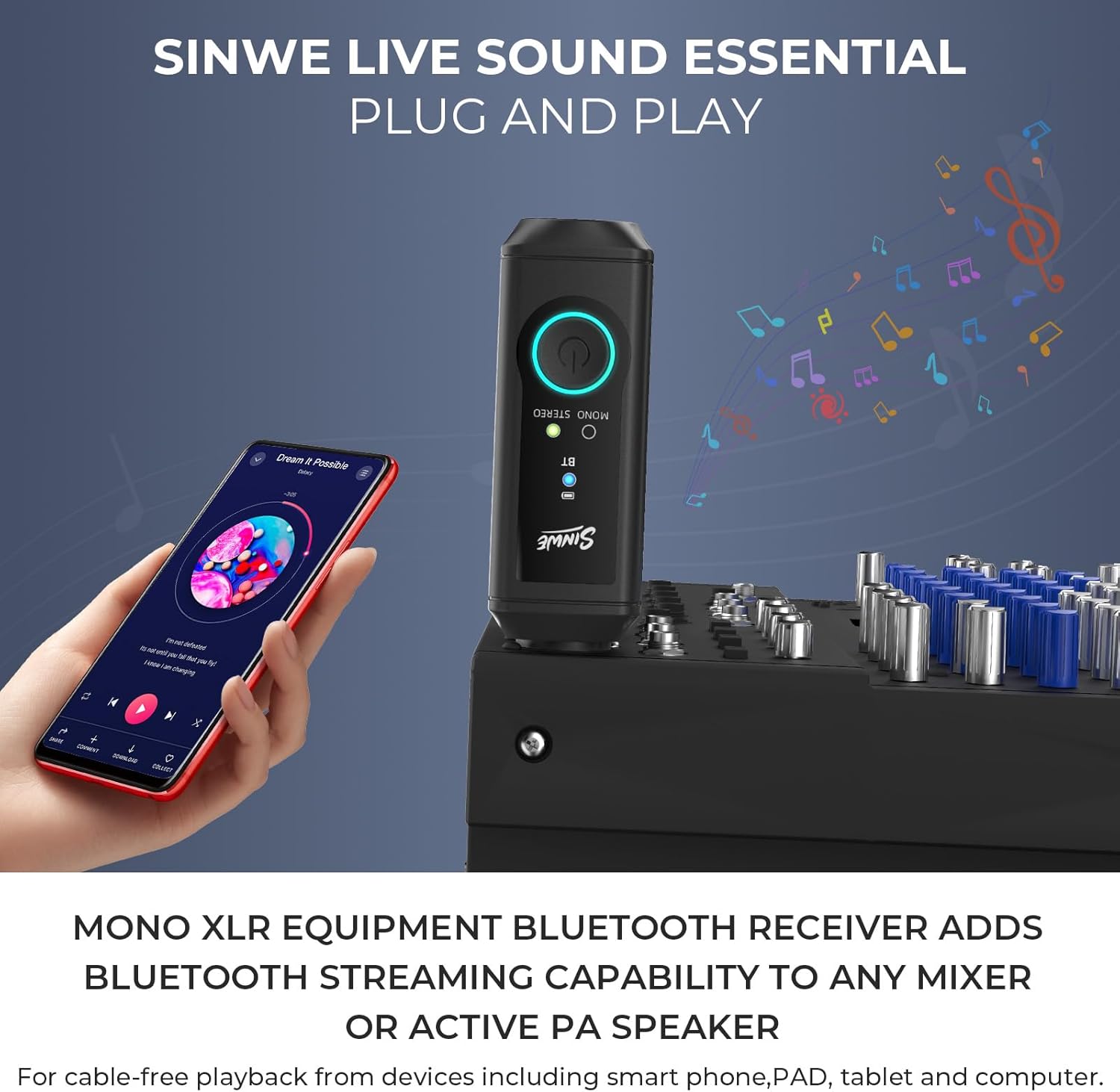
Figure 3: The SINWE P16 receiver plugged into an audio mixer, demonstrating its direct XLR integration for live sound applications.
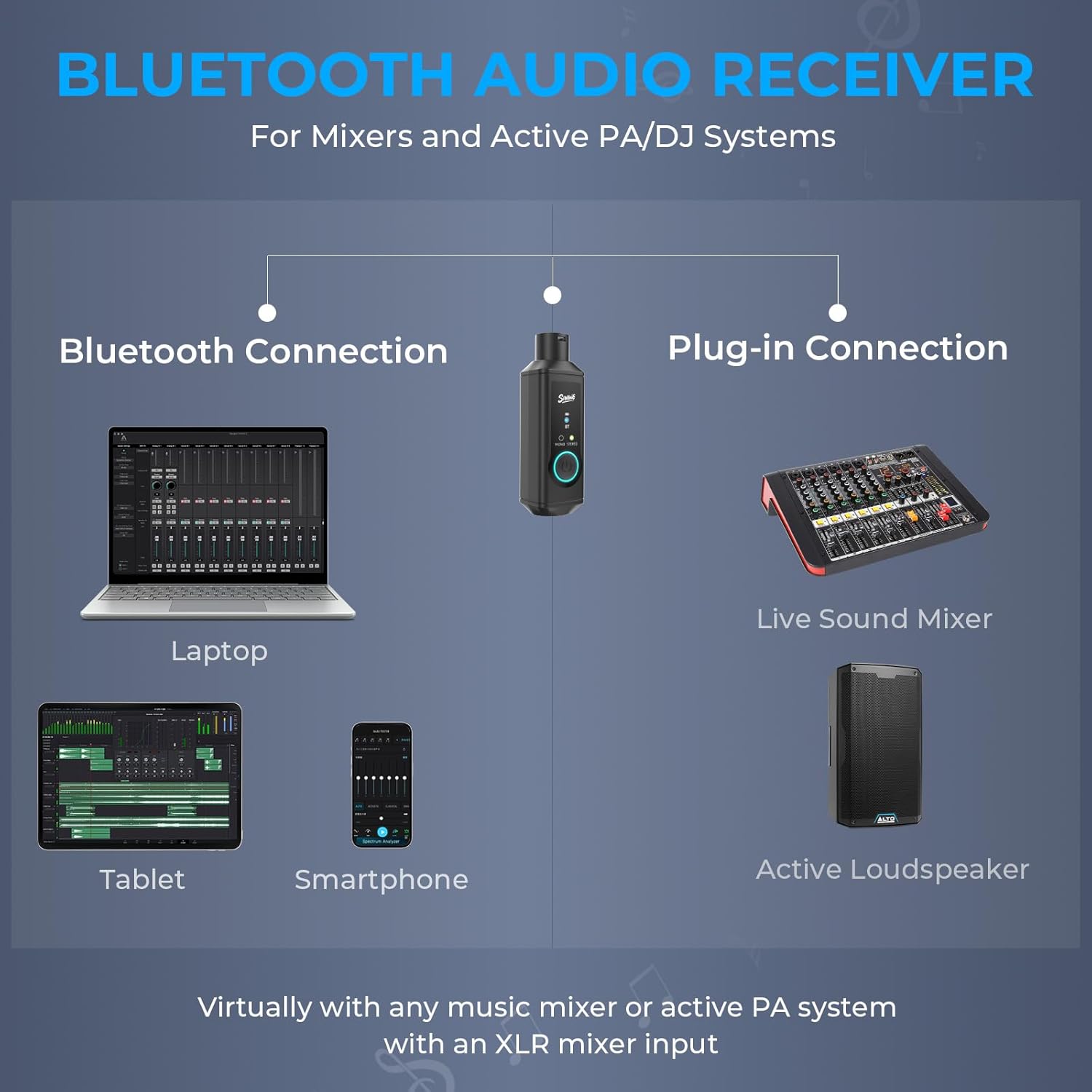
Figure 4: Diagram illustrating the various devices that can connect to the SINWE P16, including laptops, tablets, and smartphones via Bluetooth, and its connection to live sound mixers and active loudspeakers via XLR.
4. Operating Instructions
4.1 Powering On/Off
Press and hold the power button on the P16 for 3 seconds to power it on or off. The indicator lights will illuminate upon power-on.
4.2 Bluetooth Pairing
- Ensure the P16 is powered on. The Bluetooth indicator light will flash, indicating it is in pairing mode.
- On your audio source device (smartphone, tablet, laptop), enable Bluetooth and search for available devices.
- Select "SINWE P16" from the list of devices.
- Once connected, the Bluetooth indicator light on the P16 will remain solid. The device will auto-reconnect to the last paired device upon startup.
4.3 Mono/Stereo TWS Pairing (for two P16 units)
The P16 supports True Wireless Stereo (TWS) pairing, allowing two P16 units to function as a stereo pair. This is ideal for achieving a wider soundstage or accommodating larger setups without extensive wiring.
- Ensure both P16 units are powered on and not connected to any other Bluetooth device.
- On one P16 unit (this will be your primary unit), double-press the power button. The indicator lights will flash rapidly, indicating TWS pairing mode.
- Within 10 seconds, double-press the power button on the second P16 unit.
- The two units will automatically pair with each other. Once paired, the primary unit's stereo indicator will light up, and the secondary unit's mono indicator will light up.
- Now, connect your audio source device to the primary P16 unit via Bluetooth as described in Section 4.2. Audio will be streamed in stereo across both P16 units.

Figure 5: Two SINWE P16 units connected to an audio mixer, demonstrating the TWS stereo pairing capability for enhanced audio output.
4.4 Bluetooth Range and Performance
The P16 utilizes Bluetooth 5.3 technology, providing an ultra-low latency connection of less than 4ms and an impressive open-field range of up to 160 feet (50 meters). This ensures stable and lag-free audio transmission, even in demanding environments.

Figure 6: Visual representation of the SINWE P16's ultra-long Bluetooth range, showing a maximum coverage of 160 feet in an open environment.
5. Maintenance
5.1 Cleaning
To clean the device, use a soft, dry cloth. Do not use liquid cleaners or aerosols, as they may damage the device.
5.2 Battery Care
The P16 contains a built-in 500mAh military-grade lithium battery. To prolong battery life:
- Avoid exposing the device to extreme temperatures.
- Charge the device regularly, even if not in frequent use.
- Do not attempt to replace the battery yourself. Contact support if battery issues arise.
6. Troubleshooting
6.1 No Audio Output
- Ensure the P16 is properly plugged into the XLR input of your audio equipment.
- Verify that the P16 is powered on and successfully paired with your audio source device (Bluetooth indicator solid).
- Check the volume levels on both your audio source device and the connected audio equipment.
- Ensure the P16 battery is charged.
6.2 Bluetooth Disconnections or Poor Range
- Ensure there are no significant physical obstructions (walls, large metal objects) between the P16 and your audio source device.
- Reduce the distance between the P16 and your audio source device.
- Minimize interference from other wireless devices (Wi-Fi routers, other Bluetooth devices) by moving them further away.
- Re-pair the P16 with your audio source device.
6.3 Unable to Pair Two P16 Units for Stereo
- Ensure both P16 units are fully charged.
- Make sure both units are not already connected to any other Bluetooth device before attempting TWS pairing.
- Follow the TWS pairing steps precisely as described in Section 4.3.
- Try powering both units off and on again before attempting TWS pairing.
7. Specifications
| Feature | Specification |
|---|---|
| Model Number | P16 |
| Bluetooth Version | 5.3 |
| Audio Output | XLR Balanced |
| DAC Resolution | 24bit/48kHz |
| Frequency Response | 20Hz-20kHz |
| Latency | <4ms |
| Wireless Range | Up to 160ft (50m) in open field |
| Battery Type | 500mAh Military-Grade Lithium Battery |
| Battery Life | Up to 15 hours (actual usage may vary) |
| Charging Port | USB-C |
| Charging Time | Approx. 2 hours |
| Dimensions | 5.04 x 3.15 x 1.57 inches |
| Weight | 3.52 ounces |
| Material | Acrylonitrile Butadiene Styrene (ABS) |
8. Safety Information
- Do not expose the device to extreme temperatures (above 45°C or below 0°C).
- Keep the device away from water or other liquids.
- Avoid dropping or subjecting the device to severe impacts.
- Do not attempt to disassemble or modify the device. This will void the warranty and may cause damage.
- Handle the rechargeable battery with care to prevent damage or leakage.
- Dispose of the device and its battery responsibly according to local regulations.
9. Warranty and Support
9.1 Warranty Information
Specific warranty details are typically provided with your purchase documentation or on the product packaging. Please refer to those materials for information regarding warranty duration and terms. For general warranty inquiries, please contact SINWE customer support.
9.2 Customer Support
For technical assistance, troubleshooting not covered in this manual, or other inquiries, please contact SINWE customer support through the retailer's platform or the official SINWE website. Please have your product model (P16) and purchase details ready when contacting support.