
1. Introduction
This manual provides comprehensive instructions for the installation, operation, and maintenance of your UNITOPSCI 10.1-inch Android Car Stereo. This unit is specifically designed for Honda Accord 9th Generation 2.0L models manufactured between 2013 and 2017. Please read this manual thoroughly before using the product to ensure proper functionality and safety.
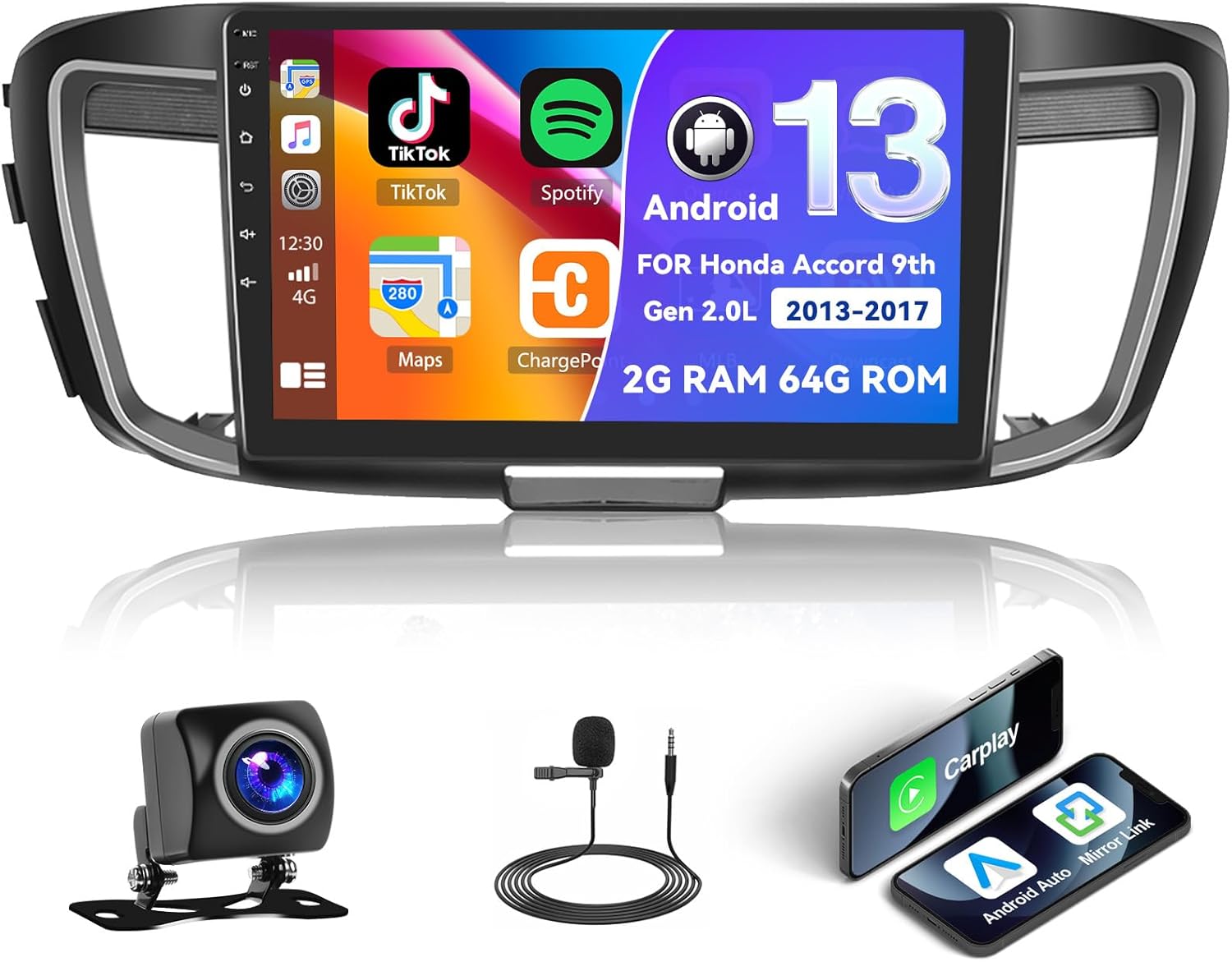
Figure 1.1: UNITOPSCI Android Car Stereo with backup camera, microphone, and smartphone mirroring icons.
2. Safety Information
- Do not operate the system in a way that distracts you from driving safely. Always prioritize road safety.
- Ensure all wiring is correctly connected to prevent short circuits or damage.
- Avoid exposing the unit to extreme temperatures, direct sunlight for prolonged periods, or excessive moisture.
- Professional installation is recommended to ensure correct wiring and functionality.
- Keep the volume at a level that allows you to hear external traffic sounds.
3. Product Overview
3.1 Key Features
- 10.1-inch Touchscreen Display (1024*600 resolution)
- Android Operating System (2GB RAM + 64GB ROM)
- Wireless/Wired Apple CarPlay and Android Auto
- Dual Mirror Link for Android/iOS phones
- Built-in GPS Navigation with offline map support (HERE WE GO preloaded)
- WiFi Connectivity
- Bluetooth with A2DP/Hands-Free/Phone Book functions
- FM/RDS Radio with 18 preset stations
- Backup Camera Input with automatic display switching
- Steering Wheel Control (SWC) support
- Split Screen Functionality
- Built-in Equalizer System
- Multiple UI Themes (26 options)
3.2 Package Contents
- UNITOPSCI Android Car Stereo Unit
- Wiring Harnesses
- GPS Antenna
- USB Cables (Double USB interface)
- External Microphone
- Backup Camera
- User Manual (this document)
4. Setup and Installation
4.1 Compatibility Check
This car stereo is compatible with Honda Accord 9th Generation 2.0L models from 2013 to 2017 (basic version). It is not compatible with high-end versions that include a large OEM screen or navigation system. Please verify your vehicle's center console and compare it with the provided installation frame images to ensure compatibility.

Figure 4.1: Dashboard compatibility for Honda Accord 9th Gen (2013-2017) 2.0L low-end version. Note: Not suitable for models with existing OEM Navi Screen.
4.2 Installation Steps
- Preparation: Disconnect the vehicle's battery to prevent electrical damage.
- Remove OEM Unit: Carefully remove the existing car radio and dashboard trim. Refer to your vehicle's service manual for specific instructions.
- Connect Wiring: Connect the provided wiring harness to the car stereo and the vehicle's existing wiring. Ensure all connections are secure. Connect the GPS antenna, external microphone, and backup camera cables.
- Test Functionality: Before fully reassembling the dashboard, temporarily connect the battery and power on the unit to test basic functions like power, audio, and display.
- Secure Unit: Mount the new car stereo into the dashboard opening and secure it with screws.
- Reassemble: Reinstall all dashboard trim pieces.
- Final Connection: Reconnect the vehicle's battery.
Note: If your vehicle has an OEM Radio with a Center Navi Screen, additional wiring kits may be required. Contact customer support for assistance.
5. Operating Instructions
5.1 Power On/Off
The unit will typically power on automatically when the vehicle's ignition is turned on. To manually power off or restart, press and hold the power button on the unit or use the software controls.
5.2 Wireless CarPlay & Android Auto
This unit supports both wireless and wired Apple CarPlay and Android Auto. Connect your smartphone via Bluetooth/WiFi for wireless functionality or use a USB cable for a wired connection. Once connected, you can access phone calls, navigation, music, and other compatible apps directly from the stereo's touchscreen.

Figure 5.1: Wireless CarPlay, Android Auto, and Mirror Link interfaces.
5.3 GPS Navigation
The stereo has built-in GPS and supports both online and offline navigation. The HERE WE GO map application is preloaded. To use offline maps, download the necessary map data via a WiFi connection. For online navigation, ensure the unit is connected to WiFi or a mobile hotspot.

Figure 5.2: GPS Navigation interface and WiFi connection options.
5.4 Bluetooth & FM/RDS Radio
Bluetooth: Pair your smartphone via Bluetooth for hands-free calling, music streaming (A2DP), and automatic phone book download. This enhances safety by allowing you to manage calls without holding your phone.
FM/RDS Radio: Access FM radio stations with 18 preset options. The RDS (Radio Data System) feature displays station information where available. Use the tuner to find news, music, and sports broadcasts.

Figure 5.3: FM/RDS Radio, Bluetooth interface, and Equalizer settings.
5.5 Mirror Link
The Mirror Link function allows you to display your Android or iOS phone's screen directly onto the 10.1-inch head unit. This can be achieved via a wired or wireless connection, enabling you to view videos or maps from your phone on the larger screen.
5.6 Steering Wheel Control (SWC)
The unit supports your vehicle's existing steering wheel controls. This allows you to adjust volume, change tracks, answer calls, and switch modes without taking your hands off the steering wheel, improving driving safety and convenience. The system includes a learning function for SWC configuration.
5.7 Backup Camera Input
When the vehicle is shifted into reverse gear, the stereo automatically displays the view from the connected AHD backup camera on the 10.1-inch screen. This assists with safe parking and maneuvering.

Figure 5.4: Steering Wheel Control interface and backup camera view with guidelines.
5.8 Split Screen & UI Themes
Split Screen: The split-screen feature allows you to run two applications side-by-side on the display, for example, navigation on one side and music playback on the other.
UI Themes: The Android radio offers 26 different user interface themes. You can customize the look of your desktop by long-pressing the main interface and selecting your preferred theme.

Figure 5.5: Split screen view and examples of different UI desktop themes.
6. Maintenance
- Cleaning: Use a soft, dry cloth to clean the screen and unit. Avoid abrasive cleaners or solvents.
- Software Updates: Periodically check for available software updates to ensure optimal performance and access to new features.
- Temperature: Do not leave the unit in direct sunlight for extended periods, especially in hot weather, as this can affect its lifespan.
7. Troubleshooting
| Problem | Possible Cause | Solution |
|---|---|---|
| Unit does not power on | Incorrect wiring, blown fuse, vehicle battery issue | Check power connections, inspect vehicle fuses, ensure battery is charged. |
| No sound | Volume too low, incorrect audio settings, speaker wiring issue | Increase volume, check audio output settings, verify speaker connections. |
| GPS signal lost or inaccurate | GPS antenna obstructed or disconnected, poor satellite coverage | Ensure GPS antenna is properly installed and has a clear view of the sky. Check antenna connection. |
| Bluetooth connection issues | Device not paired, Bluetooth off on phone or stereo | Ensure Bluetooth is enabled on both devices. Re-pair the device. |
| Touchscreen unresponsive | Temporary software glitch | Restart the unit. If issue persists, perform a factory reset (Factory setting keyword: 000000). |
If you encounter issues not listed here or if troubleshooting steps do not resolve the problem, please contact UNITOPSCI customer support.
8. Specifications
| Feature | Specification |
|---|---|
| System | Android |
| Chipset | 8227L-DEMO |
| Screen Size | 10.1 inches |
| Memory (RAM+ROM) | 2GB RAM + 64GB ROM |
| Screen Resolution | 1024*600 |
| Radio Chip | MT6625 |
| Power Output | 4*45W |
| Work Temperature | -20℃ to 75℃ (-4°F to 167°F) |
| Power Amplifier Chip | TDA7388 |
| Radio Band | FM/RDS |
| Video Output | Support |
| External Microphone | Support |
| Split Screen | Support |
| Maps | Built-in offline maps (requires internet to download data) |
| WIFI | Support |
| USB | Double USB interface |
| Audio Format Support | APE/FLAC/WAV/MP3/WMA etc. |
| Video Format Support | MKV/RMVB/AVI/MP4/MDV etc. |
| Picture Format Support | PNG/JPEG/JPG/GIF/WBMP/BNP etc. |
| Factory Setting Keyword | 000000 |
| Languages | Chinese/English/French/Italian/Korean/Japanese/Arabic/Spanish/Portuguese/Russian/Turkish/Vietnamese/Hebrew/Polish/German |
| Item Weight | 3.08 pounds |
| Package Dimensions | 17.13 x 7.8 x 4.06 inches |
9. Warranty and Support
Your UNITOPSCI Android Car Stereo comes with a 12-month warranty. Replacement is available within 24 months for qualifying issues. We offer lifetime after-sales consultation and technical support.
For any inquiries, technical assistance, or warranty claims, please contact us:
- Email: UNITOPSCI@126.com

Figure 9.1: UNITOPSCI Customer Support Contact Information.


