1. Introduction
The LEOBOG AMG65 is a high-performance 65% mechanical gaming keyboard designed for enthusiasts and gamers seeking advanced features and customization. It boasts a unique dual-screen display, versatile tri-mode connectivity, hot-swappable switches, and dynamic RGB backlighting, providing a superior typing and gaming experience across various platforms.

Figure 1: LEOBOG AMG65 Mechanical Gaming Keyboard Overview.
2. What's in the Box
Upon opening your LEOBOG AMG65 package, please verify that all the following items are included:
- AMG65 Gaming Keyboard (1 unit)
- LEOBOG Linear Switches (2 spare units)
- USB Cable (for wired connection and charging)
- Keycap Puller (1 unit)
- User Manual (1 unit)
- Dust Cover (1 unit)

Figure 2: Included components with the LEOBOG AMG65 keyboard.
3. Setup
3.1 Physical Setup
- Unpacking: Carefully remove the keyboard and all accessories from the packaging.
- Protective Film Removal: Locate and gently peel off any protective films from the keyboard's display screens and the bottom plate before use. This ensures optimal display clarity and proper adhesion of the rubber feet.
- Adjusting Kickstands: On the underside of the keyboard, you will find two adjustable kickstands. Flip them out to achieve your preferred typing angle for ergonomic comfort.
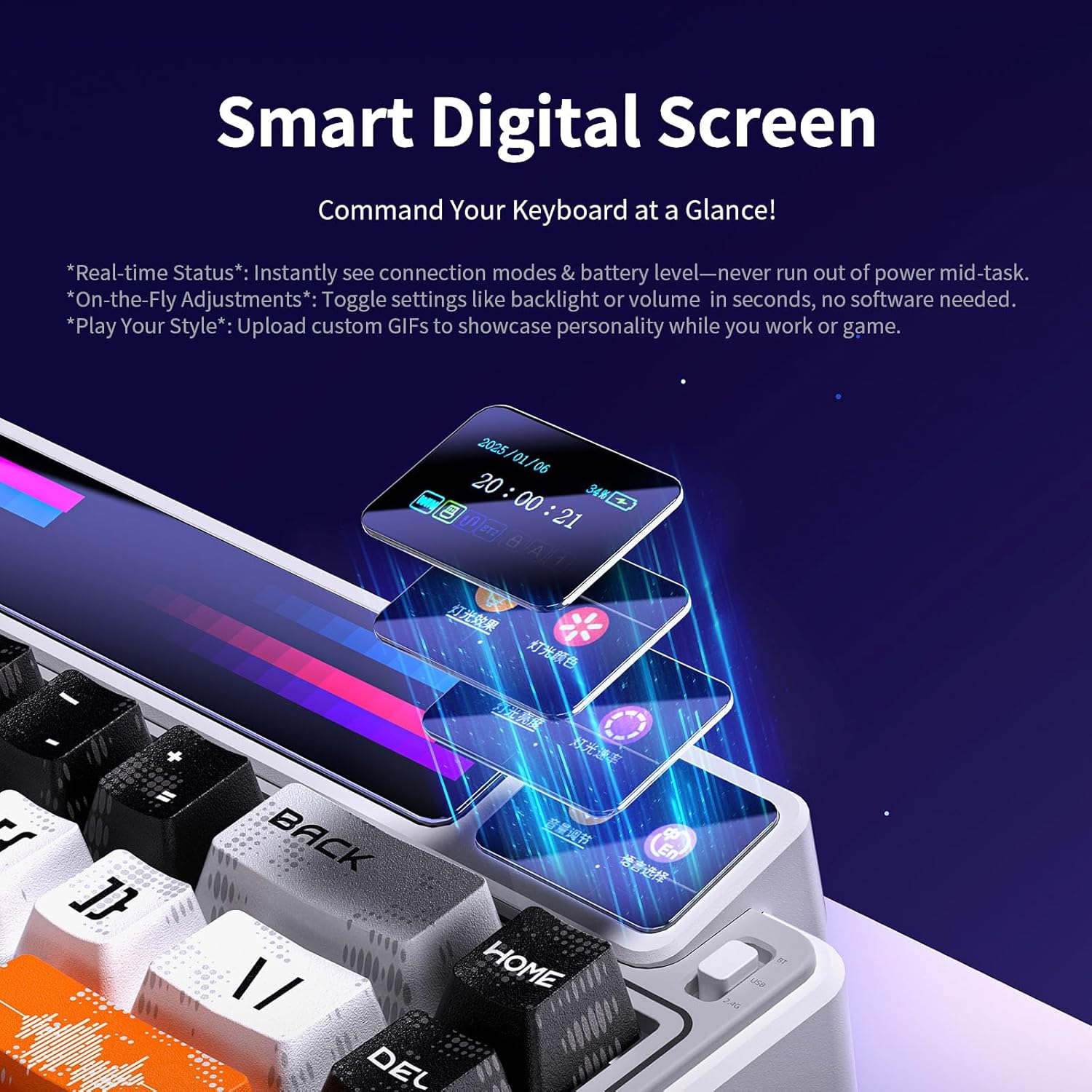
Figure 3: The smart digital screen provides real-time status updates.
3.2 Connectivity
The LEOBOG AMG65 keyboard supports three connection modes: USB-C wired, 2.4GHz wireless, and Bluetooth 5.0. You can connect up to 5 devices simultaneously.

Figure 4: Visual representation of the three connection modes.
- USB-C Wired Connection:
Connect the provided USB-C cable to the keyboard's port and the other end to your computer. Ensure the mode switch on the keyboard is set to the wired position (usually indicated by a cable icon or middle position).
- 2.4GHz Wireless Connection:
Insert the 2.4GHz USB receiver into an available USB port on your device. Slide the keyboard's mode switch to the 2.4GHz position. The keyboard should automatically pair. If not, press FN + Q to initiate pairing. The smart screen will display "2.4G Connected" upon successful connection.
- Bluetooth 5.0 Connection (BT1, BT2, BT3):
The keyboard can store up to three Bluetooth profiles. To pair:
- Slide the keyboard's mode switch to the Bluetooth position.
- Press and hold FN + E for BT1, FN + R for BT2, or FN + T for BT3 until the smart screen indicates "BT1/BT2/BT3 Pairing".
- On your device (PC, laptop, tablet, smartphone), search for Bluetooth devices and select "LEOBOG AMG65".
- The smart screen will display "BT1/BT2/BT3 Connected" once pairing is successful.
- To switch between paired Bluetooth devices, simply press FN + E/R/T corresponding to the desired profile.
4. Operating Instructions
4.1 Dual Screen Functionality
The LEOBOG AMG65 features a unique dual-screen setup:
- Massive 10-inch LED Strip Display: This display supports 8 preset animated pixel graphics. Toggle through them by pressing FN + Right Shift. It also features real-time music visualization and supports custom DIY creations via the driver software.
- Smart Digital Screen: This smaller screen provides real-time status updates including connection modes, battery level, and current GIFs. It allows for on-the-fly adjustments like backlight or volume settings without software. You can also upload custom GIFs to personalize your keyboard.

Figure 5: The large LED strip display for animations and music visualization.
Figure 6: The smart digital screen displaying various keyboard statuses.
4.2 Dynamic RGB Backlight
The AMG65 features 16.8 million RGB lighting colors and 20 lighting effects. You can change the color, brightness, and speed of the backlight using FN key combinations. Refer to the included user manual for specific FN key combinations to cycle through effects and adjust settings.
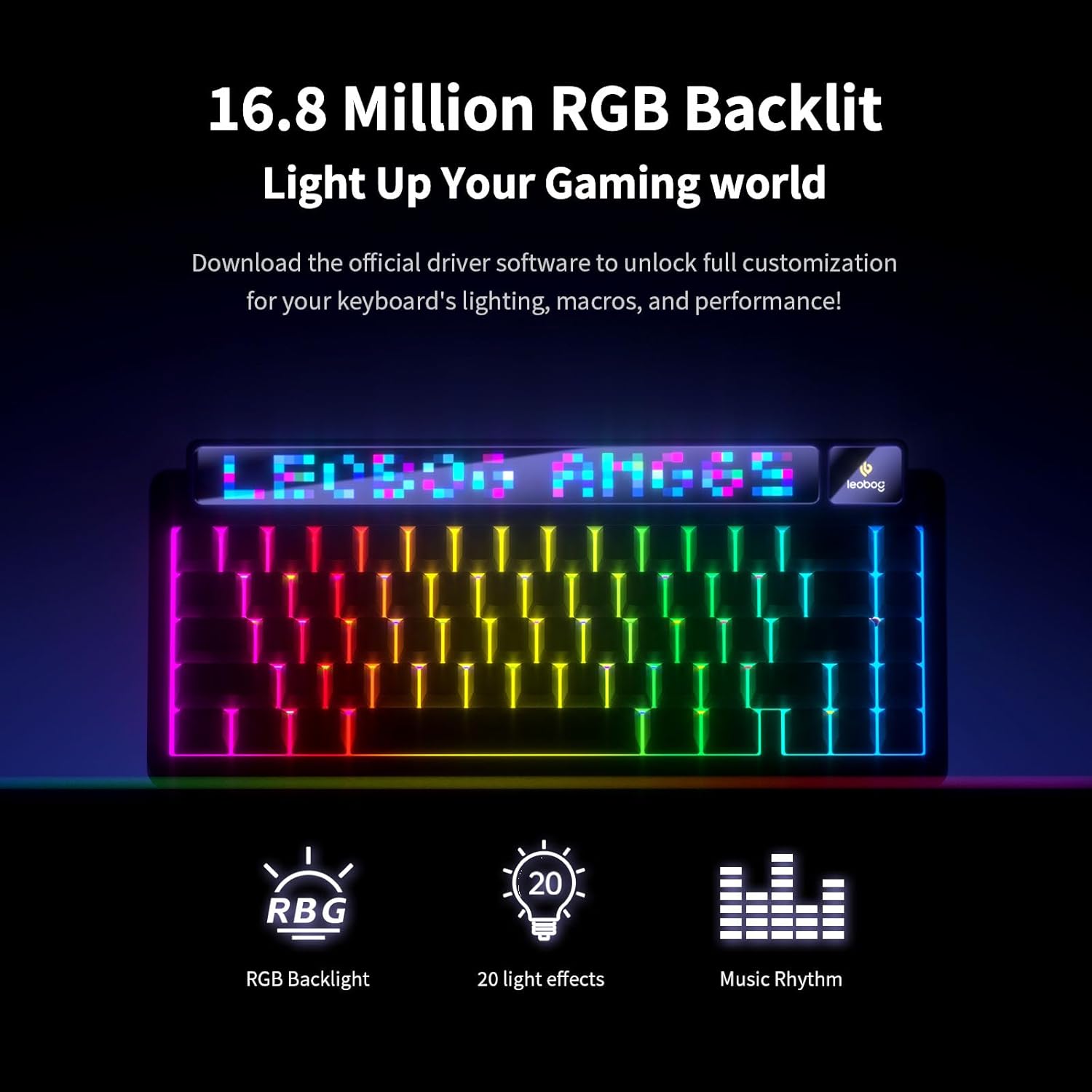
Figure 7: The keyboard illuminated with dynamic RGB backlighting.
4.3 Customization and Hot-Swappable Switches
The keyboard is equipped with a hot-swappable PCB, supporting both 3-pin and 5-pin switches. This allows for easy customization of your typing feel by swapping out switches without soldering. The pre-lubricated LEOBOG linear switches provide a smooth typing experience.
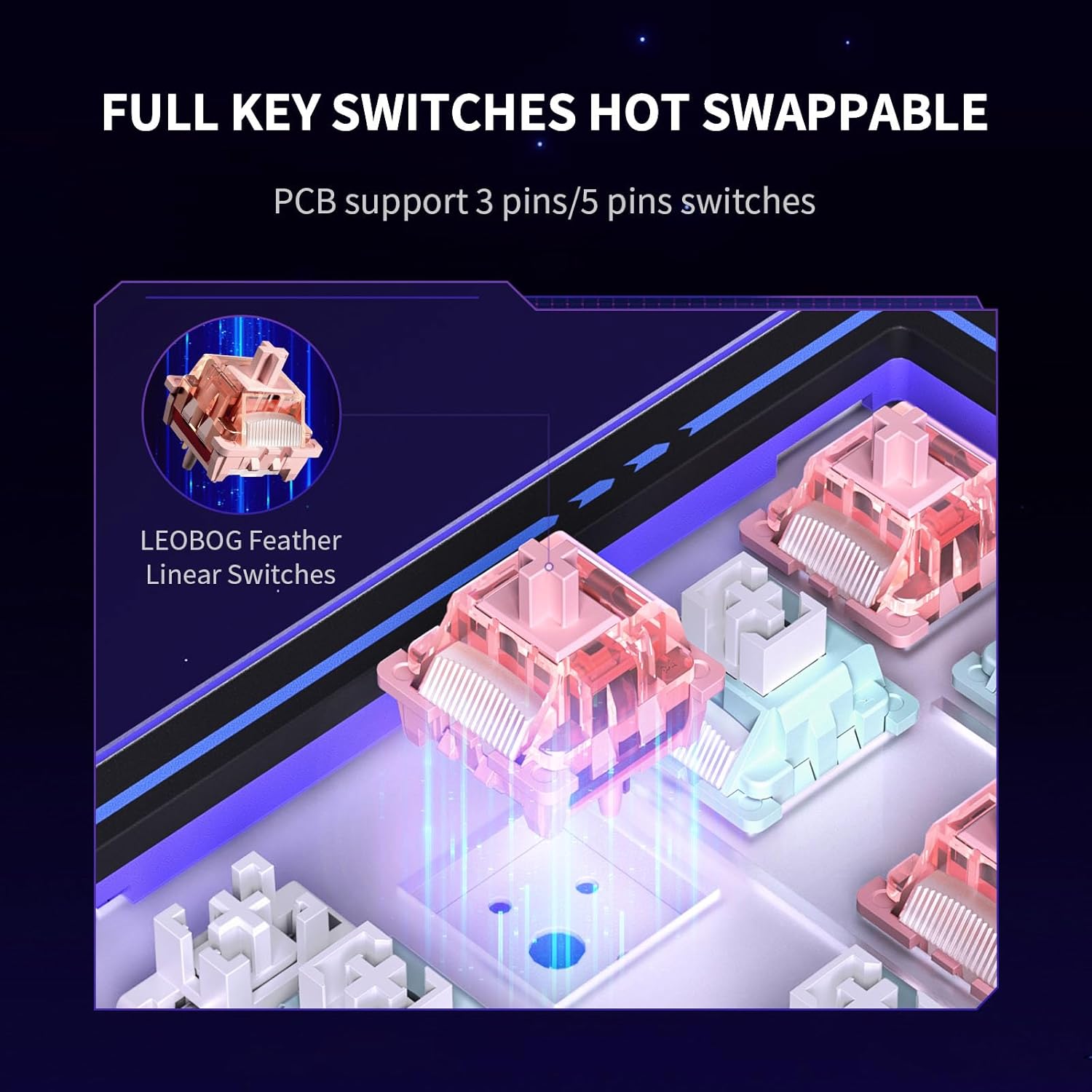
Figure 8: Illustration of the hot-swappable switch design.
For full customization, including designing pixel animations, uploading GIFs, creating macros, and setting sleep timers, download the official driver software. Please note that the driver software currently supports Windows systems only and requires a wired connection for certain functions like animation uploads.
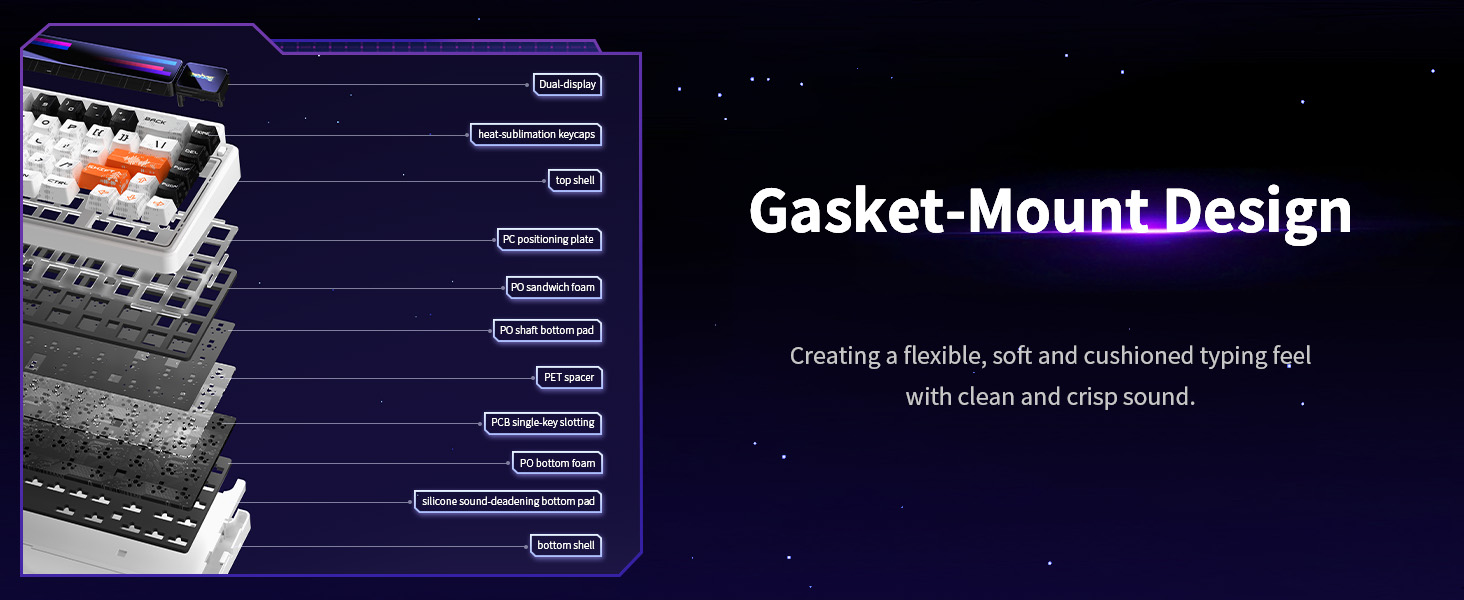
Figure 9: The advanced gasket structure for a soft and cushioned typing feel.
5. Maintenance
- Cleaning: Regularly clean the keyboard using a soft, dry cloth. For deeper cleaning, use a keycap puller to remove keycaps and a brush or compressed air to clear debris from between switches.
- Keycap Care: The Double-Shot PBT keycaps are designed for durability and wear resistance. Avoid using harsh chemicals or abrasive materials that could damage the keycap legends.
- Storage: When not in use, especially for extended periods, it is recommended to use the provided dust cover to protect the keyboard from dust and spills.
6. Troubleshooting
- Keyboard Not Responding:
- Ensure the keyboard is charged or connected via USB-C.
- Verify the mode switch (wired, 2.4GHz, Bluetooth) is set correctly for your desired connection.
- For wireless connections, ensure the USB receiver is properly inserted and within range. Re-pair if necessary.
- Display Issues (Smart Screen/LED Strip):
- Ensure protective films have been removed from the displays.
- If the smart screen displays in a foreign language (e.g., Chinese), refer to the included user manual for instructions on changing the language via the OSD menu using FN + arrow keys.
- For advanced display customization or to set time/date, connect the keyboard to a Windows PC and use the official driver software.
- Software Compatibility:
- The official driver software for full customization is currently only compatible with Windows operating systems. Mac users can use the keyboard for basic typing and some on-board functions but will not have access to full software customization.
- Key Not Registering / Double Typing:
- Due to the hot-swappable design, ensure the switch is fully seated in its socket. Gently press down on the affected switch.
- If the issue persists, try swapping the problematic switch with one of the spare switches provided.
7. Specifications
| Feature | Detail |
|---|---|
| Model Number | AMG65 |
| Key Position | 67 Keys (65% Layout) |
| Product Dimensions | 12.8 x 5.64 x 1.74 inches |
| Item Weight | 2.24 pounds |
| Connectivity Technology | Bluetooth 5.0, 2.4GHz Wireless, USB-C Wired |
| Compatible Devices | Gaming Console, Laptop, PC, Smartphone, Tablet |
| Switches | LEOBOG Linear Switches (Hot-Swappable, 3-pin/5-pin support) |
| Keycaps | Double-Shot PBT Keycaps |
| Backlighting | 16.8 Million RGB Colors, 20 Lighting Effects |
| Battery Capacity | 8000mAh (up to 40hrs RGB-lit, 106hrs lights-off) |
| Special Features | Dual Screen Display (10-inch LED strip + Smart Digital Screen), Gasket Structure, Full-Key Anti-ghosting, Programmable |
| Manufacturer | LEOBOG |
8. Warranty and Support
For detailed warranty information and technical support, please refer to the official LEOBOG website or contact LEOBOG customer service directly. You can also download the comprehensive user manual in PDF format for further reference:
Visit the official LEOBOG Store for more products and information: LEOBOG Store


