
1. Introduction
The KAIWEETS KM200s is a smart digital multimeter designed for accurate and efficient electrical measurements. Featuring True RMS technology, 4000 counts display, and auto-ranging capabilities, it simplifies the process of measuring AC/DC voltage, resistance, and continuity. Its non-contact voltage (NCV) detection enhances safety, making it suitable for various electrical checks and DIY repairs.
2. Safety Precautions
Always adhere to safety guidelines when using electrical testing equipment. Failure to do so may result in injury or damage to the device. This multimeter is rated CAT II 600V, CE, and RoHS certified for safety.
- Do not exceed the maximum input values specified for each measurement range.
- Ensure the test leads are properly connected and in good condition before use.
- Avoid touching exposed wires or circuit components during measurements.
- Use the Non-Contact Voltage (NCV) feature to identify live wires safely before making direct contact.
- Replace batteries promptly when the low battery indicator appears to ensure accurate readings.
- Do not operate the multimeter if it appears damaged or is not functioning correctly.
3. Package Contents
Verify that all items are present in the package:
- 1 x KAIWEETS KM200s Digital Multimeter
- 2 x Test Leads (Red and Black)
- 2 x AAA Batteries
- 1 x User Manual
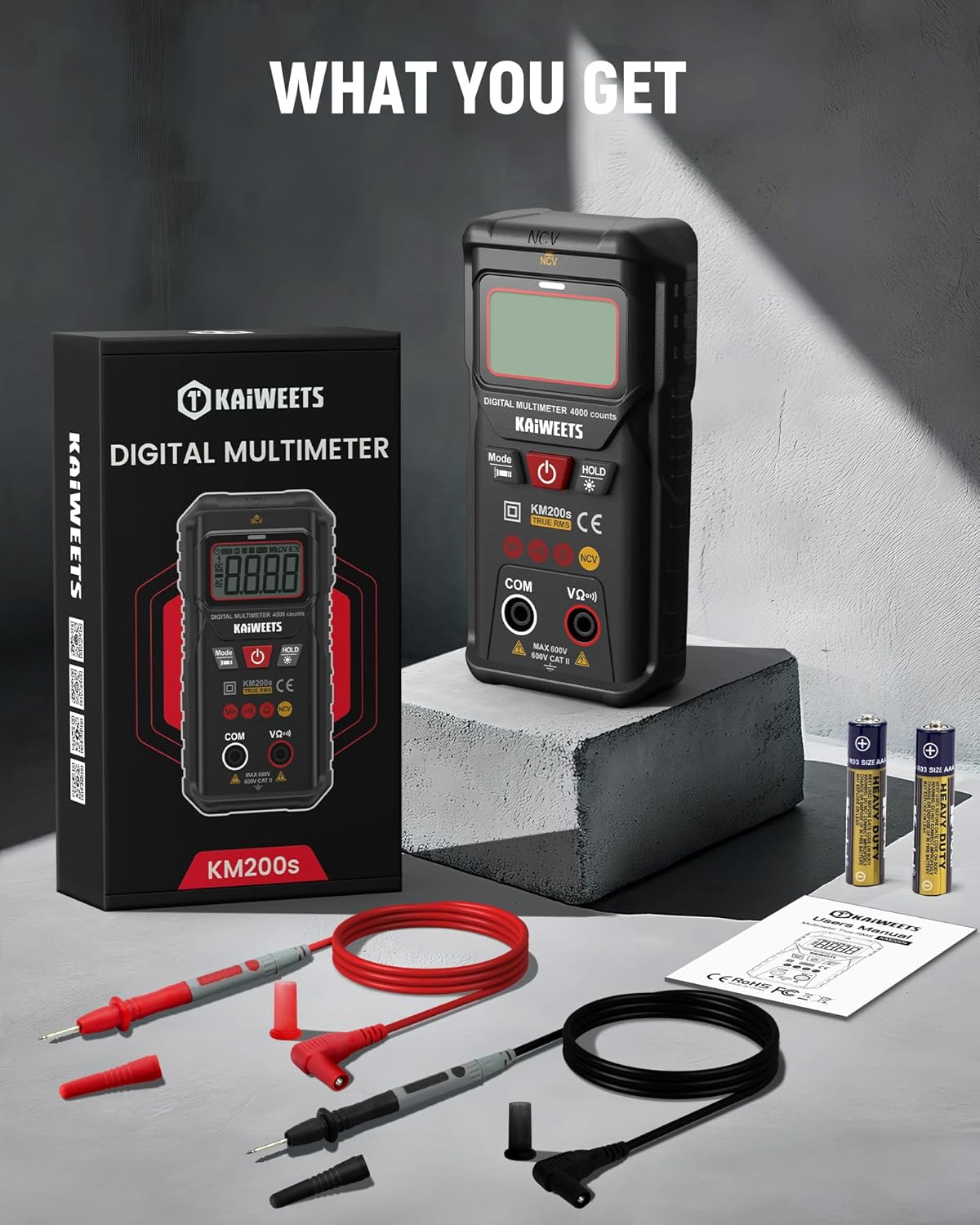
Image: The KAIWEETS KM200s multimeter, along with its included test leads, two AAA batteries, and user manual, laid out on a surface.
4. Product Features & Components
The KM200s multimeter is designed for ease of use and reliability. Key features include:
- Smart Auto Ranging: Automatically identifies and measures AC/DC voltage, resistance, and continuity.
- True RMS: Provides accurate readings for non-sinusoidal waveforms.
- Non-Contact Voltage (NCV) Detection: Detects AC voltage without direct contact.
- 4000 Counts Display: High-resolution digital display for precise readings.
- Backlit LCD & Flashlight: Enhances visibility in low-light conditions.
- Data Hold: Freezes the displayed reading for convenient recording.
- Auto Power-Off: Conserves battery life by automatically shutting down after 15 minutes of inactivity.
- Low Battery Indication: Alerts when batteries need replacement.

Image: The KAIWEETS KM200s Smart Digital Multimeter, showing its display, function buttons, input jacks, and protective casing. Test leads and AAA batteries are also visible.

Image: A close-up of the KAIWEETS KM200s multimeter in use, highlighting its 4000 counts display and True RMS feature, alongside icons representing AC Voltage, DC Voltage, Resistance, Continuity, Data Hold, Auto Ranging, Non-Contact Voltage, and True RMS.
5. Getting Started
5.1 Battery Installation
The KM200s multimeter requires two AAA batteries (included). To install or replace batteries:
- Ensure the multimeter is turned off and disconnect any test leads from the input jacks.
- Locate the battery compartment cover on the back of the device.
- Use a screwdriver to open the battery compartment.
- Insert the two AAA batteries, observing the correct polarity (+/-) as indicated inside the compartment.
- Securely close the battery compartment cover.
6. Operating Instructions
6.1 Smart Auto Ranging Mode
The KM200s features a smart auto-ranging mode that automatically detects and measures AC/DC voltage, resistance, and continuity. Simply turn on the device, and it will enter this mode, indicated by 'AUTO' on the display.

Image: The KAIWEETS KM200s multimeter with its display showing 'Auto', signifying its automatic measurement mode for voltage, resistance, and continuity.
6.2 True RMS Measurement
The True RMS function provides accurate measurements of AC voltage and current, especially for non-sinusoidal waveforms often found in modern electronics. This ensures reliable data and reduces the risk of misinterpretation compared to average-responding multimeters.

Image: A visual comparison illustrating the benefits of True RMS accuracy provided by the KM200s, contrasting it with potential errors and safety hazards from non-True RMS devices.
6.3 Non-Contact Voltage (NCV) Detection
The NCV feature allows for safe detection of AC voltage without direct contact with conductors. This is useful for identifying live wires in outlets, switches, or junction boxes.
- Press the 'Mode' button repeatedly until 'NCV' is displayed.
- Place the top end of the multimeter near the suspected live wire or electrical source.
- The device will emit beep alarms and display alerts (visual/LED) if AC voltage is detected. The frequency of beeps and LED flashes increases with stronger voltage.
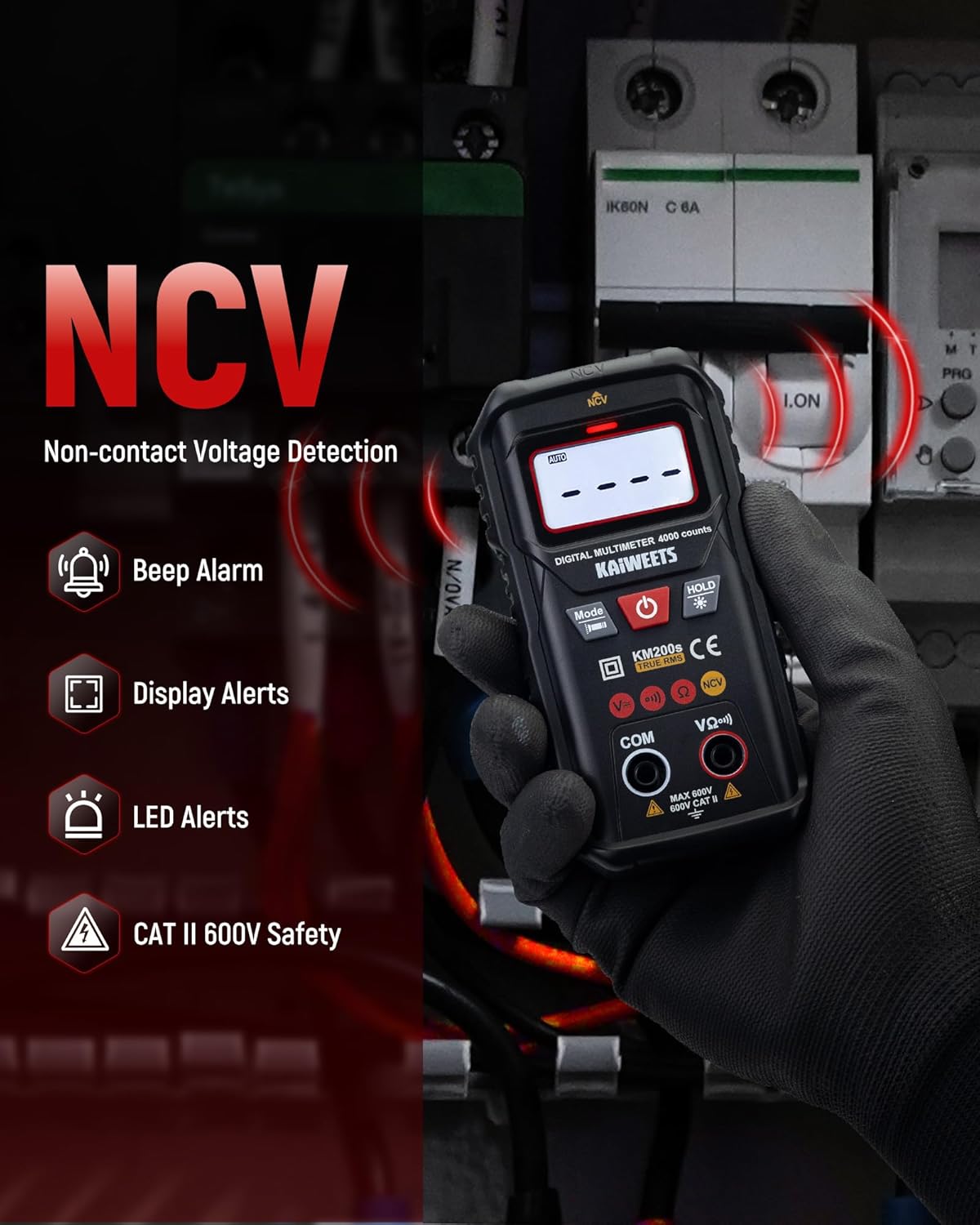
Image: A hand holding the KAIWEETS KM200s multimeter near electrical wires, demonstrating its Non-Contact Voltage (NCV) detection capability with visual and audible alerts.
6.4 Measuring AC/DC Voltage
In Smart Auto Ranging mode, the multimeter automatically detects AC or DC voltage. For manual selection, press the 'Mode' button to cycle through functions until the desired voltage mode (AC V or DC V) is selected.
- Insert the red test lead into the 'VΩ+' input jack and the black test lead into the 'COM' input jack.
- Connect the test probes across the circuit or component to be measured.
- Read the voltage value on the display.

Image: A user measuring AC voltage with the KAIWEETS KM200s multimeter in an electrical panel, showing the display with a voltage reading.
6.5 Measuring Resistance
To measure resistance:
- Ensure the circuit is de-energized before measuring resistance.
- Insert the red test lead into the 'VΩ+' input jack and the black test lead into the 'COM' input jack.
- Connect the test probes across the component whose resistance you want to measure.
- Read the resistance value on the display.
6.6 Continuity Test
The continuity test checks for an open or closed circuit. A continuous beep indicates a closed circuit (low resistance).
- Ensure the circuit is de-energized.
- Insert the red test lead into the 'VΩ+' input jack and the black test lead into the 'COM' input jack.
- Connect the test probes across the circuit or component.
- The multimeter will beep if continuity is detected.
6.7 Additional Functions
- Data Hold: Press the 'HOLD' button to freeze the current reading on the display. Press again to release.
- Backlight: Press and hold the 'HOLD' button to turn the LCD backlight on or off. This improves visibility in dark environments.
- Flashlight: Press and hold the 'Mode' button to activate the built-in flashlight. This illuminates the work area.
- Auto Power-Off: The multimeter automatically powers off after approximately 15 minutes of inactivity to conserve battery life. Press any button or turn the power switch to reactivate.

Image: The KAIWEETS KM200s multimeter in a dark setting, demonstrating its clear backlit LCD display and integrated flashlight for improved visibility during measurements.

Image: A composite image illustrating the Data Hold function (freezing a reading), the Low Battery Indication icon on the display, and the 15-minute Auto Power-off feature of the KM200s multimeter.
7. Maintenance
- Cleaning: Wipe the multimeter with a damp cloth and mild detergent. Do not use abrasives or solvents.
- Storage: Store the device in a cool, dry place away from direct sunlight and extreme temperatures. If storing for extended periods, remove the batteries to prevent leakage.
- Test Leads: Regularly inspect test leads for any signs of damage, such as cracks or frayed insulation. Replace damaged leads immediately.
8. Troubleshooting
| Problem | Possible Cause | Solution |
|---|---|---|
| No display or weak display | Dead or low batteries | Replace the AAA batteries. |
| Inaccurate readings | Low battery; Incorrect function selected; Damaged test leads | Replace batteries; Ensure correct mode is selected (or use Auto mode); Inspect and replace test leads if damaged. |
| No NCV detection | No AC voltage present; Multimeter not in NCV mode | Verify the presence of AC voltage with another method if possible; Ensure NCV mode is selected. |
| Auto power-off too soon | Normal operation (15 min inactivity) | This is a battery-saving feature. Press any button to reactivate. |
9. Specifications
| Parameter | Value |
|---|---|
| Product Dimensions | 4.33 x 1.97 x 1.18 inches |
| Item Model Number | KM200S |
| Batteries | 2 AAA batteries (included) |
| Weight | 8.11 ounces |
| Manufacturer | KAIWEETS |
| Power Source | Battery Powered |
| Style | Digital Multimeter |
| Color | Black |
| AC Voltage Range | Auto Function: 1.000V-600V ±(1.2%+5); Manual Function: 0.000V-600V ±(1.2%+5) |
| DC Voltage Range | Auto Function: 0.800V-600V ±(1.0%+5); Manual Function: 0.000V-600V ±(1.0%+5) |
| Resistance Range | 400Ω/4KΩ/40KΩ/400KΩ/4MΩ/40MΩ ±(1.2%+5) |
| Auto Ranging | Yes (Automatically identifies AC/DC Voltage and Resistance) |
| Auto Power-off | 15 Minutes |
| NCV | Yes |
| Continuity Buzzer | Yes |
| True RMS | Yes (40-1KHz) |
| Data Hold | Yes |
| Low Battery Indication | Yes |
| Backlight | Yes |
| Flashlight | Yes |
10. Warranty and Support
KAIWEETS provides comprehensive support for the KM200s Smart Digital Multimeter:
- Warranty: A 3-Year warranty is provided from the date of purchase.
- After-Sales Service: 24/7h after-sales service is available to assist with any inquiries or issues.
For support, please refer to the contact information provided in your product packaging or visit the official KAIWEETS website.


