
Soundcore V40i
Soundcore V40i Open-Ear Headphones
User Manual
Introduction
Welcome to the Soundcore V40i Open-Ear Headphones user manual. These headphones are designed to provide a comfortable listening experience while keeping you aware of your surroundings. Featuring adjustable earhooks for a secure fit, powerful sound, and a sleek, portable design, the V40i is perfect for daily use. This manual will guide you through the setup, operation, and maintenance of your new headphones.
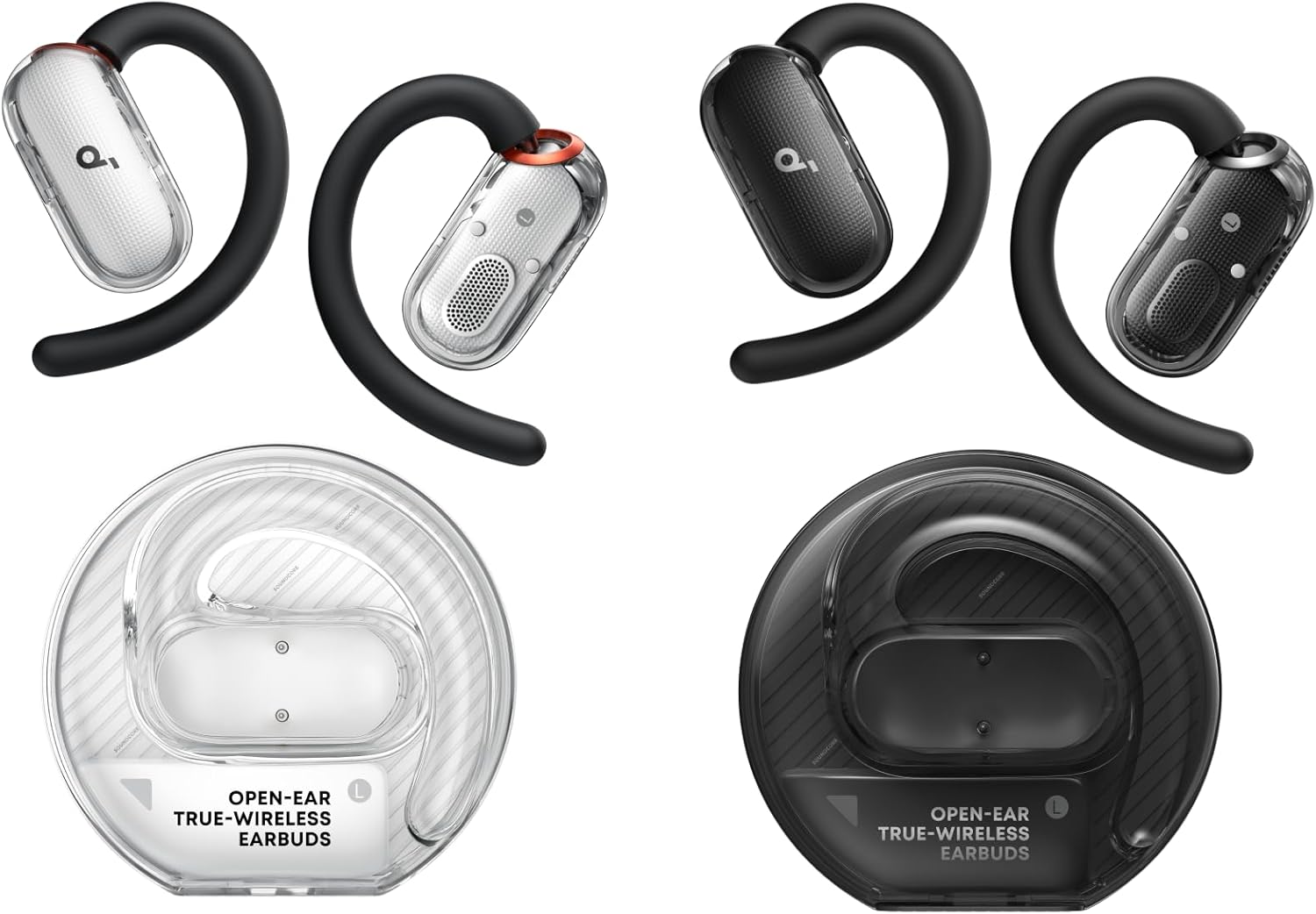
Image: Soundcore V40i Open-Ear Headphones in both black and white variants, showcasing the earbuds and their unique transparent charging cases.
Setup
1. Charging the Headphones
Before first use, fully charge your Soundcore V40i headphones. Place the earbuds into their magnetic lidless case. The light bar on the case will indicate charging status. A full charge provides up to 21 hours of playtime.

Image: A close-up of the Soundcore V40i black earbuds being securely placed into their magnetic lidless charging case, highlighting the strong magnetic connection.
2. Pairing with Your Device
Open the charging case. The earbuds will automatically enter pairing mode. On your device (smartphone, tablet, etc.), go to Bluetooth settings and select "Soundcore V40i" from the list of available devices to connect.
3. App Control
For enhanced features and customization, download the Soundcore app from your device's app store. The app allows you to switch between different sound effects, adjust controls, and activate gaming mode.
Operating the Headphones
Comfort and Fit
The V40i features an open-ear design that reduces in-ear pressure and allows you to remain aware of your surroundings. The innovative 4-level adjustable ear hooks ensure a comfortable and secure fit for various ear shapes and sizes.

Image: A person wearing a black Soundcore V40i earbud, illustrating the comfortable and secure fit of the open-ear design.

Image: A visual representation of the four adjustable levels of the ear hooks, demonstrating how they can be customized for a more secure, comfortable fit and enhanced bass.
Sound Quality
Equipped with 16 × 13mm drivers and a high-elastic diaphragm, the V40i delivers powerful sound and punchy bass. The adjustable ear hooks allow the sound to be closer to the ear canal, providing a maximum boost of 7.5dB over non-adjustable hooks for richer audio.

Image: A detailed view of the Soundcore V40i earbud, emphasizing its 16mm x 13mm racetrack diaphragm and the powerful bass it produces.

Image: A comparative diagram illustrating how the adjustable ear hooks of the Soundcore V40i bring the sound closer to the ear canal, resulting in deeper bass compared to non-adjustable designs.
Portability
The V40i's compact and portable design, along with its magnetic lidless case, makes it easy to carry and prevents accidental loss of the earbuds.

Image: A hand holding the compact, transparent charging case of the Soundcore V40i earbuds, emphasizing its small size and ease of transport.
Maintenance
To ensure the longevity and optimal performance of your Soundcore V40i headphones, follow these maintenance guidelines:
- Cleaning: Gently wipe the earbuds and charging case with a soft, dry, lint-free cloth. Avoid using abrasive materials or harsh chemicals.
- Water Resistance: The V40i headphones have an IP55 rating, meaning they are protected against dust and low-pressure water jets. Do not submerge them in water. Dry them thoroughly if they get wet.
- Storage: When not in use, store the headphones in their charging case to protect them from dust and damage. Store in a cool, dry place away from extreme temperatures.
- Charging: Charge the headphones regularly, even if not in frequent use, to maintain battery health.
Troubleshooting
If you encounter any issues with your Soundcore V40i headphones, try the following solutions:
- No Sound/Poor Sound Quality:
- Ensure the headphones are properly paired and connected to your device.
- Check the volume levels on both the headphones and your device.
- Make sure the earbuds are clean and free of debris.
- Try adjusting the ear hooks for a better fit and sound delivery.
- Cannot Pair:
- Ensure Bluetooth is enabled on your device.
- Place the earbuds back into the charging case, close the lid, wait a few seconds, then open it again to re-enter pairing mode.
- Forget the device from your device's Bluetooth settings and try pairing again.
- Charging Issues:
- Ensure the charging cable is securely connected to both the case and a power source.
- Check if the charging contacts on the earbuds and inside the case are clean.
- Try a different charging cable or power adapter.
- App Connectivity Issues:
- Ensure the Soundcore app is updated to the latest version.
- Restart the app or your device.
- Re-pair the headphones with your device.
If the issue persists, please contact Soundcore customer support for further assistance.
Specifications
| Feature | Description |
|---|---|
| Model | Soundcore V40i |
| Connectivity | Bluetooth 5.4 |
| Driver Size | 16 × 13mm |
| Playtime (Single Charge) | Up to 21 hours |
| Water Resistance | IP55 (Dust and water jet resistant) |
| Ear Hook Adjustment | 4-level adjustable |
| Case Design | Magnetic Lidless Transparent Case |
| First Available | June 4, 2025 |
Warranty and Support
For detailed warranty information and customer support, please visit the official Soundcore website or refer to the documentation included with your product. You can also find more information and support resources at the Soundcore Store on Amazon.
Related documentsV40i


Ask a question about this manual
Ask about setup, troubleshooting, compatibility, parts, safety, or missing instructions. Manuals+ will review the question and use this page’s manual context to help answer it.