
IMAGIC M3
IMAGIC M3 Wet Dry Vacuum Cleaner User Manual
Model: M3
Brand: IMAGIC
1. Safety Information
Please read all safety warnings and instructions before using this appliance. Failure to follow the warnings and instructions may result in electric shock, fire, or serious injury.
- This appliance is for household use only. Do not use outdoors or on commercial surfaces.
- Do not immerse the appliance in water or other liquids.
- Keep hair, loose clothing, fingers, and all parts of the body away from openings and moving parts.
- Use only as described in this manual. Use only manufacturer's recommended attachments.
- Do not handle the plug or appliance with wet hands.
- Do not use to pick up flammable or combustible liquids, such as gasoline, or use in areas where they may be present.
- Do not pick up anything that is burning or smoking, such as cigarettes, matches, or hot ashes.
- Always turn off the appliance before making any adjustments, changing accessories, or storing.
- Store the appliance indoors in a cool, dry place.
2. Product Overview
The IMAGIC M3 is a cordless wet dry vacuum cleaner designed for efficient cleaning of hard floors. It combines vacuuming and mopping functions to tackle both dry debris and wet messes simultaneously.
Key Features:
- Vacuum and Mop in One Step: Cleans wet and dry messes on hard floors simultaneously.
- 160°F Hot Air Drying: Enhances self-cleaning cycles for a dry, fresh, and odorless brush roller.
- Fresh Water Cleaning: Dual-tank design ensures cleaning with fresh water, achieving over 92% water recovery.
- Edge Cleaning & Self-Propelled: Specialized brush roller for precise cleaning along baseboards and corners, with an easy-to-maneuver, lightweight design.
- Fast Charging: Fully charges in 2.5 hours for up to 35 minutes of cleaning.
- Integrated LED Screen and Voice Prompts: Provides real-time status updates and guidance.
Product Components:

Figure 2.1: IMAGIC M3 Wet Dry Vacuum Cleaner with charging dock and accessories.
This image displays the main unit of the IMAGIC M3 Wet Dry Vacuum Cleaner, along with its charging dock, two bottles of cleaning solution, and two spare brush rollers. The vacuum features a sleek design with a clear dirty water tank visible.

Figure 2.2: Contents of the IMAGIC M3 package.
This image details the items included in the IMAGIC M3 package: Deodorizing & Cleaning Solution (x2), 3-in-1 Cleaning Brush, Brush Roller (x2), DWT Filter, Adaptor, 3-in-1 Docking Station, and the main vacuum unit with its dimensions.
3. Setup
3.1 Unpacking
- Carefully remove all components from the packaging.
- Check the packing list (Figure 2.2) to ensure all parts are present and undamaged.
- Remove any protective films or packaging materials from the appliance.
3.2 Assembly
- Insert the handle into the main body of the vacuum until it clicks securely into place.
- Ensure the clean water tank and dirty water tank are correctly seated in their respective positions.
- Place the 3-in-1 docking station on a flat, stable surface near a power outlet.
3.3 Initial Charging
- Connect the adaptor to the docking station and plug it into a power outlet.
- Place the assembled vacuum cleaner onto the docking station. The LED display will indicate charging status.
- Allow the vacuum to fully charge before first use. A full charge takes approximately 2.5 hours.
4. Operating Instructions
4.1 Filling the Clean Water Tank
- Remove the clean water tank from the main unit.
- Open the tank cap and fill with clean tap water. For enhanced cleaning, add a small amount of IMAGIC deodorizing & cleaning solution (do not exceed the MAX fill line).
- Securely close the cap and reinsert the tank into the vacuum cleaner.
4.2 Powering On and Selecting Modes
- Press the power button to turn on the vacuum cleaner. The LED display will illuminate.
- Use the mode selection button to cycle through the available cleaning modes:
- ECO Mode: For light cleaning and everyday spills, optimizing battery life.
- MAX Mode: For stubborn dirt and heavy messes, providing maximum suction and water flow.
- Suction Mode: For vacuuming dry debris only, without dispensing water.
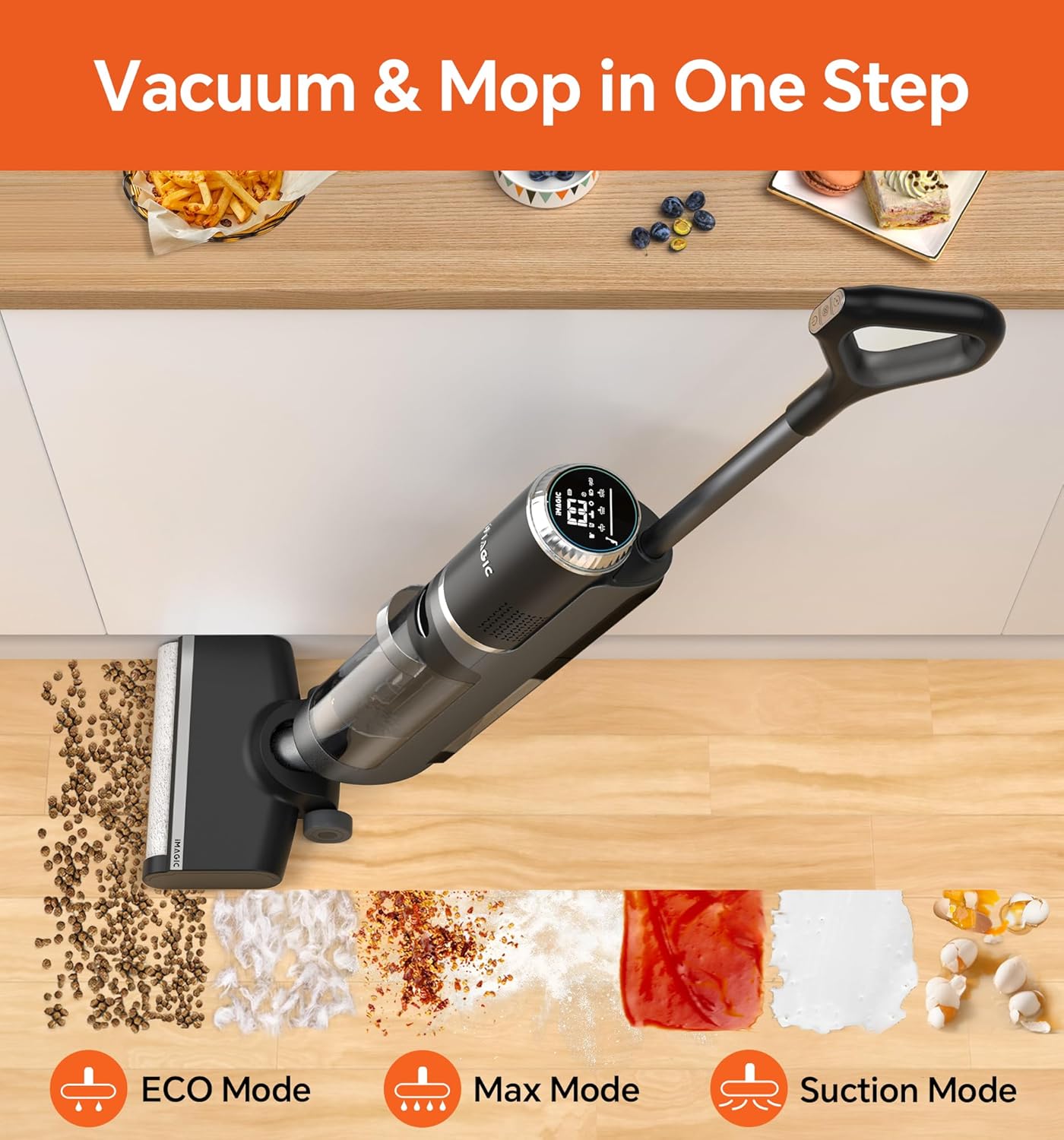
Figure 4.1: IMAGIC M3 simultaneously vacuuming and mopping.
This image illustrates the IMAGIC M3 in action, demonstrating its capability to vacuum dry particles like coffee beans and mop wet spills such as ketchup or eggs, all in a single pass. It highlights the different cleaning modes: ECO, Max, and Suction.
4.3 Cleaning Techniques
- General Cleaning: Push the vacuum forward and pull it back slowly over the area to be cleaned. The self-propelled feature will assist movement.
- Edge Cleaning: Position the vacuum head close to walls or baseboards. The specialized brush roller is designed to clean within 0.1 inch of edges.

Figure 4.2: IMAGIC M3's edge cleaning capability.
This image demonstrates the IMAGIC M3's ability to clean close to edges, such as baseboards, with its brush roller reaching within 0.1 inch. It also shows its effectiveness for cleaning stairs and pet mats.

Figure 4.3: IMAGIC M3 cleaning various hard floor types.
This image illustrates the versatility of the IMAGIC M3 across different hard floor surfaces, including hardwood, marble, tile, and laminate, effectively cleaning various types of spills and debris.

Figure 4.4: User operating IMAGIC M3 for fast, streak-free drying.
A person is shown operating the IMAGIC M3 on a tiled floor, emphasizing the vacuum's ability to leave surfaces dry and streak-free quickly after cleaning.
5. Maintenance
Regular maintenance ensures optimal performance and extends the lifespan of your IMAGIC M3.
5.1 Emptying the Dirty Water Tank
- After each use, remove the dirty water tank from the main unit.
- Carefully open the tank and dispose of the dirty water.
- Rinse the dirty water tank thoroughly with clean water.
- Ensure the filter inside the dirty water tank is also rinsed and free of debris.
- Allow the tank and filter to air dry completely before reassembling.
5.2 Self-Cleaning Cycle
The IMAGIC M3 features self-cleaning modes to maintain the brush roller and internal tubes.

Figure 5.1: IMAGIC M3 self-cleaning process with hot air drying.
This image visually explains the IMAGIC M3's self-cleaning capabilities, including a 3-minute Quick Self-cleaning and a 30-minute Deep Self-cleaning with 160°F hot air drying to prevent odors.
- Place the vacuum cleaner on the docking station.
- Ensure the clean water tank has sufficient water.
- Press the self-clean button on the handle.
- Choose between Quick Self-cleaning (approx. 3 minutes) or Deep Self-cleaning (approx. 30 minutes with 160°F hot air drying).
- The vacuum will automatically clean the brush roller and internal components.
- After the cycle, empty the dirty water tank.
5.3 Cleaning the Brush Roller
- If the brush roller requires manual cleaning, turn off the vacuum and remove the brush cover.
- Remove the brush roller.
- Use the provided 3-in-1 cleaning brush to remove any tangled hair or debris from the roller.
- Rinse the brush roller under running water.
- Allow the brush roller to air dry completely before reinserting.
5.4 Cleaning the Filter
- Remove the filter from the dirty water tank.
- Rinse the filter under running water to remove any accumulated dust or debris.
- Ensure the filter is completely dry before placing it back into the dirty water tank.
6. Troubleshooting
If you encounter issues with your IMAGIC M3, refer to the following table for common problems and solutions.
| Problem | Possible Cause | Solution |
|---|---|---|
| No power / Does not turn on | Battery is depleted. Not properly docked. | Charge the battery fully. Ensure the vacuum is correctly placed on the charging dock. |
| Poor suction | Dirty water tank full. Filter clogged. Brush roller tangled. | Empty and clean the dirty water tank. Clean or replace the filter. Clean the brush roller. |
| Water leakage | Clean/dirty water tank not properly installed. Tank cap loose. | Ensure both tanks are securely in place. Tighten tank caps. |
| Abnormal noise | Brush roller obstructed. Foreign object in the air duct. | Check and clean the brush roller. Inspect the air duct for blockages. |
| Self-cleaning not working | Insufficient water in clean water tank. Vacuum not properly docked. | Fill the clean water tank. Ensure the vacuum is correctly placed on the docking station. |
7. Specifications
| Feature | Detail |
|---|---|
| Brand | IMAGIC |
| Model Name | M3 |
| Product Dimensions | 10.71"L x 7.72"W x 43.31"H |
| Item Weight | 9.53 pounds |
| Color | Deep Grey |
| Wattage | 200 watts |
| Charging Time | 2.5 Hours |
| Battery Life | 35 minutes |
| Battery Type | Lithium-Ion (1 included) |
| Filter Type | Washable Filter |
| Noise Level | 73 dB |
| Clean Water Tank Capacity | 650mL (approx.) |
| Dirty Water Tank Capacity | 800mL (approx.) |
| Recommended Uses | Indoor, Hard Floor, Hardwood, Laminate, Multi Surface, Tile, Vinyl |
8. Warranty and Support
IMAGIC products are manufactured to high-quality standards. For information regarding warranty coverage, please refer to the warranty card included with your purchase or visit the official IMAGIC website.
For technical support, troubleshooting assistance, or to order replacement parts, please contact IMAGIC Customer Service. Contact details can typically be found on the product packaging or the official brand website.
Please retain your proof of purchase for warranty claims.
Related documentsM3

Ask a question about this manual
Ask about setup, troubleshooting, compatibility, parts, safety, or missing instructions. Manuals+ will review the question and use this page’s manual context to help answer it.