
Reboot RBC6000L
Reboot RBC6000L 60A Plasma Cutter User Manual
Model: RBC6000L | Brand: Reboot
1. Introduction
This manual provides essential information for the safe and efficient operation of your Reboot RBC6000L 60A Plasma Cutter. The RBC6000L features non-contact pilot arc technology for clean cuts on various surfaces, including rough, painted, or rusted materials. It utilizes advanced IGBT inverter technology for precise cutting up to 16mm. The unit is designed for portability and quick setup, making it suitable for a range of metal cutting tasks.

Main view of the Reboot RBC6000L Plasma Cutter, showing its compact design, approximate dimensions of 12 inches length, 8.86 inches height, 4.33 inches width, and a weight of 3.7 kg. The plasma torch and earth clamp are also visible.
2. Safety Information
Always prioritize safety when operating the plasma cutter. Failure to follow safety guidelines can result in serious injury or equipment damage.
2.1 General Safety Precautions
- Always wear appropriate personal protective equipment (PPE), including a welding helmet with a suitable shade, flame-resistant gloves, and protective clothing.
- Ensure the work area is well-ventilated to disperse fumes and gases produced during cutting.
- Keep children and unauthorized personnel away from the work area.
- Do not operate the plasma cutter near flammable materials or in explosive atmospheres.
2.2 Electrical Safety
- Ensure the power supply voltage and frequency match the unit's requirements (240V, 50/60Hz).
- Do not operate the equipment in wet conditions or with wet hands.
- Regularly inspect power cables and connections for damage. Do not use damaged cables.
2.3 Compressed Air Safety
- Use clean, dry compressed air within the recommended pressure range.
- Ensure all air connections are secure to prevent leaks.
3. Product Overview
This section details the components and controls of the RBC6000L plasma cutter.

Front and rear panel view of the RBC6000L Plasma Cutter. The front panel shows the overheat indicator, power indicator, digital display, current adjust knob, PT-31 torch connector, torch switch socket, and earth clamp connector. The rear panel displays the turn on/off switch, pressure control knob, air input connector, pressure gauge, power cable, air filter regulator, and powerful fan.
3.1 Front Panel Controls
- Overheat Indicator: Illuminates if the unit exceeds safe operating temperature.
- Power Indicator: Shows when the unit is powered on.
- Digital Display: Shows current settings.
- Current Adjust Knob: Used to set the cutting amperage (10-60A).
- PT-31 Torch Connector: Connection point for the plasma torch.
- Torch Switch Socket: Connects the torch trigger cable.
- Earth Clamp Connector: Connects the earth clamp cable.
3.2 Rear Panel Controls
- Turn On/Off Switch: Main power switch.
- Pressure Control Knob: Adjusts the air pressure for cutting.
- Air Input Connector: Connects the compressed air supply.
- Pressure Gauge: Displays the current air pressure.
- Power Cable: Connects to the main power supply.
- Air Filter Regulator: Filters and regulates the incoming air supply.
- Powerful Fan: Provides cooling for the unit.
4. Setup
Follow these steps to set up your plasma cutter for operation.
4.1 Unpacking
Carefully remove the plasma cutter and all included accessories from the packaging. Inspect for any shipping damage.
4.2 Air Compressor Connection
Connect a suitable air compressor (not included) to the air input connector on the rear panel. The recommended air compressor should provide a pressure range of 90 psi, 250 l/min, 2.2 kW or more. The recommended operating pressure for the unit is 30-60 PSI.
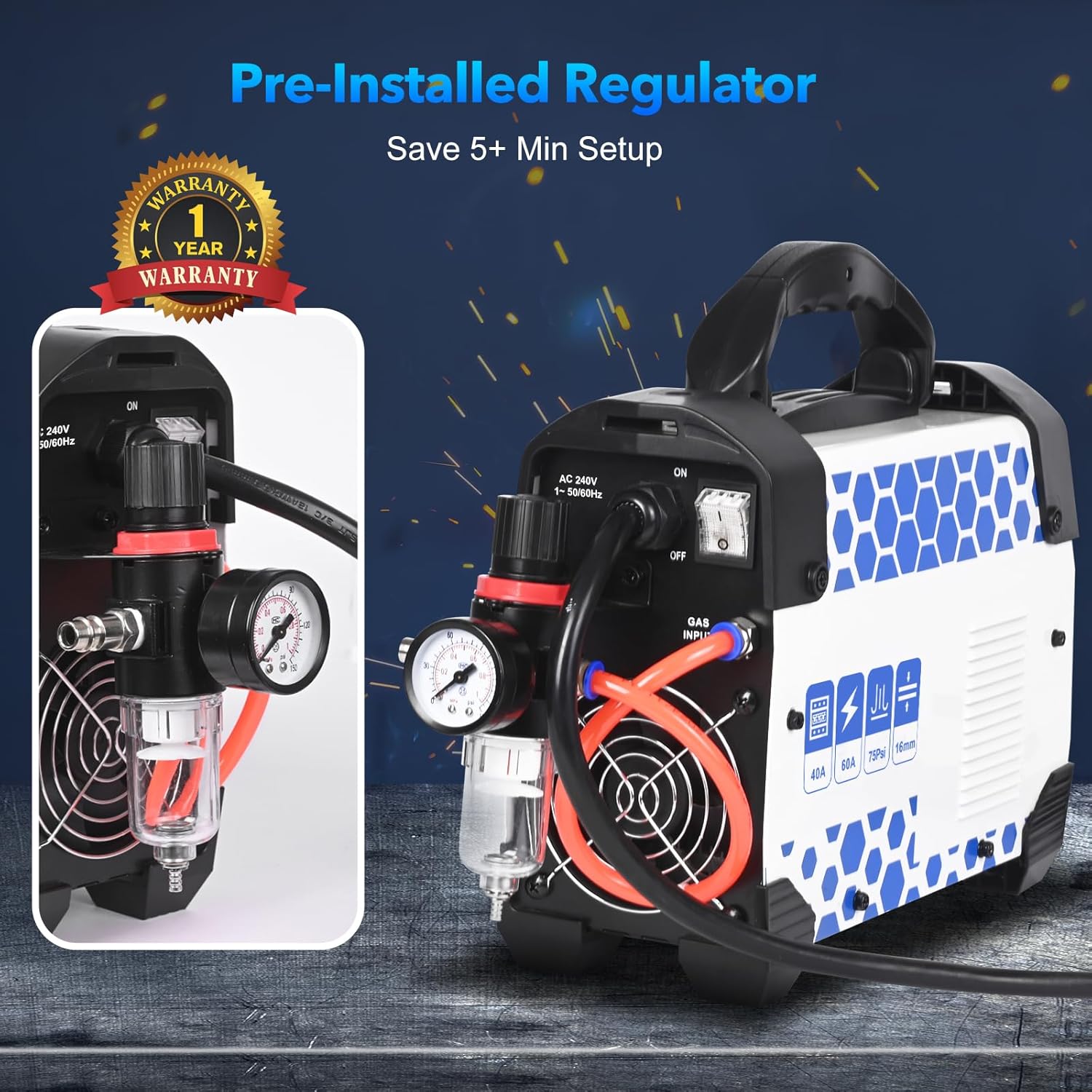
Close-up view of the pre-installed air filter regulator on the rear of the plasma cutter, highlighting its role in ensuring a clean and regulated air supply.
4.3 Torch and Earth Clamp Connection
- Connect the PT-31 plasma torch to its designated connector on the front panel.
- Connect the torch switch cable to the torch switch socket.
- Connect the earth clamp cable to the earth clamp connector. Securely attach the earth clamp to the workpiece, ensuring good electrical contact.
4.4 Power Connection
Connect the power cable to a grounded 240V power outlet.
5. Operation
Understand the operational steps for effective and safe cutting.
5.1 Power On and Air Pressure Adjustment
- Turn on the main power switch on the rear panel.
- Adjust the air pressure using the pressure control knob on the rear panel until the pressure gauge shows the recommended operating pressure (30-60 PSI).
5.2 Current Adjustment and Pilot Arc
- Use the current adjust knob on the front panel to set the desired cutting amperage (10-60A) based on the material thickness and type.
- The RBC6000L features a non-contact pilot arc, allowing it to cut through painted, rusted, or dirty surfaces without direct contact, which helps reduce slag and extends consumable life.

Illustration of the cutting features of the plasma cutter, including High Frequency (HF) ignition, IGBT Technology, Large Capacitance, 50/60Hz compatibility, Strong Heat Dissipation, and Pilot Arc functionality.
5.3 Cutting Process
- Position the torch nozzle approximately 1/8 inch (3mm) above the workpiece.
- Press the torch trigger to initiate the pilot arc and begin cutting.
- Maintain a steady travel speed for clean and consistent cuts.
5.4 Cutting Capabilities and Material Compatibility
- The unit is capable of achieving clean cuts up to 10mm (1/2 inch).
- The maximum severance cut capability is up to 16mm (5/8 inch).

Demonstration of the maximum cutting thickness capabilities, showing a 5/8 inch maximum severance cut and a 1/2 inch clean cut on metal plates.
The plasma cutter is suitable for cutting various metals, including:
- Steel
- Stainless Steel
- Aluminum
- Copper
- Iron
- Carbon Steel

Collage showing the plasma cutter being used to cut different materials: Stainless Steel, Mild Steel, Carbon Steel, Copper Metal, Aluminum Alloy, and Iron Metal.
6. Maintenance
Regular maintenance ensures optimal performance and extends the lifespan of your plasma cutter.
6.1 Consumables
Regularly inspect and replace wear parts such as electrodes, nozzles, and shield cups (AG60 model consumables). Worn consumables can significantly affect cut quality and performance. Always use genuine replacement parts.

A kit of plasma cutter consumables, including nozzles, electrodes, and ceramic cups, suitable for AG-60 torches.
6.2 Air Filter Regulator
Periodically drain any accumulated moisture from the air filter regulator. Clean or replace the filter element as needed to ensure a clean and dry air supply to the plasma cutter.
6.3 General Cleaning
Keep the unit clean and free from dust and metal particles. Ensure cooling vents are unobstructed to prevent overheating.
7. Troubleshooting
The RBC6000L features an integrated fault system to simplify troubleshooting. Refer to the digital display for error codes or indicators. Below are common issues and general solutions:
- No Arc: Check power supply, air pressure, and torch connections. Ensure the earth clamp has good contact with the workpiece. Inspect consumables for wear and replace if necessary.
- Poor Cut Quality: Adjust cutting speed, amperage, and air pressure. Replace worn consumables. Ensure the workpiece surface is clean.
- Overheat Indicator On: Allow the unit to cool down. Ensure cooling vents are clear and the fan is operating correctly. Reduce the duty cycle if continuously cutting at high amperage.
- Air Leakage: Check all air hose connections and the air filter regulator for proper sealing.
8. Specifications
| Feature | Specification |
|---|---|
| Model | RBC6000L |
| Input Voltage | 240V |
| Output Current | 10-60A DC |
| Max Cutting Thickness (Clean) | 10mm (1/2 inch) |
| Max Cutting Thickness (Severance) | 16mm (5/8 inch) |
| Technology | IGBT Inverter, Non-Touch Pilot Arc |
| Recommended Air Pressure | 30-60 PSI |
| Recommended Air Compressor | 90 psi, 250 l/min, 2.2 kW or more |
| Dimensions (L x W x H) | Approx. 30 x 11 x 22.5 cm (12 x 4.33 x 8.86 inches) |
| Weight | Approx. 3.7 kg (8.16 lbs) |
| Included Components | RBC6000L Plasma Cutter, Air Hose, Air Regulator, Earth Clamp with Cable, Plasma Torch, Consumables Kit |
9. Warranty
The Reboot RBC6000L Plasma Cutter comes with a 1-year warranty from the date of purchase. Please retain your proof of purchase for any warranty claims. The warranty covers manufacturing defects under normal use conditions. It does not cover damage due to misuse, unauthorized modifications, or normal wear and tear of consumables.
10. Support
For technical assistance, questions, or support regarding your Reboot RBC6000L Plasma Cutter, please contact Reboot customer service. Reboot offers expert support based on 13 years of experience in welding and cutting equipment. Refer to the product packaging or the official Reboot website for the most current contact details.
You can also visit the Reboot Brand Store for additional product information and resources.
Related documentsRBC6000L


Ask a question about this manual
Ask about setup, troubleshooting, compatibility, parts, safety, or missing instructions. Manuals+ will review the question and use this page’s manual context to help answer it.