1. Introduction
The ATK VXE Dragonfly R1 Wireless Gaming Mouse is engineered for high-performance gaming, offering a lightweight design, advanced sensor technology, and versatile connectivity. This manual provides essential information for setting up, operating, maintaining, and troubleshooting your R1 series mouse to ensure optimal performance.
2. Product Overview
The R1 series mouse features an ergonomic design for comfortable use during extended gaming sessions. Key components include:
- Left and Right Click Buttons
- Scroll Wheel (with click function)
- Side Buttons (programmable)
- DPI Cycle Button (typically on the bottom or top, depending on model)
- USB-C Port for charging and wired connection
- 2.4GHz Wireless Receiver Storage Compartment (located on the underside)

This image displays the ATK VXE Dragonfly R1 SE+ wireless gaming mouse in black, viewed from directly above. It highlights the ergonomic shape, the scroll wheel, and the primary left and right click buttons.
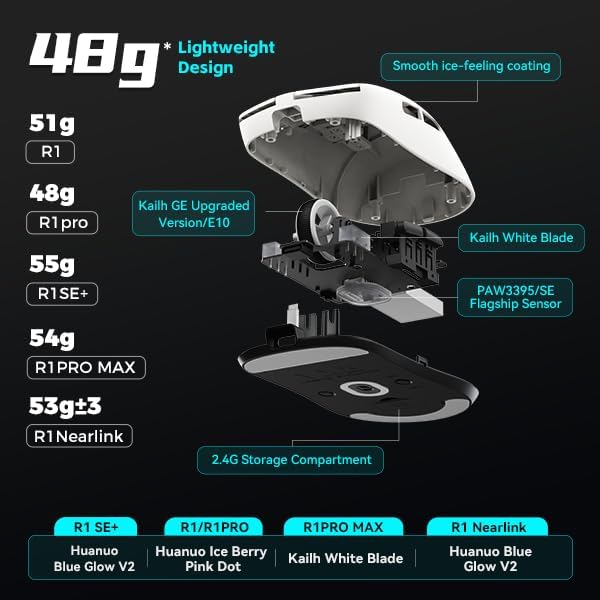
An exploded diagram of the ATK VXE Dragonfly R1 series mouse, illustrating its internal components including the Kailh GE Upgraded Version/E10 scroll wheel, Kailh White Blade switches, PAW3395/SE Flagship Sensor, and the 2.4G storage compartment. The image also provides a weight comparison for different R1 models: R1 (51g), R1 Pro (48g), R1 SE+ (55g), R1 Pro Max (54g), and R1 Nearlink (53g ±3g). It also mentions the smooth ice-feeling coating.
3. Setup
3.1 Initial Charging
Before first use, it is recommended to fully charge the mouse. Connect the included USB-C cable to the mouse's front port and to a USB power source (e.g., computer USB port, USB wall adapter). The LED indicator will show charging status and turn off or change color when fully charged.
3.2 Connecting the Mouse
The ATK VXE Dragonfly R1 series supports Tri-Mode connectivity (Type-C wired, 2.4GHz wireless, Bluetooth 5.4) on certain models (R1 SE+, R1, R1 NearLink). R1 Pro and R1 Pro Max models are Dual-Mode (wired/2.4GHz).
3.2.1 2.4GHz Wireless Connection
- Locate the 2.4GHz USB receiver in the storage compartment on the underside of the mouse.
- Plug the USB receiver into an available USB port on your computer.
- Turn on the mouse using the power switch (usually on the underside).
- The mouse should automatically connect. If not, press the pairing button (if available) or refer to the software section for pairing instructions.
3.2.2 Bluetooth Connection (Tri-Mode models only)
- Ensure your computer's Bluetooth is enabled.
- Switch the mouse to Bluetooth mode using the mode switch on the underside.
- Press and hold the Bluetooth pairing button (refer to your specific model's diagram if unsure) until the LED indicator blinks, indicating pairing mode.
- On your computer, search for Bluetooth devices and select "ATK VXE Dragonfly R1" (or similar) to pair.
3.2.3 Wired Connection
Connect the USB-C cable from the mouse to a USB port on your computer. The mouse will function in wired mode and charge simultaneously. This mode also allows for quick charging during gameplay.

The image showcases the Tri-Mode connectivity options of the ATK VXE Dragonfly R1 mouse: Type-C wired, Bluetooth 5.4, and 2.4GHz/Nearlink wireless. It specifies that R1 SE+, R1, and R1 NearLink models support Tri-Mode, while R1 Pro and R1 Pro Max models are Dual-Mode. The mouse supports smooth operation in both 2.4GHz receiver or Bluetooth modes and can be quick-charged via wired USB during gameplay.
4. Operating the Mouse
4.1 DPI Adjustment
The mouse features adjustable DPI (Dots Per Inch) settings, allowing you to change cursor sensitivity. Use the dedicated DPI button (if present) or the V HUB software to cycle through preset DPI levels or customize them. The PAW3395/SE sensor provides powerful optical tracking performance.
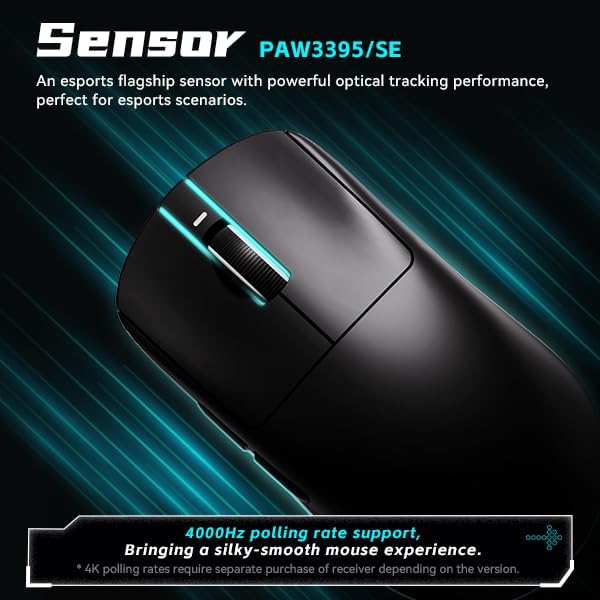
This image highlights the PAW3395/SE esports flagship sensor integrated into the ATK VXE Dragonfly R1 mouse, known for its powerful optical tracking performance. It also indicates support for a 4000Hz polling rate, providing a silky-smooth mouse experience. Note that 4K polling rates may require a separate receiver depending on the mouse version.
4.2 Polling Rate
The R1 series supports various polling rates, including 1000Hz and up to 4000Hz on certain models (with separate receiver purchase). A higher polling rate reduces input lag, providing a more responsive experience. Adjust this setting via the V HUB software.

This image shows the ATK VXE Dragonfly R1 mouse with an overlay highlighting its 4K Polling Rate capability. It emphasizes the Nordic/BEKEN(compx)/HiSilicon Nearlink MCU, described as a flagship-level chip offering powerful performance, low power consumption, and enhanced interference resistance, engineered for esports.
4.3 Smart Speed X Latency Technology
VXE's self-developed Smart Speed X transmission technology, based on the Nordic master chip, is designed to minimize latency and enhance endurance, contributing to a smooth and responsive gaming experience even in environments with signal interference.

A white ATK VXE Dragonfly R1 mouse is depicted, showcasing the 'Smart Speed X' wireless transmission technology. This technology, developed by VXE based on the Nordic master chip, aims to reduce latency and enhance endurance for optimal gaming performance, ensuring smooth operation even in environments with strong signal interference.
5. Customization with V HUB Software
The V HUB software provides comprehensive management for your ATK VXE Dragonfly R1 mouse. With V HUB, you can:
- Adjust DPI settings and create custom profiles.
- Change polling rates.
- Program button macros and reassign functions.
- Monitor battery status.
- Update firmware.
Download the latest V HUB software from the official ATKGEAR website.
6. Maintenance
6.1 Cleaning
To maintain performance and hygiene, regularly clean your mouse. Use a soft, dry cloth to wipe the surface. For stubborn dirt, a slightly damp cloth with mild soap can be used, ensuring no liquid enters the mouse. The 'Smooth ice-feeling' coating is designed to be dirt-resistant and easy to clean.

The image illustrates the 'Smooth ice-feeling' coating of the ATK VXE Dragonfly R1 mouse, which is dirt-resistant and easy to clean, designed for swift movement. It differentiates between 'Smooth Texture' found on R1 Pro / R1 Pro Max models and 'Matte Texture' on R1 / R1 SE+ / R1 Nearlink models.
6.2 Battery Care
The mouse uses a rechargeable nonstandard battery. To prolong battery life:
- Avoid fully discharging the battery frequently.
- Store the mouse in a cool, dry place when not in use for extended periods.
- Charge the mouse using the provided USB-C cable or a compatible charger.
7. Troubleshooting
7.1 Mouse Not Responding
- Ensure the mouse is powered on.
- Check battery level and charge if necessary.
- For 2.4GHz wireless, ensure the USB receiver is securely plugged in and the mouse is in 2.4GHz mode. Try a different USB port.
- For Bluetooth, ensure Bluetooth is enabled on your computer and the mouse is correctly paired and in Bluetooth mode. Try re-pairing.
- For wired connection, ensure the USB-C cable is securely connected to both the mouse and the computer.
- Try restarting your computer.
7.2 Erratic Cursor Movement
- Clean the mouse sensor area on the underside.
- Ensure you are using the mouse on a clean, uniform surface. Avoid highly reflective or transparent surfaces.
- Check for wireless interference. Move the receiver closer to the mouse or away from other wireless devices.
- Adjust DPI settings via the mouse or V HUB software.
7.3 Buttons Not Working
- Check V HUB software for any remapping or macro conflicts.
- Ensure the mouse firmware is up to date.
8. Specifications
Below is a summary of key specifications for the ATK VXE Dragonfly R1 series. Specifics may vary by model (R1, R1 SE+, R1 Pro, R1 Pro Max, R1 Nearlink).

A comprehensive table outlining the specifications for various models within the VXE Dragonfly R1 series, including R1 Nearlink, R1 SE PLUS, R1, R1 PRO, and R1 PRO MAX. It covers dimensions, coating, sensor, chip, transmission technology, polling rate, battery capacity, continuous operating battery life, weight, microswitch type, scroll wheel, connection method, and 2.4G receiver details.
| Feature | Detail |
|---|---|
| Model | R1 |
| Item Weight | 7 ounces (approx. 55g for R1 SE+) |
| Package Dimensions | 6.3 x 4.72 x 2.36 inches |
| Sensor | PAW3395/SE Optical |
| Connectivity | Bluetooth 5.4, 2.4GHz Wireless, USB-C Wired (Tri-Mode) |
| Switches | Kailh White Blade / Ice Berry Pink Dot (model dependent) |
| Coating | Smooth Ice-Feeling / Matte Texture (model dependent) |
| Battery | 1 Nonstandard Battery (included) |
| Special Feature | Ergonomic Design, Programmable Macro Keys, Adjustable DPI |

This diagram details the two types of micro switches used in the ATK VXE Dragonfly R1 series: Kailh White Blade and Ice Berry Pink Dot. Kailh White Blade switches offer a balanced feel with a 100 million click lifespan, while Ice Berry Pink Dot switches provide a soft bounce feel and a 90 million click lifespan, suitable for prolonged use.
9. Warranty and Support
For warranty information, technical support, or further assistance, please refer to the official ATKGEAR website or contact their customer service directly. Keep your proof of purchase for warranty claims.


