
1. Product Overview
The LIGE Smart Watch FV18 is a versatile wearable device designed to enhance your daily life with health monitoring, fitness tracking, and smart communication features. It features a 1.47-inch HD display, IP68 water resistance, and supports Bluetooth calls.
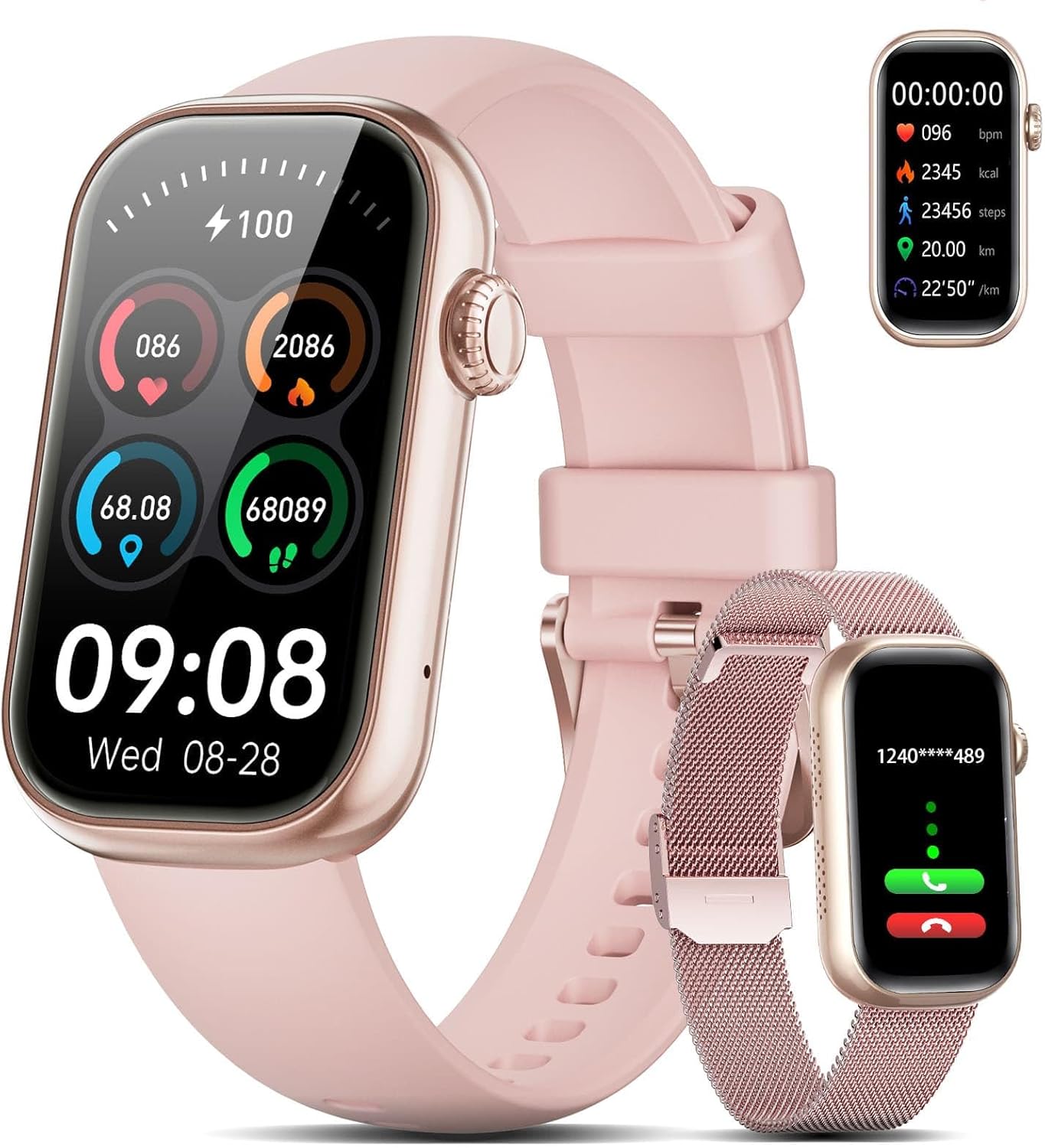
Image 1.1: LIGE Smart Watch FV18 with interchangeable straps.
2. Setup Guide
2.1 Unboxing and Components
Upon opening the package, you will find the following items:
- 1 x LIGE Smart Watch FV18
- 1 x Stainless Steel Mesh Strap
- 1 x Silicone Strap
- 1 x Magnetic Charging Cable
- 1 x User Manual
Video 2.1: Unboxing the LIGE Smart Watch FV18 and its components.
2.2 Attaching the Straps
The LIGE Smart Watch FV18 comes with two interchangeable straps. To attach a strap, align the pins on the strap with the holes on the watch body and slide them into place until they click securely. To remove, pull the small lever on the strap pin and gently detach.
2.3 App Download and Installation
To utilize all features of your smart watch, download the GloryFit application on your smartphone. You can find the app by:
- Scanning the QR code provided in the user manual or on the watch display.
- Searching for "GloryFit" in the Apple App Store (for iOS) or Google Play Store (for Android).
Follow the on-screen instructions to install the app.

Image 2.2: Guide for downloading and installing the GloryFit app.
2.4 Device Pairing
After installing the GloryFit app, follow these steps to pair your smart watch:
- Ensure your phone's Bluetooth is enabled.
- Open the GloryFit app and navigate to the "Device" section.
- Tap "Add Device" or "Select device" and allow location permissions if prompted.
- The app will search for nearby devices. Select "QS-50(ID-5B05)" or a similar identifier for your LIGE Smart Watch FV18.
- Confirm the pairing request on both your phone and the watch.
2.5 Notification and Contact Synchronization
To receive notifications and make calls directly from your watch:
- Notifications: In the GloryFit app, go to "Device" > "Push message" and grant "Notification access" to GloryFit. Then, enable notifications for desired applications (e.g., WhatsApp, Facebook, Instagram).
- Contacts: In the GloryFit app, go to "Device" > "Bluetooth call with watch" > "Address Book" to synchronize up to 100 contacts from your phone to the watch.
3. Operating Instructions
3.1 Basic Navigation
The LIGE Smart Watch FV18 features a full touchscreen display. Swipe left, right, up, or down to navigate through menus, access quick settings, and view different functions. Press the side button to return to the home screen or wake the device.
3.2 Making and Answering Calls
Once paired via Bluetooth, you can manage calls directly from your watch:
- Answering Calls: When a call comes in, tap the green icon on your watch to answer.
- Making Calls: Access the call menu on your watch to dial numbers or select from synchronized contacts. The watch uses its built-in speaker and microphone for clear communication.

Image 3.1: Smart Bluetooth Call feature on the LIGE Smart Watch FV18.
3.3 Receiving Notifications
After enabling notification access in the GloryFit app, your watch will display real-time alerts for incoming calls, SMS messages, and various app notifications (e.g., Facebook, WhatsApp, TikTok).

Image 3.2: The watch receives notifications from various social media and messaging apps.
3.4 Health Monitoring
The watch is equipped with optical sensors for continuous health tracking:
- Heart Rate: Monitors your heart rate throughout the day.
- Blood Oxygen (SpO2): Measures your blood oxygen saturation levels.
- Sleep Tracking: Analyzes your sleep patterns, including deep sleep, light sleep, and awake times.
- Activity Tracking: Records steps taken, distance covered, and calories burned.

Image 3.3: 24/7 Health Management features including Heart Rate, Sleep Tracking, and Blood Oxygen.
3.5 Sports Modes
The watch supports over 70 sports modes to track your workouts. Select your activity from the watch menu or the GloryFit app to record real-time data such as duration, heart rate, and calories burned.

Image 3.4: The watch offers a wide range of sports modes for tracking physical activities.
Video 3.5: Demonstrating health tracking and various sports modes on the LIGE Smart Watch FV18.
3.6 Customizing Watch Faces
Personalize your watch with over 165 selectable watch faces available through the GloryFit app. You can also upload your own photos to create custom dials.
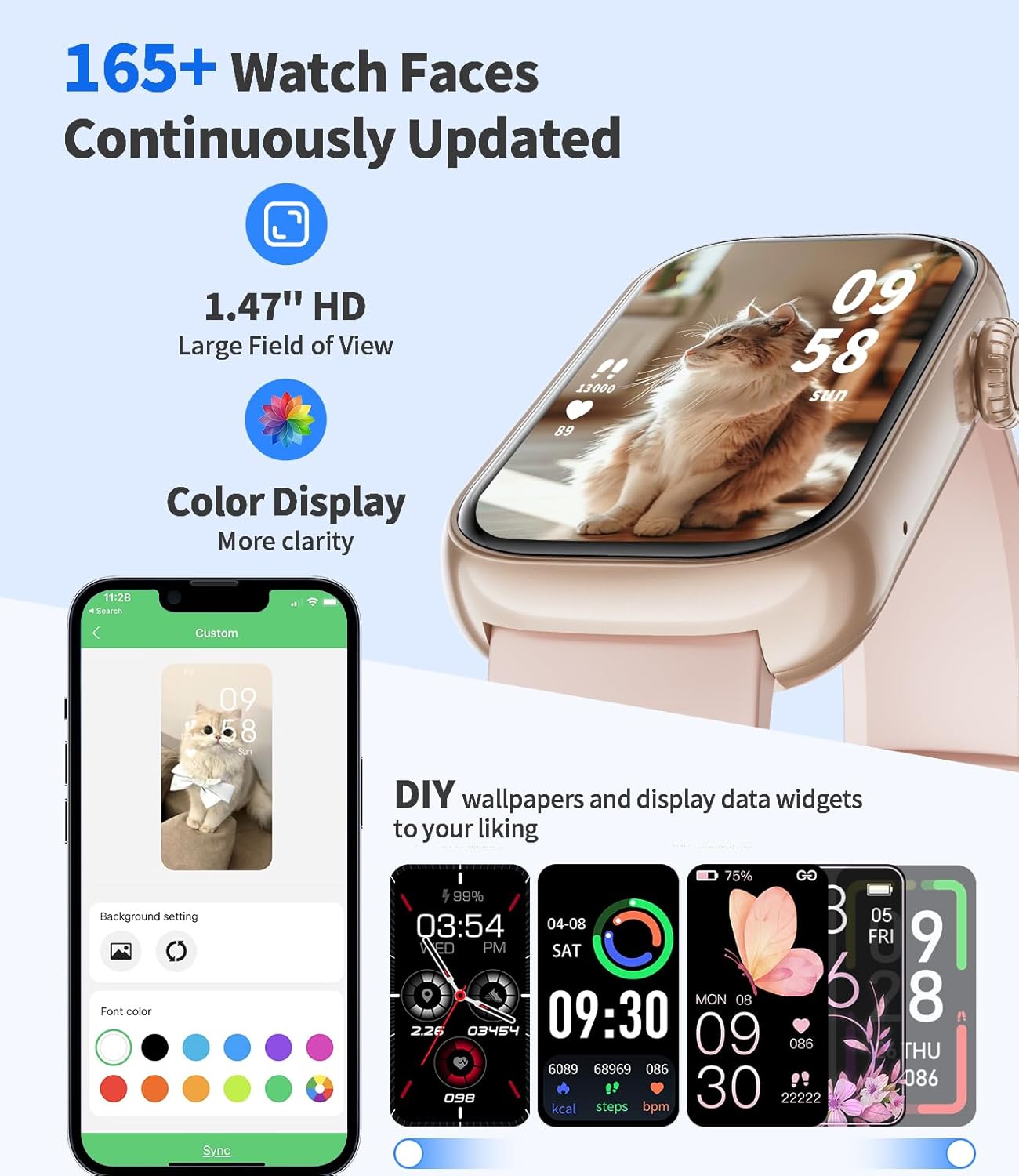
Image 3.6: A selection of watch faces and options for custom backgrounds.
3.7 Music and Camera Control
Control your smartphone's music playback and camera shutter directly from your watch when connected via Bluetooth.
3.8 Find Phone Feature
If your phone is misplaced, use the "Find Phone" feature on your watch to make your phone ring, helping you locate it.
4. Maintenance
4.1 Charging the Device
Connect the magnetic charging cable to the charging points on the back of the watch and a USB power source. A full charge takes approximately 2 hours. The watch provides 5-10 days of typical usage and up to 20 days in standby mode.

Image 4.1: Information on IP68 water resistance and battery life.
4.2 Water Resistance
The LIGE Smart Watch FV18 is IP68 certified, meaning it is resistant to dust and can withstand splashes, rain, and sweat. It is not suitable for swimming, diving, or use in saunas or hot showers, as steam and hot water can compromise the seals.
Video 4.2: Demonstrating the durability and water resistance of the LIGE Smart Watch FV18.
4.3 Cleaning and Care
To maintain your watch, regularly clean the watch body and straps with a soft, dry cloth. If necessary, use a slightly damp cloth for the silicone strap. Avoid using harsh chemicals or abrasive materials.
5. Troubleshooting
If you encounter issues with your LIGE Smart Watch FV18, please refer to the following common solutions:
- Watch not turning on: Ensure the watch is fully charged. Connect it to the magnetic charger for at least 30 minutes.
- Cannot pair with phone:
- Ensure Bluetooth is enabled on your phone and the watch is within range.
- Restart both your phone and the watch.
- Check if the GloryFit app has necessary permissions (location, Bluetooth).
- Try unpairing and re-pairing the device through the GloryFit app.
- Notifications not received:
- Verify that "Notification access" is granted to GloryFit in your phone's settings.
- Ensure specific app notifications are enabled within the GloryFit app.
- Check if "Do Not Disturb" mode is active on either your phone or watch.
- Inaccurate health data: Ensure the watch is worn snugly on your wrist, not too tight or too loose. Clean the sensor on the back of the watch regularly.
- Short battery life: Reduce screen brightness, disable unnecessary notifications, or limit continuous heart rate monitoring to extend battery life.
6. Specifications
| Feature | Detail |
|---|---|
| Model | FV18 |
| Display Size | 1.47 Inches IPS HD (172 x 320 pixels) |
| Connectivity | Bluetooth 5.2 |
| Battery Capacity | 300 mAh |
| Charging Time | Approx. 2 hours |
| Battery Life (Typical Use) | 5-10 days |
| Battery Life (Standby) | Up to 20 days |
| Water Resistance | IP68 |
| Memory Storage | 128 MB |
| Operating System | Android/iOS compatible |
| Watch Body Weight | 14.5 grams |
| Watch Dimensions | 45.5mm x 26.4mm x 11mm |
7. Warranty and Support
7.1 Warranty Information
Your LIGE Smart Watch FV18 comes with a 2-year warranty. Please retain your proof of purchase for warranty claims.
7.2 Customer Support
If you have any questions, require technical assistance, or need to make a warranty claim, please contact our professional customer service team. We aim to respond to your inquiry within 24 hours and provide the best solution.
Contact details can typically be found on the product packaging, the official LIGE website, or through your purchase platform.


