
Metro Mobility M2
Metro Mobility 4 Wheel Foldable Mobility Scooter User Manual
Model: M2
Introduction and Overview
This manual provides essential information for the safe and efficient operation, maintenance, and troubleshooting of your Metro Mobility 4 Wheel Foldable Mobility Scooter, Model M2. Please read this manual thoroughly before using the scooter to ensure proper handling and to maximize its lifespan.
The Metro Mobility scooter is designed for effortless and dependable movement, featuring a robust 260W brushless motor and a travel range of up to 20 miles. It supports a weight capacity of up to 330 lbs, making it suitable for a wide range of users. Key design elements prioritize user comfort, including an adjustable tiller, a breathable seat, and an extended footrest.

Figure 1: The Metro Mobility 4 Wheel Foldable Mobility Scooter, Model M2. This image shows the scooter's overall design, including the blue base, black seat, and front storage basket.
Setup and Initial Use
Unpacking and Assembly
Your Metro Mobility scooter is designed for easy assembly and disassembly, allowing for convenient transport and storage. Upon receiving your scooter, carefully remove all components from the packaging. Refer to the included quick start guide for specific assembly steps. Ensure all parts are securely connected before initial use.

Figure 2: The scooter is designed to be easy to assemble and disassemble, fitting conveniently into most car trunks for transport.
Battery Installation and Charging
The scooter is powered by a removable 22.5Ah lithium battery, providing a range of up to 20 miles on a full charge. Before first use, ensure the battery is fully charged. Connect the charger to the scooter's charging port and then to a standard electrical outlet. The charging indicator light will show the charging status. Disconnect the charger once the battery is fully charged.

Figure 3: Overview of the scooter's power capabilities, highlighting its 20-mile range, 330 lbs weight capacity, and 5 mph maximum speed.
Operating Instructions
Control Panel Overview
The scooter features an intuitive control system for effortless operation. Familiarize yourself with the functions of each control before riding.
- Key Switch: Turns the scooter power on or off.
- Battery Gauge: Displays the current battery charge level.
- Speed Knob: Adjusts the maximum speed of the scooter.
- Horn Button: Activates the scooter's horn for alerting others.
- Headlight Button: Turns the front LED headlight on or off.
- USB Charging Port: Allows for convenient charging of personal electronic devices while on the go.
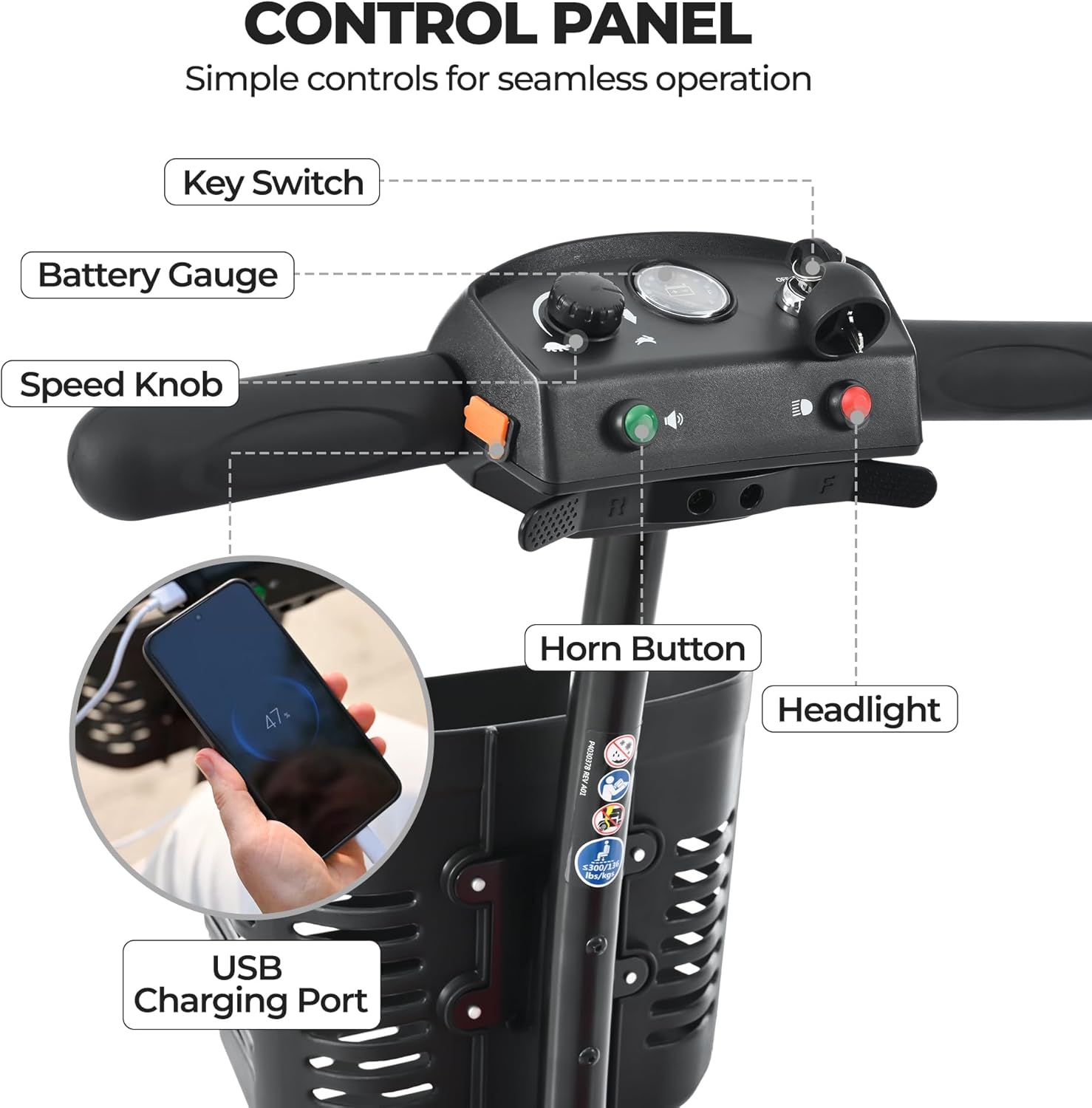
Figure 4: The scooter's control panel, illustrating the location and function of each control element.
Driving and Safety Features
The scooter offers a top speed of 4.97 mph and a tight 47.2-inch turning radius for maneuverability. Safety is paramount, with features designed to enhance visibility and control.
- LED Lighting: Bright front LED headlight and rear brake light enhance visibility, especially in low-light conditions.
- Electromagnetic Braking System: Provides instant stopping power when the throttle is released, ensuring a safe and controlled stop.
- Anti-Tipping Wheels: Located at the rear, these wheels provide additional stability and prevent the scooter from tipping backward on inclines or during sudden stops. The scooter is capable of handling inclines up to 8 degrees.

Figure 5: Demonstrating the scooter's safe electromagnetic brake system and the presence of anti-tipping wheels for enhanced stability on inclines.

Figure 6: Detailed view of thoughtful design elements including the breathable seat, integrated brake light, and bright LED headlight.
Maintenance
Battery Care
- Always charge the battery fully before first use and after each significant period of use.
- Avoid completely draining the battery, as this can reduce its lifespan.
- If storing the scooter for an extended period, ensure the battery is fully charged and then charge it periodically (e.g., once a month) to maintain its health.
- Store the battery in a cool, dry place away from direct sunlight and extreme temperatures.
Cleaning and General Care
- Clean the scooter regularly with a damp cloth and mild detergent. Avoid using abrasive cleaners or solvents.
- Do not spray water directly onto electrical components.
- Inspect tires for wear and tear periodically.
- Check all nuts and bolts for tightness regularly to ensure safe operation.
Troubleshooting
This section addresses common issues you might encounter with your Metro Mobility scooter. For problems not listed here, please contact customer support.
| Problem | Possible Cause | Solution |
|---|---|---|
| Scooter does not power on. | Battery is low or not connected; Key switch is off. | Charge the battery; Ensure battery is properly connected; Turn the key switch to the 'ON' position. |
| Scooter moves slowly or lacks power. | Low battery charge; Speed knob set too low; Overload. | Recharge the battery; Adjust speed knob to a higher setting; Reduce load on the scooter. |
| Brakes are not engaging properly. | Throttle not fully released; Brake system malfunction. | Ensure throttle lever is fully released; Contact customer support if issue persists. |
Specifications
| Feature | Detail |
|---|---|
| Model | M2 |
| Motor | 260W Brushless Motor |
| Weight Capacity | 330 lbs |
| Travel Range | Up to 20 miles |
| Battery | Removable 22.5Ah Lithium Battery (1 12V battery included) |
| Top Speed | 4.97 mph |
| Turning Radius | 47.2 inches |
| Wheel Size | 8 Inches |
| Item Weight | 84.9 Pounds |
| Color | Blue |
| Package Dimensions | 45.3 x 19.7 x 16.5 inches |
| UPC | 725380613298 |
Warranty and Support
Metro Mobility stands behind the quality of its products. Your scooter comes with a 1-year limited warranty. This warranty covers manufacturing defects and ensures peace of mind regarding your purchase.
For any questions, technical assistance, or warranty claims, please contact Metro Mobility's dedicated after-sales support. As a trusted mobility scooter manufacturer, Metro Mobility prioritizes your shopping experience and is committed to providing excellent customer service.
You can typically find contact information on the Metro Mobility official website or through the retailer where you purchased the scooter. Please have your model number (M2) and purchase date ready when contacting support.
Related documentsM2


Ask a question about this manual
Ask about setup, troubleshooting, compatibility, parts, safety, or missing instructions. Manuals+ will review the question and use this page’s manual context to help answer it.