
1. Introduction
This manual provides detailed instructions for the operation and maintenance of your LIGE EF14-B Military Smartwatch. Please read this manual thoroughly to ensure proper use and to maximize the device's functionality.

Image 1.1: LIGE EF14-B Military Smartwatch with its accessories, showcasing the main watch face and an alternative strap.
The LIGE EF14-B smartwatch is engineered for durability and functionality, featuring a 1.62-inch HD AMOLED display, Bluetooth calling capabilities, and IP68 water resistance. It includes over 110 sports modes and comprehensive health monitoring features.

Image 1.2: Overview of the LIGE EF14-B Military Smartwatch highlighting its AMOLED display, 730mAh battery, tactical LED flashlight, Bluetooth calls, IP68 rating, and advanced performance monitor.
2. Setup
2.1. Charging the Device
Before initial use, fully charge the smartwatch. Connect one of the provided magnetic charging cables (USB or Type-C) to the charging contacts on the back of the watch and to a compatible power source. The watch will display a charging indicator.

Image 2.1: The LIGE EF14-B Smartwatch connected to its charger, illustrating its 730mAh battery capacity and expected usage times: 2 hours for full charge, 7-15 days of use, and 50+ days standby.
2.2. App Installation and Pairing
- Download the App: Search for and download the 'Fit Cloud Pro' application from your smartphone's app store (compatible with Android 5.0+ and iOS 10.0+).
- Enable Bluetooth: Ensure Bluetooth is enabled on your smartphone.
- Open App and Pair: Open the 'Fit Cloud Pro' app, create an account if necessary, and follow the on-screen instructions to search for and connect to your LIGE EF14-B smartwatch. Confirm the pairing request on both your phone and the watch.
3. Operating Instructions
3.1. Basic Navigation
- Touch Screen: Swipe left/right, up/down to navigate through menus and functions. Tap to select.
- Side Buttons: Use the physical buttons on the side for quick access to specific functions or to return to the home screen.
3.2. Bluetooth Calling and Notifications
Once paired with your smartphone, the smartwatch supports Bluetooth calls and displays notifications.
- Making/Receiving Calls: Use the watch's dial pad or contact list to make calls. Incoming calls can be answered or rejected directly from the watch.
- Message Notifications: Receive alerts for messages, emails, and social media apps.
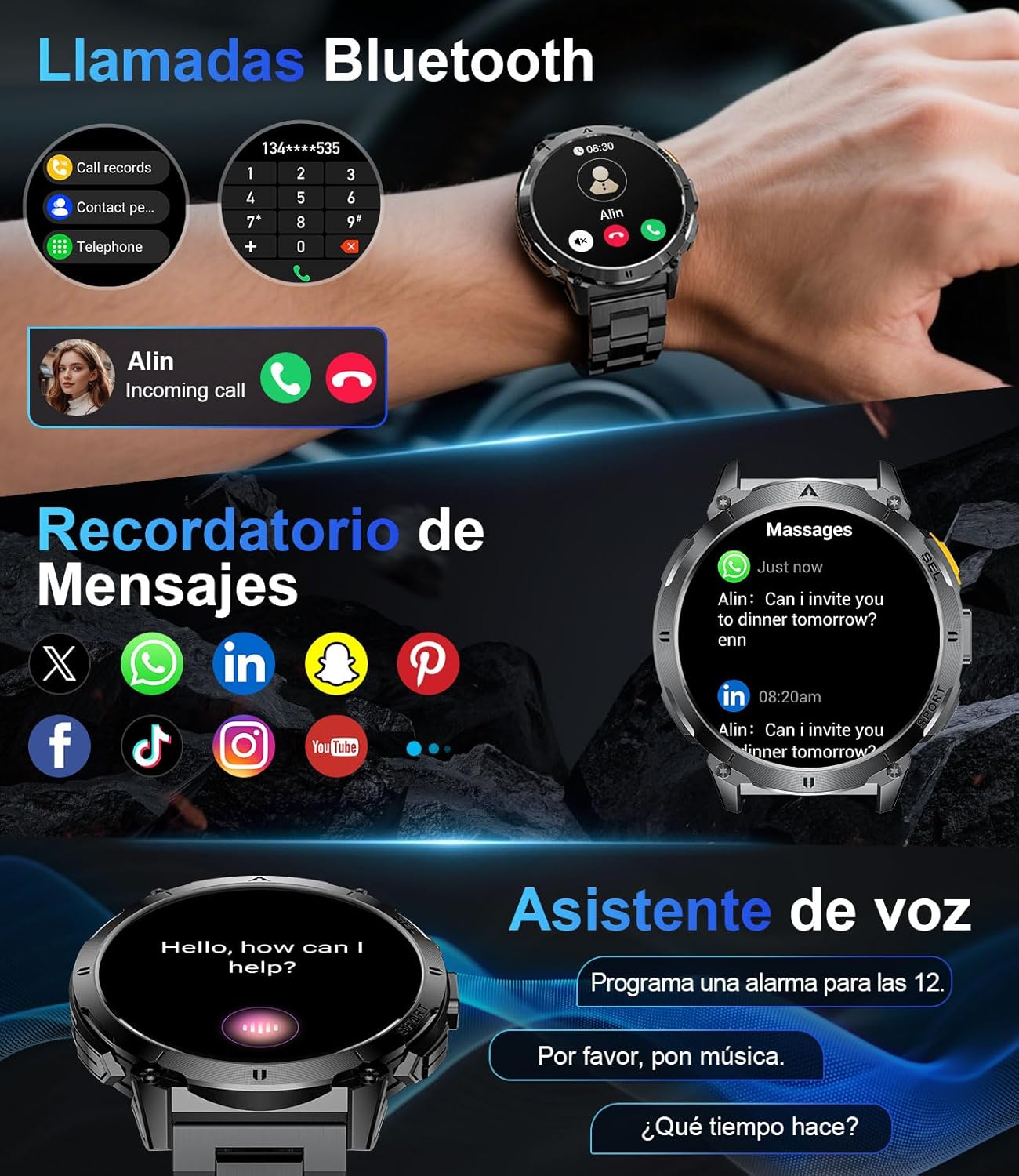
Image 3.1: The smartwatch displaying Bluetooth call functionality, message notifications from various apps, and the voice assistant interface.

Image 3.2: Detailed view of the Bluetooth calling feature, including call history and contact directory, alongside the voice assistant function.
3.3. Sports Modes
The smartwatch offers over 110 sports modes to track your physical activities. Eight modes are pre-installed, with additional modes available via the companion app.
- Accessing Modes: Navigate to the 'Sports' menu on the watch.
- Tracking: Select your desired activity to start tracking metrics such as steps, distance, calories burned, and duration.

Image 3.3: The smartwatch interface showing activity tracking for steps, distance, calories, and time, with examples of users engaged in climbing, cycling, and hiking.

Image 3.4: The smartwatch showcasing its 110+ sports modes, providing real-time statistics like heart rate, calories, steps, and distance, with various activity icons.
3.4. Health Monitoring
The LIGE EF14-B continuously monitors key health metrics.
- Heart Rate: Tracks your heart rate throughout the day.
- Blood Oxygen (SpO2): Measures blood oxygen saturation levels.
- Sleep Tracking: Monitors sleep patterns, including light and deep sleep stages.
- Breath Training: Guided breathing exercises for stress relief.

Image 3.5: The smartwatch displaying various health metrics: heart rate, daily activity rings, sleep duration and quality, and breath training exercises.

Image 3.6: A user climbing while the smartwatch displays integrated health monitoring, including heart rate, daily steps, sleep analysis, and breath training.

Image 3.7: The smartwatch illustrating its intelligent stress relief and sleep analysis features, showing sleep patterns and duration.
3.5. LED Flashlight
The integrated LED flashlight provides convenient illumination for various situations.
- Activation: Access the flashlight function through the watch menu or a dedicated side button.
- Usage: Useful for camping, emergencies, or navigating in low-light conditions.

Image 3.8: A user demonstrating the integrated LED flashlight of the LIGE EF14-B Smartwatch, highlighting its effective range and utility for night walking and SOS modes.

Image 3.9: The smartwatch's super bright tactical flashlight, useful for threat deterrence, power outages, and precision visibility in dark environments.
3.6. Other Practical Functions
The smartwatch includes several additional features for daily convenience:
- Voice Assistant: Interact with your watch using voice commands.
- Music Control: Play, pause, skip tracks, and adjust volume for music playing on your phone.
- Camera Remote: Control your smartphone's camera remotely.
- Weather Forecast: View current weather conditions and forecasts.
- Hydration Reminder: Set reminders to drink water.
- Sedentary Reminder: Alerts you to move after periods of inactivity.
- Find Phone: Locate your paired smartphone.

Image 3.10: The smartwatch displaying music control, weather forecast, and camera remote functions, alongside other practical features like exercise data, health monitoring, and reminders.

Image 3.11: A comprehensive view of additional smartwatch features: hydration reminder, smart alarm, phone finder, remote camera control, music player, and activity monitoring, along with live weather forecasts.
3.7. Custom Watch Faces
Personalize your smartwatch with a variety of watch faces. The device supports over 200 watch faces available through the app, and you can also use your own photos.

Image 3.12: The smartwatch displaying various customizable watch faces, including an option to upload personal photos via the app.
4. Maintenance
4.1. Charging
The LIGE EF14-B smartwatch is equipped with a 730mAh battery, offering extended usage. Use the provided magnetic USB or Type-C charging cables. A full charge typically takes approximately 2 hours. Battery life can vary from 5-7 days with normal use to up to 30 days in standby mode.

Image 4.1: The smartwatch highlighting its 730mAh battery, providing 5-7 days of daily use and up to 30 days of standby time.
4.2. Water Resistance (IP68)
The smartwatch has an IP68 water resistance rating, meaning it is protected against dust ingress and can withstand immersion in water up to 1.5 meters for 30 minutes. It is suitable for daily use, hand washing, and light rain. Avoid hot water, saunas, or diving, as steam and high temperatures can compromise the seal.
4.3. Cleaning
Regularly clean your smartwatch and strap with a soft, dry cloth. If necessary, use a slightly damp cloth with mild soap, then wipe dry. Avoid harsh chemicals or abrasive materials.
5. Troubleshooting
- Watch not turning on: Ensure the watch is fully charged. Connect it to the charger for at least 30 minutes.
- Cannot pair with phone: Make sure Bluetooth is enabled on your phone and the watch is within range. Restart both devices and try pairing again through the 'Fit Cloud Pro' app.
- Inaccurate health data: Ensure the watch is worn snugly on your wrist, not too tight or too loose. Clean the sensor on the back of the watch.
- Notifications not appearing: Check app permissions on your phone to ensure 'Fit Cloud Pro' has access to notifications. Verify notification settings within the app.
- Short battery life: Reduce screen brightness, disable 'Always-On Display' if enabled, and limit background app refresh.
If you encounter persistent issues, please refer to the support section or contact customer service.
6. Specifications
Image 6.1: Detailed view of the LIGE EF14-B Smartwatch, including its dimensions, internal components like the low-power intelligent chip, high-resistance mineral crystal, AMOLED display, breathable strap, dedicated buttons, and stainless steel case.
| Feature | Detail |
|---|---|
| Brand | LIGE |
| Model | EF14-B |
| Display Size | 1.62 Inches |
| Display Type | AMOLED |
| Resolution | 320 x 320 |
| Battery Capacity | 730 mAh |
| Battery Composition | Lithium Ion |
| Connectivity | Bluetooth |
| Water Resistance | IP68 |
| Compatible Devices | Smartphone (Android 5.0+, iOS 10.0+) |
| Memory Capacity | 256 MB |
| Product Dimensions | 14 x 9.8 x 2.5 cm |
| Product Weight | 210 g |
| Special Features | Calendaring, Activity Tracker, Phone Call, Notifications, LED Flashlight |
7. Package Contents
The LIGE EF14-B Military Smartwatch package includes:
- 1 x Smartwatch (LIGE EF14-B)
- 1 x Silicone Strap (anti-sweat)
- 1 x Stainless Steel Strap (adjustable clasp)
- 1 x Magnetic USB Charging Cable
- 1 x Magnetic Type-C Charging Cable
- 1 x User Manual (multilingual)
8. Warranty and Support
LIGE is committed to providing a reliable product and excellent customer experience. For any questions, technical assistance, or support needs, please contact LIGE customer service. Refer to the contact information provided in the multilingual user manual included in your package or visit the official LIGE website for support resources.


