
TISHLED G9
TISHLED G9 Typewriter Keyboard User Manual
Model: G9
Introduction
This manual provides instructions for the TISHLED G9 Typewriter Keyboard. This mechanical keyboard features a unique faux leather panel, tri-mode connectivity (2.4GHz wireless, Bluetooth 5.0, and wired USB-C), clicky blue switches, retro round keycaps, and white LED backlighting. It is designed for various uses, including business, education, gaming, and general computing.
What's in the Box
- 1* GEEZER G9 Typewriter Keyboard Wireless
- 1* 2.4GHz Dongle
- 1* USB A-C Cable
- User Manual
Setup
Physical Setup
Place the keyboard on a stable, flat surface. The keyboard features adjustable feet on the underside to modify the typing angle for comfort.

Image: Close-up of the TISHLED G9 keyboard showcasing its faux leather panel and round keycaps.
Connectivity Modes
The TISHLED G9 keyboard supports three connection modes:
- 2.4GHz Wireless: Insert the included 2.4GHz USB dongle into your device's USB port. The keyboard will automatically connect.
- Bluetooth 5.0: The keyboard can store up to 3 Bluetooth devices. To pair, activate Bluetooth on your device and select the keyboard from the available devices.
- Wired USB-C: Connect the keyboard to your device using the provided USB A-C charging data cable. This mode also charges the keyboard.

Image: The TISHLED G9 keyboard shown with a laptop and smartphone, illustrating its tri-mode connectivity options.
Charging the Battery
The keyboard is equipped with a 1450mAh rechargeable lithium battery. Connect the keyboard to a USB power source using the provided USB A-C cable. A full charge takes approximately 2 hours and provides about 15 days of battery life under normal usage.
Operating Instructions
Key Features
- 104-Key Layout: Full-size keyboard with a numeric keypad for comprehensive input.
- Mechanical Blue Switches: Provides tactile feedback and an audible click, with a lifespan of 60 million keystrokes.
- N-Key Rollover (NKRO): Ensures all key presses are registered accurately, even when multiple keys are pressed simultaneously.
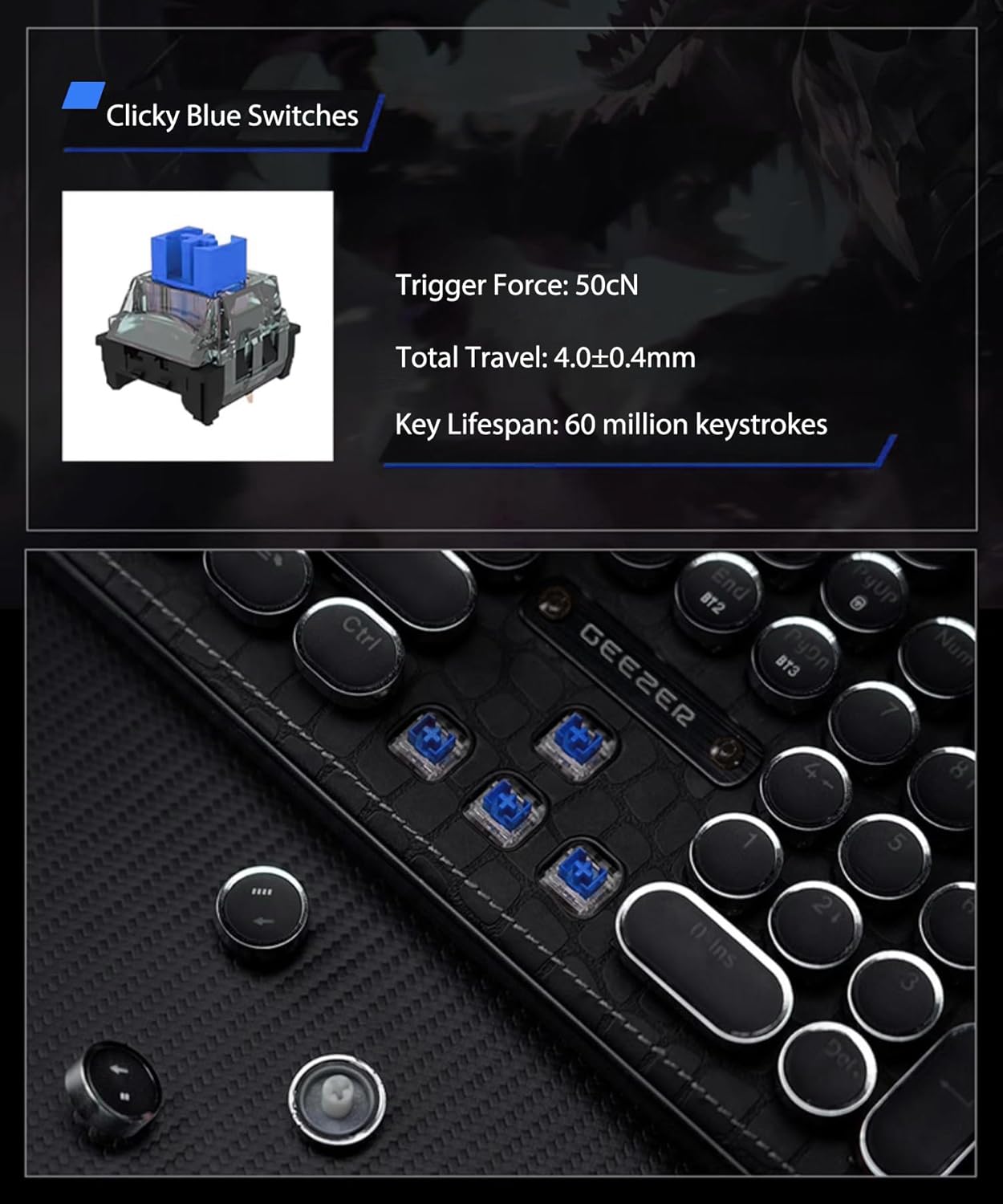
Image: Detailed view of the TISHLED G9 keyboard's blue mechanical switches beneath the round keycaps.
Backlight Control
The keyboard features an elegant pure white LED backlight with 24 lighting effects.
- Switch Lighting Effects: Press Fn + PrtSc to cycle through the 24 lighting effects.
- Turn Backlight On/Off: Press Fn + BackSpace to toggle the backlight.
- Adjust Brightness/Speed: Use dedicated function keys (refer to keyboard legends) to adjust backlight brightness and effect speed.

Image: The TISHLED G9 keyboard with its white LED backlight active, highlighting the round keycaps.
Multimedia Functions
Access multimedia functions using the Fn key in combination with F1 to F12 keys. Refer to the icons on the F-keys for specific functions (e.g., volume control, media playback).
Battery Percentage Check (Wireless/Bluetooth)
In wireless or Bluetooth modes, hold down Fn + B to check the remaining battery percentage. The backlight indicators will provide a visual cue.
Compatibility
The keyboard is compatible with a wide range of operating systems and devices, including:
- Windows XP/Vista/7/8/9/10/11
- MacOS 10.10 or later
- Android 4.3 or later
- Compatible devices include PCs, laptops, gaming consoles (PS4, PS5, XBOX), tablets, smartphones, iMac, iPad, iPhone, MacBook.

Image: A user typing on the TISHLED G9 keyboard, showcasing its full-size layout and ergonomic design.
Maintenance
To ensure the longevity and optimal performance of your TISHLED G9 keyboard, follow these maintenance guidelines:
- Cleaning: Use a soft, dry cloth to wipe the keyboard surface. For deeper cleaning, gently remove keycaps and use compressed air to clear debris from between the switches. Avoid using harsh chemicals or abrasive materials.
- Storage: Store the keyboard in a cool, dry place away from direct sunlight and extreme temperatures.
- Liquid Exposure: Avoid spilling liquids on the keyboard. If accidental spills occur, immediately disconnect the keyboard, power it off, and allow it to dry completely before reconnecting.
Troubleshooting
| Problem | Solution |
|---|---|
| Keyboard not connecting via 2.4GHz wireless. | Ensure the 2.4GHz dongle is securely inserted into a USB port. Check if the keyboard is in 2.4GHz mode. Try a different USB port. |
| Bluetooth connection issues or frequent disconnections. | Ensure the keyboard is in Bluetooth mode and within range of your device. Forget the device on your computer/phone and re-pair. Ensure no other Bluetooth devices are causing interference. The keyboard can store up to 3 Bluetooth devices; ensure you are connecting to the correct one. |
| Backlight not working or dim. | Press Fn + BackSpace to turn the backlight on. Adjust brightness using the designated function keys. Ensure the keyboard battery is sufficiently charged. |
| Keys not responding or typing incorrectly. | Check the connection mode (wired, 2.4G, Bluetooth). Ensure the keyboard is charged. If using wireless, try connecting via USB-C cable to rule out wireless interference. Clean any debris from under the keycaps. |
| Keyboard not recognized by device. | Try connecting via a different mode (e.g., wired if wireless fails). Restart your computer/device. Ensure your device's operating system is compatible. |
Specifications
- Model: G9
- Product Dimensions: 17.4"L x 5.4"W x 1.4"H
- Item Weight: 2 pounds
- Connectivity Technology: Bluetooth 5.0, USB-C, Wireless 2.4G
- Keyboard Description: Typewriter Style Mechanical Gaming Keyboard with Faux Leather Panel
- Special Feature: Clicky Blue Switches, Faux Leather Panel, Retro Round Keycaps with Silver Rings, Tri-Mode Connection, White LED Backlit
- Keyboard Backlighting: Single Color (White LED)
- Battery: 1450mAh Nonstandard Battery (included)
- Compatible Devices: Laptop, PC, PS4, PS5, XBOX, Smartphone, iPhone, iPad, iMac, MacBook
- Manufacturer: Shenzhen SQT Electronics Co., Ltd.
Warranty and Support
For warranty information, please refer to the documentation included with your purchase or contact TISHLED customer service. For technical support or further assistance, please visit the official TISHLED website or contact their support channels.
Product Videos
TISHLED GEEZER G9 Tri-Mode Typewriter Keyboard Overview
Video: An overview of the TISHLED GEEZER G9 Tri-Mode Typewriter Keyboard, demonstrating its features and design.
TISHLED GEEZER G9 Tri-Mode Typewriter Keyboard
Video: A demonstration of the TISHLED GEEZER G9 Tri-Mode Typewriter Keyboard in use, highlighting its typing experience.
Ask a question about this manual
Ask about setup, troubleshooting, compatibility, parts, safety, or missing instructions. Manuals+ will review the question and use this page’s manual context to help answer it.