
1. Introduction
This manual provides essential instructions for the safe and efficient operation, maintenance, and troubleshooting of your NARWAL S30 Pro Wet Dry Vacuum Cleaner. Please read this manual thoroughly before using the appliance and retain it for future reference.
2. Important Safety Instructions
When using an electrical appliance, basic precautions should always be followed, including the following:
- Read all instructions before using this appliance.
- Do not use outdoors or on wet surfaces.
- Do not allow to be used as a toy. Close attention is necessary when used by or near children.
- Use only as described in this manual. Use only manufacturer’s recommended attachments.
- Do not use with damaged cord or plug. If appliance is not working as it should, has been dropped, damaged, left outdoors, or dropped into water, return it to a service center.
- Do not pull or carry by cord, use cord as a handle, close a door on cord, or pull cord around sharp edges or corners. Do not run appliance over cord. Keep cord away from heated surfaces.
- Do not unplug by pulling on cord. To unplug, grasp the plug, not the cord.
- Do not handle plug or appliance with wet hands.
- Do not put any object into openings. Do not use with any opening blocked; keep free of dust, lint, hair, and anything that may reduce air flow.
- Keep hair, loose clothing, fingers, and all parts of body away from openings and moving parts.
- Turn off all controls before unplugging.
- Use extra care when cleaning on stairs.
- Do not use to pick up flammable or combustible liquids, such as gasoline, or use in areas where they may be present.
- Do not pick up anything that is burning or smoking, such as cigarettes, matches, or hot ashes.
- Do not use without filters in place.
- Prevent unintentional starting. Ensure the switch is in the off-position before connecting to battery pack, picking up or carrying the appliance.
- Recharge only with the charger specified by the manufacturer. A charger that is suitable for one type of battery pack may create a risk of fire when used with another battery pack.
- Under abusive conditions, liquid may be ejected from the battery; avoid contact. If contact accidentally occurs, flush with water. If liquid contacts eyes, additionally seek medical help. Liquid ejected from the battery may cause irritation or burns.
- Do not use an appliance that is damaged or modified. Damaged or modified batteries may exhibit unpredictable behavior resulting in fire, explosion or risk of injury.
- Do not expose an appliance to fire or excessive temperature. Exposure to fire or temperature above 130°C (265°F) may cause explosion.
- Follow all charging instructions and do not charge the appliance outside of the temperature range specified in the instructions. Charging improperly or at temperatures outside of the specified range may damage the battery and increase the risk of fire.
- Have servicing performed by a qualified repair person using only identical replacement parts. This will ensure that the safety of the product is maintained.
- Do not modify or attempt to repair the appliance or the battery pack (as applicable) except as indicated in the instructions for use and care.
3. Package Contents
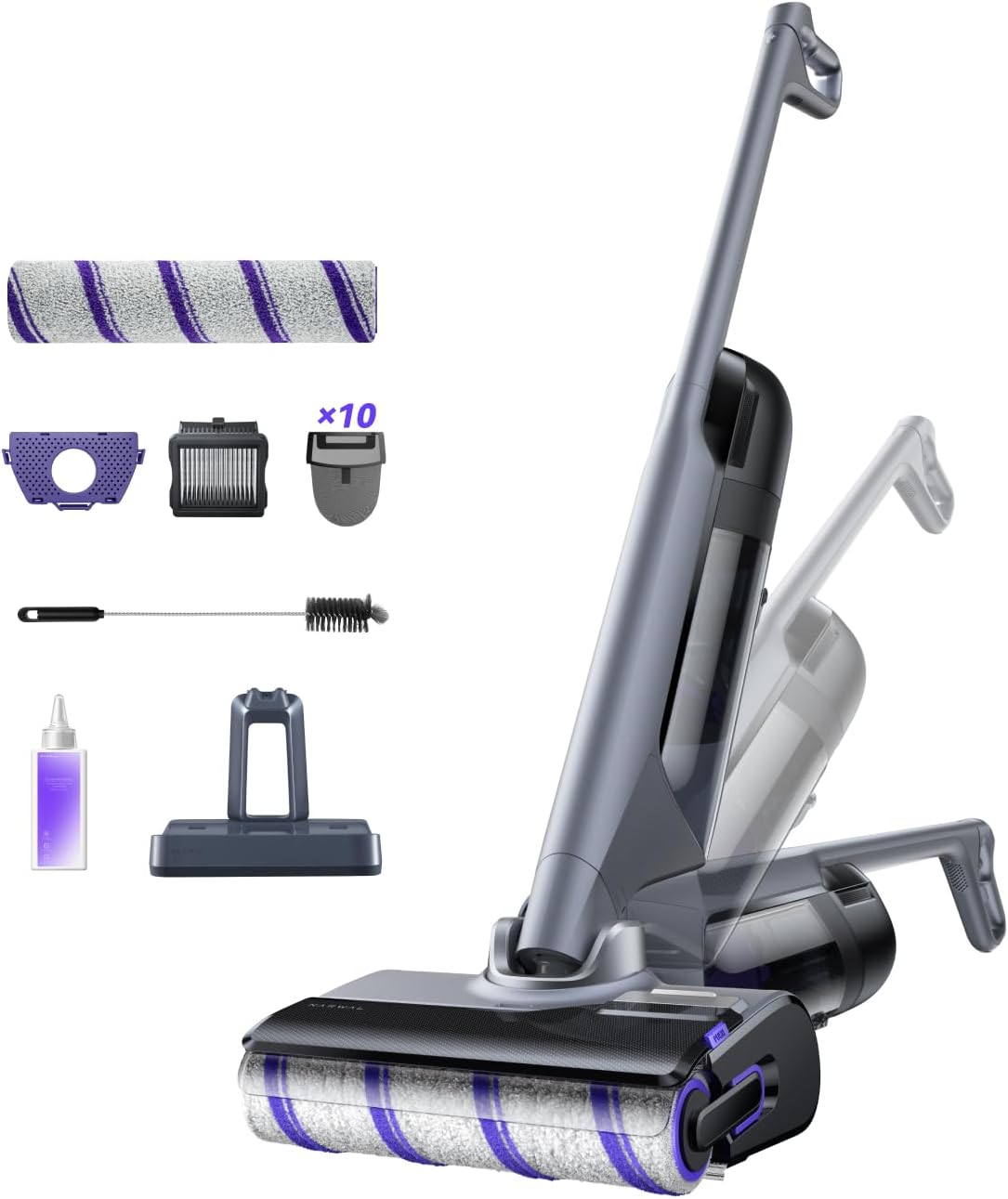
Verify that all components are present and in good condition upon opening the package.
- Main Unit
- Handle
- Self-Cleaning Base
- Adapter
- Soft Velvet Roller Brush (1 installed, 1 spare)
- Filter 2.0
- Cleaning Brush
- Detergent (1 bottle)
- Self-Contained Waste Separation Bag (10 pieces)
- Integrated Deodorant Module

4. Product Overview
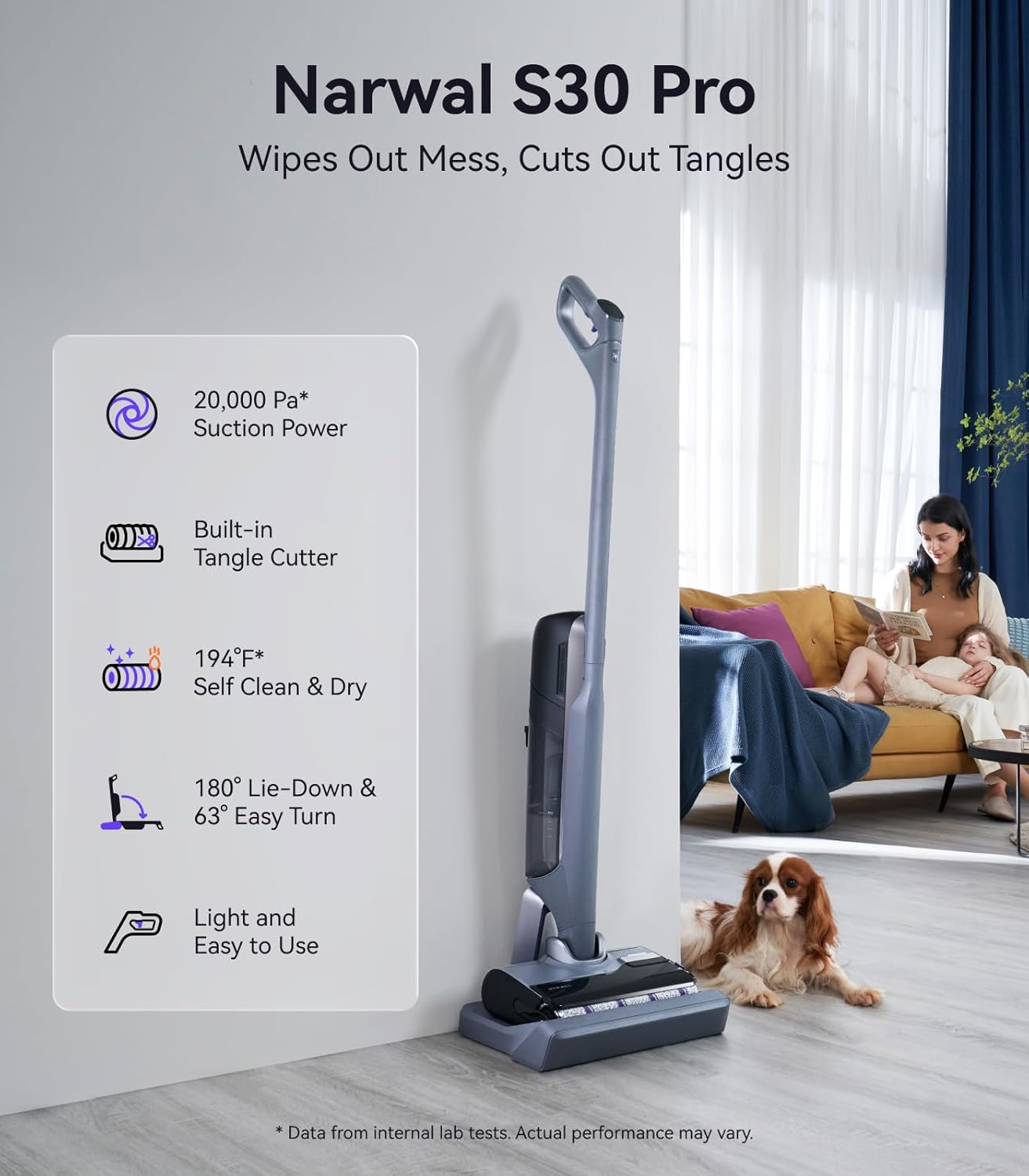
Key Features:
- Wet & Dry Cleaning: Vacuums and mops simultaneously for comprehensive cleaning.
- 20,000Pa Suction: Powerful suction for effective debris removal.
- Tangle-Free Hair-Cutting: Built-in scissors and dual comb prevent hair tangles on the roller brush.
- 194°F Self-Cleaning & Drying: Hot water self-cleaning and heated drying for the roller brush and internal components.
- Disposable Waste Bag System: For hygienic and convenient waste disposal.
- 180° Lie-Flat Design: Allows cleaning under low furniture.
- 63° Easy Turn: Enhanced maneuverability around obstacles.
- Edge Cleaning: Designed to clean close to walls and edges.
- AI DirtSense: Automatically adjusts cleaning power based on detected dirt levels.
5. Setup
5.1 Assembly
- Attach the Handle: Insert the upper handle into the main unit until it clicks securely into place.
- Place the Self-Cleaning Base: Position the self-cleaning base on a flat, stable surface near a power outlet.
- Connect Power: Plug the adapter into the self-cleaning base and then into a power outlet.
- Install Waste Separation Bag: Open the dirty water tank on the main unit, insert a self-contained waste separation bag, and close the tank.
- Insert Deodorant Module: Place the integrated deodorant module into its designated slot, typically located near the dirty water tank or waste separation area.
5.2 Initial Charging
Place the assembled NARWAL S30 Pro onto the self-cleaning base. The unit will begin charging automatically. Ensure the appliance is fully charged before its first use. A full charge takes approximately 3.5 hours.
5.3 Filling Water and Detergent Tanks
- Clean Water Tank: Remove the clean water tank from the back of the main unit. Fill it with clean tap water up to the MAX line. Reinsert the tank securely.
- Detergent Tank: Locate the detergent fill hole, usually on the front of the main unit near the roller brush cover. Pour the provided NARWAL detergent into this opening. The unit will automatically dispense the correct amount during operation. An indicator will change color when detergent is low.
6. Operating Instructions
6.1 Power On/Off
Lift the S30 Pro off the charging dock. Press the power button on the handle's display panel to turn the unit on. Press again to pause or turn off.
6.2 Cleaning Modes
The S30 Pro offers several cleaning modes, selectable via the mode button on the display panel:
- AI Smart Mode (Default): The vacuum automatically detects dirt levels and adjusts suction, water output, and roller speed.
- Max Enhancement Mode: Activates maximum power for heavy messes. Triggered by a dedicated button on the handle.
- Suction Mode: For dry vacuuming or picking up spills without mopping. Ideal for dry, hair-free floors.
- Quiet Mode: Operates at a lower noise level, suitable for use during quiet hours.
- Wood Floor Mode: Optimized for wood floors, using less water to prevent damage.

6.3 Cleaning Process
- Select your desired cleaning mode.
- Guide the S30 Pro across your hard floors. The self-propelled feature assists movement.
- For optimal cleaning, move the unit in overlapping passes.
- The 180° lie-flat design allows access under low furniture. The 63° turning angle provides easy maneuverability around obstacles.
- The edge cleaning feature ensures thorough cleaning along baseboards and corners.

7. Maintenance
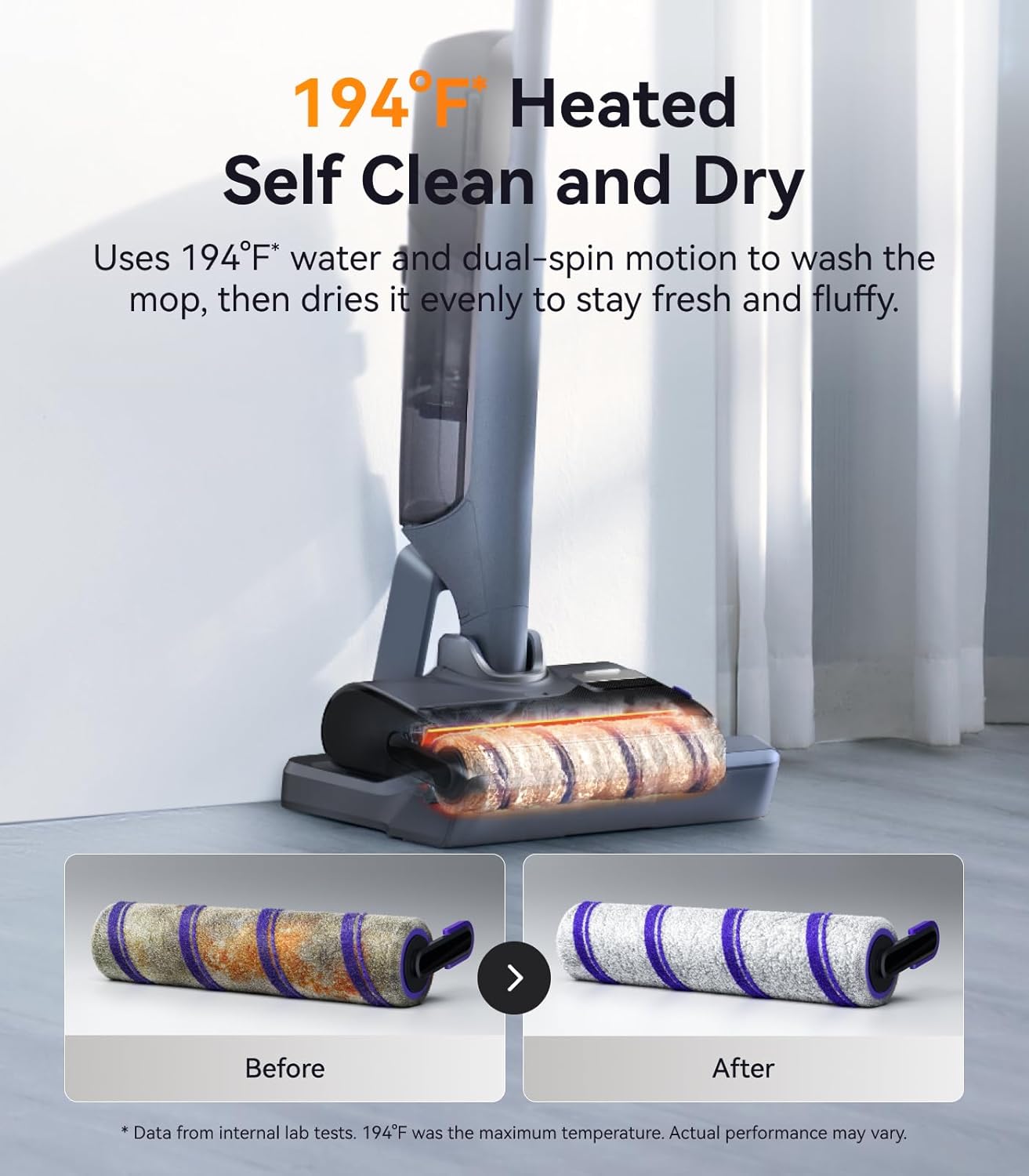
7.1 Self-Cleaning Cycle
After each cleaning session, return the S30 Pro to its self-cleaning base. Press the "Clean" button on the base or follow the voice prompts to initiate the self-cleaning cycle. The unit will use 194°F hot water and detergent to thoroughly clean the roller brush, then dry it with heat to prevent odors and mildew.

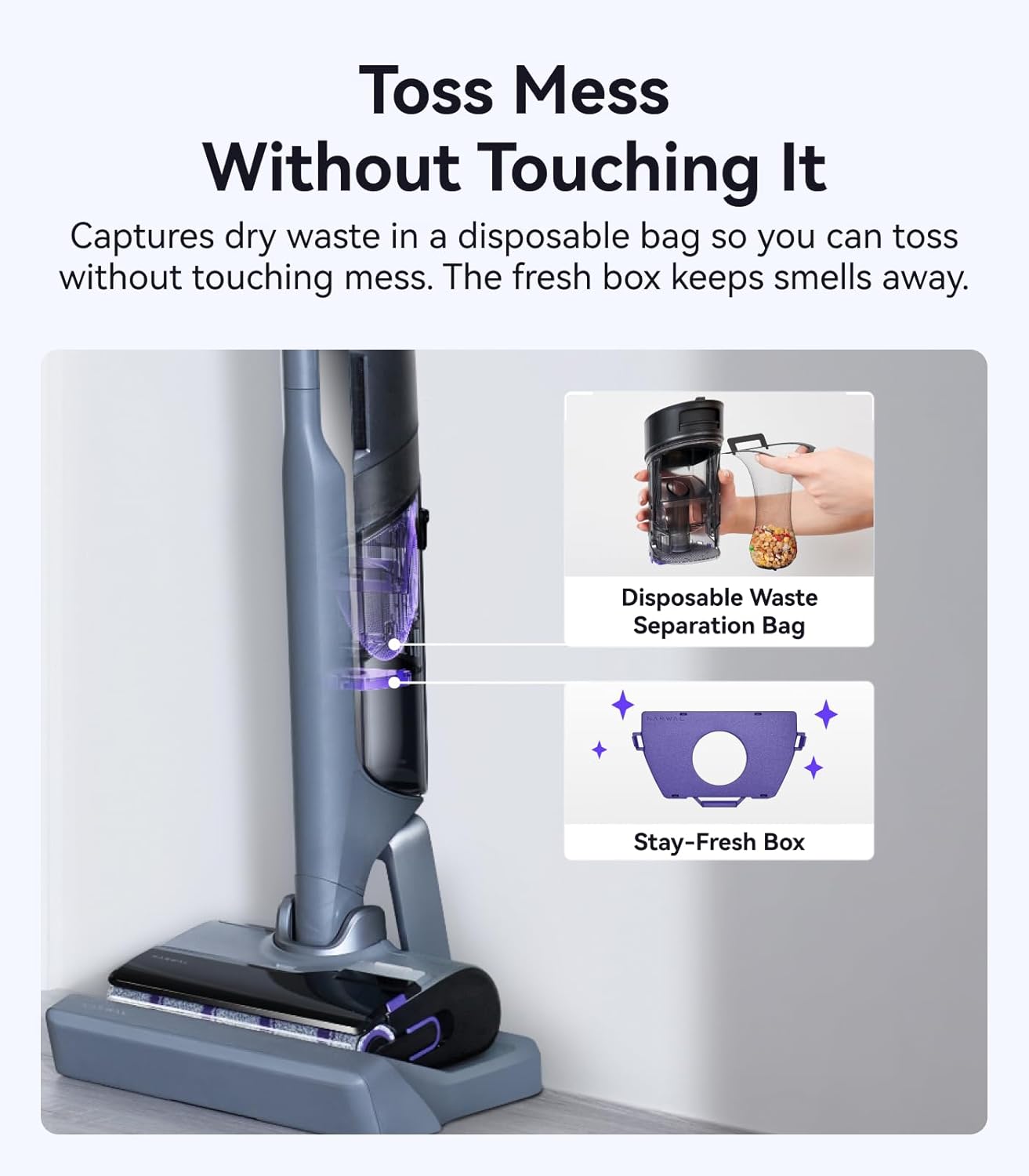
7.2 Waste Disposal
The S30 Pro utilizes a disposable waste separation bag system for hygienic disposal of solid debris. After each use, remove the dirty water tank, detach the waste separation bag, and dispose of it. Empty the dirty water into a drain. Rinse the dirty water tank and allow it to air dry.
7.3 Roller Brush and Filter Care
- Roller Brush: The built-in scissors automatically cut hair during self-cleaning. Periodically inspect the roller brush for any remaining debris and remove it using the provided cleaning brush. Replace the roller brush every 3-6 months, or as needed, depending on usage.
- Filter: The Filter 2.0 should be rinsed with water after every few uses and allowed to air dry completely before reinstallation. Replace the filter every 3-6 months to maintain optimal suction performance.
8. Troubleshooting
If you encounter issues with your NARWAL S30 Pro, refer to the table below for common problems and solutions. If the problem persists, contact customer support.
| Problem | Possible Cause | Solution |
|---|---|---|
| No power/Unit not turning on | Battery depleted; Unit not properly docked; Power adapter issue. | Ensure unit is fully charged. Check if the unit is correctly placed on the charging dock. Verify power adapter connection. |
| Poor suction | Dirty filter; Blocked air inlet/outlet; Full dirty water tank. | Clean or replace the filter. Check for and remove any blockages. Empty the dirty water tank. |
| Roller brush not spinning or tangled | Hair/debris tangled around brush; Brush motor malfunction. | Run a self-cleaning cycle. Manually remove any remaining tangles. If problem persists, contact support. |
| Unpleasant odor | Dirty water tank not emptied/cleaned; Roller brush not dried properly; Deodorant module depleted. | Empty and thoroughly clean the dirty water tank. Ensure self-cleaning and drying cycle completes. Replace the deodorant module. |
| Water leakage | Water tanks not properly installed; Damaged seals. | Ensure clean and dirty water tanks are securely in place. Inspect seals for damage. |
9. Specifications
- Brand: NARWAL
- Model Name: YJSC008
- Special Feature: Cordless
- Filter Type: HEPA Filter
- Capacity (Clean Water Tank): 790 Milliliters
- Charging Time: 3.5 Hours
- Recommended Uses: Hard Floor
- Form Factor: Stick
- Color: Space Gray
- Product Dimensions: 9.72"L x 10.7"W x 46.1"H
- Battery Type: Lithium-Ion
- Noise Level: 43 dB (Quiet Mode)
- Item Weight: 9.6 pounds
- Indoor/Outdoor Usage: Indoor
10. Warranty and Support
The NARWAL S30 Pro Wet Dry Vacuum Cleaner comes with a standard manufacturer's warranty. For detailed warranty information, including terms and conditions, please refer to the warranty card included in your product packaging or visit the official NARWAL website.
For technical support, service, or to order replacement parts and accessories, please contact NARWAL customer service through their official channels. Contact information can typically be found on the NARWAL website or in your product documentation.


