
Bellemave Full Size Wood Gaming Loft Bed
Bellemave Full Size Wood Gaming Loft Bed with Desk Instruction Manual
Model: Full Size Wood Gaming Loft Bed
Brand: Bellemave
Introduction
Thank you for choosing the Bellemave Full Size Wood Gaming Loft Bed with Desk. This manual provides essential information for the safe assembly, operation, maintenance, and troubleshooting of your new loft bed. Please read these instructions carefully before beginning assembly and retain them for future reference.
Safety Information
Important Safety Warnings:
- The bed can hold up to 551 lbs and the table 110 lbs. Do not exceed these weight limits.
- Ensure all parts are securely fastened before use. Regularly check and tighten all connections.
- Do not allow children under 6 years of age on the upper bunk.
- Use only a mattress that is 74-75 inches long and 53-54 inches wide. The mattress thickness should not exceed 6 inches.
- Always use the ladder for entering and exiting the upper bunk. Do not jump on the bed.
- Keep small parts away from children during assembly to prevent choking hazards.
- This product is designed for indoor use only.
Package Contents
Your Bellemave Full Size Wood Gaming Loft Bed with Desk is shipped in two separate packages, which may arrive at different times. Please ensure you have received both packages and all components before beginning assembly.
Typical components include:
- Bed frame panels (headboard, footboard, side rails)
- Bed slats
- Desk surface and support panels
- Multi-storage shelves
- Ladder components
- Guardrails
- RGB light strip
- Charging station unit
- Hardware pack (screws, bolts, cam locks, etc.)
- Assembly tools (e.g., Allen wrench)
Note: The hardware pack contains the exact amount of screws and cams needed. Please do not lose or break any parts.
Setup and Assembly
Assembly of the Bellemave Full Size Wood Gaming Loft Bed requires careful attention to detail. We recommend two adults for assembly, which typically takes approximately 6 hours.
- Unpack and Identify Parts: Carefully unpack all components and lay them out. Compare them against the parts list provided in the separate detailed assembly instructions to ensure all pieces are present and undamaged.
- Review Instructions: Read the entire detailed assembly instruction booklet thoroughly before starting. Pay close attention to diagrams and warnings.
- Assemble Base Structure: Begin by assembling the main bed frame and support posts according to the step-by-step guide.
- Install Desk and Shelves: Attach the desk surface and multi-storage shelves to the designated areas. Ensure they are level and securely fastened.
- Attach Ladder and Guardrails: Securely install the ladder and guardrails to the bed frame. These are crucial safety components.
- Integrate Electrical Components: Install the charging station and RGB light strip as directed. Ensure all wiring is safely routed and connected.
- Final Checks: Once assembled, double-check all screws, bolts, and connections to ensure they are tight and secure.
 Image: Overall dimensions of the Bellemave Full Size Wood Gaming Loft Bed with Desk.
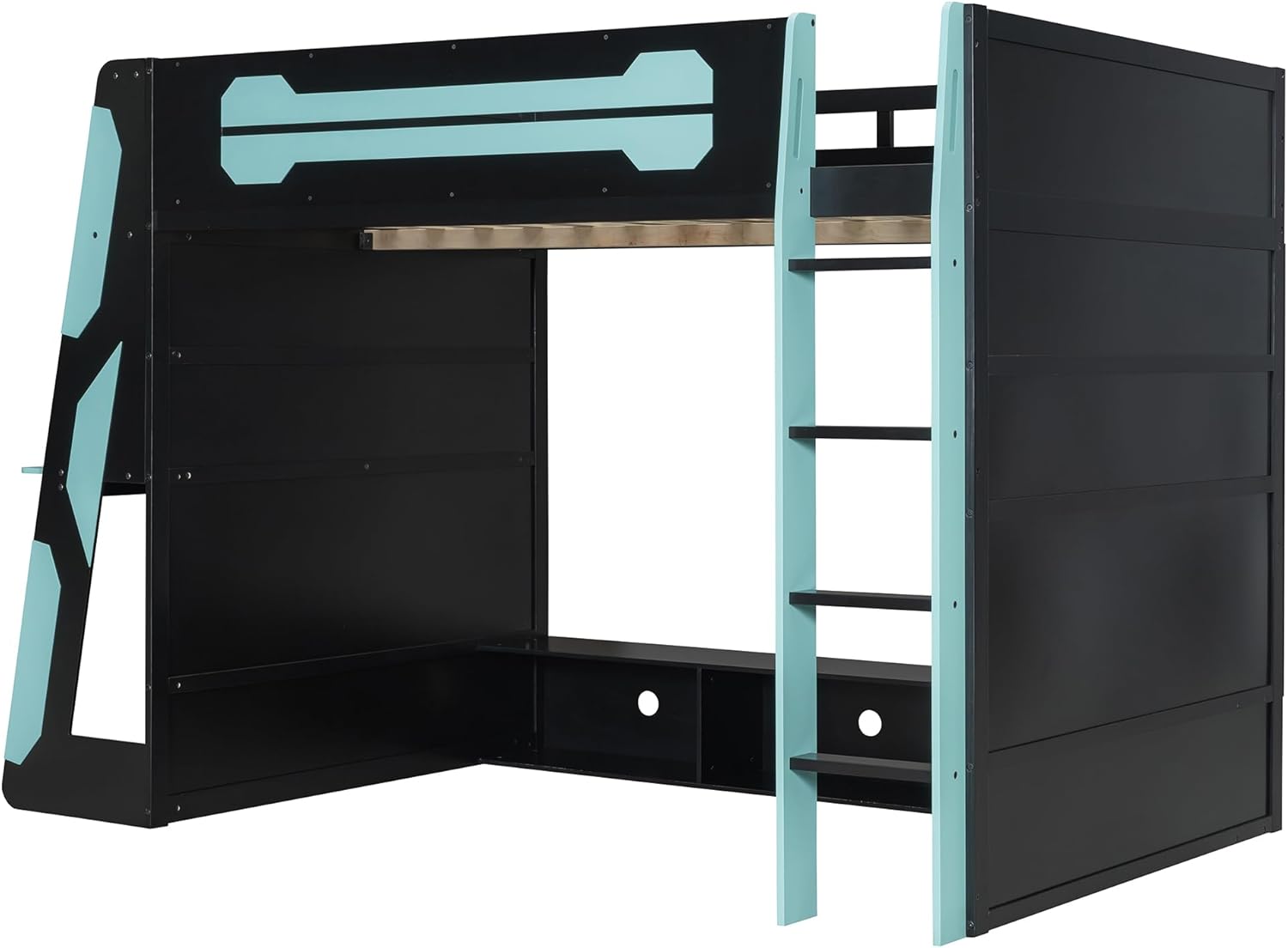 Image: Side view illustrating the structural components of the loft bed.
 Image: Front view showing the underbed console shelf and storage areas.
Operating Instructions
Charging Station
The integrated charging station provides convenient power access for your devices. It includes standard AC outlets and USB ports.
- Plug the charging station's power cord into a wall outlet.
- Connect your electronic devices to the available AC outlets or USB ports.
- Ensure devices are compatible with the power output.
 Image: Detail of the charging station with AC outlets and USB ports, alongside a cable management grommet.
RGB Light Strip
The built-in RGB light strip enhances the ambiance of your gaming setup. The light strip is typically controlled via a small inline controller or a remote (if included, refer to its specific instructions).
- Ensure the light strip is properly connected to its power source.
- Use the controller to turn the lights on/off, change colors, and adjust brightness or lighting modes.
 Image: Close-up view of the RGB light strip, showing individual LED components.
Desk and Storage Utilization
The loft bed features a side-mounted desk and multi-storage shelves designed for efficient space utilization.
- The desk accommodates a desktop computer and peripherals.
- The built-in console shelf underneath the desk is suitable for gaming consoles or other equipment.
- The underbed area offers space for a TV and additional console storage, allowing for various resting and entertainment configurations.
Video: An overview of the Bellemave Full Size Wood Gaming Loft Bed with Desk, showcasing its features including the gaming setup, underbed entertainment area, and overall design.
 Image: The loft bed configured with a gaming PC setup on the desk and decorative items on shelves.
 Image: The underbed area of the loft bed, set up with a television and console storage for entertainment.
Maintenance
- Cleaning: Wipe surfaces with a soft, damp cloth. Avoid harsh chemicals or abrasive cleaners that may damage the finish.
- Hardware Check: Periodically inspect all bolts, screws, and connections. Tighten any loose hardware to ensure the bed remains stable and safe.
- Wood Care: Protect the wood from extreme temperature changes and direct sunlight to prevent warping or fading.
Troubleshooting
| Problem | Possible Cause | Solution |
|---|---|---|
| Bed feels wobbly or unstable | Loose hardware connections. | Check and tighten all bolts and screws. Ensure all components are correctly aligned. |
| RGB lights not working | Power connection issue, faulty strip, or controller problem. | Verify the light strip is properly plugged in. Check the controller for battery issues (if applicable) or damage. Contact support if the issue persists. |
| Charging station not providing power | Not plugged into wall outlet, tripped circuit, or internal fault. | Ensure the charging station's main plug is securely in a working wall outlet. Check your home's circuit breaker. Test with another device. |
| Missing or damaged parts during assembly | Shipping error or oversight during unpacking. | Contact customer support immediately with your purchase details and a list of missing/damaged parts. |
Specifications
| Feature | Detail |
|---|---|
| Size | Full |
| Product Dimensions (L x W x H) | 93.3" x 55.6" x 65" |
| Material | Wood |
| Color | Blue |
| Special Feature | Space Saving, Integrated Desk, Multi-Storage, RGB Lighting, Charging Station |
| Included Components | Guardrails, Desk, Shelves, Ladder, RGB Light Strip, Charging Station |
| Compatible Mattress Size | Full |
| Assembly Required | Yes |
| Item Weight | 52.5 pounds |
| Maximum Bed Weight Capacity | 551 lbs |
| Maximum Desk Weight Capacity | 110 lbs |
Warranty Information
Specific warranty details for the Bellemave Full Size Wood Gaming Loft Bed are not provided in the product information. Please refer to your purchase documentation or contact Bellemave customer support for warranty terms and conditions.
Customer Support
For any questions, assistance with assembly, or to report missing/damaged parts, please contact Bellemave customer support:
- Email: US-VC@bellemavehome.com
- Please include your purchase details and a clear description of your inquiry when contacting support.
Ask a question about this manual
Ask about setup, troubleshooting, compatibility, parts, safety, or missing instructions. Manuals+ will review the question and use this page’s manual context to help answer it.