
1. Introduction
This manual provides essential instructions for the safe and effective use of your GEPRC Vapor-D6 O4 Pro FPV Drone. Please read this manual thoroughly before operating the drone to ensure proper setup, flight, and maintenance. The Vapor-D6 O4 Pro is a high-performance FPV racing quadcopter designed for cinematic HD footage and dynamic flight experiences, featuring seamless integration with the O4 Air Unit Pro VTX.

Image 1.1: Top-down view of the GEPRC Vapor-D6 O4 Pro FPV Drone, showcasing its carbon fiber frame and propeller layout.
2. Safety Precautions
Operating an FPV drone requires adherence to strict safety guidelines to prevent injury or damage. Always prioritize safety.
- Local Regulations: Always comply with local aviation laws and regulations. Obtain necessary permits or licenses if required.
- Pre-Flight Check: Before each flight, inspect the drone for any damage, loose components, or obstructions. Ensure propellers are securely attached and undamaged.
- Battery Safety: Use only recommended batteries (6S LiPo 1500mAh – 2000mAh). Handle LiPo batteries with care, avoiding punctures or overcharging. Store them in a fireproof bag.
- Propeller Hazard: Keep hands, face, and loose clothing away from rotating propellers. Propellers can cause severe injury.
- Environment: Fly in open areas, away from people, animals, buildings, and power lines. Avoid flying in strong winds, rain, or other adverse weather conditions.
- Line of Sight: Maintain visual line of sight with the drone at all times, even when using FPV goggles.
- Interference: Be aware of potential radio interference sources that could affect control.
- Emergency Procedures: Familiarize yourself with emergency disarming procedures for your flight controller and radio transmitter.
3. Package Contents
Verify that all items listed below are included in your package. If any items are missing or damaged, contact your retailer or GEPRC support.
- 1 x Vapor-D6 O4 Pro FPV Drone
- 2 x HQprop 6X3.5X3 Propellers (sets)
- 2 x Battery anti-slip pads
- 1 x Spare screw pack (includes M3*10mm, M3*8mm, M3*6mm, M5*28mm screws, M5 flange nut, M3 rivet nuts)
- 1 x Vapor side panel
- 2 x M20*250mm battery straps
- 1 x L-shaped screwdriver 1.5mm
- 1 x L-shaped screwdriver 2.0mm
- 1 x GoPro mount
- Optional: GEP-M10 GPS module (if purchased with GPS option)
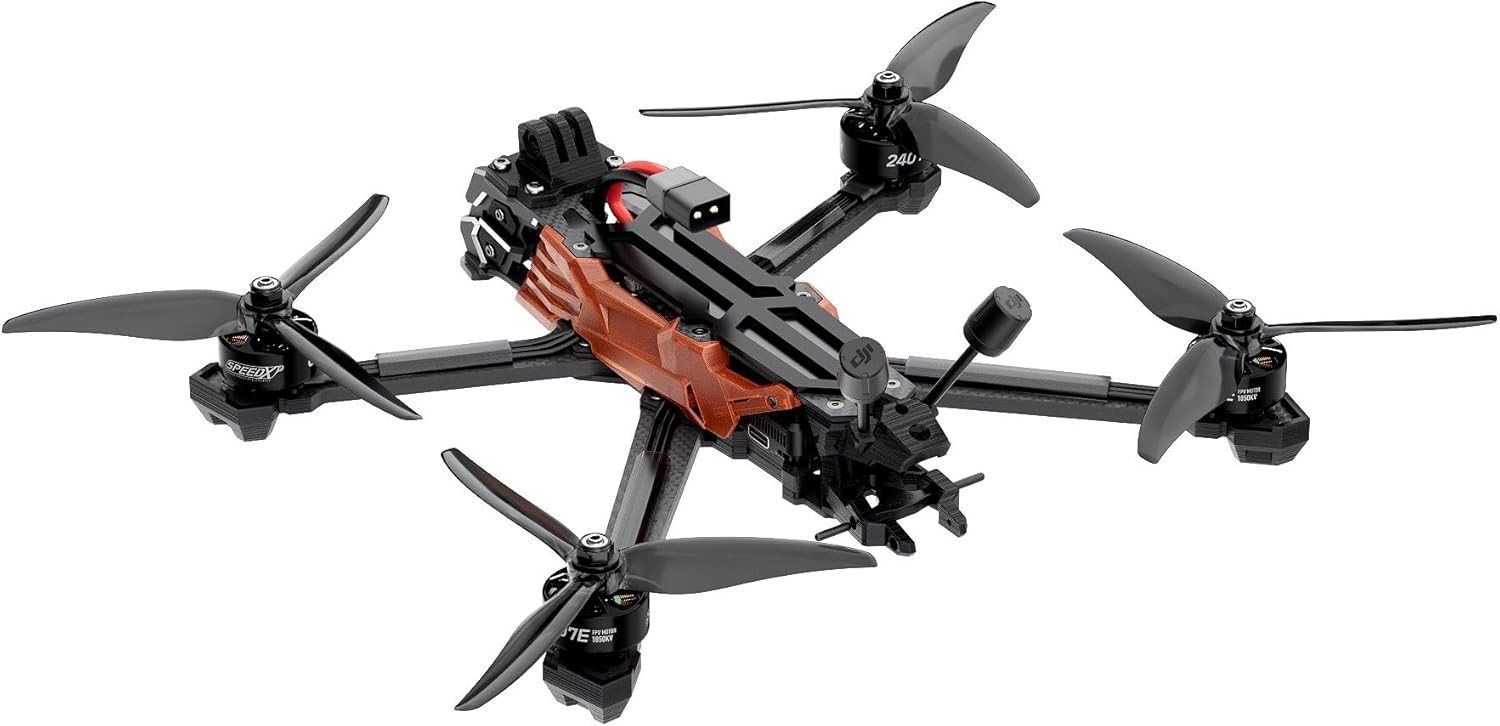
Image 3.1: Angled view of the GEPRC Vapor-D6 O4 Pro FPV Drone, showing the integrated O4 Air Unit Pro and antenna.
4. Setup
4.1 Propeller Installation
- Identify the correct rotation direction for each propeller (CW and CCW).
- Align the propeller with the motor shaft and secure it using the provided nuts. Ensure they are tightened sufficiently but do not overtighten.
- Double-check that all propellers are firmly attached and spin freely without obstruction.
4.2 Battery Connection
The Vapor-D6 O4 Pro uses an XT60 connector for battery input. Ensure your battery is fully charged before connecting.
- Connect a fully charged 6S LiPo battery (1500mAh – 2000mAh recommended) to the XT60 connector on the drone.
- Secure the battery to the top plate using the provided battery straps and anti-slip pads to prevent movement during flight.
4.3 O4 Air Unit Pro Integration
The drone is designed for seamless integration with the O4 Air Unit Pro Transmission Module and Camera, which provides enhanced image clarity and light sensitivity for FPV and recording.
- Ensure the O4 Air Unit Pro is correctly seated and connected according to the manufacturer's instructions for the air unit.
- Verify the O4 Air Unit Pro Antenna is securely attached and positioned for optimal signal transmission.
4.4 Optional GPS Module Installation (GEP-M10 GPS)
If you have the optional GEP-M10 GPS module, follow these steps for installation:
- Mount the GPS module in the designated location on the drone frame, typically away from other electronics to minimize interference.
- Connect the GPS module to the flight controller (GEP-F722-HD v2) using the appropriate port (UART). Refer to the flight controller diagram for specific pinouts.
- Configure the GPS settings within the Betaflight configurator (see section 4.6).
4.5 Receiver Binding
The drone supports PNP (Plug-N-Play), GEPRC ELRS24, or TBS Nano RX receivers. Refer to your specific receiver's manual for binding procedures with your radio transmitter.
- Ensure your receiver is correctly wired to the flight controller.
- Follow the binding instructions for your chosen receiver and radio transmitter.
- Verify successful binding through the Betaflight configurator (Receiver tab).
4.6 Betaflight Configuration
The drone comes with a GEP-F722-HD v2 flight controller. Basic configuration is typically pre-tuned, but adjustments may be necessary.
- Download and install the latest Betaflight Configurator software on your computer.
- Connect the drone to your computer via a USB cable.
- In Betaflight, verify sensor calibration (Gyro: ICM42688-P, Barometer).
- Check motor direction and ESC settings (TAKER H60_BLS 60A 4IN1 ESC).
- Configure OSD (On-Screen Display) elements as desired.
- If using GPS, enable and configure the GPS module in the Ports and Configuration tabs.

Image 4.1: Top view of the GEPRC Vapor-D6 O4 Pro FPV Drone, highlighting the central electronics stack and battery mounting area.
5. Operating Instructions
5.1 Pre-Flight Checks
- Ensure battery is fully charged and securely mounted.
- Verify propellers are undamaged and correctly installed.
- Check for any loose wires or components.
- Power on your radio transmitter and FPV goggles.
- Confirm clear FPV video feed and strong radio signal.
- Check for GPS lock if the module is installed and enabled.
5.2 Arming and Disarming
The drone must be armed before motors will spin. The default arming procedure is typically a stick command (e.g., throttle down and yaw right). Refer to your Betaflight configuration for specific arming switches or stick commands.
- Arming: Perform the configured arming command. The motors will typically spin slowly, indicating the drone is armed.
- Disarming: Perform the configured disarming command (usually throttle down and yaw left, or a dedicated switch). Motors will stop. Always disarm immediately after landing or in an emergency.
5.3 Flight
The Vapor-D6 O4 Pro is equipped with high-performance SPEEDX2 2407E 1750KV motors and factory-tuned PID controls for stable flight.
- Takeoff: Gently increase throttle after arming. The drone should lift off smoothly.
- Control: Use the left stick for throttle and yaw, and the right stick for pitch and roll (Mode 2). Practice gentle movements initially.
- Flight Time: Expect approximately 14-19 minutes of flight time with a recommended 6S LiPo 1500mAh – 2000mAh battery, depending on flight style and conditions.
- Landing: Reduce throttle slowly to descend. Disarm the drone immediately upon landing.
5.4 Cinematic HD Footage
The integrated O4 Air Unit Pro provides high-quality video for both FPV and recording. Ensure your O4 Air Unit Pro is configured for recording before flight if you intend to capture cinematic footage.

Image 5.1: Side view of the GEPRC Vapor-D6 O4 Pro FPV Drone, showing the robust carbon fiber arms and motor mounts.
6. Maintenance
Regular maintenance ensures the longevity and performance of your drone.
- Cleaning: After each flight, clean the drone to remove dirt, dust, and debris. Use a soft brush or compressed air. Avoid using liquids directly on electronics.
- Propeller Inspection: Inspect propellers for cracks, bends, or nicks before and after every flight. Replace damaged propellers immediately.
- Frame Inspection: Check the carbon fiber arms (5.0 mm thickness) and other frame components for any signs of stress, cracks, or damage. Tighten any loose screws.
- Motor Inspection: Ensure motors (SPEEDX2 2407E 1750KV) spin freely and quietly. Check for any debris lodged in the motor bells.
- Wiring: Periodically inspect all wiring for fraying, cuts, or loose connections.
- Battery Care: Follow LiPo battery best practices: do not overcharge or over-discharge, store at storage voltage, and inspect for swelling or damage.
7. Troubleshooting
This section addresses common issues you might encounter.
| Problem | Possible Cause | Solution |
|---|---|---|
| Drone does not arm | Throttle not at minimum; arming switch not engaged; pre-arm checks failed (e.g., low battery, no receiver signal) | Ensure throttle is at zero. Check arming switch. Verify receiver is bound and connected. Check Betaflight OSD for pre-arm warnings. |
| No FPV video feed | O4 Air Unit Pro not powered; antenna loose; channel mismatch; goggles not powered | Check power to the drone and O4 Air Unit Pro. Secure antenna. Ensure goggles and O4 Air Unit Pro are on the same channel. Charge goggles. |
| Unstable flight / Drifting | Damaged propeller; unbalanced motor; incorrect PID tuning; sensor calibration issue | Inspect and replace damaged propellers. Check motors for debris. Recalibrate accelerometer in Betaflight. Consult GEPRC support for PID tuning advice if needed. |
| Short flight time | Battery degradation; incorrect battery size; aggressive flying style | Inspect battery for swelling or damage, replace if necessary. Use recommended 6S LiPo 1500-2000mAh batteries. Adjust flying style. |
| GPS not locking (if installed) | Poor satellite visibility; incorrect configuration; interference | Fly in an open area with clear sky. Verify GPS settings in Betaflight. Ensure GPS module is mounted away from other electronics. |
8. Specifications
Detailed technical specifications for the GEPRC Vapor-D6 O4 Pro FPV Drone.
- Model: Vapor-D6 O4 Pro
- Frame: GEP-Vapor-D6 O4 Pro frame
- Wheelbase: 274.60 mm
- Top Plate Thickness: 2.0 mm
- Middle Plate Thickness: 2.0 mm
- Bottom Plate Thickness: 2.5 mm
- Arm Thickness: 5.0 mm
- Flight Controller (FC): GEP-F722-HD v2
- MCU: STM32F722
- Gyro: ICM42688-P (SPI)
- Barometer: Yes
- OSD: Betaflight OSD w/AT7456E
- ESC: TAKER H60_BLS 60A 4IN1 ESC
- VTX: O4 Air Unit Pro Transmission Module
- Camera: O4 Air Unit Pro Transmission Module Camera
- Antenna: O4 Air Unit Pro Antenna
- Connector: XT60
- Optional GPS: GEP-M10 GPS
- Motors: GEPRC SPEEDX2 2407E 1750KV
- Propellers: HQprop 6X3.5X3
- PNP Version Weight: 465 g ±5g
- Receiver Options: PNP/GEPRC ELRS24/TBS Nano RX
- Recommended Battery: 6S LiPo 1500mAh – 2000mAh
- Estimated Flight Time: 14-19 min
- Product Dimensions: 10.75"L x 11"W x 3.15"H
- Item Weight: 1005 Grams (shipping weight, includes packaging)

Image 8.1: Bottom view of the GEPRC Vapor-D6 O4 Pro FPV Drone, showing the motor mounts and structural design.
9. Warranty and Support
GEPRC products are covered by a manufacturer's warranty against defects in materials and workmanship. The specific terms and duration of the warranty may vary by region and product type. Please retain your proof of purchase for warranty claims.
- Warranty Claims: For warranty service, contact the retailer where you purchased the product or GEPRC customer support directly.
- Technical Support: For technical assistance, setup guidance, or troubleshooting beyond this manual, visit the official GEPRC website or contact their customer support team.
- Online Resources: Additional resources, firmware updates, and community forums may be available on the GEPRC website.


