
Introduction
Thank you for choosing the GOBOULT Soniq Over Ear Bluetooth Headphones. These headphones are designed to provide a superior audio experience with features like 70 hours of playtime, 40mm bass drivers, Zen™ ENC microphone, Type-C fast charging, and dual device pairing. This manual will guide you through the setup, operation, and maintenance of your new headphones to ensure optimal performance.
What's in the Box
Please check the package contents to ensure all items are present:
- Soniq Headphone
- Type-C Charging Cable
- User Manual
- Ear Cushions (pre-installed)
- Warranty Card
Product Features Overview
The GOBOULT Soniq headphones come equipped with several advanced features:
- Extended Playtime: Up to 70 hours of audio playback on a single charge.
- Customizable EQ Modes: Adjust sound profiles for bass boost, balanced audio, or vocal clarity.
- Environmental Noise Cancellation (ENC): Enhances call clarity by reducing background noise.
- Dual Device Pairing: Seamlessly connect and switch between two devices simultaneously.
- Powerful Audio Drivers: 40mm bass-boosted drivers for rich sound.
- Latest Bluetooth Technology: Bluetooth 5.4 for faster pairing and stable connections.
- Comfortable Design: Lightweight build with cushioned earcups for prolonged wear.
- Water Resistance: IPX5 rating for splash, rain, and sweat protection.
- Tactile Controls: Easy-to-use physical buttons for volume, playback, and mode switching.
- AI Voice Assistant Support: Compatible with Google Assistant and Siri.

Image: Overview of key features including 70H battery, EQ modes, ENC, dual pairing, 40mm drivers, and Bluetooth 5.4.

Image: Close-up of the GOBOULT Soniq headphone earcup highlighting the 40mm power-packed bass neodymium drivers with BoomX™ Technology and Memory Foam.
Setup Guide
1. Charging the Headphones
Before first use, fully charge your GOBOULT Soniq headphones. Use the provided Type-C charging cable to connect the headphones to a compatible USB power source.
- A full charge provides up to 70 hours of playtime.
- Fast charging feature: 10 minutes of charge provides approximately 8 hours of playtime.
- The LED indicator will show charging status and turn off or change color when fully charged.

Image: GOBOULT Soniq headphones connected via Type-C cable, illustrating 70 hours playtime and fast charging capability.
2. Powering On/Off
To power on, press and hold the Power button for approximately 3 seconds until the LED indicator lights up. To power off, press and hold the Power button again for 3 seconds until the LED indicator turns off.
3. Bluetooth Pairing
Follow these steps to pair your headphones with a Bluetooth-enabled device:
- Ensure the headphones are fully charged and powered off.
- Press and hold the Power button for 5-7 seconds until the LED indicator flashes red and blue alternately, indicating pairing mode.
- On your device (smartphone, tablet, laptop), enable Bluetooth and search for available devices.
- Select "GOBOULT Soniq" from the list of found devices.
- Once connected, the LED indicator will flash blue slowly or remain solid blue.

Image: GOBOULT Soniq headphones highlighting Bluetooth 5.4 for fast and stable connection.
Operating Instructions
1. Basic Controls
The headphones feature tactile buttons for easy control:
- Power Button: Press and hold to power on/off. Short press for play/pause.
- Volume Up (+): Short press to increase volume. Long press for next track.
- Volume Down (-): Short press to decrease volume. Long press for previous track.
- Multi-function Button (often combined with Power or a dedicated button): Answer/End calls, activate voice assistant.

Image: Close-up of the right earcup showing tactile button controls for volume and play/pause.
2. EQ Modes
Customize your audio experience with multiple EQ modes. Press the dedicated EQ button (or a specific combination, refer to quick start guide if available) to cycle through modes:
- Bass Boost Mode: Enhances low frequencies for a deeper bass sound.
- Balanced Mode: Provides a neutral sound profile suitable for various genres.
- Vocal Mode: Optimizes mid-range frequencies for clearer vocals.
- Game Mode: Reduces latency for a more synchronized gaming audio experience (60ms ultra-low latency).
- Music Mode: Standard audio profile for general music listening.
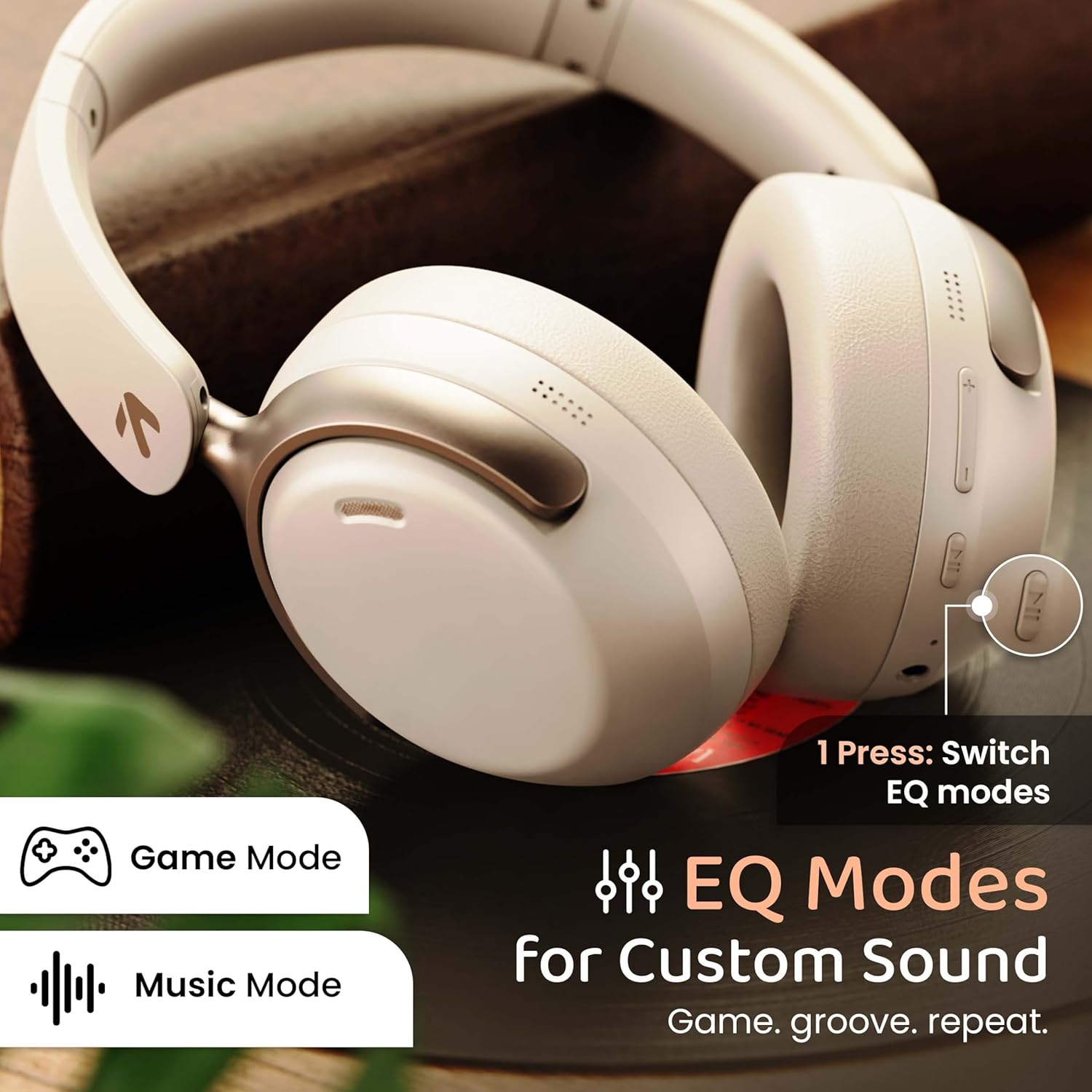
Image: GOBOULT Soniq headphones illustrating the EQ modes for custom sound, including Game Mode and Music Mode.

Image: GOBOULT Soniq headphones highlighting Combat™ Gaming Mode with 60ms ultra-low latency, tailored for mobile gaming and real-time sound accuracy.
3. Dual Device Pairing
The headphones support dual device pairing, allowing you to connect to two devices simultaneously and switch between them seamlessly.
- Pair the headphones with the first device as described in the "Bluetooth Pairing" section.
- Disable Bluetooth on the first device.
- Pair the headphones with the second device.
- Re-enable Bluetooth on the first device. The headphones should automatically connect to both devices.
- Audio will play from the device currently active. To switch, pause audio on the first device and start playing on the second.

Image: GOBOULT Soniq headphones demonstrating dual device connectivity with a laptop and a smartphone.
4. Wired Mode (AUX)
For a wired connection, use a standard 3.5mm AUX cable (not included) to connect the headphones to your audio source. In wired mode, the headphones operate passively, and the built-in microphone will not function.

Image: GOBOULT Soniq headphones showing the option for wireless mode and an optional wired mode via AUX cable, noting that the mic is off in wired mode.
5. Environmental Noise Cancellation (ENC) for Calls
The Zen™ ENC microphone technology helps reduce ambient noise during calls, ensuring clearer conversations. This feature is automatically active during phone calls.

Image: Close-up of the GOBOULT Soniq headphone earcup highlighting the Zen™ ENC Mic for processed calling, ambient noise isolation, enhanced call experience, and sharper voice clarity.
6. Voice Assistant
Activate your device's voice assistant (Google Assistant or Siri) by pressing the multi-function button (or specific button, refer to quick start guide) for approximately 2 seconds.

Image: GOBOULT Soniq headphones with icons for Google Assistant and Siri, indicating personalized AI assistant support.
Maintenance and Care
- Cleaning: Wipe the headphones with a soft, dry cloth. Do not use abrasive cleaners or solvents.
- Water Resistance: The headphones are IPX5 water resistant, meaning they are protected against splashes, rain, and sweat. Do not submerge them in water or expose them to strong jets of water.
- Storage: When not in use, store the headphones in a cool, dry place, away from direct sunlight and extreme temperatures. The foldable design allows for compact storage.
- Battery Care: To prolong battery life, avoid fully discharging the headphones frequently. Charge them regularly, even if not in constant use.
Image: GOBOULT Soniq headphones illustrating IPX5 water resistance, indicating protection against splash, rain, and sweat.

Image: GOBOULT Soniq headphones showcasing their adjustable headband, foldable design, and movable earcups for maximum comfort and portability.
Troubleshooting
| Problem | Possible Solution |
|---|---|
| Headphones do not power on. | Ensure the headphones are charged. Connect to a power source using the Type-C cable. |
| Cannot pair with device. |
|
| No sound or low volume. |
|
| Microphone not working in wired mode. | The built-in microphone is not active when using the AUX wired connection. This is normal operation. |
| Intermittent connection. |
|
Specifications
| Feature | Detail |
|---|---|
| Model Name | AirBass |
| Connectivity Technology | Bluetooth, Wired, Wireless |
| Wireless Communication Technology | Bluetooth 5.4 |
| Bluetooth Range | 10 Metres |
| Audio Driver Size | 40 Millimetres |
| Audio Driver Type | Dynamic Driver |
| Battery Life | 40 Hours |
| Charging Port | Type-C Fast Charging Jack |
| Noise Control | Environmental Noise Cancellation (ENC) |
| Water Resistance Level | IPX5 (Splash, Rain, Sweat Proof) |
| Audio Latency | 60 Milliseconds (Game Mode) |
| Earpiece Shape | Over Ear |
| Material | Memory Foam (Ear Cushions) |
| Item Weight | 227 Grams |
| Product Dimensions (LxWxH) | 17 x 5.5 x 19 Centimeters |
| Controller Type | Button, Google Assistant |
| Impedance | 32 Ohms |
| Sensitivity | 118 dB |
Warranty and Support
Your GOBOULT Soniq Over Ear Bluetooth Headphones come with a 1-year manufacturer warranty from the date of purchase. This warranty covers manufacturing defects and ensures the reliability of your product.
For warranty claims, technical support, or any inquiries, please refer to the contact information provided on the warranty card included in your package or visit the official GOBOULT support website.
Please retain your purchase receipt as proof of purchase for warranty validation.


