1. Product Overview
The NGTeco NG-TC7 is a cloud-based time clock designed for small and medium businesses to manage employee attendance efficiently. It supports multiple authentication methods including facial recognition, fingerprint scanning, and IC cards. The device connects via 2.4G WiFi, allowing real-time data synchronization and remote management through a dedicated web portal and mobile application. This manual provides detailed instructions for the installation, configuration, and daily operation of your NG-TC7 time clock.

Image 1.1: The NGTeco NG-TC7 time clock unit shown alongside a smartphone displaying the NGTeco Office application login screen.
2. What's in the Box
Please verify that all items are present in your package:
- NGTeco NG-TC7 Time Clock Device
- Power Adapter
- IC Cards (Quantity: 10)
- Mounting Hardware (Screws and Wall Anchors)
- Quick Start Guide
3. Setup Instructions
3.1 Physical Installation
The NG-TC7 is designed for indoor tabletop use. Ensure the device is placed on a stable, flat surface in an area with good 2.4G WiFi signal strength and adequate lighting for facial recognition.
3.2 Power Connection
- Connect the power adapter to the DC input port on the back of the NG-TC7 device.
- Plug the power adapter into a standard electrical outlet.
- The device will power on automatically.
3.3 Network Configuration (2.4G WiFi)
The device requires a 2.4G WiFi connection for cloud-based features. Follow the on-screen prompts or refer to the Quick Start Guide for initial WiFi setup.
3.4 Initial Software Setup (5 Steps)
The NGTeco Office system facilitates quick setup via web or mobile application. The process involves:
- Step 1: Add Site - Define your business location and time zone.
- Step 2: Create Device - Register your NG-TC7 device within the system.
- Step 3: Add Employee - Enroll employees with their details and authentication methods (face, fingerprint, card).
- Step 4: Add Timesheet - Configure work schedules and rules.
- Step 5: Add Schedule - Assign specific timesheets to employees.
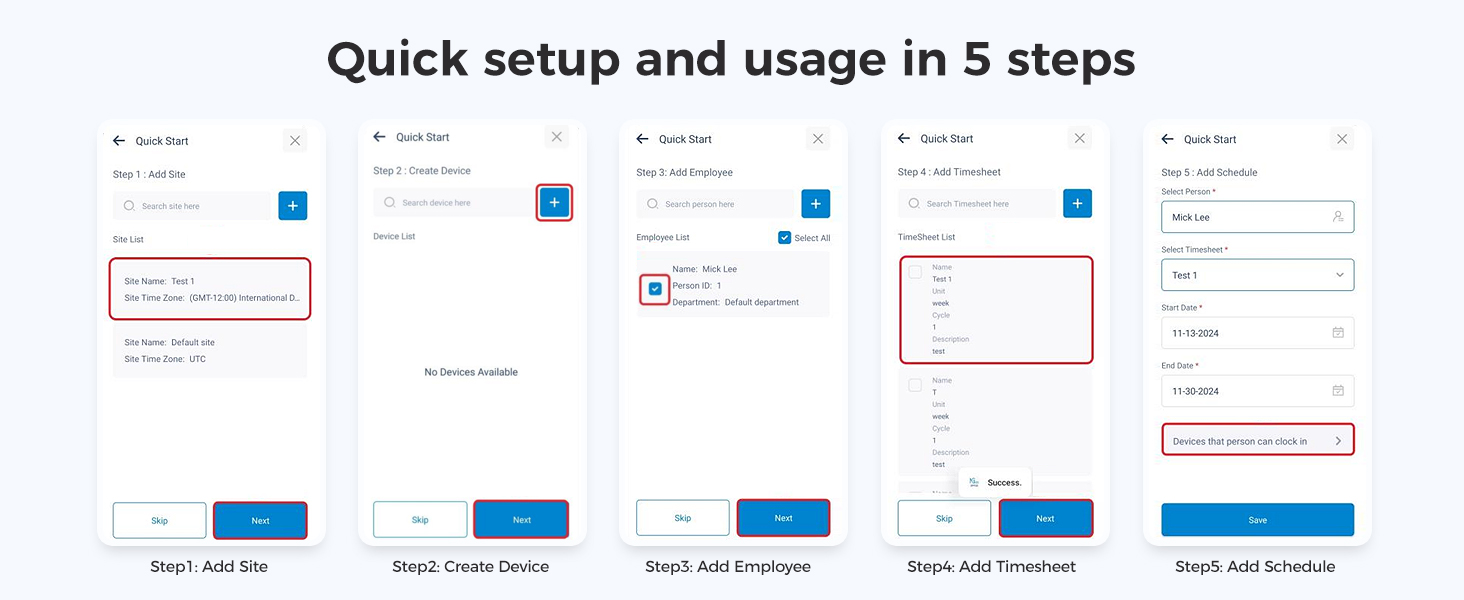
Image 3.4: Visual representation of the five-step setup process within the NGTeco Office application, from adding a site to assigning schedules.
4. Operating Instructions
4.1 Employee Enrollment
Employees can be enrolled directly on the device or through the NGTeco Office web/mobile application. Enrollment involves capturing facial data, fingerprint scans, or assigning an IC card.
4.2 Clocking In/Out
Employees can clock in or out using one of the following methods:
- Facial Recognition: Stand approximately 0.3m to 1m from the device. Ensure your face is clearly visible in the camera's view.
- Fingerprint Scan: Place your registered finger firmly on the fingerprint sensor.
- IC Card: Tap your registered IC card against the card reader area on the device.
4.3 Shift Management
The NGTeco Office system supports various shift configurations:
- Flexible Shifts: Ideal for part-time staff or changing schedules (e.g., cafes, retail shops).
- Fixed Shifts: Suitable for consistent hours and stable teams (e.g., offices, clinics).
- Night Shifts: Designed for late night or overnight operations (e.g., restaurants, security services).
The system allows for auto work hour calculation, flexible break and overtime rules, and blacklist control. Department-specific rules and cross-department schedules can also be managed.

Image 4.3.1: Overview of smart shift management features, including fixed shift rules and automatic shift matching based on the first punch.

Image 4.3.2: Tailored attendance options for various business needs, including flexible, fixed, and night shifts.
4.4 Data Access and Reporting
Attendance data is synchronized in real-time to the cloud and can be accessed via the NGTeco Office web portal or mobile application. The system provides comprehensive reporting features:
- Supports fixed, flexible, and rotating shifts.
- Handles overnight and complex schedules.
- Provides detailed logs for accurate tracking.
- Offers clear work hour summaries.
- Flags exception reports instantly.
Reports can be generated and exported, with options for automatic report sending at regular intervals.

Image 4.4.1: The 'All-in-One Attendance Reports' interface, showcasing detailed logs and summary options.

Image 4.4.2: Illustration of the auto-send reports feature, eliminating manual work for report distribution.
4.5 Optional Employee App Features
An optional upgrade for the employee app (available for a one-time fee) unlocks additional functionalities:
- GPS-Restricted Punch-In for accurate location tracking.
- Ability to add unlimited employees.
- View and export personal reports anytime.
- Simplified team attendance management.

Image 4.5: Features available through the optional employee application, such as GPS-restricted punch-in and personal report access.
5. Maintenance
5.1 Cleaning the Device
To ensure optimal performance, especially for facial recognition and fingerprint scanning, keep the device clean.
- Use a soft, dry cloth to wipe the screen and camera lens.
- For fingerprint sensors, gently wipe with a lint-free cloth.
- Avoid using abrasive cleaners or solvents.
5.2 Software Updates
The NGTeco Office system provides free software upgrades. Ensure your device and applications are updated regularly to benefit from the latest features and security enhancements. Updates are typically managed through the web portal or mobile app.
6. Troubleshooting
6.1 Device Not Powering On
- Check if the power adapter is securely connected to both the device and the electrical outlet.
- Verify that the electrical outlet is functional by plugging in another device.
- Ensure the power adapter is the original NGTeco adapter provided with the device.
6.2 WiFi Connectivity Issues
- Confirm that your router is broadcasting a 2.4G WiFi signal. The device does not support 5G WiFi.
- Check the WiFi signal strength near the device. Relocate the device closer to the router if the signal is weak.
- Restart your WiFi router and the NG-TC7 device.
- Verify that the WiFi password entered is correct.
6.3 Biometric Recognition Problems (Face/Fingerprint)
- Facial Recognition: Ensure adequate and consistent lighting. Avoid direct sunlight or very dim conditions. Make sure your face is clean and unobstructed.
- Fingerprint Scan: Ensure your finger is clean and dry. Place your entire finger pad firmly on the sensor. Re-enroll your fingerprint if issues persist.
- If recognition consistently fails, try using an alternative authentication method (IC card or PIN) or re-enroll the user's biometric data.
6.4 Data Synchronization Issues
- Verify that the device has a stable internet connection.
- Check the status of the NGTeco cloud service through the web portal or app.
- Ensure the device's firmware and application versions are up to date.
7. Product Specifications
| Feature | Detail |
|---|---|
| Brand | NGTeco |
| Model Number | NG-TC7 |
| Color | Black |
| Display Type | Digital |
| Special Features | Cloud-Based, Face+Fingerprint+Card, Remote Control |
| Product Dimensions | 5.7"W x 3.6"H |
| Power Source | Corded Electric |
| Indoor/Outdoor Usage | Indoor |
| Material | Premium ABS Plastic |
| Mounting Type | Tabletop |
| Batteries Required | 1 AA battery (not included) for backup |
| Item Weight | 1.41 pounds |
| UPC | 798610261668 |
8. Warranty and Support
8.1 Product Warranty
The NGTeco NG-TC7 Time Clock comes with a 1-Year Warranty from the date of purchase. This warranty covers manufacturing defects and malfunctions under normal use. Please retain your proof of purchase for warranty claims.
8.2 Customer Support
NGTeco provides comprehensive customer support to assist you with any questions or issues:
- Lifetime Free Service: Access to support services for the lifetime of the product.
- Availability: Monday to Friday, 6 AM to 6 PM EST.
- Contact: Fast assistance via phone or email. Refer to the NGTeco website for current contact information.
- Free Troubleshooting: Assistance with diagnosing and resolving technical issues.
- One-on-One Support: Personalized guidance for setup and operation.
- Tailored Setup Advice: Get recommendations for optimal settings based on your team's schedule.
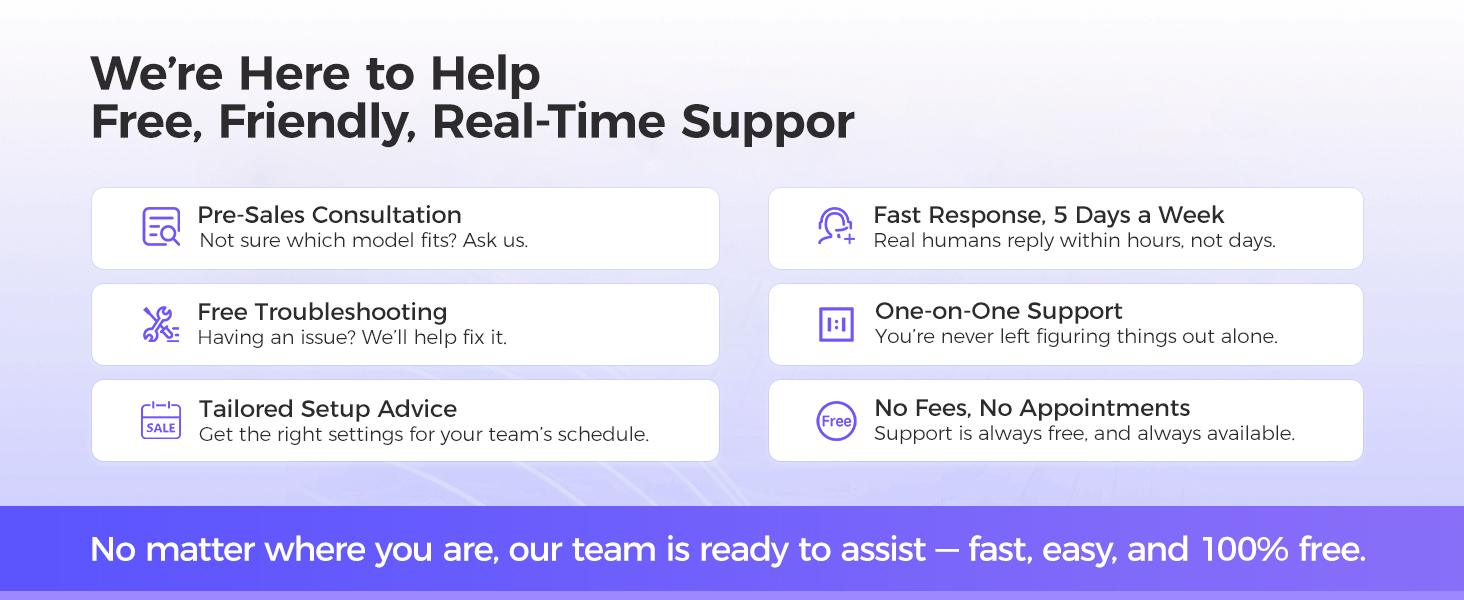
Image 8.2: Overview of NGTeco's free and comprehensive customer support services.
Note on Videos: The provided product data indicates the presence of videos, but specific URLs for embedding were not available. Therefore, no videos could be embedded in this manual.


