
ZEBRONICS 11
ZEBRONICS Zeb Zest 11 Portable Bluetooth Speaker User Manual
Model: Zeb Zest 11
1. Introduction
Thank you for purchasing the ZEBRONICS Zeb Zest 11 Portable Bluetooth Speaker. This manual provides detailed instructions for the proper setup, operation, and maintenance of your device. Please read this manual carefully before use to ensure optimal performance and longevity of the product. Keep this manual for future reference.
2. Package Contents
- ZEBRONICS Zeb Zest 11 Portable Bluetooth Speaker
- Warranty Card
- Charging Cable
- Audio Cable
3. Product Overview
The ZEBRONICS Zeb Zest 11 is a portable Bluetooth speaker designed for versatile audio playback. It features a 10.16cm driver, multi-connectivity options, and a built-in mobile holder.
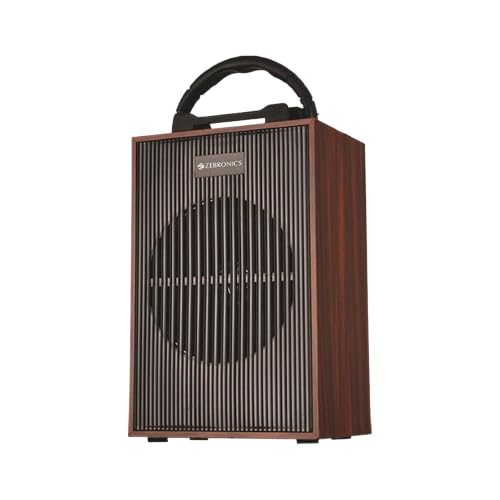
Figure 3.1: Front view of the ZEBRONICS Zeb Zest 11 Portable Speaker, showcasing its compact design and handle.
3.1 Controls and Ports
Familiarize yourself with the various controls and connection ports located on the speaker.

Figure 3.2: Detailed view of the rear panel, indicating mSD Card Port, AUX input, USB port, Charging port, and Volume/Media/Mode Controller.
- mSD Card Port: Insert a microSD card for audio playback.
- AUX Input: Connect external audio devices via a 3.5mm audio cable.
- USB Port: Connect a USB drive for audio playback.
- DC 5V Charging Port: Connect the charging cable to power the speaker.
- ON/OFF Switch: Power the speaker on or off.
- Volume & Media / Mode Controller: Multifunction knob for volume adjustment, track control, and mode switching.

Figure 3.3: Rear panel showing the Microphone Input port. A microphone can be connected here for karaoke or public address functions (microphone sold separately).
4. Setup
4.1 Charging the Speaker
- Locate the DC 5V charging port on the rear panel of the speaker.
- Connect the charging cable to the speaker's charging port.
- Connect the other end of the charging cable to a compatible USB power adapter (not included) or a computer's USB port.
- The charging indicator light will illuminate, indicating that the speaker is charging.
- Once fully charged, the indicator light may change color or turn off. Disconnect the charging cable.
- The speaker is equipped with a 12V battery. A full charge provides approximately 6 hours of playback time.
4.2 Powering On/Off
- To power on the speaker, slide the ON/OFF switch to the "ON" position. You will hear an audible prompt.
- To power off the speaker, slide the ON/OFF switch to the "OFF" position.
5. Operating Instructions
5.1 Bluetooth Mode
- Power on the speaker. It will automatically enter Bluetooth mode, indicated by an audible prompt.
- On your mobile device (smartphone, tablet, etc.), enable Bluetooth and search for available devices.
- Select "ZEB-ZEST 11" from the list of found devices.
- Once paired, you will hear a confirmation tone. You can now play audio from your device through the speaker.
- Use the Volume & Media / Mode Controller to adjust volume or skip tracks.
5.2 USB Playback
- Insert a USB flash drive containing MP3 audio files into the USB port.
- The speaker will automatically switch to USB mode and begin playing audio. If not, use the Mode Controller to switch to USB mode.
- Use the Volume & Media / Mode Controller to adjust volume or skip tracks.
5.3 MicroSD Card Playback
- Insert a microSD card containing MP3 audio files into the mSD Card Port.
- The speaker will automatically switch to mSD mode and begin playing audio. If not, use the Mode Controller to switch to mSD mode.
- Use the Volume & Media / Mode Controller to adjust volume or skip tracks.
5.4 AUX Mode
- Connect one end of a 3.5mm audio cable (not included) to the AUX input port on the speaker.
- Connect the other end of the audio cable to the audio output jack of your external device (e.g., laptop, MP3 player).
- Use the Mode Controller to switch the speaker to AUX mode.
- Control audio playback and volume from your connected external device.
5.5 FM Radio
- Power on the speaker and switch to FM mode using the Mode Controller.
- Press and hold the Play/Pause button (often integrated with the Mode Controller) to automatically scan and save available FM stations.
- Once scanning is complete, use the track skip buttons (often integrated with the Mode Controller) to navigate between saved stations.
5.6 Call Function
- When connected via Bluetooth to a smartphone, the speaker supports hands-free calling.
- To answer an incoming call, press the Play/Pause button.
- To end a call, press the Play/Pause button again.
- To reject an incoming call, press and hold the Play/Pause button.
5.7 Mobile Holder
The ZEBRONICS Zeb Zest 11 features an integrated mobile holder on top of the speaker, allowing you to conveniently place your smartphone or tablet while enjoying audio or video content.

Figure 5.1: The speaker demonstrating the use of its integrated mobile holder, providing a convenient viewing angle for a smartphone.
6. Maintenance
- Keep the speaker away from water, moisture, and extreme temperatures. The speaker is not waterproof.
- Clean the speaker with a soft, dry cloth. Do not use abrasive cleaners or solvents.
- Avoid dropping or subjecting the speaker to strong impacts.
- When not in use for extended periods, store the speaker in a cool, dry place and charge it periodically to maintain battery health.
7. Troubleshooting
| Problem | Possible Solution |
|---|---|
| Speaker does not power on. | Ensure the battery is charged. Connect the speaker to a power source using the charging cable. |
| No sound. | Check the volume level on both the speaker and the connected device. Ensure the correct input mode (Bluetooth, USB, mSD, AUX) is selected. Verify audio cables are securely connected. |
| Bluetooth pairing fails. | Ensure the speaker is in Bluetooth pairing mode. Disable and re-enable Bluetooth on your device. Move the speaker closer to your device. Clear previous pairings on your device and try again. |
| FM radio reception is poor. | Relocate the speaker to an area with better signal reception. Ensure no large metallic objects are obstructing the signal. |
8. Specifications
| Brand | ZEBRONICS |
| Model Name | Zeb Zest 11 |
| Speaker Type | Subwoofer |
| Speaker Size | 10.16 Centimeters (4 inches) |
| Wireless Communication Technology | Bluetooth |
| Connectivity Options | Bluetooth, USB, MicroSD, AUX, FM Radio |
| Control Method | Touch (via Volume & Media / Mode Controller) |
| Playback Time | Up to 6 hours* |
| Battery | 1 x 12V (included) |
| Product Dimensions | 10D x 19W x 27H Centimeters |
| Item Weight | 4 Kilograms |
| Waterproof | No |
| Included Components | Warranty Card |
*Playback time may vary depending on volume level and audio content.
9. Warranty and Support
The ZEBRONICS Zeb Zest 11 comes with a 1-year warranty from the date of purchase. Please refer to the included Warranty Card for detailed terms and conditions.
For technical support, service, or warranty claims, please contact ZEBRONICS customer service through their official website or the contact information provided on the warranty card.
Manufacturer: Zebronics India Pvt Ltd.
Address: 13/7 Smith Road, Royapettah, Chennai, Tamil Nadu - 600 002, India
Related documents11


Ask a question about this manual
Ask about setup, troubleshooting, compatibility, parts, safety, or missing instructions. Manuals+ will review the question and use this page’s manual context to help answer it.