
Introduction
Thank you for choosing the Pinmoco 42" Reversible L-Shaped Gaming Desk. This manual provides essential information for assembly, operation, maintenance, and troubleshooting to ensure you get the most out of your new desk. Designed for versatility and comfort, this desk features an ergonomic monitor stand, vibrant LED lighting, and ample storage solutions to enhance your gaming or work environment.
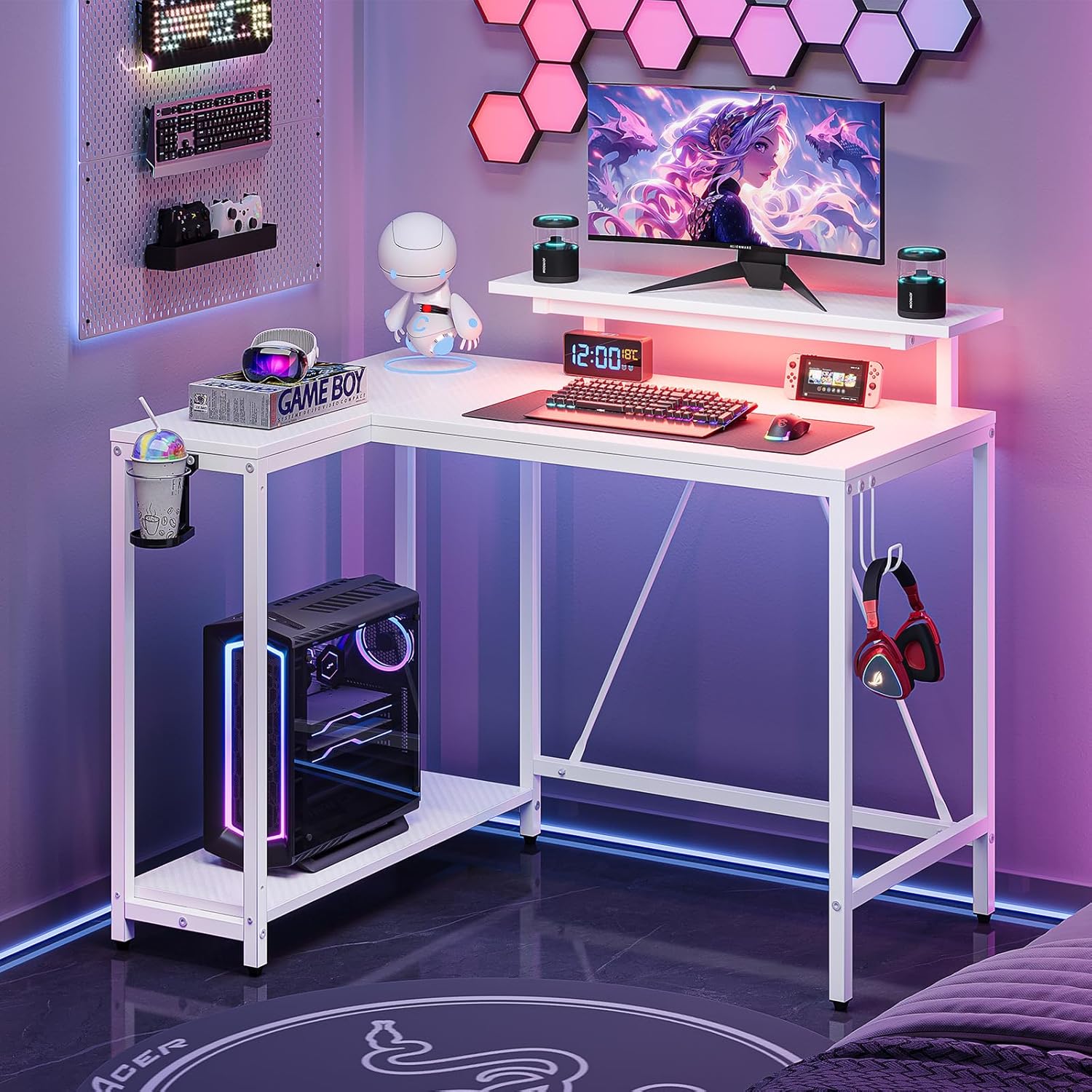
Overall view of the Pinmoco 42" L-Shaped Gaming Desk in a typical setup, showcasing its design and features.
Product Features
- Ergonomic Monitor Stand: An adjustable monitor stand is included to elevate your screen to eye level, promoting better posture and reducing neck and spine strain.
- RGB Lighting: Features 7 primary colors and up to 20 dynamic modes, allowing for customizable ambiance to suit your mood or gaming setup.
- Reversible and Flexible Design: The L-shaped layout can be configured to either the left or right side, offering flexibility to fit various room layouts and maximize space efficiency.
- Multi-Function Storage Space: A spacious 42-inch desktop provides ample room for essential items. An under-desk storage shelf accommodates files, books, or a PC tower, helping maintain a clutter-free workspace.
- Integrated Accessories: Includes a convenient hook for headphones and a foldable cup holder for easy access to beverages and accessories.
- Sturdy and Durable Construction: Crafted from premium P2 particleboard, ensuring durability, water resistance, and scratch resistance for long-lasting quality.
- Reinforced Legs and Adjustable Leveling Pads: Designed with reinforced legs and adjustable leveling pads to ensure stability on uneven surfaces and enhance overall reliability.

Detailed view of the integrated cup holder, headphone hook, and the spacious under-desk storage shelf.
Specifications
| Attribute | Detail |
|---|---|
| Brand | Pinmoco |
| Product Dimensions (D x W x H) | 41.93"D x 32.36"W x 36.02"H |
| Color | Carbon Fiber White |
| Style | Modern |
| Base Material | Metal |
| Top Material Type | Wood (P2 Particleboard) |
| Finish Type | Wood |
| Special Feature | LED Light |
| Assembly Required | Yes |

Detailed dimensions and weight capacities for different sections of the desk.
Setup Instructions
- Unpack and Verify: Carefully unpack all components and compare them against the parts list provided in your packaging to ensure all pieces are present and undamaged.
- Choose Orientation: Decide whether you want the L-shaped extension on the left or right side of the main desk. The design is reversible to accommodate your space.
- Assemble Frame: Follow the step-by-step diagrams in your included assembly guide to construct the metal frame. Ensure all screws are tightened securely but do not overtighten until all parts are aligned.
- Attach Desktop Panels: Place the P2 particleboard desktop panels onto the assembled frame. Secure them using the provided hardware.
- Install Monitor Stand and Accessories: Attach the monitor stand, headphone hook, and cup holder according to the instructions.
- Adjust Leveling Pads: Once assembled, adjust the leveling pads at the bottom of the desk legs to ensure the desk is stable and level on your floor.

Illustrations demonstrating the four flexible assembly options for the desk, allowing for left or right L-shape configurations.
Operating Instructions
- LED Lighting Control: The LED lights are typically controlled via a button or remote (if included). Connect the LED strip to a USB power source. Use the controller to cycle through the 7 main colors and 20 dynamic modes. Refer to the specific LED controller instructions for detailed operation.
- Monitor Stand Usage: Place your monitor on the elevated stand. This helps maintain an ergonomic viewing angle. Ensure the monitor's weight does not exceed the stand's capacity (refer to specifications).
- Accessory Usage: Utilize the headphone hook to keep your headset within reach and off the desktop. The foldable cup holder provides a secure spot for your drink, preventing spills on your electronics.

The LED monitor stand in operation, highlighting its RGB lighting capabilities and ergonomic benefits for posture.
Maintenance
- Cleaning: Wipe the desk surfaces with a soft, damp cloth. Avoid harsh chemicals or abrasive cleaners, as they may damage the finish. For the carbon fiber texture, a gentle wipe is sufficient.
- Spill Management: In case of spills, wipe immediately with a dry cloth to prevent water damage to the particleboard.
- Hardware Check: Periodically check all screws and fasteners to ensure they remain tight. Retighten if necessary to maintain stability.
- LED Care: Ensure the LED strip and controller are kept dry. Avoid bending the LED strip sharply to prevent damage.
Troubleshooting
- Desk is wobbly:
- Ensure all assembly screws are tightened. Adjust the leveling pads on the bottom of each leg to compensate for uneven flooring.
- LED lights are not working:
- Check if the USB power cable is securely connected to a working USB port or power adapter. Verify that the LED controller is properly connected to the LED strip. Try pressing the power button on the controller.
- Parts are missing or damaged:
- Refer to your assembly guide's parts list. Contact Pinmoco customer support with your purchase details and a description of the issue for assistance.
Warranty and Support
For any questions, concerns, or support needs regarding your Pinmoco 42" Reversible L-Shaped Gaming Desk, please contact Pinmoco Direct, the seller. Please have your purchase information and product model number (B0F9WTTWRF) ready when contacting support for faster service.
While specific warranty details are not provided in this manual, Pinmoco is committed to customer satisfaction. Please reach out to the seller for information on product warranty and return policies.


