
1. Introduction
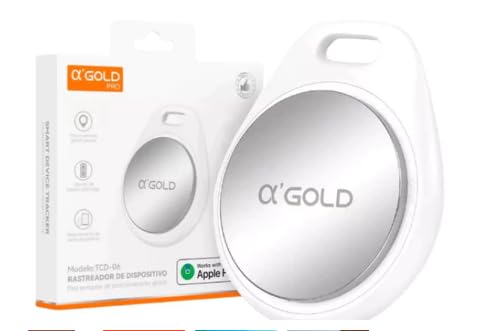
The Genérico Smart Tag TDC-06 is an intelligent GPS tracker designed exclusively for iOS devices. It allows you to easily locate and track your valuable items such as luggage, keys, backpacks, and more, using the Apple Find My app. This device provides real-time location tracking, forget-me reminders, and a lost mode feature to help you keep track of your belongings.
2. Setup Guide
Follow these steps to set up your Smart Tag TDC-06 with your iOS device:
- Unbox the Smart Tag: Carefully remove the Smart Tag from its packaging. An instruction manual is included to assist with configuration.
- Activate Bluetooth: Ensure Bluetooth is enabled on your iPhone, iPad, or Mac.
- Open Find My App: Launch the Apple Find My application on your iOS device.
- Power On the Tag: Press and hold the button on the Smart Tag until it powers on.
- Add New Item: In the Find My app, navigate to the 'Items' tab. Tap the '+' icon and select 'Add Other Item'.
- Connect the Tag: Your device will search for nearby items. When 'Sling tag' appears, tap 'Connect'.
- Name Your Item: Assign a name to your Smart Tag (e.g., "Keys", "Wallet", "Backpack").
- Choose an Emoji: Select an emoji to represent your item for easy identification.
- Confirm and Finish: Review the details and tap 'Continue' or 'Finish' to complete the setup. The tag is now active and linked to your Apple ID.
3. Operating Instructions
Utilize the Apple Find My app to manage and locate your Smart Tag:
- Find Nearby Items: If your item is within 200 feet, open the Find My app, select your Smart Tag, and tap 'Play Sound' to make the tag emit an audible alert, helping you pinpoint its exact location.
- Find Distant Items: For items beyond 200 feet, use the map navigation feature within the Find My app. It will guide you to the last known location of your Smart Tag.
- Forget Me Reminders: Receive instant notifications on your Apple device if your Smart Tag disconnects from Bluetooth, alerting you if you leave an item behind.
- Lost Mode: If an item is lost, activate 'Lost Mode' in the Find My app. This allows anyone who finds your tag to access your contact information by tapping their NFC-enabled device against it. Ensure your contact details are entered in the app beforehand.
- Privacy Protection: Your location data is encrypted and accessible only to you, ensuring your privacy.
4. Features
- iOS Compatibility: Fully compatible with Apple Find My network, allowing tracking via iPhone, iPad, or Mac.
- Real-time Location: View the real-time location of your items on a map.
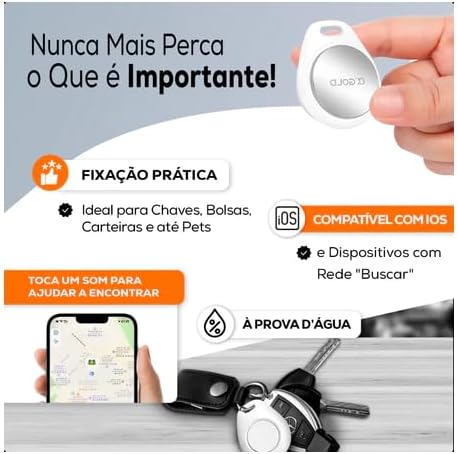
- Audible Alerts: Play a sound to locate items when they are nearby.
- Forget Me Notifications: Receive alerts when you leave your tracked items behind.
- Lost Mode with NFC: Enable contact information sharing via NFC for found items.
- IP67 Water Resistance: Designed to withstand splashes, rain, and brief submersion.
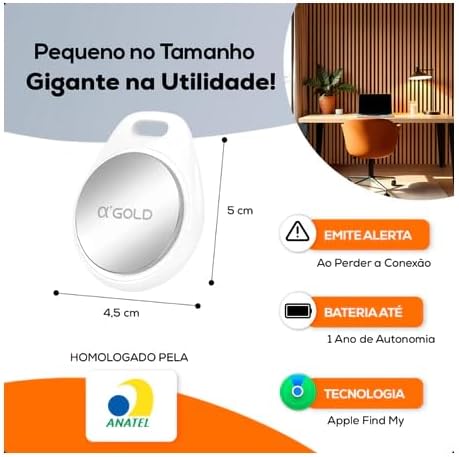
- Replaceable Battery: Features a user-replaceable battery with an average life of one year.
- No Subscription Fees: Enjoy full functionality without any recurring monthly charges or subscriptions.
5. Product Images


6. Product Videos
7. Specifications
| Feature | Detail |
|---|---|
| Brand | Genérico |
| Model | TDC-06 |
| Compatible Devices | iPhone (iOS devices) |
| Connectivity Technology | Bluetooth |
| Supported Application | Find My |
| Special Features | Water Resistant (IP67) |
| Power Source Type | Battery |
| Average Battery Life | 1 Year |
| Material Type | Plastic |
| Product Weight | 35 g |
| Product Dimensions | 10 x 10 x 2 cm |
| Certification | ANATEL: 10221-24-13889 |
| Specific Product Uses | Personal Item Tracking |
8. Troubleshooting
If you encounter issues with your Smart Tag TDC-06, consider the following:
- Tag Not Connecting: Ensure Bluetooth is active on your iOS device and the Smart Tag's battery is not depleted. Try restarting both the tag and your device.
- Inaccurate Location: Verify that your iOS device has a stable internet connection (Wi-Fi or cellular data) and location services are enabled for the Find My app.
- Sound Not Playing: Check the volume settings on your iOS device. Ensure the tag is within Bluetooth range for the sound feature to work.
- Lost Mode Not Working: Confirm that you have enabled Lost Mode for the specific item in the Find My app and have entered your contact information.
- Battery Life Concerns: The battery is designed to last approximately one year. If it drains faster, ensure the tag is not constantly out of range, which can increase power consumption.
9. Maintenance
To ensure optimal performance and longevity of your Smart Tag TDC-06:
- Battery Replacement: The tag uses a replaceable battery. When the battery is low, replace it with a new one to maintain tracking functionality. Refer to the included mini-manual for specific battery type and replacement instructions.
- Cleaning: Wipe the tag with a soft, dry cloth to remove dust or dirt. Avoid using harsh chemicals or abrasive materials.
- Water Resistance: While IP67 water-resistant, avoid prolonged submersion or exposure to high-pressure water jets to prevent damage.
- Storage: Store the tag in a cool, dry place when not in use for extended periods.
10. Warranty and Support
The Genérico Smart Tag TDC-06 comes with a manufacturer's warranty of 3 months from the date of purchase.
For technical support, warranty claims, or further assistance, please refer to the contact information provided by your retailer or the manufacturer's official support channels. Keep your proof of purchase for warranty validation.