
1. Product Overview
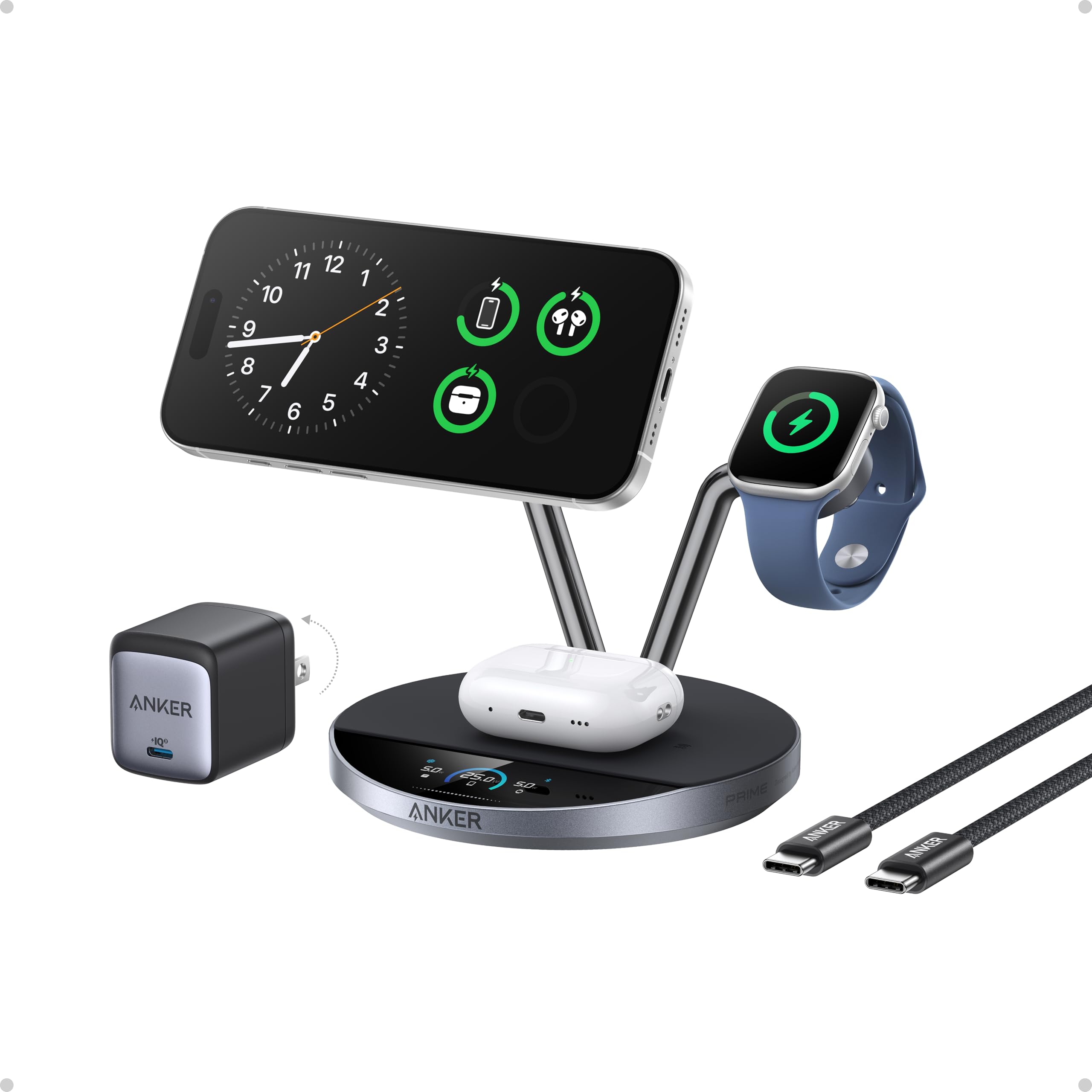
The Anker Prime 3-in-1 Wireless Charging Station is a versatile charging solution designed for Apple devices. It features Qi2 25W ultra-fast wireless charging for compatible iPhones, a dedicated charging spot for Apple Watch, and a pad for AirPods. Advanced TEC active cooling ensures optimal charging performance and battery health. A built-in HD display provides real-time charging status, and smart interaction is available via the Anker app.
2. Package Contents
- Anker Prime Wireless Charging Station (3-in-1, MagGo, AirCool, Dock Stand)
- 65W GaN Foldable Adapter
- 5 ft USB-C to USB-C Cable (10,000-bend tested)
- Welcome Guide
3. Key Features
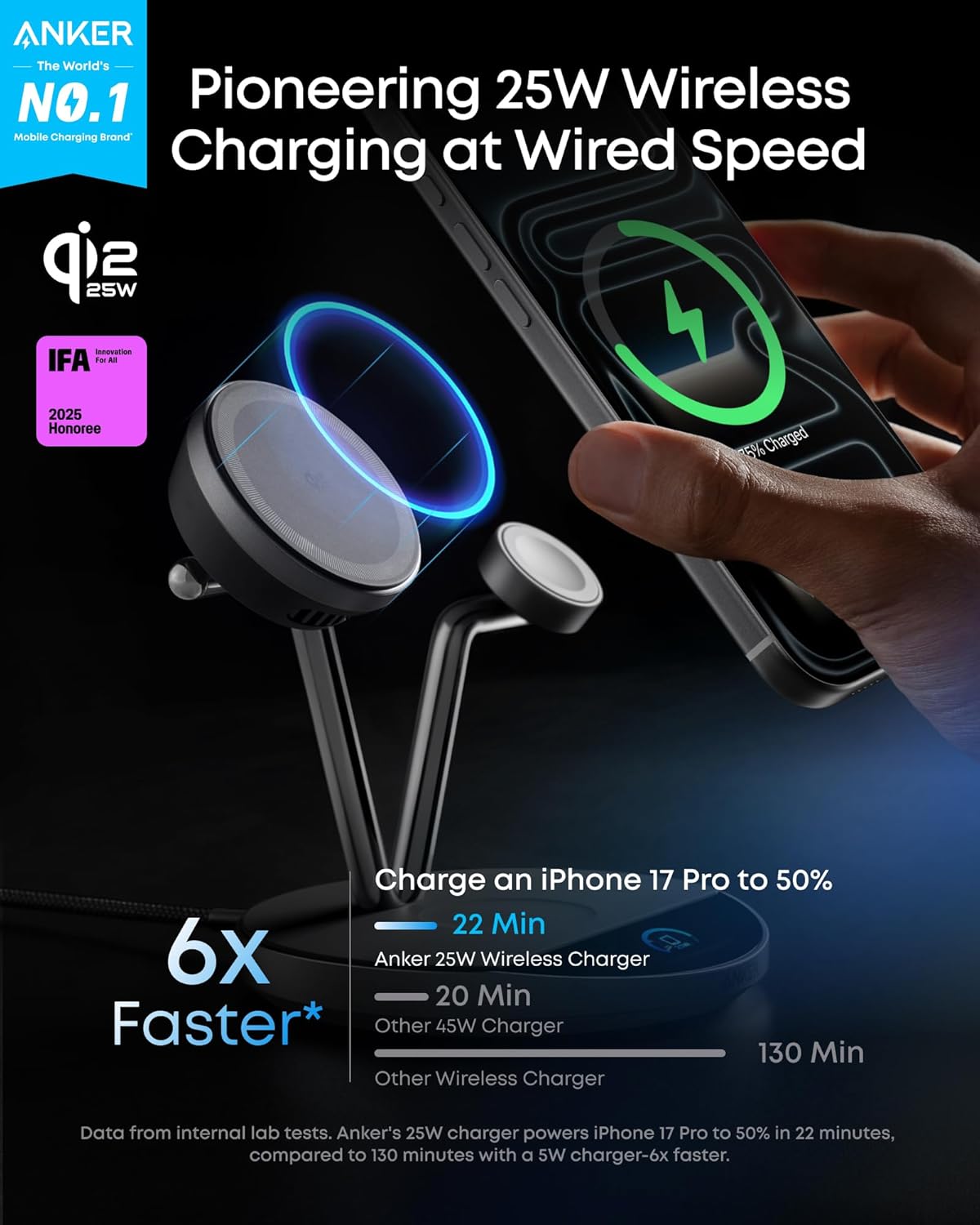
- 25W Ultra-Fast Wireless Charging: Charge compatible iPhones up to 50% in just 22 minutes, utilizing TEC active cooling for stable and efficient power delivery.
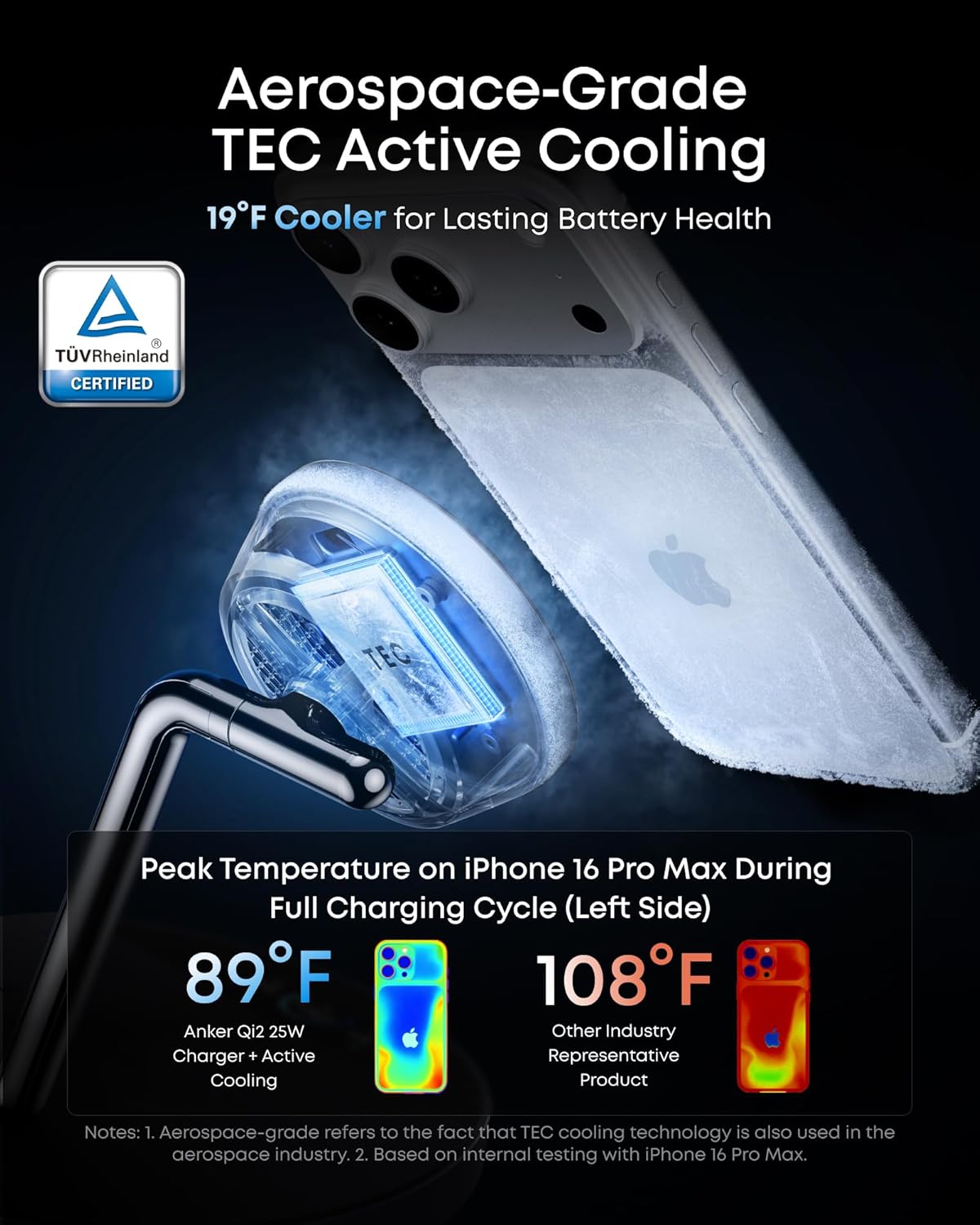
- Aerospace-Grade TEC Active Cooling: Maintains phone temperature below 89°F during charging, protecting battery health and reducing degradation.
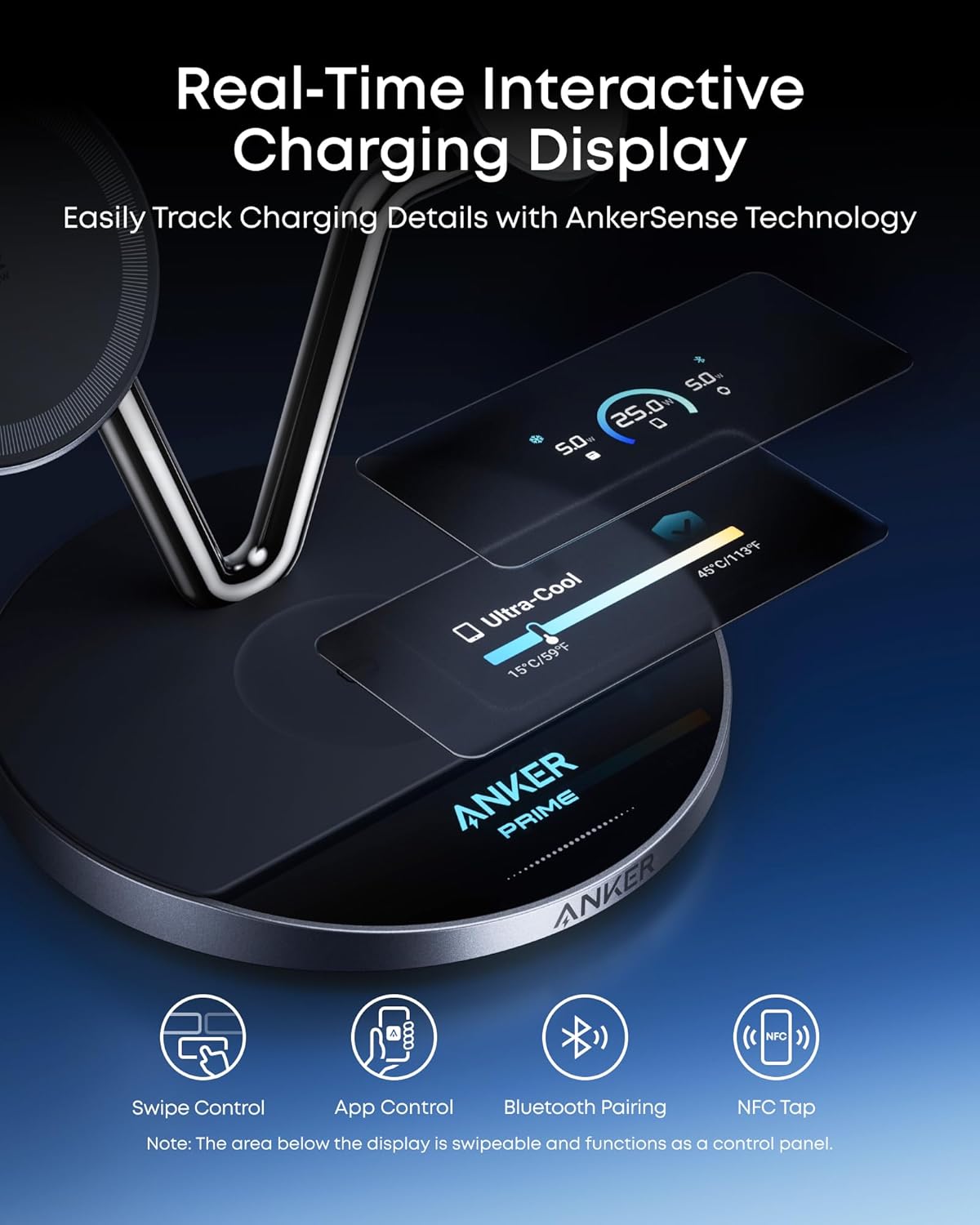
- Live Charging Display: A 1.65" HD display provides real-time updates on power, temperature, and charging status. Customizable screen and instant safety alerts are included.
- 3 Smart Charging Modes:
- Boost Mode: High-power charging with cooling for quick top-ups.
- Ice Mode: Maximum cooling with rapid charging, ideal for charging while in use.
- Sleep Mode: Turns off cooling and dims the display for quiet overnight charging.
- Smart Interaction: Connect via NFC or Bluetooth to the Anker app to check charging status, switch modes, schedule charging cycles, and set screensavers.
- 3-in-1 Design: Simultaneously charges iPhone (MagSafe-compatible), Apple Watch, and AirPods (with wireless charging case).
4. Setup Instructions
- Connect Power Adapter: Plug the provided 65W GaN foldable adapter into a wall outlet.
- Connect USB-C Cable: Connect one end of the 5 ft USB-C to USB-C cable to the charging station's input port and the other end to the 65W power adapter.
- Power On: The charging station will power on, and the HD display will activate.
Note: For optimal 25W charging and proper cooling, use the included 65W or higher USB-C adapter.
5. Operating Instructions
5.1 Charging Devices
- For iPhone: Place your MagSafe-compatible iPhone (iPhone 12 series or newer) onto the magnetic charging pad. Ensure proper alignment for optimal charging. The phone charging module can tilt up to 80 degrees and lie completely flat.
- For Apple Watch: Place your Apple Watch onto the dedicated charging module. The charger supports fast charging for Apple Watch Series 7/8/9/10/11/Ultra.
- For AirPods: Place your AirPods (with wireless charging case) onto the charging pad on the base. Ensure the case is centered on the Qi logo for effective charging.
5.2 Using the Live Charging Display
The 1.65" HD display shows real-time charging power, temperature, and status. You can monitor the charging process and customize the screen. Instant safety alerts will appear on-screen to protect your devices.
5.3 Switching Charging Modes
Switch between Boost Mode, Ice Mode, and Sleep Mode directly from the display or via the Anker app to suit your charging needs.
5.4 Smart Interaction with Anker App
Connect the charging station to the Anker app via NFC or Bluetooth. The app allows you to check charging status, switch modes, schedule day or night cycles (e.g., automatically enter/exit Sleep Mode), and set screensavers.
6. Compatibility
- For iPhone: iPhone 17 / 16 Series (25W Max); iPhone 15 / 14 / 13 / 12 Series (15W Max). Not compatible with iPhone 16e. Only supports MagSafe-compatible phone cases.
- For Apple Watch: Apple Watch Series 11 / 10 / 9 / 8 / 7 / Ultra (Fast Charging); Apple Watch Series 1 - 6; Apple Watch SE Series. Only compatible with Apple Watch, not with other smartwatches.
- For Earbuds: AirPods (With Wireless Charging Case): Gen 2 / 3 / 4 / Pro / Pro 2 / Pro 3. Compatible with all earbuds that support Qi wireless charging.
7. Care and Maintenance
- Keep the charging station clean and free from dust.
- Avoid exposing the device to extreme temperatures or humidity.
- Do not disassemble or attempt to repair the device yourself.
8. Troubleshooting
- Device not charging: Ensure the charging station is properly connected to the 65W adapter and a working power outlet. Verify that your device is correctly aligned on the charging pad. Check for any on-screen safety alerts.
- Slow charging: Confirm you are using the provided 65W adapter. Ensure your device is compatible with 25W/15W charging and is not overheating (TEC cooling should prevent this, but check for obstructions).
- App connectivity issues: Ensure Bluetooth is enabled on your device and the Anker app is updated. Try restarting the app or resetting the charging station's Bluetooth (press for 7 seconds).
- MagSafe puck wiggle/noise: While some movement might be normal, excessive wiggle or squeaky noises could indicate a manufacturing issue. Contact customer service if concerned.
9. Product Specifications
| Product Dimensions | 6.65 x 4.92 x 5.43 inches (169 x 125 x 138 mm) |
| Item Weight | 1.37 pounds (620 g) |
| Input Voltage | 9 Volts (AC) |
| Amperage | 3 Amps |
| Wattage | 25 watts |
| Color | Phantom Gray |
| Item Model Number | A25X7 |
10. Media Gallery
Product Images


Official Product Videos
11. Warranty and Customer Service
The Anker Prime Wireless Charging Station comes with a 24-month warranty. For any inquiries or support, please contact our friendly customer service.


